KunAgent/KunPublic

Local-first AI agent workspace for coding, writing, design, research, and automation — one runtime for desktop GUI and TUI.

AI summary: An AI agent workspace integrating requirement clarification, design, coding, and writing into a single GUI.

Stars
6.4K
+3 today
Forks
598
Watchers
123
Open issues
14
Open PRs
5
Contributors
~41
Commits
4.5K
Branches
137
Views (30d)
8

TypeScriptOtherCreated May 21, 2026Last push 5d agoLatest release v0.4.5+2 stars this week+68 this month

Quick answers

What is Kun?
An AI agent workspace integrating requirement clarification, design, coding, and writing into a single GUI.
What does Kun do?
This project, known as Kun, offers a next-generation coding paradigm by tightly integrating AI capabilities directly into the development workflow via a unified GUI. Built with TypeScript and Electron, it combines the power of DeepSeek, Xiaomi MiMo, and MiniMax models to handle tasks ranging from initial requirement clarification and architectural design, to actual code generation and documentation writing. It aims to provide a complete, closed-loop AI environment that handles the entire software lifecycle within a single desktop application. The system emphasizes a demand-driven workflow, utilizing AI to interactively refine requirements and plans before executing code changes. It also features a visual node-based workflow builder and extensive Model Context Protocol (MCP) support for tool integration.
Who is Kun for?
Software developers, product managers, and designers looking for an integrated, AI-first tool to manage the entire software creation lifecycle, particularly those favoring DeepSeek models. It is ideal for teams wanting to bridge the gap between requirements engineering and code generation.
How do I get started with Kun?
git clone https://github.com/KunAgent/Kun.git
How popular is Kun on GitHub?
KunAgent/Kun has 6,381 stars and 598 forks on GitHub, and gained 2 stars in the last 7 days.
What license does Kun use?
KunAgent/Kun is released under the Other license.

Star history

since Jul 28, 2026
02K4K6KJul 2026Sep 2026Oct 2026Nov 2026
6.4K stars as of Nov 17, 2026. Measured daily since Jul 28, 2026; GitHub no longer exposes earlier star timestamps.

Update history

5 recorded
  • Nov 17, 2026New release v0.4.5 (previously v0.4.4).
  • Nov 6, 2026New release v0.4.4 (previously v0.4.3).
  • Oct 27, 2026New release v0.4.3 (previously v0.4.1).
  • Oct 19, 2026New release v0.4.1 (previously v0.3.12).
  • Oct 4, 2026Previously tracked as XingYu-Zhong/DeepSeek-GUI; its 1 daily snapshot and 2 trending appearances were merged into this profile. Stars: 5,499 on 2026-07-28 under the old name, 6,321 on 2026-10-03 (+822).

Contribution activity

commits per day, last 52 weeks
NovDecJanFebMarAprMayJunJulAugSepOctNovMonWedFri2025-11-23: 0 commits2025-11-24: 0 commits2025-11-25: 0 commits2025-11-26: 0 commits2025-11-27: 0 commits2025-11-28: 0 commits2025-11-29: 0 commits2025-11-30: 0 commits2025-12-01: 0 commits2025-12-02: 0 commits2025-12-03: 0 commits2025-12-04: 0 commits2025-12-05: 0 commits2025-12-06: 0 commits2025-12-07: 0 commits2025-12-08: 0 commits2025-12-09: 0 commits2025-12-10: 0 commits2025-12-11: 0 commits2025-12-12: 0 commits2025-12-13: 0 commits2025-12-14: 0 commits2025-12-15: 0 commits2025-12-16: 0 commits2025-12-17: 0 commits2025-12-18: 0 commits2025-12-19: 0 commits2025-12-20: 0 commits2025-12-21: 0 commits2025-12-22: 0 commits2025-12-23: 0 commits2025-12-24: 0 commits2025-12-25: 0 commits2025-12-26: 0 commits2025-12-27: 0 commits2025-12-28: 0 commits2025-12-29: 0 commits2025-12-30: 0 commits2025-12-31: 0 commits2026-01-01: 0 commits2026-01-02: 0 commits2026-01-03: 0 commits2026-01-04: 0 commits2026-01-05: 0 commits2026-01-06: 0 commits2026-01-07: 0 commits2026-01-08: 0 commits2026-01-09: 0 commits2026-01-10: 0 commits2026-01-11: 0 commits2026-01-12: 0 commits2026-01-13: 0 commits2026-01-14: 0 commits2026-01-15: 0 commits2026-01-16: 0 commits2026-01-17: 0 commits2026-01-18: 0 commits2026-01-19: 0 commits2026-01-20: 0 commits2026-01-21: 0 commits2026-01-22: 0 commits2026-01-23: 0 commits2026-01-24: 0 commits2026-01-25: 0 commits2026-01-26: 0 commits2026-01-27: 0 commits2026-01-28: 0 commits2026-01-29: 0 commits2026-01-30: 0 commits2026-01-31: 0 commits2026-02-01: 0 commits2026-02-02: 0 commits2026-02-03: 0 commits2026-02-04: 0 commits2026-02-05: 0 commits2026-02-06: 0 commits2026-02-07: 0 commits2026-02-08: 0 commits2026-02-09: 0 commits2026-02-10: 0 commits2026-02-11: 0 commits2026-02-12: 0 commits2026-02-13: 0 commits2026-02-14: 0 commits2026-02-15: 0 commits2026-02-16: 0 commits2026-02-17: 0 commits2026-02-18: 0 commits2026-02-19: 0 commits2026-02-20: 0 commits2026-02-21: 0 commits2026-02-22: 0 commits2026-02-23: 0 commits2026-02-24: 0 commits2026-02-25: 0 commits2026-02-26: 0 commits2026-02-27: 0 commits2026-02-28: 0 commits2026-03-01: 0 commits2026-03-02: 0 commits2026-03-03: 0 commits2026-03-04: 0 commits2026-03-05: 0 commits2026-03-06: 0 commits2026-03-07: 0 commits2026-03-08: 0 commits2026-03-09: 0 commits2026-03-10: 0 commits2026-03-11: 0 commits2026-03-12: 0 commits2026-03-13: 0 commits2026-03-14: 0 commits2026-03-15: 0 commits2026-03-16: 0 commits2026-03-17: 0 commits2026-03-18: 0 commits2026-03-19: 0 commits2026-03-20: 0 commits2026-03-21: 0 commits2026-03-22: 0 commits2026-03-23: 0 commits2026-03-24: 0 commits2026-03-25: 0 commits2026-03-26: 0 commits2026-03-27: 0 commits2026-03-28: 0 commits2026-03-29: 0 commits2026-03-30: 0 commits2026-03-31: 0 commits2026-04-01: 0 commits2026-04-02: 0 commits2026-04-03: 0 commits2026-04-04: 0 commits2026-04-05: 0 commits2026-04-06: 0 commits2026-04-07: 0 commits2026-04-08: 0 commits2026-04-09: 0 commits2026-04-10: 0 commits2026-04-11: 0 commits2026-04-12: 0 commits2026-04-13: 0 commits2026-04-14: 0 commits2026-04-15: 0 commits2026-04-16: 0 commits2026-04-17: 0 commits2026-04-18: 0 commits2026-04-19: 0 commits2026-04-20: 0 commits2026-04-21: 0 commits2026-04-22: 0 commits2026-04-23: 0 commits2026-04-24: 0 commits2026-04-25: 0 commits2026-04-26: 0 commits2026-04-27: 0 commits2026-04-28: 0 commits2026-04-29: 0 commits2026-04-30: 0 commits2026-05-01: 0 commits2026-05-02: 0 commits2026-05-03: 0 commits2026-05-04: 0 commits2026-05-05: 0 commits2026-05-06: 0 commits2026-05-07: 0 commits2026-05-08: 0 commits2026-05-09: 0 commits2026-05-10: 0 commits2026-05-11: 0 commits2026-05-12: 0 commits2026-05-13: 0 commits2026-05-14: 0 commits2026-05-15: 0 commits2026-05-16: 0 commits2026-05-17: 0 commits2026-05-18: 0 commits2026-05-19: 0 commits2026-05-20: 0 commits2026-05-21: 2 commits2026-05-22: 9 commits2026-05-23: 0 commits2026-05-24: 1 commit2026-05-25: 7 commits2026-05-26: 9 commits2026-05-27: 2 commits2026-05-28: 2 commits2026-05-29: 0 commits2026-05-30: 0 commits2026-05-31: 0 commits2026-06-01: 0 commits2026-06-02: 0 commits2026-06-03: 0 commits2026-06-04: 0 commits2026-06-05: 8 commits2026-06-06: 6 commits2026-06-07: 18 commits2026-06-08: 37 commits2026-06-09: 20 commits2026-06-10: 31 commits2026-06-11: 3 commits2026-06-12: 0 commits2026-06-13: 33 commits2026-06-14: 24 commits2026-06-15: 4 commits2026-06-16: 13 commits2026-06-17: 19 commits2026-06-18: 55 commits2026-06-19: 49 commits2026-06-20: 35 commits2026-06-21: 25 commits2026-06-22: 12 commits2026-06-23: 18 commits2026-06-24: 21 commits2026-06-25: 11 commits2026-06-26: 51 commits2026-06-27: 14 commits2026-06-28: 22 commits2026-06-29: 8 commits2026-06-30: 3 commits2026-07-01: 28 commits2026-07-02: 9 commits2026-07-03: 104 commits2026-07-04: 44 commits2026-07-05: 0 commits2026-07-06: 0 commits2026-07-07: 12 commits2026-07-08: 3 commits2026-07-09: 21 commits2026-07-10: 6 commits2026-07-11: 233 commits2026-07-12: 37 commits2026-07-13: 3 commits2026-07-14: 8 commits2026-07-15: 20 commits2026-07-16: 16 commits2026-07-17: 30 commits2026-07-18: 13 commits2026-07-19: 27 commits2026-07-20: 1 commit2026-07-21: 13 commits2026-07-22: 14 commits2026-07-23: 12 commits2026-07-24: 7 commits2026-07-25: 29 commits2026-07-26: 21 commits2026-07-27: 8 commits2026-07-28: 0 commits2026-07-29: 48 commits2026-07-30: 13 commits2026-07-31: 18 commits2026-08-01: 22 commits2026-08-02: 30 commits2026-08-03: 4 commits2026-08-04: 5 commits2026-08-05: 7 commits2026-08-06: 52 commits2026-08-07: 27 commits2026-08-08: 19 commits2026-08-09: 15 commits2026-08-10: 19 commits2026-08-11: 13 commits2026-08-12: 13 commits2026-08-13: 36 commits2026-08-14: 19 commits2026-08-15: 15 commits2026-08-16: 17 commits2026-08-17: 8 commits2026-08-18: 14 commits2026-08-19: 29 commits2026-08-20: 24 commits2026-08-21: 4 commits2026-08-22: 27 commits2026-08-23: 14 commits2026-08-24: 23 commits2026-08-25: 16 commits2026-08-26: 37 commits2026-08-27: 37 commits2026-08-28: 25 commits2026-08-29: 4 commits2026-08-30: 25 commits2026-08-31: 51 commits2026-09-01: 18 commits2026-09-02: 16 commits2026-09-03: 36 commits2026-09-04: 54 commits2026-09-05: 24 commits2026-09-06: 18 commits2026-09-07: 10 commits2026-09-08: 12 commits2026-09-09: 51 commits2026-09-10: 18 commits2026-09-11: 20 commits2026-09-12: 6 commits2026-09-13: 22 commits2026-09-14: 13 commits2026-09-15: 24 commits2026-09-16: 40 commits2026-09-17: 21 commits2026-09-18: 7 commits2026-09-19: 20 commits2026-09-20: 27 commits2026-09-21: 17 commits2026-09-22: 9 commits2026-09-23: 10 commits2026-09-24: 27 commits2026-09-25: 51 commits2026-09-26: 113 commits2026-09-27: 87 commits2026-09-28: 44 commits2026-09-29: 74 commits2026-09-30: 33 commits2026-10-01: 48 commits2026-10-02: 8 commits2026-10-03: 4 commits2026-10-04: 15 commits2026-10-05: 11 commits2026-10-06: 38 commits2026-10-07: 58 commits2026-10-08: 66 commits2026-10-09: 29 commits2026-10-10: 35 commits2026-10-11: 37 commits2026-10-12: 8 commits2026-10-13: 10 commits2026-10-14: 0 commits2026-10-15: 20 commits2026-10-16: 4 commits2026-10-17: 23 commits2026-10-18: 28 commits2026-10-19: 23 commits2026-10-20: 31 commits2026-10-21: 36 commits2026-10-22: 30 commits2026-10-23: 54 commits2026-10-24: 45 commits2026-10-25: 26 commits2026-10-26: 26 commits2026-10-27: 44 commits2026-10-28: 24 commits2026-10-29: 8 commits2026-10-30: 19 commits2026-10-31: 24 commits2026-11-01: 15 commits2026-11-02: 20 commits2026-11-03: 17 commits2026-11-04: 6 commits2026-11-05: 9 commits2026-11-06: 5 commits2026-11-07: 5 commits2026-11-08: 30 commits2026-11-09: 0 commits2026-11-10: 0 commits2026-11-11: 0 commits2026-11-12: 0 commits2026-11-13: 0 commits2026-11-14: 0 commits2026-11-15: 0 commits2026-11-16: 0 commits2026-11-17: 0 commits2026-11-18: 0 commits2026-11-19: 0 commits2026-11-20: 0 commits2026-11-21: 0 commits
3,882 commits in the last yearLessMore

Signals and awards

derived from tracked data
  • Very active

    3,882 commits in 52 weeks

  • Well documented

    High community health score

  • Continuous integration

    Automated checks passing

What Kun does

This project, known as Kun, offers a next-generation coding paradigm by tightly integrating AI capabilities directly into the development workflow via a unified GUI. Built with TypeScript and Electron, it combines the power of DeepSeek, Xiaomi MiMo, and MiniMax models to handle tasks ranging from initial requirement clarification and architectural design, to actual code generation and documentation writing. It aims to provide a complete, closed-loop AI environment that handles the entire software lifecycle within a single desktop application. The system emphasizes a demand-driven workflow, utilizing AI to interactively refine requirements and plans before executing code changes. It also features a visual node-based workflow builder and extensive Model Context Protocol (MCP) support for tool integration.

Software developers, product managers, and designers looking for an integrated, AI-first tool to manage the entire software creation lifecycle, particularly those favoring DeepSeek models. It is ideal for teams wanting to bridge the gap between requirements engineering and code generation.

  • Full Lifecycle Integration: Supports requirement clarification, design, coding, and documentation seamlessly within a unified interface.
  • Multi-Model Support: Leverages DeepSeek for reasoning, Xiaomi MiMo for multimodal tasks, and MiniMax for comprehensive media generation.
  • Demand-Driven Workflow: Focuses heavily on getting requirements right interactively, generating UI designs and plans before generating code.
  • Visual Workflow Builder: Provides a node-based orchestration canvas to design, run, and reuse multi-step Agent processes.
  • Desktop GUI Experience: Provides a rich, user-friendly Electron interface for managing complex AI interactions and file system changes.
  • Extensible Architecture: Supports installing `.kunx` extensions to add new UIs, tools, custom models, and background services.

Where teams use it

End-to-End Development

Use a single tool to go from a rough idea to fully designed and coded software.

Interactive Requirements Engineering

Utilize AI to interactively clarify ambiguous requirements before starting any implementation.

Automated Technical Documentation

Generate comprehensive design docs, readmes, and PowerPoint presentations automatically alongside the code generation process.

Rapid Prototyping

Quickly iterate on software designs and see immediate code generation results within the GUI.

Custom Agent Workflows

Build reusable, node-based automation loops to handle repetitive organizational tasks directly on the desktop.

Getting started: git clone https://github.com/KunAgent/Kun.git

README

master branch

Kun 蓝色 K 标识

Kun

本地优先的 AI 工作台:写代码、做文档、和 Agent 一起推进事情。

下载  ·  文档  ·  更新日志  ·  English

Kun 最新 GitHub Release 支持 macOS、Windows 和 Linux Kun 使用 PolyForm Noncommercial 1.0.0 许可证

Kun:本地优先的 AI 工作台。桌面 Code 界面、终端 TUI 与吉祥物

Kun 能做什么

Kun 是跑在你电脑上的桌面应用。Code、Work 和对话共用一个本地运行时:写代码、做设计、处理文档和论文,也能把任务交给不同的 Agent 协作完成。会话、记忆和设置留在本机,模型由你自己接入。
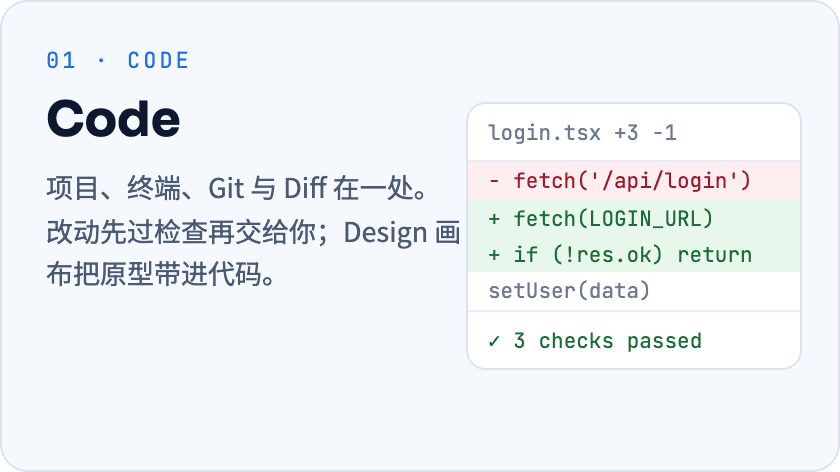
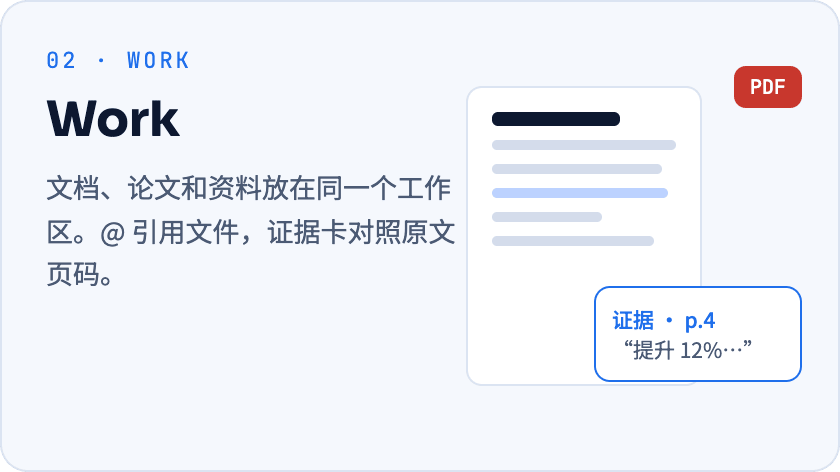
Code:项目、终端、Git 与 Diff 在一处,Design 画布把原型带进代码 Work:文档、论文和资料放在同一个工作区
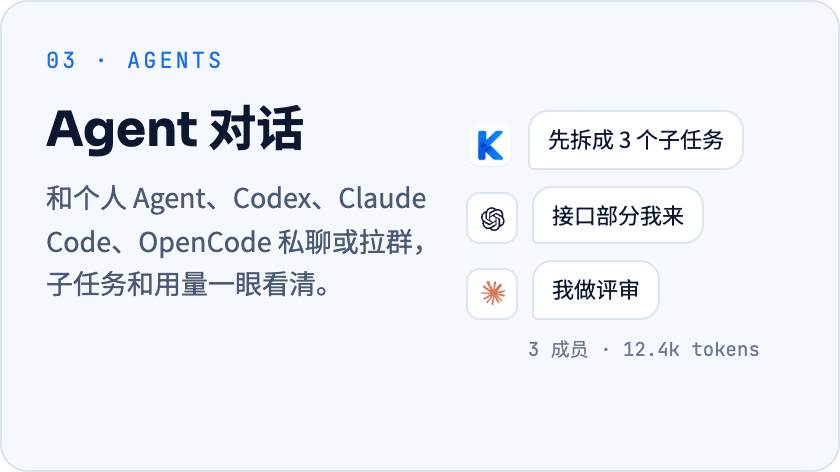
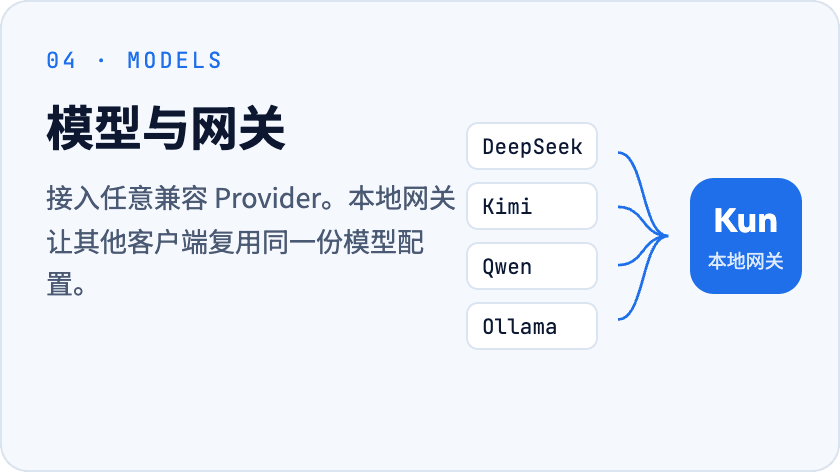
Agent 对话:和个人 Agent、Codex、Claude Code、OpenCode 私聊或拉群 模型与网关:接入任意兼容 Provider,本地网关复用同一份配置
  • Code / Design:项目、终端、Git 与 Diff 放在一处。先在 Design 画布中比较多屏、状态与方案,确认后再交给 Agent 实现;Claude Code、Codex 等外部 Agent 也能打开设计。
  • Work / 论文:会话与文件用标签页组织,需要时分屏对照;选中文字即可改写、扩写或引用到会话,选中表格单元格可查看统计并交给 Kun 分析。独立论文库集中管理导入、阅读、笔记与相关会话。
  • 对话 / Agent 协作:与个人 Agent、Codex、Claude Code、OpenCode 私聊或拉群,为计划选择执行 Agent,分派任务并查看各自的进展和结果。个人助理任务工作流可在“设置 → Lab”启用,需服务端开放并完成助理接入。
  • 报告 / 产物:让 Kun 把实际数据整理成指标、图表和说明组成的报告,直接在对话里查看,并保存到产物库继续打开或更新;缩略图帮助你更快找到需要的产物。
  • 连接 / 扩展:统一管理可用的 GitHub、Gmail 连接,通过 MCP / Skills、Loops 和 Extension 平台扩展工作流。本地模型网关复用同一份 Provider 配置。

还有:提醒与定时任务、存储管理、终端 TUI、手机远程、Kun 账号与衣橱。最新变化见 0.4.4 更新日志。

三步开始

  1. 下载安装。 从 Releases 选择对应平台的安装包。
  2. 连接一个模型。 首次启动的引导里填 API Key,或登录已有订阅。支持 OpenAI / Anthropic 兼容接口与本地模型,见 Provider 文档。
  3. 给一件具体的事。 打开一个项目文件夹交给 Code,或把资料拖进 Work。Agent 动手前会先请你确认。
平台 安装包 架构
macOS .dmg / .zip Apple Silicon / Intel
Windows .exe x64
Linux .AppImage / .deb x64

Linux 的 .deb 请用 sudo apt install ./Kun-*.deb 安装,apt 会一并装上 libnotify4 等依赖;dpkg -i 不处理依赖,在精简系统上会装不上。

看一眼

Code 界面:项目、任务入口与输入区
Code · 项目、任务与改动
Work 界面:文件树、文档与 Work 助手
Work · 资料、文档与论文

本地优先,权限在你

  • 数据在本机。 会话、记忆、日志存在本地;用云端模型时,只有本次请求的上下文发给你选的 Provider。
  • 动手先确认。 工具、目录和工作台权限默认需要批准;记忆和群聊不会扩大权限。
  • 模型随你换。 DeepSeek、Kimi、GLM、Qwen、Ollama 等预设,也可自定义 Provider。
  • GUI 与 TUI 共用。 同一个 kun serve 运行时,线程、计划和审批两边都能接着用。

从源码运行

需要 Node.js 22.19+。

git clone --branch develop https://github.com/KunAgent/Kun.git
cd Kun && npm ci && npm run dev
常用命令
命令 用途
npm run dev 构建运行时并启动 Electron 开发环境
npm run dev:tui 构建运行时并启动终端 TUI
npm run typecheck TypeScript 类型检查
npm run lint ESLint 与文件大小检查
npm run test 运行测试
npm run build 生产构建
npm run dist:mac / dist:win / dist:linux 构建对应平台安装包

中国大陆网络较慢时可加 --registry=https://registry.npmmirror.com。

终端 TUI 的两种用法

保持桌面应用运行,在项目目录连接它的运行时,与 GUI 共用线程和审批:

kun --no-start

单独使用时先退出桌面应用,再运行 kun;TUI 会启动自己的运行时,退出时一并停止。更多见 Kun TUI 文档。

文档

上手 模型 Provider · 个人 Agent 与记忆 · 终端 TUI
工作台 Code 中的 Agent 对话 · Design 画布 · 论文与证据
扩展 MCP 与 Skills · Loops · Extension 平台 · 本地网关
开发 本地开发 · 运行时架构 · 贡献指南

参与贡献

欢迎提交 bug 修复、UI、运行时、Provider 和文档改进。PR 请以 develop 为目标分支,开始前读一下 贡献指南;外部贡献需要签署 CLA。

Kun 贡献者

许可证

PolyForm Noncommercial 1.0.0,仅限学习、研究和非商业用途。商业使用、托管服务或集成进商业产品,需要作者单独书面授权。

记忆架构参考了 Nowledge Mem 公开文档中的 Thread / Memory 分离与来源追踪理念,实现保持独立。


觉得有用?点个 Star,让更多人看到 Kun。

View on GitHub

Recent activity

commits and pull requests

Releases and announcements

107 total
  1. Kun 0.4.5v0.4.5Nov 9, 2026551 downloads

    # Kun 0.4.5 0.4.5 把 Kun 带到桌面和更多设备:桌面伙伴随时陪你对话,远程访问统一管理手机与电脑,PDF 有了独立标签页和论文助手。同时改进计划任务批量管理、浏览器浮窗预览与扩展手机视图,并修复响应中断、图片保留和跨版本更新问题。 ## ✨ 新功能 - **桌面伙伴**:小坤、ikun 和鲸鱼娘来到桌面,支持快捷对话、语音输入和任务气泡。可导入 Codex 宠物包,也可邀请伙伴短暂来访、调整来访频率或暂停来访;默认不显示,需要在“设置 → 宠物”选择并唤醒。自动陪伴感知打字、录音等活动状态,不读取输入文字,也不采集音频;跟随其他软件的录音状态默认关闭。 - **手机与桌面远控**:一个远程访问主开关,集中管理手机、桌面远控和浏览器入口。逐设备设置“仅查看”或“查看与控制”,随时撤销授权,并分别提示缺少的屏幕录制或键鼠权限。手机远控需要 Kun 账号与 Plus 及以上权益;电脑之间远控首版支持同账号的 Apple Silicon Mac(macOS 13 及以上)。 - **PDF 标签页与论文助手**:PDF 使用独立的 Work 标签页,每篇论文都有自己的助手会话。切换标签保留阅读位置和工作文件夹,引文可点回对应页面,选中的原文先进入草稿,由你确认后发送。 - **计划任务批量管理**:在可搜索、可筛选的列表中浏览计划任务,通过详情面板查看内容。支持批量启用、停用和删除,删除前确认,并避免误启用已经过期的一次性任务。 - **远控组件与手机直连**:远控组件按需下载、独立更新,后台校验后等待空闲启用,失败时回退。手机可通过局域网、Tailscale 或自建隧道直连电脑,用 5 分钟内有效、仅能使用一次的配对信息建立独立授权的加密连接,会话和附件不经过官方中继。手机终端由电脑托管,桌面顶部显示可随时结束的提示。 - **浏览器浮窗预览**:浏览器预览支持拖动、方向键移动、缩放和吸附回侧栏。你开始手动操作时 AI 会暂停;空间不足、会话停止或需要清理临时数据时都有明确提示,清理前需要确认。 - **扩展手机视图**:扩展 API 可声明轻量的只读原生手机视图,用于展示文本、指标和选项状态。不运行网页脚本或远程动作;未声明手机视图的扩展会标为仅桌面可用。 - **Design 预览与缩略图**:HTML 画板保留有数量上限的预览与缩略图,按优先级分配预览资源。多画板场景不再同时启动全部预览,减少资源占用。 ## 🐛 修复与改进 - **响应中断**:保留已经收到的内容,不再重放请求并拼接第二次生成。模型流中断时明确标为“响应中断”,只在可确认时说明保留了部分内容。 - **外部 Agent 模型列表**:Agent 升级或启动路径变化后重新探测模型与模式列表,避免刷新后只剩默认模型。 - **委托与团队提示**:及时显示容量不足

  2. Kun 0.4.4v0.4.4Nov 1, 2026569 downloads

    # Kun 0.4.4 0.4.4 让资料、对话与产物更紧密地连在一起:Work 用标签页和分屏串起会话与文件,论文库整合为独立空间;Design 支持分区多画板,数据报告可以直接呈现在对话里并保存到产物库。同时带来工作台新版引导、统一应用连接入口、个人助理任务工作流与存储管理,并改善计划交接、并行任务恢复和 Windows 启动稳定性。 ## ✨ 新功能 - **Work 标签页与论文空间**:会话与文件共用标签栏,支持并排对照和会话内预览,论文库统一为独立的检索、阅读与笔记空间。文档选区可直接交给 Kun 改写、扩写或引用,表格选区可查看统计并发起分析。 - **分区多画板设计**:同一个 Design 画布可以按分区组织多个页面、状态与方案,继续对话即可追加或修改画板。Claude Code、Codex 及受支持的 ACP Agent 也能在 Code 对话中打开设计,确认方案后再进入代码实现。 - **数据报告与产物预览**:对话中可直接展示包含指标、图表和说明的数据报告,并保存到产物库中重新打开和更新。产物卡片增加真实缩略图,查找已有成果更直观。 - **工作台与新版引导**:更新圆角工作区、模式切换和可收起的右侧工具条,macOS 侧栏支持通透的玻璃效果。首次使用或从旧版本跨越 0.4.4 升级时提供可跳过的工作台介绍,并可从帮助入口重看各模式引导。 - **统一应用连接入口**:在“设置 → 连接”集中查看和管理应用连接。GitHub 与 Gmail 可用;Notion、Figma 预设已列入目录,但尚未开放连接。 - **个人助理任务工作流(Lab)**:向已连接的个人助理派发任务,查看送达状态、进度与结果,支持历史恢复、追问和取消。功能默认关闭,需在“设置 → Lab”启用,并由服务端开放;助理回传不会替代你的敏感操作授权。 - **存储管理与清理**:在设置中查看缓存、会话、工作树和附件等分类占用,预览清理范围并回收空间。自动清理旧内容需先授权规则,扩大清理范围或缩短保留期限时会重新请求同意。 - **其他**:重新设计启动恢复窗口、编辑重发输入框和回合变更摘要;Work 侧栏与标签页、Code 文件标签页增加右键菜单;支持将未读会话标为已读。 ## 🐛 修复与改进 - **计划交接与分派结果**:修复计划交给其他 Agent 执行、卡片上切换 Agent 及导航后续接的问题。分派卡片支持展开 Markdown 结果,父会话接收工作 Agent 的实际结论,而不再只有任务标题。 - **任务恢复与并行执行**:改善瞬时停顿、Manager 数据传输超时及委托会话续接失败后的恢复。保留可续接的会话,避免重启后重复执行已完成的工作。 - **Work 历史与工作树提交**:恢复较早 Work 会话的访问,并修复切换页面后工作树提交

  3. Kun 0.4.3v0.4.3Oct 27, 20261.2K downloads

    # Kun 0.4.3 0.4.3 让计划执行与多 Agent 协作更顺手:在计划卡片中选择执行 Agent,为任务分派填写 Agent 与模型偏好,并在侧栏查看工作 Agent。账户与设置入口进一步整合,新增会员兑换与状态刷新,支持 MiniMax-M3.1-Flash,同时减少计划工作区的磁盘占用,改善工具调用、审批和历史会话的稳定性。 ## ✨ 新功能 - **计划执行 Agent 选择**:在计划卡片中选择负责执行的 Agent,让计划交给合适的引擎完成。 - **任务分派与协作**:支持填写 Agent 与模型分派偏好,侧栏在父会话下展示工作 Agent,方便查看协作进展。改进中断子任务的续接;调整分派选择时暂停倒计时,切换的 Agent 会正确应用。 - **账户与会员入口**:账户卡片与设置整合到侧栏底部的统一入口,支持会员兑换与会员状态刷新。回到应用时会重新获取会员权益信息。 - **更轻量的计划工作区**:计划构建工作树通过写时复制复用已有依赖,减少重复安装与磁盘占用。增加已合并空闲工作树的自动清理,并在可用磁盘空间不足 5 GB 时阻止新建计划构建工作树。 - **MiniMax-M3.1-Flash**:MiniMax 官方 API 与 Token Plan 模型目录新增 MiniMax-M3.1-Flash。同步适配推理强度选项与用量计价。 ## 🐛 修复与改进 - **工具调用稳定性**:阻止反复执行相同失败工具调用的循环,避免任务持续重复无效操作。 - **大型会话历史**:修复大型持久化事件的回放,改善重新打开历史会话时的数据恢复。 - **外部 Agent 分派**:补齐 Codex 与 Pi 工作 Agent 的传输注册,并修正 Qoder ACP 权限协商与启动时的权限设置。 - **审批流程**:提交工具审批选择时不再重复弹出确认对话框,并避免第三方 Agent 模型参与自动审批审查。 - **附件与实时引导**:向 ACP Agent 传递文档附件中的文本,并在实时引导未被接受时保留引导内容。 - **计划执行边界**:没有生成计划文件时,不再继续自动构建,避免普通问答触发计划执行。 - **协作与对话显示**:默认保留协作历史的查看入口,侧栏工作 Agent 使用对应标志而非首字母。窄面板中的回复统计与操作支持换行。 --- ## English Kun 0.4.3 makes plan execution and multi-agent collaboration easier: choose an Agent on the plan card, write Agent and model preferences for dispatch, and find workers under their

  4. Kun 0.4.2v0.4.2Oct 25, 2026214 downloads

    # Kun 0.4.2 0.4.2 是 0.4.1 之后的增量更新。产物库、可编辑幻灯片和 Office 预览让成果更容易查看与继续修改;交互组件(Gen UI)与 MCP Apps 转为内置能力,Code 工作台、Design 和 Work 写作体验也有了新布局。Changes 面板新增提交与推送,回合撤销只还原 Kun 改过的文件;Agent 名册、协作面板、内置终端、文件树和 Kun TUI 同步升级,启动与空闲资源占用进一步降低。 > **上线状态**:个人助手仅在“实验功能”中提供,默认关闭;App / 移动端相关能力仍在预览和内部验证阶段,尚未正式上线。本版本不将它们作为正式功能发布。 ## ✨ 新功能与体验改进 - **产物库**:侧栏新增“产物”入口,集中展示 Kun 在各个项目里做出的设计稿、文档、幻灯片、表格、白板和生成图片。支持网格与列表视图、按类型和项目筛选、搜索与排序;PDF 和白板可直接预览,详情页可查看版本,或回到原会话让 Kun 继续修改。回合结束和窗口重新聚焦时自动刷新。PPTX、DOCX、XLSX 产物打开后可直接在右侧与 Kun 对话修改:当前页、选中文字或单元格区域会作为上下文随消息发送;Kun 改动文件前自动保存版本快照,支持对比与撤销。 - **交互组件与 MCP Apps**:交互组件(Gen UI)与 MCP Apps 从实验功能转为内置能力,默认开启。Agent 可以在回复中直接生成可交互的小页面——模拟器、参数探索、计算器或界面原型;页面运行在隔离沙箱中,不能联网、调用工具或访问文件。声明了交互页面的 MCP 工具会把页面显示在会话卡片或右侧 App 面板中,随版本内置的可编辑画布也走同一通道。 - **工作台与 Office 预览**:Code 右侧面板改为按文件独立的标签页,侧栏收紧布局。PPTX 使用浏览器逐页渲染,缩略图与主视图保持同步;DOCX 按页显示、支持选中文字,XLSX 可在网格中浏览和选择单元格,文档与表格的缩放、滚动和工具栏也重新整理。打开产物后仍可带着当前页或选区让 Kun 修改。 - **Work 写作审阅**:选中文字后可从更简洁的菜单调用技能或让 Kun 改写;改写先展示审阅结果,由你确认后再应用到文档,不再直接覆盖选区。 - **设计画布**:画布支持多页面与分区,并可放置便签:在便签里 @Kun 会把内容转为设计任务并跟踪进度。选中元素会出现浮动工具栏(字体、颜色、对齐、圆角),可直接在该元素上留言交给 Kun 处理;HTML 组件内还能圈选具体元素作为对话目标。Tweaks 标签页改为更直观的标签/控件行布局。 - **幻灯片生成**:让 Kun 做 PPT 时由主 Agent 按内置幻灯片技能完成:先生成可编辑的 PPTD 再逐页渲染预览,离线导出 PPTX 并

  5. Kun 0.4.1v0.4.1Oct 17, 2026594 downloads

    # Kun 0.4.1 0.4.1 是 0.4.0 之后的增量更新,集中改善 Code 首页与 Focus 模式、Agent 与模型选择、审批交互,以及长会话和第三方 Agent 的稳定性。 > **上线状态**:Gmail 连接与 App / 移动端相关能力仍在预览和内部验证阶段,尚未正式上线。本版本不将其作为正式功能发布,实际入口和可用范围以应用内提示为准。 ## ✨ 新功能与体验改进 - **Code 首页与 Focus 模式**:Code 新任务首页加入点击涟漪与漂移字场;中文界面使用《庄子·逍遥游》中的汉字,其他语言使用拉丁字符。动画在空闲时停止,并遵循“减少动态效果”设置。Focus 模式改为带文字的开关,开启后隐藏账号卡、会话头像和 Kun 动画。设置 > 外观新增“首页点击涟漪”开关。 - **首条消息更顺滑**:从 Code 首页发送第一条消息时,欢迎标题、输入框和消息气泡的切换更连贯,减少创建会话往返造成的布局跳动。 - **Agent 与模型选择**:模型选择器按 Agent 提供的分组展示模型,修复同名模型分组丢失的问题。第三方 Agent 版本页新增“让 Kun 更新”,只生成更新请求并填入默认对话,需用户确认后才执行。 - **上下文与用量**:Cursor 上下文弹层展示 Cursor 自己的分类;Devin 与 Cursor 的用量按实际模型调用记录,展示方式与 Codex 一致。 - **审批交互**:待处理审批以编号选项显示在输入框上方,支持数字键选择、展开查看完整内容、拒绝时附加说明,并可直接停止当前回合。 - **账号头像**:侧栏账号卡会记住本机使用的头像,重启后不再回到默认 Kun;退出登录或切换账号后清除本机记录。 ## 🐛 修复与改进 - **长会话与任务恢复**:大历史不再写入线程元数据,归档、恢复、删除和结算不再因历史过大而受阻;修复私聊回复在收尾后再次校验失败的问题。 - **Worker 与协作**:未启动的 worker 会明确报告失败或取消,并保留在面板中;运行中的 worker 在执行工具或等待审批时仍显示“查看过程”;重启后 Worker 面板可从团队记录恢复;超出步数或时间预算时显示真实原因和用量。 - **模型路由与网关**:本地网关开关热应用时同步路由与网关全局配置,不再停在“等待同步”;多供应商和路由池在流式请求、重试与切换时校验路由代次,失败信息区分请求是否已发出;运行时覆盖凭据随供应商切换重新迁移。 - **运行时与协议兼容**:修复代理返回 204 或无 body 时 kun serve 崩溃的问题;Anthropic 格式网关可通过 `/mcp/kun` 接受包含 `browser_use` 等工具的 schema;打包版补齐 kun-remote 协议依赖。 -

Code frequency

additions and deletions
+1.2M-1.2MWeek of 2026-05-17: +47,392 linesWeek of 2026-05-17: -1,481 linesWeek of 2026-05-24: +28,625 linesWeek of 2026-05-24: -4,303 linesWeek of 2026-05-31: +122,006 linesWeek of 2026-05-31: -30,821 linesWeek of 2026-06-07: +74,340 linesWeek of 2026-06-07: -11,427 linesWeek of 2026-06-14: +73,179 linesWeek of 2026-06-14: -9,678 linesWeek of 2026-06-21: +31,222 linesWeek of 2026-06-21: -4,392 linesWeek of 2026-06-28: +174,978 linesWeek of 2026-06-28: -50,332 linesWeek of 2026-07-05: +82,716 linesWeek of 2026-07-05: -27,103 linesWeek of 2026-07-12: +432,264 linesWeek of 2026-07-12: -35,159 linesWeek of 2026-07-19: +105,206 linesWeek of 2026-07-19: -9,252 linesWeek of 2026-07-26: +223,803 linesWeek of 2026-07-26: -29,445 linesWeek of 2026-08-02: +143,834 linesWeek of 2026-08-02: -14,750 linesWeek of 2026-08-09: +1,204,167 linesWeek of 2026-08-09: -835,633 linesWeek of 2026-08-16: +73,432 linesWeek of 2026-08-16: -10,017 linesWeek of 2026-08-23: +63,706 linesWeek of 2026-08-23: -12,311 linesWeek of 2026-08-30: +109,190 linesWeek of 2026-08-30: -25,493 linesWeek of 2026-09-06: +59,623 linesWeek of 2026-09-06: -8,693 linesWeek of 2026-09-13: +100,271 linesWeek of 2026-09-13: -14,991 linesWeek of 2026-09-20: +247,863 linesWeek of 2026-09-20: -38,684 linesWeek of 2026-09-27: +195,981 linesWeek of 2026-09-27: -22,971 linesWeek of 2026-10-04: +207,382 linesWeek of 2026-10-04: -57,586 linesWeek of 2026-10-11: +63,914 linesWeek of 2026-10-11: -31,650 linesWeek of 2026-10-18: +222,251 linesWeek of 2026-10-18: -87,571 linesWeek of 2026-10-25: +71,856 linesWeek of 2026-10-25: -13,908 linesWeek of 2026-11-01: +60,899 linesWeek of 2026-11-01: -10,611 linesWeek of 2026-11-08: +9,642 linesWeek of 2026-11-08: -1,362 linesWeek of 2026-11-15: +0 linesWeek of 2026-11-15: -0 linesMay 17, 2026Nov 15, 2026
+4.2M lines added, -1.4M removed over the last year.

Commits per week

last 52 weeks
2980Week of 2025-11-23: 0 commitsWeek of 2025-11-30: 0 commitsWeek of 2025-12-07: 0 commitsWeek of 2025-12-14: 0 commitsWeek of 2025-12-21: 0 commitsWeek of 2025-12-28: 0 commitsWeek of 2026-01-04: 0 commitsWeek of 2026-01-11: 0 commitsWeek of 2026-01-18: 0 commitsWeek of 2026-01-25: 0 commitsWeek of 2026-02-01: 0 commitsWeek of 2026-02-08: 0 commitsWeek of 2026-02-15: 0 commitsWeek of 2026-02-22: 0 commitsWeek of 2026-03-01: 0 commitsWeek of 2026-03-08: 0 commitsWeek of 2026-03-15: 0 commitsWeek of 2026-03-22: 0 commitsWeek of 2026-03-29: 0 commitsWeek of 2026-04-05: 0 commitsWeek of 2026-04-12: 0 commitsWeek of 2026-04-19: 0 commitsWeek of 2026-04-26: 0 commitsWeek of 2026-05-03: 0 commitsWeek of 2026-05-10: 0 commitsWeek of 2026-05-17: 11 commitsWeek of 2026-05-24: 21 commitsWeek of 2026-05-31: 14 commitsWeek of 2026-06-07: 142 commitsWeek of 2026-06-14: 199 commitsWeek of 2026-06-21: 152 commitsWeek of 2026-06-28: 218 commitsWeek of 2026-07-05: 275 commitsWeek of 2026-07-12: 127 commitsWeek of 2026-07-19: 103 commitsWeek of 2026-07-26: 130 commitsWeek of 2026-08-02: 144 commitsWeek of 2026-08-09: 130 commitsWeek of 2026-08-16: 123 commitsWeek of 2026-08-23: 156 commitsWeek of 2026-08-30: 224 commitsWeek of 2026-09-06: 135 commitsWeek of 2026-09-13: 147 commitsWeek of 2026-09-20: 254 commitsWeek of 2026-09-27: 298 commitsWeek of 2026-10-04: 252 commitsWeek of 2026-10-11: 102 commitsWeek of 2026-10-18: 247 commitsWeek of 2026-10-25: 171 commitsWeek of 2026-11-01: 77 commitsWeek of 2026-11-08: 30 commitsWeek of 2026-11-15: 0 commitsNov 23, 2025Nov 15, 2026
3.9K commits in the last 52 weeks.

When work happens

weekday and hour
SunMonTueWedThuFriSat036912151821Sun 0:00 — 40 commitsSun 1:00 — 25 commitsSun 2:00 — 13 commitsSun 3:00 — 10 commitsSun 4:00 — 11 commitsSun 5:00 — 9 commitsSun 6:00 — 7 commitsSun 7:00 — 17 commitsSun 8:00 — 4 commitsSun 9:00 — 8 commitsSun 10:00 — 23 commitsSun 11:00 — 23 commitsSun 12:00 — 28 commitsSun 13:00 — 20 commitsSun 14:00 — 31 commitsSun 15:00 — 24 commitsSun 16:00 — 42 commitsSun 17:00 — 23 commitsSun 18:00 — 45 commitsSun 19:00 — 25 commitsSun 20:00 — 34 commitsSun 21:00 — 29 commitsSun 22:00 — 29 commitsSun 23:00 — 61 commitsMon 0:00 — 40 commitsMon 1:00 — 30 commitsMon 2:00 — 23 commitsMon 3:00 — 9 commitsMon 4:00 — 14 commitsMon 5:00 — 18 commitsMon 6:00 — 10 commitsMon 7:00 — 9 commitsMon 8:00 — 13 commitsMon 9:00 — 11 commitsMon 10:00 — 8 commitsMon 11:00 — 5 commitsMon 12:00 — 4 commitsMon 13:00 — 12 commitsMon 14:00 — 8 commitsMon 15:00 — 7 commitsMon 16:00 — 9 commitsMon 17:00 — 4 commitsMon 18:00 — 8 commitsMon 19:00 — 1 commitsMon 20:00 — 9 commitsMon 21:00 — 14 commitsMon 22:00 — 49 commitsMon 23:00 — 42 commitsTue 0:00 — 37 commitsTue 1:00 — 34 commitsTue 2:00 — 34 commitsTue 3:00 — 22 commitsTue 4:00 — 8 commitsTue 5:00 — 11 commitsTue 6:00 — 2 commitsTue 7:00 — 6 commitsTue 8:00 — 8 commitsTue 9:00 — 24 commitsTue 10:00 — 20 commitsTue 11:00 — 3 commitsTue 12:00 — 17 commitsTue 13:00 — 12 commitsTue 14:00 — 4 commitsTue 15:00 — 5 commitsTue 16:00 — 12 commitsTue 17:00 — 5 commitsTue 18:00 — 19 commitsTue 19:00 — 18 commitsTue 20:00 — 16 commitsTue 21:00 — 23 commitsTue 22:00 — 45 commitsTue 23:00 — 36 commitsWed 0:00 — 58 commitsWed 1:00 — 19 commitsWed 2:00 — 95 commitsWed 3:00 — 26 commitsWed 4:00 — 6 commitsWed 5:00 — 41 commitsWed 6:00 — 11 commitsWed 7:00 — 6 commitsWed 8:00 — 16 commitsWed 9:00 — 26 commitsWed 10:00 — 16 commitsWed 11:00 — 4 commitsWed 12:00 — 2 commitsWed 13:00 — 24 commitsWed 14:00 — 15 commitsWed 15:00 — 9 commitsWed 16:00 — 14 commitsWed 17:00 — 1 commitsWed 18:00 — 15 commitsWed 19:00 — 11 commitsWed 20:00 — 6 commitsWed 21:00 — 15 commitsWed 22:00 — 56 commitsWed 23:00 — 54 commitsThu 0:00 — 55 commitsThu 1:00 — 28 commitsThu 2:00 — 85 commitsThu 3:00 — 26 commitsThu 4:00 — 21 commitsThu 5:00 — 19 commitsThu 6:00 — 16 commitsThu 7:00 — 22 commitsThu 8:00 — 19 commitsThu 9:00 — 23 commitsThu 10:00 — 4 commitsThu 11:00 — 11 commitsThu 12:00 — 7 commitsThu 13:00 — 7 commitsThu 14:00 — 1 commitsThu 15:00 — 8 commitsThu 16:00 — 15 commitsThu 17:00 — 5 commitsThu 18:00 — 3 commitsThu 19:00 — 9 commitsThu 20:00 — 12 commitsThu 21:00 — 49 commitsThu 22:00 — 55 commitsThu 23:00 — 76 commitsFri 0:00 — 63 commitsFri 1:00 — 57 commitsFri 2:00 — 120 commitsFri 3:00 — 33 commitsFri 4:00 — 14 commitsFri 5:00 — 14 commitsFri 6:00 — 9 commitsFri 7:00 — 9 commitsFri 8:00 — 21 commitsFri 9:00 — 35 commitsFri 10:00 — 8 commitsFri 11:00 — 2 commitsFri 12:00 — 11 commitsFri 13:00 — 25 commitsFri 14:00 — 19 commitsFri 15:00 — 14 commitsFri 16:00 — 14 commitsFri 17:00 — 3 commitsFri 18:00 — 13 commitsFri 19:00 — 4 commitsFri 20:00 — 28 commitsFri 21:00 — 31 commitsFri 22:00 — 36 commitsFri 23:00 — 25 commitsSat 0:00 — 45 commitsSat 1:00 — 32 commitsSat 2:00 — 16 commitsSat 3:00 — 98 commitsSat 4:00 — 93 commitsSat 5:00 — 13 commitsSat 6:00 — 17 commitsSat 7:00 — 6 commitsSat 8:00 — 14 commitsSat 9:00 — 10 commitsSat 10:00 — 14 commitsSat 11:00 — 44 commitsSat 12:00 — 43 commitsSat 13:00 — 39 commitsSat 14:00 — 30 commitsSat 15:00 — 22 commitsSat 16:00 — 39 commitsSat 17:00 — 17 commitsSat 18:00 — 15 commitsSat 19:00 — 22 commitsSat 20:00 — 31 commitsSat 21:00 — 43 commitsSat 22:00 — 35 commitsSat 23:00 — 55 commits
Commit volume by weekday and hour (UTC). Larger dots mean more commits.
DateListRankStars gained
Jun 8, 2026daily#19+32
Jun 7, 2026daily#9+102
  • morluto/rea

    Reverse engineer anything with agents, from app behavior down to native binaries.

    471.6K stars · TypeScript

  • freeCodeCamp/freeCodeCamp

    freeCodeCamp.org's open-source codebase and curriculum. Learn math, programming, and computer science for free.

    459.4K stars · TypeScript

  • openclaw/openclaw

    The AI that really does things. Any OS. Any Platform. The lobster way. 🦞

    394.9K stars · TypeScript

  • affaan-m/ECC

    The agent harness performance optimization system. Skills, instincts, memory, security, and research-first development for Claude Code, Codex, Opencode, Cursor and beyond.

    307.9K stars · JavaScript

  • NousResearch/hermes-agent

    The agent that grows with you

    265K stars · Python

  • react/react

    The library for web and native user interfaces.

    252.8K stars · JavaScript