agegr/pi-webPublic

Web UI for the pi coding agent

AI summary: A local web-based UI for the Pi coding agent, offering rich session browsing, project previews, and real-time chat.

Stars
8.3K
+68 today
Forks
1.3K
Watchers
20
Open issues
3
Open PRs
4
Contributors
~187
Commits
1.3K
Branches
1

TypeScriptMITCreated Mar 22, 2026Last push 3d agoLatest release v0.17.0+145 stars this week+790 this month

Quick answers

What is pi-web?
A local web-based UI for the Pi coding agent, offering rich session browsing, project previews, and real-time chat.
What does pi-web do?
Pi Web is a local web application that serves as an exceptionally rich graphical interface for the Pi CLI coding agent. It operates by continually reading local Pi session files and rendering them into a beautiful browser workspace, seamlessly transforming raw terminal output into highly readable Markdown. The interface enables developers to intuitively browse past sessions organized by project, interact via real-time chat, configure AI models, and actively manage agent skills. Crucially, it incorporates a comprehensive file explorer that previews project files natively within the browser, providing immense immediate context while the agent works. This completely eliminates the need to constantly switch back and forth between a terminal window and an IDE.
Who is pi-web for?
Developers and active users of the Pi coding agent who desperately want a richer, highly visual, web-based workspace rather than interacting strictly through the CLI. Users should be familiar with TypeScript development environments.
How do I get started with pi-web?
npx @agegr/pi-web@latest
How popular is pi-web on GitHub?
agegr/pi-web has 8,295 stars and 1,260 forks on GitHub, and gained 145 stars in the last 7 days.
What license does pi-web use?
agegr/pi-web is released under the MIT license.

Star history

since Jul 27, 2026
02.5K5K7.5KJul 2026Sep 2026Oct 2026Nov 2026
8.3K stars as of Nov 18, 2026. Measured daily since Jul 27, 2026; GitHub no longer exposes earlier star timestamps.

Update history

3 recorded
  • Nov 14, 2026New release v0.17.0 (previously v0.13.0).
  • Oct 31, 2026New release v0.13.0 (previously v0.12.2).
  • Oct 17, 2026New release v0.12.2 (previously v0.10.0).

Contribution activity

commits per day, last 52 weeks
NovDecJanFebMarAprMayJunJulAugSepOctNovMonWedFri2025-11-16: 0 commits2025-11-17: 0 commits2025-11-18: 0 commits2025-11-19: 0 commits2025-11-20: 0 commits2025-11-21: 0 commits2025-11-22: 0 commits2025-11-23: 0 commits2025-11-24: 0 commits2025-11-25: 0 commits2025-11-26: 0 commits2025-11-27: 0 commits2025-11-28: 0 commits2025-11-29: 0 commits2025-11-30: 0 commits2025-12-01: 0 commits2025-12-02: 0 commits2025-12-03: 0 commits2025-12-04: 0 commits2025-12-05: 0 commits2025-12-06: 0 commits2025-12-07: 0 commits2025-12-08: 0 commits2025-12-09: 0 commits2025-12-10: 0 commits2025-12-11: 0 commits2025-12-12: 0 commits2025-12-13: 0 commits2025-12-14: 0 commits2025-12-15: 0 commits2025-12-16: 0 commits2025-12-17: 0 commits2025-12-18: 0 commits2025-12-19: 0 commits2025-12-20: 0 commits2025-12-21: 0 commits2025-12-22: 0 commits2025-12-23: 0 commits2025-12-24: 0 commits2025-12-25: 0 commits2025-12-26: 0 commits2025-12-27: 0 commits2025-12-28: 0 commits2025-12-29: 0 commits2025-12-30: 0 commits2025-12-31: 0 commits2026-01-01: 0 commits2026-01-02: 0 commits2026-01-03: 0 commits2026-01-04: 0 commits2026-01-05: 0 commits2026-01-06: 0 commits2026-01-07: 0 commits2026-01-08: 0 commits2026-01-09: 0 commits2026-01-10: 0 commits2026-01-11: 0 commits2026-01-12: 0 commits2026-01-13: 0 commits2026-01-14: 0 commits2026-01-15: 0 commits2026-01-16: 0 commits2026-01-17: 0 commits2026-01-18: 0 commits2026-01-19: 0 commits2026-01-20: 0 commits2026-01-21: 0 commits2026-01-22: 0 commits2026-01-23: 0 commits2026-01-24: 0 commits2026-01-25: 0 commits2026-01-26: 0 commits2026-01-27: 0 commits2026-01-28: 0 commits2026-01-29: 0 commits2026-01-30: 0 commits2026-01-31: 0 commits2026-02-01: 0 commits2026-02-02: 0 commits2026-02-03: 0 commits2026-02-04: 0 commits2026-02-05: 0 commits2026-02-06: 0 commits2026-02-07: 0 commits2026-02-08: 0 commits2026-02-09: 0 commits2026-02-10: 0 commits2026-02-11: 0 commits2026-02-12: 0 commits2026-02-13: 0 commits2026-02-14: 0 commits2026-02-15: 0 commits2026-02-16: 0 commits2026-02-17: 0 commits2026-02-18: 0 commits2026-02-19: 0 commits2026-02-20: 0 commits2026-02-21: 0 commits2026-02-22: 0 commits2026-02-23: 0 commits2026-02-24: 0 commits2026-02-25: 0 commits2026-02-26: 0 commits2026-02-27: 0 commits2026-02-28: 0 commits2026-03-01: 0 commits2026-03-02: 0 commits2026-03-03: 0 commits2026-03-04: 0 commits2026-03-05: 0 commits2026-03-06: 0 commits2026-03-07: 0 commits2026-03-08: 0 commits2026-03-09: 0 commits2026-03-10: 0 commits2026-03-11: 0 commits2026-03-12: 0 commits2026-03-13: 0 commits2026-03-14: 0 commits2026-03-15: 0 commits2026-03-16: 0 commits2026-03-17: 0 commits2026-03-18: 1 commit2026-03-19: 0 commits2026-03-20: 0 commits2026-03-21: 0 commits2026-03-22: 1 commit2026-03-23: 7 commits2026-03-24: 15 commits2026-03-25: 6 commits2026-03-26: 7 commits2026-03-27: 3 commits2026-03-28: 1 commit2026-03-29: 0 commits2026-03-30: 1 commit2026-03-31: 0 commits2026-04-01: 0 commits2026-04-02: 2 commits2026-04-03: 1 commit2026-04-04: 0 commits2026-04-05: 11 commits2026-04-06: 6 commits2026-04-07: 2 commits2026-04-08: 0 commits2026-04-09: 0 commits2026-04-10: 0 commits2026-04-11: 3 commits2026-04-12: 0 commits2026-04-13: 2 commits2026-04-14: 1 commit2026-04-15: 0 commits2026-04-16: 0 commits2026-04-17: 3 commits2026-04-18: 1 commit2026-04-19: 1 commit2026-04-20: 0 commits2026-04-21: 0 commits2026-04-22: 0 commits2026-04-23: 4 commits2026-04-24: 4 commits2026-04-25: 9 commits2026-04-26: 0 commits2026-04-27: 0 commits2026-04-28: 0 commits2026-04-29: 4 commits2026-04-30: 0 commits2026-05-01: 4 commits2026-05-02: 0 commits2026-05-03: 0 commits2026-05-04: 3 commits2026-05-05: 0 commits2026-05-06: 0 commits2026-05-07: 0 commits2026-05-08: 1 commit2026-05-09: 1 commit2026-05-10: 0 commits2026-05-11: 0 commits2026-05-12: 1 commit2026-05-13: 1 commit2026-05-14: 0 commits2026-05-15: 0 commits2026-05-16: 0 commits2026-05-17: 0 commits2026-05-18: 0 commits2026-05-19: 0 commits2026-05-20: 0 commits2026-05-21: 2 commits2026-05-22: 1 commit2026-05-23: 3 commits2026-05-24: 0 commits2026-05-25: 0 commits2026-05-26: 0 commits2026-05-27: 2 commits2026-05-28: 0 commits2026-05-29: 0 commits2026-05-30: 0 commits2026-05-31: 1 commit2026-06-01: 0 commits2026-06-02: 0 commits2026-06-03: 0 commits2026-06-04: 8 commits2026-06-05: 0 commits2026-06-06: 0 commits2026-06-07: 0 commits2026-06-08: 4 commits2026-06-09: 3 commits2026-06-10: 1 commit2026-06-11: 0 commits2026-06-12: 0 commits2026-06-13: 0 commits2026-06-14: 0 commits2026-06-15: 0 commits2026-06-16: 1 commit2026-06-17: 1 commit2026-06-18: 0 commits2026-06-19: 0 commits2026-06-20: 0 commits2026-06-21: 0 commits2026-06-22: 0 commits2026-06-23: 7 commits2026-06-24: 5 commits2026-06-25: 0 commits2026-06-26: 15 commits2026-06-27: 3 commits2026-06-28: 0 commits2026-06-29: 7 commits2026-06-30: 0 commits2026-07-01: 12 commits2026-07-02: 9 commits2026-07-03: 12 commits2026-07-04: 12 commits2026-07-05: 1 commit2026-07-06: 15 commits2026-07-07: 0 commits2026-07-08: 0 commits2026-07-09: 0 commits2026-07-10: 1 commit2026-07-11: 9 commits2026-07-12: 0 commits2026-07-13: 0 commits2026-07-14: 6 commits2026-07-15: 18 commits2026-07-16: 9 commits2026-07-17: 2 commits2026-07-18: 0 commits2026-07-19: 0 commits2026-07-20: 0 commits2026-07-21: 9 commits2026-07-22: 11 commits2026-07-23: 4 commits2026-07-24: 4 commits2026-07-25: 22 commits2026-07-26: 7 commits2026-07-27: 11 commits2026-07-28: 6 commits2026-07-29: 4 commits2026-07-30: 9 commits2026-07-31: 13 commits2026-08-01: 3 commits2026-08-02: 0 commits2026-08-03: 0 commits2026-08-04: 0 commits2026-08-05: 0 commits2026-08-06: 7 commits2026-08-07: 16 commits2026-08-08: 14 commits2026-08-09: 9 commits2026-08-10: 3 commits2026-08-11: 12 commits2026-08-12: 15 commits2026-08-13: 0 commits2026-08-14: 1 commit2026-08-15: 11 commits2026-08-16: 3 commits2026-08-17: 18 commits2026-08-18: 3 commits2026-08-19: 0 commits2026-08-20: 11 commits2026-08-21: 1 commit2026-08-22: 0 commits2026-08-23: 0 commits2026-08-24: 0 commits2026-08-25: 31 commits2026-08-26: 10 commits2026-08-27: 0 commits2026-08-28: 0 commits2026-08-29: 0 commits2026-08-30: 0 commits2026-08-31: 0 commits2026-09-01: 0 commits2026-09-02: 0 commits2026-09-03: 0 commits2026-09-04: 0 commits2026-09-05: 43 commits2026-09-06: 5 commits2026-09-07: 1 commit2026-09-08: 5 commits2026-09-09: 2 commits2026-09-10: 4 commits2026-09-11: 27 commits2026-09-12: 0 commits2026-09-13: 1 commit2026-09-14: 0 commits2026-09-15: 3 commits2026-09-16: 5 commits2026-09-17: 0 commits2026-09-18: 9 commits2026-09-19: 27 commits2026-09-20: 0 commits2026-09-21: 0 commits2026-09-22: 13 commits2026-09-23: 14 commits2026-09-24: 0 commits2026-09-25: 0 commits2026-09-26: 0 commits2026-09-27: 0 commits2026-09-28: 0 commits2026-09-29: 3 commits2026-09-30: 32 commits2026-10-01: 27 commits2026-10-02: 37 commits2026-10-03: 10 commits2026-10-04: 1 commit2026-10-05: 0 commits2026-10-06: 0 commits2026-10-07: 20 commits2026-10-08: 19 commits2026-10-09: 43 commits2026-10-10: 7 commits2026-10-11: 25 commits2026-10-12: 0 commits2026-10-13: 2 commits2026-10-14: 7 commits2026-10-15: 31 commits2026-10-16: 1 commit2026-10-17: 0 commits2026-10-18: 20 commits2026-10-19: 0 commits2026-10-20: 14 commits2026-10-21: 0 commits2026-10-22: 0 commits2026-10-23: 0 commits2026-10-24: 0 commits2026-10-25: 0 commits2026-10-26: 0 commits2026-10-27: 0 commits2026-10-28: 0 commits2026-10-29: 65 commits2026-10-30: 0 commits2026-10-31: 0 commits2026-11-01: 2 commits2026-11-02: 30 commits2026-11-03: 16 commits2026-11-04: 3 commits2026-11-05: 0 commits2026-11-06: 0 commits2026-11-07: 0 commits2026-11-08: 6 commits2026-11-09: 0 commits2026-11-10: 0 commits2026-11-11: 7 commits2026-11-12: 32 commits2026-11-13: 47 commits2026-11-14: 14 commits
1,225 commits in the last yearLessMore

Signals and awards

derived from tracked data
  • Very active

    1,225 commits in 52 weeks

  • Community-driven

    ~187 contributors

  • Permissive license

    MIT

  • Continuous integration

    Automated checks passing

  • Repeat trending

    16 trending appearances

What pi-web does

Pi Web is a local web application that serves as an exceptionally rich graphical interface for the Pi CLI coding agent. It operates by continually reading local Pi session files and rendering them into a beautiful browser workspace, seamlessly transforming raw terminal output into highly readable Markdown. The interface enables developers to intuitively browse past sessions organized by project, interact via real-time chat, configure AI models, and actively manage agent skills. Crucially, it incorporates a comprehensive file explorer that previews project files natively within the browser, providing immense immediate context while the agent works. This completely eliminates the need to constantly switch back and forth between a terminal window and an IDE.

Developers and active users of the Pi coding agent who desperately want a richer, highly visual, web-based workspace rather than interacting strictly through the CLI. Users should be familiar with TypeScript development environments.

  • Session browsing: Continuously reads local files to accurately visualize past interactions, structured tool calls, and context usage in a clean UI.
  • Contextual file viewing: Directly renders complex project files, including source code, PDFs, and images, right in the browser while chatting.
  • Real-time chat interface: Delivers a sophisticated browser-based chat window featuring deep Markdown and Mermaid support for interacting with the agent.
  • Model configuration: Empowers users to rapidly switch active models, manage sensitive API keys, and seamlessly adjust thinking levels from the web UI.
  • Git worktree support: Enables effortlessly switching Git worktrees directly from the sidebar so new sessions strictly follow the chosen code checkout.

Where teams use it

Visual Agent Interaction

Developers who highly prefer a ChatGPT-like web interface over terminal commands for managing complex, multi-turn coding conversations with the Pi agent.

Session Debugging

Engineers carefully review past agent sessions to quickly understand exactly which tools were called and what precise data was returned in a structured format.

Rapid Model Switching

Users effortlessly toggle between entirely different LLMs via the web UI to accurately compare performance and execution cost on specific programming tasks.

Safe Exploration

Developers can strategically branch off an earlier message in a complex session to safely try completely different implementation directions without losing state.

Getting started: npx @agegr/pi-web@latest

README

main branch

Pi Web

中文文档 | 日本語 | Русский

Local browser UI for the pi coding agent. Pi Web uses the same local configuration and session files as pi, so you can browse and resume conversations, run agent turns, configure models and resources, and inspect project files from a browser.

Try the interactive demo → The real Pi Web UI runs entirely in your browser, with sample sessions, files and models. There is nothing to install; replies are pre-written and no model is called.
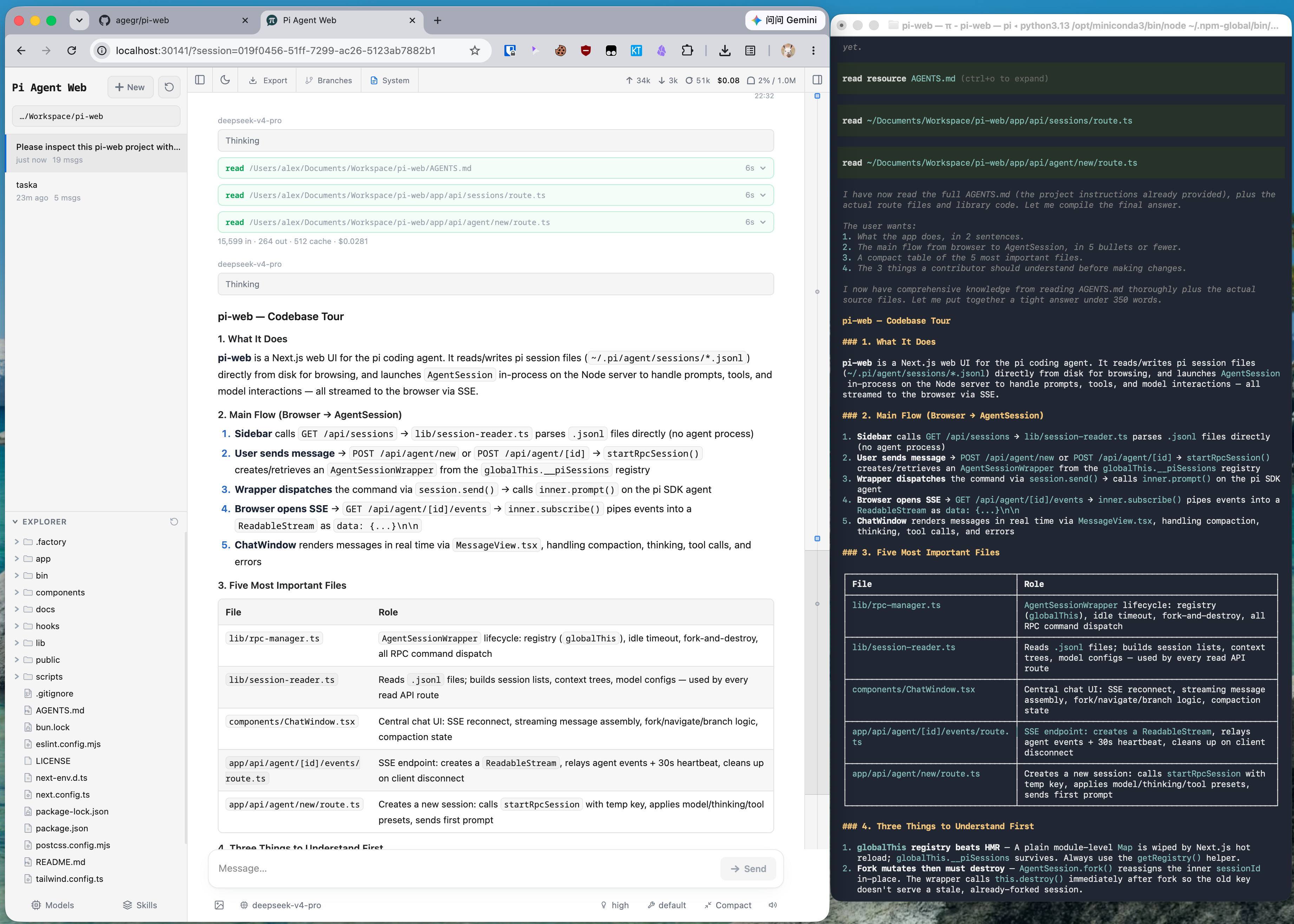
Pi Web displaying a pi session with structured Markdown, tool calls, and project navigation

Features

  • Session workspace: browse, resume, rename, export, and delete conversations grouped by project, with running state, context usage, cost, and compaction details.
  • Two ways to branch: New session creates an independent session file from an earlier message; Edit from here creates a branch inside the current session.
  • Project file tools: browse and upload files, inspect Git diffs, and preview source, Markdown, images, audio, PDFs, and DOCX files with automatic refresh.
  • Git worktrees: switch checkouts from the sidebar while keeping sessions from the same repository grouped together.
  • Web-based configuration: manage provider login and API keys, models, model tests, plugin packages, and skills without leaving Pi Web.
  • English, Simplified Chinese, and Traditional Chinese UI: Pi Web follows the browser language initially. Change it under Settings → General → Language.

Quick Start

Pi Web requires Node.js 22.19.0 or newer. Check your version with node --version, then run:

npx @agegr/pi-web@latest

The CLI opens a browser after the server is ready. If it does not, open http://127.0.0.1:30141. Pi Web listens only on 127.0.0.1 by default.

If no model provider is configured yet, open the Models panel to sign in or add an API key.

To install the pi-web command globally:

npm install -g @agegr/pi-web@latest
pi-web

Commands:

pi-web version          # print the installed version
pi-web status           # list running servers
pi-web stop [--port N]  # stop a running server
pi-web open [--port N]  # open a running server in the browser
pi-web update [--check] # update a global npm install

To update, run pi-web stop, then pi-web update (or run the same install command again). To uninstall, run npm uninstall -g @agegr/pi-web.

Configuration

For port and hostname, command-line options override the corresponding environment variables. Either --no-open or PI_WEB_NO_OPEN=1 disables automatic browser opening. Run pi-web --help (or -h) to print startup options and exit without starting the server. Unknown options exit with an error.

Option or environment variable Purpose Default
--help, -h Print startup options and exit —
--port <port>, -p <port>, or PORT Server port 30141
--hostname <host>, -H <host>, or PI_WEB_HOSTNAME Bind hostname 127.0.0.1
--no-open or PI_WEB_NO_OPEN=1 Do not open a browser automatically Browser opens
PI_WEB_APP_NAME PWA manifest name and short_name; surrounding whitespace is trimmed, empty values use the default Pi Web
PI_WEB_SKIP_VERSION_CHECK=1 Disable Pi Web update checks Unset
PI_WEB_ALLOWED_HOSTS Additional exact proxy or custom hostnames, comma-separated Unset
PI_WEB_PASSWORD Enable browser password login; API clients may use Basic Auth with username pi Authentication disabled
PI_WEB_IDLE_TIMEOUT_MS Session idle timeout in milliseconds, up to 2147483647; 0 disables idle shutdown; invalid or out-of-range values use the default 600000 (10 min)
PI_WEB_SHUTDOWN_DEADLINE_MS How long extensions get to handle session_shutdown before a closing session is disposed anyway, in milliseconds up to 2147483647; 0, invalid or out-of-range values use the default 5000 (5 s)
PI_CODEMODE_MAX_WORKERS pi's limit on codemode scripts running at once, shared by every session and subagent in the server; pi's own default is 2, and pi-web sets 8 when the variable is unset or empty. Each script may use up to 256 MB 8

Set PI_WEB_APP_NAME before starting the server (for example, PI_WEB_APP_NAME='Work Pi' pi-web). After changing it, restart the server to serve the new manifest; no rebuild is required. Updates to the name of an already installed PWA are managed by the browser and are not guaranteed to appear immediately. This does not change the page title or icons.

For example:

pi-web --help
pi-web -p 8080 -H 0.0.0.0 --no-open

Remote Access

Binding to a non-loopback address exposes an agent that can execute high-privilege actions. On a trusted LAN, require a long random password:

PI_WEB_PASSWORD='a-long-random-password' pi-web --hostname 0.0.0.0

Password authentication does not encrypt the connection. Do not expose Pi Web over plain HTTP to the internet; use HTTPS through a trusted reverse proxy or a trusted VPN. If a reverse proxy sends an external hostname, add that exact name to PI_WEB_ALLOWED_HOSTS. This allow-list does not change the address Pi Web binds to.

With many chats, terminals or file previews active at once, plain HTTP limits the browser to six connections and requests start to wait; see Serving Pi Web over HTTP/2.

Docker

Each release publishes an image to ghcr.io/agegr/pi-web. See Running Pi Web in Docker for it, the Compose example and which volumes to keep.

HTTP Proxy

Server-side model and API requests honor the standard HTTP_PROXY, HTTPS_PROXY, and NO_PROXY environment variables.

On macOS or Linux:

HTTP_PROXY=http://127.0.0.1:7890 \
HTTPS_PROXY=http://127.0.0.1:7890 \
NO_PROXY=localhost,127.0.0.1 \
npx @agegr/pi-web@latest

On Windows PowerShell:

$env:HTTP_PROXY = "http://127.0.0.1:7890"
$env:HTTPS_PROXY = "http://127.0.0.1:7890"
$env:NO_PROXY = "localhost,127.0.0.1"
npx @agegr/pi-web@latest

Notes

  • Agent data: Pi Web reads pi data from ~/.pi/agent by default, including session files under sessions/<encoded-cwd>/<timestamp>_<uuid>.jsonl. Set PI_CODING_AGENT_DIR to use another pi agent directory.
  • Filesystem access: Pi Web must be able to read the agent data directory and the working directories recorded by its sessions. Run Pi Web in the same filesystem environment as pi when sharing existing sessions.
  • Shared configuration: the Models panel uses pi's model, settings, and credential storage, so changes are visible to both interfaces. An open session applies a saved edit of its model when you select the model again.
  • File access boundary: the file browser is limited to working directories selected in Pi Web and project or session roots it already knows about; it is not a general filesystem browser.
  • Git worktrees: see Worktrees in Pi Web for switcher visibility, worktree creation, and removal behavior.
  • Integration hooks: apps that embed Pi Web can replace the session row's context menu, and server-side pi extensions can keep a session from idle shutdown; see Integration Hooks.

Development

npm install
npm run dev

The development server runs at http://127.0.0.1:30141. Run the common checks with:

npm test
node_modules/.bin/tsc --noEmit
npm run lint

Do not run next build or npm run build during normal development. It writes to .next/ and can interfere with the development server; leave builds for release work.

Before starting on a feature, read Contributing for what is in scope and the pull request checklist.

Contributor guides: Internationalization and Release process.

Repository Layout

app/             Next.js UI and API routes
components/      React UI components
hooks/           Client state and interaction hooks
lib/             Session, agent, model, file, Git, and security logic
public/          Static assets and PWA files
bin/             npm CLI entrypoint and launch option parsing
docs/            Focused user and contributor guides
demo/            Static browser demo published to GitHub Pages (see demo/README.md)

See AGENTS.md for the architecture notes, API routes and topic notes.

License

MIT

View on GitHub

Recent activity

commits and pull requests

Releases and announcements

47 total
  1. v0.17.0v0.17.0Nov 14, 2026

    ## 中文 基于 `v0.16.0..v0.17.0` 的提交整理。 ```bash npm install -g @agegr/pi-web@latest ``` ### 新增 - **Agents 条**:主聊天区显示子 Agent 或侧聊时,工具栏下方出现一行,列出主 Agent 和同一家族的所有成员,高亮当前所在的一个,运行中的显示转圈,点一下即可切换;「主 Agent」始终固定在最左。在切换器里选中一行会直接关闭切换器、交给这一条。右端的锁可以让它在主 Agent 上也一直显示(按浏览器记住)。(#1681, 1eb21f7) - **搜索覆盖侧聊**:侧聊里自己新增的内容现在能搜到(从父会话继承的部分只在父会话中命中);点开结果会打开父会话,并在右侧面板切到那个侧聊。(#1689,感谢 fallleave001) - **单个上传文件可用满 100MB**:去掉每个文件 25MB 的上限,只保留整次请求 100MB 的限制;大文件改为异步写入,不再拖慢其他请求。(bae035e) ### 修复 - **`session_start` 弹对话框的扩展不再卡死新会话**:扩展在 `session_start` 里调用 `ctx.ui.confirm/select/input/editor` 时,新会话现在能正常显示对话框并继续,与 pi TUI 一致。(#1682) - **扩展唤醒的回复不再被折叠**:扩展在空闲时发消息触发新一轮(如 pi-background-bash 的完成通知),新回复会作为单独一轮显示,上一轮的回答不再被收进 Process details。(#1687,感谢 librola) - **MCP**:Settings › MCP 里测试某个服务器连接成功后,持有它且处于失败状态的会话会重新注册它。(#1684,感谢 Epiphanye) - **完成提示音只响一次**:同一浏览器开着多个页面时,一次完成不再响多次。(#1690) - **安全与项目信任**: - Windows 上打开 PowerShell 开关后,agent 的 `powershell` 工具不再拿到 Pi Web 自身的环境变量(`PORT`、`NODE_ENV`、`NEXT_*`、`PI_WEB_PASSWORD`),与 bash 工具一致。(#1676,感谢 Shani Singh) - 技能安装、更新、搜索所调用的 `npx` 同样清理这些环境变量。(#1686,感谢 Epiphanye) - 项目里的子 Agent 配置(`.pi/agents`、`.agents/agents`)只在受信任的文件夹中加载。(#1685,感谢 Shani Singh) - Settings › Models 的 enabledModel

  2. v0.16.0v0.16.0Nov 12, 2026

    ## 中文 基于 `v0.15.0..v0.16.0` 的提交整理。 ```bash npm install -g @agegr/pi-web@latest ``` ### 新增 - **支持 pi 内置的 llama.cpp 提供商**:Settings › Models 可以添加 llama.cpp,表单默认使用 pi 的地址 `http://127.0.0.1:8080`,并带有官方图标。(#1629,感谢 Julien Chaumond) - **工具菜单里逐个开关内置工具**:预设下方列出内置工具复选框,例如只启用 `read` 和 `grep`,不必编辑 `settings.json`;不对应任何预设的组合显示为 Custom,刷新后保留,新会话也沿用。(#1612,感谢 Yannik) - **会话搜索按空格分词匹配**:`alpha beta` 匹配同时包含两个词的会话(顺序不限),用双引号括起的部分仍按完整短语匹配。(#1616,感谢 fallleave001) - **搜索结果显示项目名**:选中结果后展开所在项目分组并定位到该会话。(#1582,感谢 花菜) - **侧栏总是滚动到当前会话**:无论通过点击、搜索、Fork、`?session=` 链接、刷新、通知还是 Agents 切换器打开,会话行都会出现在视野内,必要时展开折叠的分组或置顶区。(#1614,感谢 Yejia Mo) - **已读状态跨浏览器同步**:在一个浏览器里真正看过的会话,其他浏览器里的未读圆点也会消失;只有可见、聚焦且最近有操作的页面才算已读。(#1618) - **`!` 命令实时显示输出**:长时间运行的 `!npm test` 在执行过程中就能看到输出;运行中输入 `!` 命令会在旁边直接执行,而不是作为引导消息发给模型;扩展的 `user_bash` 处理器(沙箱、远程主机等)在命令执行前会先被调用。(#1531, #1541) - **消息上的「New session」带上这条消息**:新会话的输入框预填被 Fork 的消息,与 pi 的 `/fork` 一致;扩展的 `session_before_fork` 处理器会先被询问。(#1539, #1540) - **自定义提供商可编辑显示名称**:提供商面板新增 Display name 字段,原来的键改称「Provider ID」。(#1608, 1c2ccec) - **拉取模型列表时读取更多字段**:`reasoning_levels`、价格(换算为每百万 token 的美元)和输入模态(text/image)。(#1547,感谢 dingxiaobo) - **目录选择器跟随输入的路径**:输入路径稍停后自动浏览该目录,无需再点 Go。(#1550,感谢 jianYanZhiX7)

  3. v0.15.0v0.15.0Nov 3, 2026

    ## 中文 基于 `v0.14.2..v0.15.0` 的提交整理。 ```bash npm install -g @agegr/pi-web@latest ``` ### 新增 - **运行中也能切换模型**:聊天框的模型选择器在运行时不再禁用,与 pi 的 TUI 一样,切换从这次运行的下一个请求起生效,推理级别本来就是这样。(#1527) - **侧聊标签随主会话恢复**:右侧面板里打开的侧聊标签按主会话保存在当前浏览器标签页中,回到该会话或刷新页面时恢复(已删除的侧聊不会恢复);同一项目内切换会话时保留子代理标签;未命名的侧聊在标签栏和 Agents 切换器里统一叫「Side chat 1」「Side chat 2」。(#1512,感谢 Tiger) - **拖动重排右侧面板标签**:文件、终端和代理聊天标签可以拖到其他标签前后,顺序只在页面内保留。(#1511,感谢 Tiger) - **重排自定义提供商的模型**:Settings › Models 里 `models.json` 提供商的模型行可以在桌面上拖动、用 Alt+↑/↓ 移动,或点「+ 模型」旁的 A–Z 按名称排序一次;保存后写回文件顺序,选择器和 pi 的 `/model` 跟着变。(6386fa4, #1479) - **显示提供商名称而不是 id**:模型选择器和 Settings › Models 侧栏用提供商的显示名称(如 DeepSeek、AI Flash API),筛选也能匹配名称。(#1514,感谢 谢凯文) - **扩展 UI 有颜色了**:扩展的自定义面板、widget 和 `ctx.ui.theme` 现在拿到 pi 给不报告颜色的终端用的系统主题(ANSI 调色板),按应用的明暗主题显示。(da6d538) ### 修复 - **导出 HTML 恢复正常**:升级到 pi 1.5.0 后,0.14.2 的每次导出都失败(`sortChildren expected 1 match, found 0`),现在去掉了过时的补丁。(1fbf6c6) - **Sign in with ChatGPT 可以开始登录**:Settings › Models 里 pi `openai` 提供商的 OAuth 登录不再报「requires a device ID」,使用与 TUI 相同的 `deviceId`;`openai-codex` 的显示名改为「ChatGPT Plus/Pro (legacy)」以便区分。(#1526) - **已登出提供商的 `enabledModels` 条目算作不匹配**:「清理无效条目」(Remove unmatched entries)会删除它们,不再每次启动都有 pi 的警告;重新登录不会恢复这些条目。(#1529) - **

  4. v0.14.2v0.14.2Nov 2, 2026

    ## 中文 基于 `v0.14.1..v0.14.2` 的提交整理。 ```bash npm install -g @agegr/pi-web@latest ``` ### 新增 - **模型选择器可切换「scoped | all」**:设置了 `enabledModels` 时,聊天框的模型选择器顶部多出一行「scoped | all」,与 pi 的 `/model` 一样默认显示限定范围内的模型,点按或在筛选框里按 Tab 可切换到全部模型。选中范围外的模型会用于当前会话(新会话也可以从它开始),不会成为默认模型。(#1486, #1503,感谢 Salman Abdurrahman) - **在 Agents 列表里删除侧聊**:侧聊行的标签切换按钮旁多了删除按钮,确认后只删除这个侧聊,主会话和其他侧聊保留;删除的正是主聊天里打开的侧聊时回到它的主会话。(#1507,感谢 谢凯文;48a158b) - **手机上的设置逐级全屏显示**:手机上打开 Settings 先显示分区列表,再进入分区、再进入某一项的详情,每级全屏,标题栏有返回按钮和当前级别名称并居中显示;系统返回键返回上一级,切换时有滑动动画(开启减少动态效果时不动)。(9afc508, 1420b81) - **手机上更好点的控件**:窄屏手机上 Agents 按钮留在「更多」按钮左边,不再收进菜单;手机和触屏上顶栏、侧栏工具栏和文件面板标签栏高 44px,输入框的控件行 44px,触屏上文件树行高 36px;Settings 和单独打开的配置面板在手机上全屏。(57078bb) ### 修复 - **Windows 上的终端默认启动 PowerShell**:原生 Windows 服务器上新建的终端总是 cmd.exe,现在按 pi 的 powershell 工具的方式查找,依次是 PowerShell 7、Windows PowerShell,两者都没有时才用 cmd。(#1394, #1508) - 归档视图里折叠所有项目后,不再在项目标题上方显示「没有已归档的会话」。(#1505,感谢 谢凯文) ### 内部调整 - 升级 pi 到 1.5.0,新增固定依赖 `@earendil-works/pi-schema`;MCP 的 `oauth.clientRegistration` 支持 pi 的新默认值 `"auto"`,粘贴的 `pi mcp add` 命令会读取 `--oauth-client-registration`;已保存的「不信任」也作用于无需信任的目录,与 CLI 一致。(ff8de36) - 升级 Next.js 到 16.4.4、undici 到 8.12.3,并更新锁文件中的 zod 和 dompurify,`npm audit --omit=dev

  5. v0.14.1v0.14.1Nov 2, 2026

    ## 中文 基于 `v0.13.0..v0.14.1` 的提交整理。`v0.14.0` 标签打出后发布被取消,没有发布到 npm,也没有 GitHub Release,所以本说明包含自 0.13.0 以来的全部改动。 ```bash npm install -g @agegr/pi-web@latest ``` ### 新增 - **侧聊(side chat)**:从当前会话分出一个侧聊,在右侧面板标签页里提问,带着主会话的全部上下文,主会话不受影响,运行中也能用。侧聊只保留主会话已有的只读和 shell 类工具(read、bash、grep、find、ls,Windows 上还有 powershell),不能编辑、写文件;只读的主会话分出的侧聊也没有 shell。入口有四个:`/side` 或 `/side <问题>`、选中文字后的「在侧聊询问」、运行中输入框旁的侧聊按钮、Agents 面板里的「新建侧聊」。侧聊不出现在侧栏里,在 Agents 列表中和子代理一起显示,第一条提问自动成为它的名字。(#1469,感谢 dingxiaobo;#1502) - **选中文字「引用」**:选中回答里的文字后,原来的「在这里提问」改为「引用」,只插入 `> 选中的文字`,不再附带提问模板,提问、纠正、指示都可以接着写;多段引用各自成段。(#1502) - **Docker 镜像**:每个版本会发布 `ghcr.io/agegr/pi-web` 镜像(linux/amd64、linux/arm64),标签为版本号、`主.次` 和 `latest`。仓库附带 Compose 示例,用法和要保留的卷见 [docs/docker.md](https://github.com/agegr/pi-web/blob/main/docs/docker.md)。(#1478,感谢 Misir) - **标签页图标显示待处理数量**:图标与侧栏的会话状态一致,有会话等待输入时显示琥珀色数字(等待加未读),只有未读时显示蓝色数字,都处理完恢复原图标;页面在后台时完成的会话也会计入。(#1484,感谢 Vlad Sirenko) - **Git 改动列表可切换树状视图**:文件侧栏的改动文件可以按目录树显示,折叠的目录在刷新后保持折叠;默认仍是列表视图,选择会被记住。(#1490,感谢 betago) - **Markdown 和纯文本文件默认自动换行**:文件查看器打开 md、mdx、rst、adoc、txt 等文件时自动换行,代码文件和 `.log` 仍不换行;手动切换过的选择优先。(#1471,感谢 Brynne Taylor) ### 改进 - **扩展消息保留排版**:扩展为终端排好的状态(方框、对齐的进度条、缩进的行)以等宽字体显示,保留换行、缩进和空格,箭头和框线

Code frequency

additions and deletions
+67.7K-67.7KWeek of 2026-03-15: +17,428 linesWeek of 2026-03-15: -0 linesWeek of 2026-03-22: +10,614 linesWeek of 2026-03-22: -6,705 linesWeek of 2026-03-29: +158 linesWeek of 2026-03-29: -92 linesWeek of 2026-04-05: +2,766 linesWeek of 2026-04-05: -1,495 linesWeek of 2026-04-12: +1,795 linesWeek of 2026-04-12: -1,166 linesWeek of 2026-04-19: +1,804 linesWeek of 2026-04-19: -1,214 linesWeek of 2026-04-26: +9,178 linesWeek of 2026-04-26: -2,206 linesWeek of 2026-05-03: +1,656 linesWeek of 2026-05-03: -425 linesWeek of 2026-05-10: +264 linesWeek of 2026-05-10: -67 linesWeek of 2026-05-17: +5,021 linesWeek of 2026-05-17: -5,317 linesWeek of 2026-05-24: +264 linesWeek of 2026-05-24: -8 linesWeek of 2026-05-31: +1,532 linesWeek of 2026-05-31: -531 linesWeek of 2026-06-07: +631 linesWeek of 2026-06-07: -335 linesWeek of 2026-06-14: +47 linesWeek of 2026-06-14: -14 linesWeek of 2026-06-21: +3,855 linesWeek of 2026-06-21: -1,024 linesWeek of 2026-06-28: +7,433 linesWeek of 2026-06-28: -1,005 linesWeek of 2026-07-05: +2,171 linesWeek of 2026-07-05: -790 linesWeek of 2026-07-12: +3,884 linesWeek of 2026-07-12: -724 linesWeek of 2026-07-19: +8,600 linesWeek of 2026-07-19: -2,355 linesWeek of 2026-07-26: +8,804 linesWeek of 2026-07-26: -1,973 linesWeek of 2026-08-02: +7,262 linesWeek of 2026-08-02: -1,144 linesWeek of 2026-08-09: +9,422 linesWeek of 2026-08-09: -2,877 linesWeek of 2026-08-16: +11,143 linesWeek of 2026-08-16: -3,381 linesWeek of 2026-08-23: +5,981 linesWeek of 2026-08-23: -8,692 linesWeek of 2026-08-30: +9,924 linesWeek of 2026-08-30: -1,825 linesWeek of 2026-09-06: +5,187 linesWeek of 2026-09-06: -1,125 linesWeek of 2026-09-13: +4,400 linesWeek of 2026-09-13: -824 linesWeek of 2026-09-20: +67,711 linesWeek of 2026-09-20: -2,087 linesWeek of 2026-09-27: +56,574 linesWeek of 2026-09-27: -6,205 linesWeek of 2026-10-04: +37,842 linesWeek of 2026-10-04: -8,929 linesWeek of 2026-10-11: +14,732 linesWeek of 2026-10-11: -8,940 linesWeek of 2026-10-18: +4,464 linesWeek of 2026-10-18: -612 linesWeek of 2026-10-25: +18,434 linesWeek of 2026-10-25: -2,417 linesWeek of 2026-11-01: +7,005 linesWeek of 2026-11-01: -1,871 linesWeek of 2026-11-08: +12,368 linesWeek of 2026-11-08: -1,607 linesMar 15, 2026Nov 8, 2026
+360.4K lines added, -80K removed over the last year.

Commits per week

last 52 weeks
1090Week of 2025-11-16: 0 commitsWeek of 2025-11-23: 0 commitsWeek of 2025-11-30: 0 commitsWeek of 2025-12-07: 0 commitsWeek of 2025-12-14: 0 commitsWeek of 2025-12-21: 0 commitsWeek of 2025-12-28: 0 commitsWeek of 2026-01-04: 0 commitsWeek of 2026-01-11: 0 commitsWeek of 2026-01-18: 0 commitsWeek of 2026-01-25: 0 commitsWeek of 2026-02-01: 0 commitsWeek of 2026-02-08: 0 commitsWeek of 2026-02-15: 0 commitsWeek of 2026-02-22: 0 commitsWeek of 2026-03-01: 0 commitsWeek of 2026-03-08: 0 commitsWeek of 2026-03-15: 1 commitsWeek of 2026-03-22: 40 commitsWeek of 2026-03-29: 4 commitsWeek of 2026-04-05: 22 commitsWeek of 2026-04-12: 7 commitsWeek of 2026-04-19: 18 commitsWeek of 2026-04-26: 8 commitsWeek of 2026-05-03: 5 commitsWeek of 2026-05-10: 2 commitsWeek of 2026-05-17: 6 commitsWeek of 2026-05-24: 2 commitsWeek of 2026-05-31: 9 commitsWeek of 2026-06-07: 8 commitsWeek of 2026-06-14: 2 commitsWeek of 2026-06-21: 30 commitsWeek of 2026-06-28: 52 commitsWeek of 2026-07-05: 26 commitsWeek of 2026-07-12: 35 commitsWeek of 2026-07-19: 50 commitsWeek of 2026-07-26: 53 commitsWeek of 2026-08-02: 37 commitsWeek of 2026-08-09: 51 commitsWeek of 2026-08-16: 36 commitsWeek of 2026-08-23: 41 commitsWeek of 2026-08-30: 43 commitsWeek of 2026-09-06: 44 commitsWeek of 2026-09-13: 45 commitsWeek of 2026-09-20: 27 commitsWeek of 2026-09-27: 109 commitsWeek of 2026-10-04: 90 commitsWeek of 2026-10-11: 66 commitsWeek of 2026-10-18: 34 commitsWeek of 2026-10-25: 65 commitsWeek of 2026-11-01: 51 commitsWeek of 2026-11-08: 106 commitsNov 16, 2025Nov 8, 2026
1.2K commits in the last 52 weeks.

When work happens

weekday and hour
SunMonTueWedThuFriSat036912151821Sun 0:00 — 11 commitsSun 1:00 — 4 commitsSun 2:00 — 0 commitsSun 3:00 — 1 commitsSun 4:00 — 0 commitsSun 5:00 — 1 commitsSun 6:00 — 0 commitsSun 7:00 — 0 commitsSun 8:00 — 0 commitsSun 9:00 — 0 commitsSun 10:00 — 0 commitsSun 11:00 — 2 commitsSun 12:00 — 0 commitsSun 13:00 — 2 commitsSun 14:00 — 3 commitsSun 15:00 — 3 commitsSun 16:00 — 6 commitsSun 17:00 — 3 commitsSun 18:00 — 8 commitsSun 19:00 — 11 commitsSun 20:00 — 18 commitsSun 21:00 — 11 commitsSun 22:00 — 2 commitsSun 23:00 — 8 commitsMon 0:00 — 2 commitsMon 1:00 — 0 commitsMon 2:00 — 2 commitsMon 3:00 — 0 commitsMon 4:00 — 0 commitsMon 5:00 — 0 commitsMon 6:00 — 0 commitsMon 7:00 — 1 commitsMon 8:00 — 1 commitsMon 9:00 — 1 commitsMon 10:00 — 1 commitsMon 11:00 — 0 commitsMon 12:00 — 1 commitsMon 13:00 — 4 commitsMon 14:00 — 8 commitsMon 15:00 — 13 commitsMon 16:00 — 6 commitsMon 17:00 — 17 commitsMon 18:00 — 0 commitsMon 19:00 — 7 commitsMon 20:00 — 2 commitsMon 21:00 — 15 commitsMon 22:00 — 20 commitsMon 23:00 — 7 commitsTue 0:00 — 5 commitsTue 1:00 — 1 commitsTue 2:00 — 1 commitsTue 3:00 — 1 commitsTue 4:00 — 0 commitsTue 5:00 — 0 commitsTue 6:00 — 0 commitsTue 7:00 — 1 commitsTue 8:00 — 2 commitsTue 9:00 — 2 commitsTue 10:00 — 0 commitsTue 11:00 — 6 commitsTue 12:00 — 1 commitsTue 13:00 — 3 commitsTue 14:00 — 12 commitsTue 15:00 — 9 commitsTue 16:00 — 10 commitsTue 17:00 — 10 commitsTue 18:00 — 4 commitsTue 19:00 — 13 commitsTue 20:00 — 7 commitsTue 21:00 — 18 commitsTue 22:00 — 25 commitsTue 23:00 — 22 commitsWed 0:00 — 11 commitsWed 1:00 — 6 commitsWed 2:00 — 1 commitsWed 3:00 — 0 commitsWed 4:00 — 0 commitsWed 5:00 — 5 commitsWed 6:00 — 1 commitsWed 7:00 — 0 commitsWed 8:00 — 4 commitsWed 9:00 — 2 commitsWed 10:00 — 2 commitsWed 11:00 — 2 commitsWed 12:00 — 6 commitsWed 13:00 — 6 commitsWed 14:00 — 9 commitsWed 15:00 — 8 commitsWed 16:00 — 10 commitsWed 17:00 — 6 commitsWed 18:00 — 0 commitsWed 19:00 — 22 commitsWed 20:00 — 15 commitsWed 21:00 — 21 commitsWed 22:00 — 29 commitsWed 23:00 — 15 commitsThu 0:00 — 6 commitsThu 1:00 — 1 commitsThu 2:00 — 0 commitsThu 3:00 — 1 commitsThu 4:00 — 1 commitsThu 5:00 — 1 commitsThu 6:00 — 1 commitsThu 7:00 — 1 commitsThu 8:00 — 4 commitsThu 9:00 — 5 commitsThu 10:00 — 1 commitsThu 11:00 — 7 commitsThu 12:00 — 1 commitsThu 13:00 — 3 commitsThu 14:00 — 29 commitsThu 15:00 — 32 commitsThu 16:00 — 22 commitsThu 17:00 — 13 commitsThu 18:00 — 6 commitsThu 19:00 — 8 commitsThu 20:00 — 15 commitsThu 21:00 — 20 commitsThu 22:00 — 34 commitsThu 23:00 — 38 commitsFri 0:00 — 18 commitsFri 1:00 — 11 commitsFri 2:00 — 1 commitsFri 3:00 — 2 commitsFri 4:00 — 1 commitsFri 5:00 — 2 commitsFri 6:00 — 1 commitsFri 7:00 — 0 commitsFri 8:00 — 2 commitsFri 9:00 — 7 commitsFri 10:00 — 3 commitsFri 11:00 — 12 commitsFri 12:00 — 4 commitsFri 13:00 — 6 commitsFri 14:00 — 16 commitsFri 15:00 — 6 commitsFri 16:00 — 10 commitsFri 17:00 — 13 commitsFri 18:00 — 4 commitsFri 19:00 — 0 commitsFri 20:00 — 16 commitsFri 21:00 — 21 commitsFri 22:00 — 22 commitsFri 23:00 — 68 commitsSat 0:00 — 14 commitsSat 1:00 — 5 commitsSat 2:00 — 1 commitsSat 3:00 — 0 commitsSat 4:00 — 0 commitsSat 5:00 — 0 commitsSat 6:00 — 3 commitsSat 7:00 — 4 commitsSat 8:00 — 0 commitsSat 9:00 — 2 commitsSat 10:00 — 2 commitsSat 11:00 — 4 commitsSat 12:00 — 2 commitsSat 13:00 — 6 commitsSat 14:00 — 6 commitsSat 15:00 — 4 commitsSat 16:00 — 9 commitsSat 17:00 — 7 commitsSat 18:00 — 4 commitsSat 19:00 — 20 commitsSat 20:00 — 26 commitsSat 21:00 — 26 commitsSat 22:00 — 25 commitsSat 23:00 — 23 commits
Commit volume by weekday and hour (UTC). Larger dots mean more commits.

Who is committing

last 52 weeks
Maintainer commits853 (66%)
Community commits445 (34%)

1,298 commits in total over the last year.

DateListRankStars gained
Aug 19, 2026monthly#13+3,349
Aug 18, 2026monthly#13+3,349
Aug 17, 2026monthly#11+3,175
Aug 16, 2026monthly#12+3,112
Aug 15, 2026monthly#11+3,071
Aug 14, 2026monthly#11+3,016
Aug 13, 2026monthly#12+2,977
Aug 12, 2026monthly#14+2,913
Aug 11, 2026monthly#15+2,848
Aug 10, 2026monthly#16+2,781
Aug 9, 2026monthly#18+2,755
Jul 31, 2026weekly#11+1,260
Jul 30, 2026weekly#11+1,260
Jul 29, 2026weekly#6+1,474
Jul 28, 2026weekly#5+1,676
  • morluto/rea

    Reverse engineer anything with agents, from app behavior down to native binaries.

    471.6K stars · TypeScript

  • freeCodeCamp/freeCodeCamp

    freeCodeCamp.org's open-source codebase and curriculum. Learn math, programming, and computer science for free.

    459.4K stars · TypeScript

  • openclaw/openclaw

    The AI that really does things. Any OS. Any Platform. The lobster way. 🦞

    394.9K stars · TypeScript

  • anomalyco/opencode

    The open source coding agent.

    228.3K stars · TypeScript

  • n8n-io/n8n

    Fair-code workflow automation platform with native AI capabilities. Combine visual building with custom code, self-host or cloud, 400+ integrations.

    211.6K stars · TypeScript

  • firecrawl/firecrawl

    Knowledge infrastructure to make your agents smarter. Search, scrape and access 550+ data providers through one API.

    205.3K stars · TypeScript