andrewyng/openworkerPublic

AI summary: An open-source, local-first AI coworker that automates everyday desktop tasks.

Stars
19.4K
+262 today
Forks
2.8K
Watchers
128
Open issues
209
Open PRs
204
Contributors
~77
Commits
1.2K
Branches
91

PythonMITCreated Jul 20, 2026Last push 3d agoLatest release v0.3.1+493 stars this week+818 this month

Quick answers

What is openworker?
An open-source, local-first AI coworker that automates everyday desktop tasks.
What does openworker do?
OpenWorker is a local-first desktop application that functions as an AI coworker. It runs entirely on your machine and uses local or cloud-based LLMs to execute real desktop tasks rather than just providing text responses. Built on the aisuite Python library and a Tauri/React frontend, it interfaces directly with your native shell, local files, and over 25 external APIs (like Slack, Jira, and GitHub) to produce finished deliverables such as documents or calendar updates. It emphasizes privacy by storing all keys locally and strictly requiring user approval before taking consequential actions like sending messages or running terminal commands.
Who is openworker for?
Knowledge workers, developers, and project managers who want a secure, local-first AI assistant capable of interacting with their actual desktop environment and enterprise tools without exposing private data to third-party cloud agents. The tool allows professionals to leverage AI securely within their day-to-day desktop workflow.
How do I get started with openworker?
git clone https://github.com/andrewyng/openworker && cd openworker && bash packaging/setup_dev_env.sh && .venv/bin/openworker-server --cwd ~/some/project --port 8765
How popular is openworker on GitHub?
andrewyng/openworker has 19,430 stars and 2,772 forks on GitHub, and gained 493 stars in the last 7 days.
What license does openworker use?
andrewyng/openworker is released under the MIT license.

Star history

since Jul 28, 2026
05K10K15KJul 2026Sep 2026Oct 2026Nov 2026
19.4K stars as of Nov 18, 2026. Measured daily since Jul 28, 2026; GitHub no longer exposes earlier star timestamps.

Update history

1 recorded
  • Oct 10, 2026New release v0.3.1 (previously v0.2.1).

Contribution activity

commits per day, last 52 weeks
NovDecJanFebMarAprMayJunJulAugSepOctNovMonWedFri2025-11-23: 0 commits2025-11-24: 0 commits2025-11-25: 0 commits2025-11-26: 0 commits2025-11-27: 0 commits2025-11-28: 0 commits2025-11-29: 0 commits2025-11-30: 0 commits2025-12-01: 0 commits2025-12-02: 0 commits2025-12-03: 0 commits2025-12-04: 0 commits2025-12-05: 0 commits2025-12-06: 0 commits2025-12-07: 0 commits2025-12-08: 0 commits2025-12-09: 0 commits2025-12-10: 0 commits2025-12-11: 0 commits2025-12-12: 0 commits2025-12-13: 0 commits2025-12-14: 0 commits2025-12-15: 0 commits2025-12-16: 0 commits2025-12-17: 0 commits2025-12-18: 0 commits2025-12-19: 0 commits2025-12-20: 0 commits2025-12-21: 0 commits2025-12-22: 0 commits2025-12-23: 0 commits2025-12-24: 0 commits2025-12-25: 0 commits2025-12-26: 0 commits2025-12-27: 0 commits2025-12-28: 0 commits2025-12-29: 0 commits2025-12-30: 0 commits2025-12-31: 0 commits2026-01-01: 0 commits2026-01-02: 0 commits2026-01-03: 0 commits2026-01-04: 0 commits2026-01-05: 0 commits2026-01-06: 0 commits2026-01-07: 0 commits2026-01-08: 0 commits2026-01-09: 0 commits2026-01-10: 0 commits2026-01-11: 0 commits2026-01-12: 0 commits2026-01-13: 0 commits2026-01-14: 0 commits2026-01-15: 0 commits2026-01-16: 0 commits2026-01-17: 0 commits2026-01-18: 0 commits2026-01-19: 0 commits2026-01-20: 0 commits2026-01-21: 0 commits2026-01-22: 0 commits2026-01-23: 0 commits2026-01-24: 0 commits2026-01-25: 0 commits2026-01-26: 0 commits2026-01-27: 0 commits2026-01-28: 0 commits2026-01-29: 0 commits2026-01-30: 0 commits2026-01-31: 0 commits2026-02-01: 0 commits2026-02-02: 0 commits2026-02-03: 0 commits2026-02-04: 0 commits2026-02-05: 0 commits2026-02-06: 0 commits2026-02-07: 0 commits2026-02-08: 0 commits2026-02-09: 0 commits2026-02-10: 0 commits2026-02-11: 0 commits2026-02-12: 0 commits2026-02-13: 0 commits2026-02-14: 0 commits2026-02-15: 0 commits2026-02-16: 0 commits2026-02-17: 0 commits2026-02-18: 0 commits2026-02-19: 0 commits2026-02-20: 0 commits2026-02-21: 0 commits2026-02-22: 0 commits2026-02-23: 0 commits2026-02-24: 0 commits2026-02-25: 0 commits2026-02-26: 0 commits2026-02-27: 0 commits2026-02-28: 0 commits2026-03-01: 0 commits2026-03-02: 0 commits2026-03-03: 0 commits2026-03-04: 0 commits2026-03-05: 0 commits2026-03-06: 0 commits2026-03-07: 0 commits2026-03-08: 0 commits2026-03-09: 0 commits2026-03-10: 0 commits2026-03-11: 0 commits2026-03-12: 0 commits2026-03-13: 0 commits2026-03-14: 0 commits2026-03-15: 0 commits2026-03-16: 0 commits2026-03-17: 0 commits2026-03-18: 0 commits2026-03-19: 0 commits2026-03-20: 0 commits2026-03-21: 0 commits2026-03-22: 0 commits2026-03-23: 0 commits2026-03-24: 0 commits2026-03-25: 0 commits2026-03-26: 0 commits2026-03-27: 0 commits2026-03-28: 0 commits2026-03-29: 0 commits2026-03-30: 0 commits2026-03-31: 0 commits2026-04-01: 0 commits2026-04-02: 0 commits2026-04-03: 0 commits2026-04-04: 0 commits2026-04-05: 0 commits2026-04-06: 0 commits2026-04-07: 0 commits2026-04-08: 0 commits2026-04-09: 0 commits2026-04-10: 0 commits2026-04-11: 0 commits2026-04-12: 0 commits2026-04-13: 0 commits2026-04-14: 0 commits2026-04-15: 0 commits2026-04-16: 0 commits2026-04-17: 0 commits2026-04-18: 0 commits2026-04-19: 0 commits2026-04-20: 0 commits2026-04-21: 0 commits2026-04-22: 0 commits2026-04-23: 0 commits2026-04-24: 0 commits2026-04-25: 0 commits2026-04-26: 0 commits2026-04-27: 0 commits2026-04-28: 0 commits2026-04-29: 0 commits2026-04-30: 0 commits2026-05-01: 0 commits2026-05-02: 0 commits2026-05-03: 0 commits2026-05-04: 0 commits2026-05-05: 0 commits2026-05-06: 0 commits2026-05-07: 0 commits2026-05-08: 0 commits2026-05-09: 0 commits2026-05-10: 0 commits2026-05-11: 0 commits2026-05-12: 0 commits2026-05-13: 0 commits2026-05-14: 0 commits2026-05-15: 0 commits2026-05-16: 0 commits2026-05-17: 0 commits2026-05-18: 0 commits2026-05-19: 0 commits2026-05-20: 0 commits2026-05-21: 0 commits2026-05-22: 0 commits2026-05-23: 0 commits2026-05-24: 0 commits2026-05-25: 0 commits2026-05-26: 0 commits2026-05-27: 0 commits2026-05-28: 0 commits2026-05-29: 0 commits2026-05-30: 0 commits2026-05-31: 0 commits2026-06-01: 0 commits2026-06-02: 0 commits2026-06-03: 0 commits2026-06-04: 0 commits2026-06-05: 0 commits2026-06-06: 0 commits2026-06-07: 0 commits2026-06-08: 0 commits2026-06-09: 0 commits2026-06-10: 0 commits2026-06-11: 0 commits2026-06-12: 0 commits2026-06-13: 0 commits2026-06-14: 0 commits2026-06-15: 0 commits2026-06-16: 0 commits2026-06-17: 0 commits2026-06-18: 0 commits2026-06-19: 0 commits2026-06-20: 0 commits2026-06-21: 0 commits2026-06-22: 0 commits2026-06-23: 0 commits2026-06-24: 0 commits2026-06-25: 0 commits2026-06-26: 0 commits2026-06-27: 0 commits2026-06-28: 0 commits2026-06-29: 0 commits2026-06-30: 0 commits2026-07-01: 0 commits2026-07-02: 0 commits2026-07-03: 0 commits2026-07-04: 0 commits2026-07-05: 0 commits2026-07-06: 0 commits2026-07-07: 0 commits2026-07-08: 0 commits2026-07-09: 0 commits2026-07-10: 0 commits2026-07-11: 0 commits2026-07-12: 0 commits2026-07-13: 0 commits2026-07-14: 0 commits2026-07-15: 0 commits2026-07-16: 0 commits2026-07-17: 0 commits2026-07-18: 0 commits2026-07-19: 0 commits2026-07-20: 0 commits2026-07-21: 20 commits2026-07-22: 9 commits2026-07-23: 22 commits2026-07-24: 14 commits2026-07-25: 16 commits2026-07-26: 20 commits2026-07-27: 11 commits2026-07-28: 19 commits2026-07-29: 7 commits2026-07-30: 15 commits2026-07-31: 8 commits2026-08-01: 3 commits2026-08-02: 0 commits2026-08-03: 1 commit2026-08-04: 0 commits2026-08-05: 1 commit2026-08-06: 0 commits2026-08-07: 1 commit2026-08-08: 0 commits2026-08-09: 2 commits2026-08-10: 5 commits2026-08-11: 8 commits2026-08-12: 12 commits2026-08-13: 5 commits2026-08-14: 19 commits2026-08-15: 10 commits2026-08-16: 18 commits2026-08-17: 17 commits2026-08-18: 4 commits2026-08-19: 15 commits2026-08-20: 19 commits2026-08-21: 26 commits2026-08-22: 14 commits2026-08-23: 3 commits2026-08-24: 11 commits2026-08-25: 3 commits2026-08-26: 11 commits2026-08-27: 3 commits2026-08-28: 5 commits2026-08-29: 0 commits2026-08-30: 0 commits2026-08-31: 7 commits2026-09-01: 3 commits2026-09-02: 0 commits2026-09-03: 0 commits2026-09-04: 5 commits2026-09-05: 3 commits2026-09-06: 3 commits2026-09-07: 0 commits2026-09-08: 9 commits2026-09-09: 3 commits2026-09-10: 0 commits2026-09-11: 1 commit2026-09-12: 0 commits2026-09-13: 2 commits2026-09-14: 0 commits2026-09-15: 2 commits2026-09-16: 2 commits2026-09-17: 7 commits2026-09-18: 6 commits2026-09-19: 19 commits2026-09-20: 15 commits2026-09-21: 18 commits2026-09-22: 0 commits2026-09-23: 1 commit2026-09-24: 5 commits2026-09-25: 21 commits2026-09-26: 4 commits2026-09-27: 12 commits2026-09-28: 13 commits2026-09-29: 18 commits2026-09-30: 3 commits2026-10-01: 7 commits2026-10-02: 4 commits2026-10-03: 10 commits2026-10-04: 16 commits2026-10-05: 24 commits2026-10-06: 10 commits2026-10-07: 1 commit2026-10-08: 0 commits2026-10-09: 1 commit2026-10-10: 1 commit2026-10-11: 0 commits2026-10-12: 0 commits2026-10-13: 1 commit2026-10-14: 0 commits2026-10-15: 0 commits2026-10-16: 0 commits2026-10-17: 13 commits2026-10-18: 0 commits2026-10-19: 0 commits2026-10-20: 2 commits2026-10-21: 0 commits2026-10-22: 1 commit2026-10-23: 0 commits2026-10-24: 0 commits2026-10-25: 36 commits2026-10-26: 23 commits2026-10-27: 0 commits2026-10-28: 11 commits2026-10-29: 9 commits2026-10-30: 0 commits2026-10-31: 1 commit2026-11-01: 2 commits2026-11-02: 27 commits2026-11-03: 7 commits2026-11-04: 16 commits2026-11-05: 25 commits2026-11-06: 16 commits2026-11-07: 19 commits2026-11-08: 1 commit2026-11-09: 1 commit2026-11-10: 20 commits2026-11-11: 8 commits2026-11-12: 8 commits2026-11-13: 23 commits2026-11-14: 0 commits2026-11-15: 0 commits2026-11-16: 4 commits2026-11-17: 0 commits2026-11-18: 0 commits2026-11-19: 0 commits2026-11-20: 0 commits2026-11-21: 0 commits
907 commits in the last yearLessMore

Signals and awards

derived from tracked data
  • Widely adopted

    19,430 stars

  • Very active

    907 commits in 52 weeks

  • Outside contributions

    100% of recent commits from the community

  • Permissive license

    MIT

  • Continuous integration

    Automated checks passing

  • Repeat trending

    5 trending appearances

What openworker does

OpenWorker is a local-first desktop application that functions as an AI coworker. It runs entirely on your machine and uses local or cloud-based LLMs to execute real desktop tasks rather than just providing text responses. Built on the aisuite Python library and a Tauri/React frontend, it interfaces directly with your native shell, local files, and over 25 external APIs (like Slack, Jira, and GitHub) to produce finished deliverables such as documents or calendar updates. It emphasizes privacy by storing all keys locally and strictly requiring user approval before taking consequential actions like sending messages or running terminal commands.

Knowledge workers, developers, and project managers who want a secure, local-first AI assistant capable of interacting with their actual desktop environment and enterprise tools without exposing private data to third-party cloud agents. The tool allows professionals to leverage AI securely within their day-to-day desktop workflow.

  • Local-first execution: The core agent server runs locally on your machine, keeping your files and API keys private.
  • Action approval gating: The agent explicitly asks for human permission before sending messages, modifying calendars, or running shell commands.
  • Extensive tool integrations: Connects with over 25 everyday tools (GitHub, Notion, Slack, Jira) natively and supports any MCP-compliant tool.
  • Model agnosticism: Bring your own API key for OpenAI, Anthropic, or Google, or run entirely local open-weight models via Ollama.
  • Automated scheduling: Set up recurring autonomous tasks like generating weekly reports or monitoring Slack channels for unattended execution.

Where teams use it

Task automation

Command the agent to triage your inbox, untangle your calendar, or check release statuses across Jira and GitHub.

Deliverable generation

Ask the coworker to draft a customer brief or report and receive a finished, saved document on your desktop.

Slack integration

Mention @OpenWorker in a Slack channel to trigger a desktop agent session that replies with researched data.

Recurring reporting

Schedule a morning brief automation that compiles data from various integrated tools into a daily summary.

Getting started: git clone https://github.com/andrewyng/openworker && cd openworker && bash packaging/setup_dev_env.sh && .venv/bin/openworker-server --cwd ~/some/project --port 8765

README

main branch

OpenWorker

A Desktop App for everyday work.
A Harness SDK to power your AI ideas.

openworker.com · Desktop App · Harness SDK · Issues

andrewyng%2Fopenworker | Trendshift

Use the OpenWorker Desktop App to research, write, review code, and carry out tasks across the tools you already use. Or build your own agentic desktop and web apps with the OpenWorker Harness SDK.

Bring your choice of cloud or local models. Set permissions for your agents and decide which actions need your approval.

This README mainly covers the OpenWorker Desktop App. For SDK setup, examples and architecture, see the OpenWorker Harness SDK README.

Use the OpenWorker Desktop App

An AI coworker for your everyday work. Go from a request to a prepared brief, an organized folder, or a reviewed pull request.

It runs on your machine. Bring your own model key or run locally with Ollama, and choose which integrations it can access. Commands can run inside an NVIDIA OpenShell sandbox. See Governed by design for its approval and safety controls.
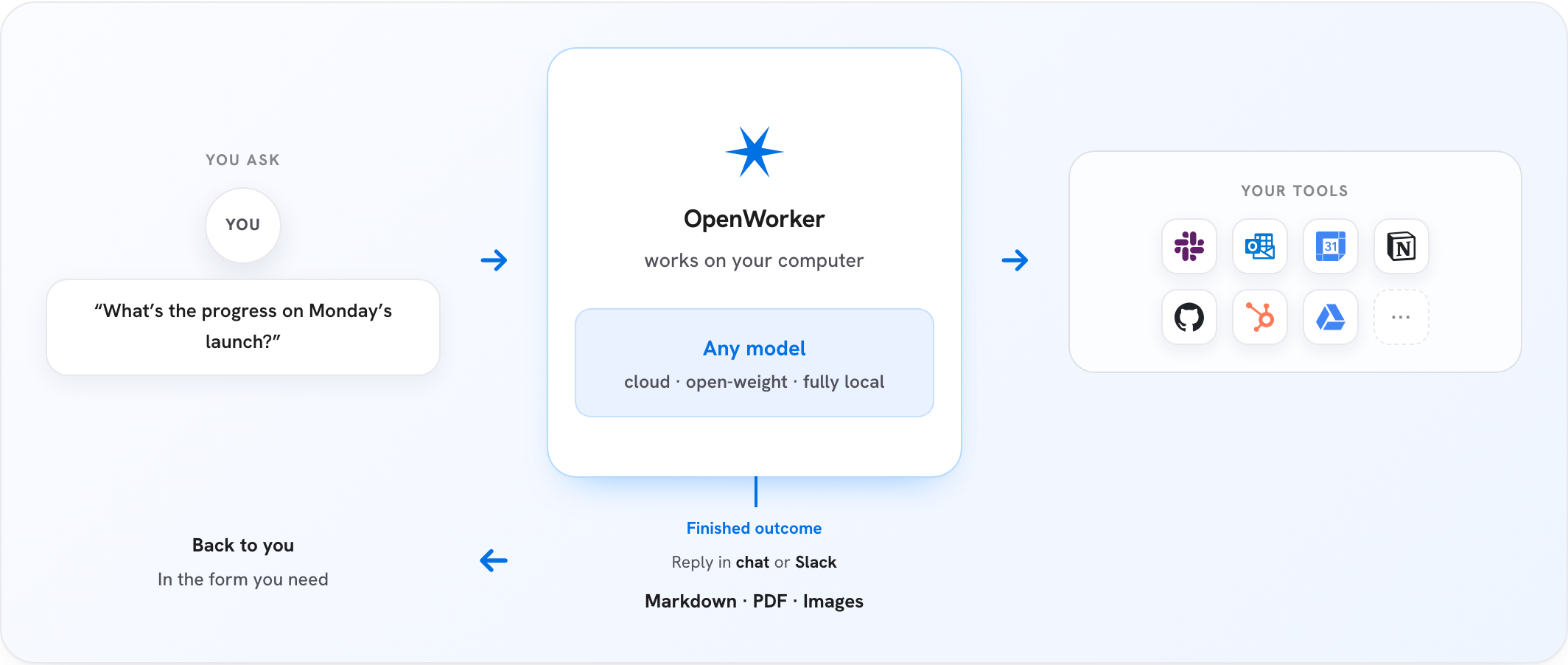
How the OpenWorker Desktop App works

⬇ macOS (Apple Silicon) macOS 12+ · signed & notarized · auto-updates

⬇ Windows 10/11 (x64) builds are not yet code-signed, so SmartScreen will warn; signing is in progress

Open the app, add a model key (or point it at Ollama), and ask for something real.

The OpenWorker Desktop App is in open beta and supports automatic updates. Issues welcome as we polish rough edges.

Build agentic apps using OpenWorker Harness SDK

Bring agentic capabilities to your own desktop app, web app or local utility. Build the product experience while OpenWorker handles the agent loop, tool calls, approvals, streaming and durable sessions.

Use the TypeScript SDK from npm, or embed the Rust engine in your application. Start with one agent. Add sub-agents, teams, OpenShell sandboxing and observability as your application grows.

npm install @openworkerai/harness-sdk

Explore the Harness SDK → · Desktop guide · Web guide · Build with Codex or Claude Code

The rest of this README focuses on the OpenWorker Desktop App. For SDK documentation, continue with the Harness SDK README.

What you can do with the Desktop App

Your work How OpenWorker helps
Research and create Turn notes, files and research into briefs, documents, spreadsheets and reports.
Review security risks Scan code and dependencies, review cloud configuration, and investigate incidents. Proposed code fixes are re-scanned and reviewed before approval.
Work across your tools Bring together GitHub, Slack, email, calendars and other connected apps. Add tools through MCP.
Delegate from Slack Mention @OpenWorker; the task runs on your desktop and the reply returns to the thread.
Automate recurring work Schedule morning briefs, weekly reports and other repeatable tasks, with transcripts to review.
Choose your model Connect a cloud provider or use a local model through Ollama and other compatible servers.
Control agent actions Review approvals, inspect recorded actions, and isolate supported commands with OpenShell or platform sandboxing.

Specialist coworkers come with tools and instructions for a particular job. Security coworkers ship first.

Try your first task

Start with a folder of meeting notes. No connected apps are needed for this example.

  1. Choose a model. Open Settings → Models & Keys and connect a provider or local model.
  2. Choose your working folder. Give the session access to a folder containing a few text or Markdown notes.
  3. Ask for a brief. Paste the request below, follow the tool activity, and review any approval requests before continuing.

Read the meeting notes in this folder. Create a one-page brief with the key decisions, open questions and next steps. Save it as brief.md. Leave the original notes unchanged and ask before writing the brief.

Example workflow: meeting notes become a brief after you review the proposed write

Open brief.md in the working folder and review it. Continue in the same session: “Make the next steps more specific, and flag anything without an owner.”

Governed by design

The Desktop App combines approvals, recorded tool activity and optional sandboxing. You can review proposed actions and decide how much autonomy to allow.

How approvals, audit trails and sandboxing work

Governance is the architecture, not a plugin - the agent can't grant itself new permissions, and no prompt can talk it past a gate. Four tiers, all in this repo:

  1. Hard floors. A set of dangerous and irreversible operations is human-only, always. No mode - including full auto-approve - lowers these floors; they always escalate to you.

  2. A ladder of earned autonomy. Actions are approval-gated by default. One-off approvals can graduate into standing rules, then into config allowlists - each step explicit, visible, and revocable. In auto-approve mode a reviewer model lets routine actions through and escalates anything it isn't sure about to you; repeated denials trip a circuit breaker that pauses the reviewer and hands control back. Reviewer verdicts are judgments, not guarantees - the floors and the audit trail are what backstop them.

  3. An audit trail that answers "who did this, and why?" Every tool call is recorded with its approval provenance - auto-approved, user-approved, or denied, with the reviewer's reasoning attached - and persisted with the conversation.

  4. A sandbox for what the agent runs. A session's commands and file tools can run inside an NVIDIA OpenShell sandbox — one Linux container per agent that holds the session's folders and nothing else: no keys, no other files, and only an allow list of network hosts. The agent loop, the model keys and the connectors stay outside the wall, so a prompt injection that reaches a command lands in a box that holds nothing. On a Mac the same protection is available with nothing to install, through the sandbox built into macOS; on Windows, through a hidden local account that cannot see your profile. See docs/openshell.md, docs/macos-sandbox.md and docs/windows-sandbox.md.

Unattended runs never self-approve: their asks park in an inbox until a human answers. Found a vulnerability? See SECURITY.md.

Bring your own model

Connect OpenAI, Anthropic, Google Gemini, OpenRouter and other providers, or use a local model through Ollama, LM Studio, llama.cpp or vLLM. Choose and switch models in Settings → Models & Keys.

See Desktop App model setup for provider options, account connections and custom endpoints. SDK developers can use the separate models and credentials guide.

Desktop App privacy

The OpenWorker Desktop App is local-first. Everything lives on your machine: the agent loop, your conversations, connector tokens, and model keys - all in the app's local secret store. The only cloud piece is a small service that brokers OAuth handshakes for connectors. You can always use the App without signing-in - use the connectors via manually-created credentials/API-keys.

Documentation

Start here What you’ll find
Desktop App model setup Cloud providers, OpenRouter accounts and custom endpoints.
Local models Connect models running on your own hardware.
Approvals and safety How the Desktop App handles permissions and records actions.
NVIDIA OpenShell Set up sandboxed command and file execution for the Desktop App.
Harness SDK SDK installation, architecture and examples.
Build a desktop app · Build a web app Learn the SDK through working applications.
App-building skill Build with Codex or Claude Code.
SDK troubleshooting Diagnose SDK setup and runtime problems.

Run the Desktop App from source

Development setup and architecture

The Desktop App uses a Python agent engine. The Harness SDK provides a separate Rust engine for applications you build.

Under the hood:

┌────────────────────────────────────────────────┐
│              OpenWorker Desktop App            │  native shell + GUI
├────────────────────────────────────────────────┤
│           local agent server (Python)          │  engine · tools · connectors - built on aisuite
├───────────────┬────────────────┬───────────────┤
│  your files   │   your tools   │  your model   │  everything runs with your keys,
│  & terminal   │ 25+ connectors │  any provider │  on your machine
└───────────────┴────────────────┴───────────────┘

Prerequisites: Python 3.10+, Node 20+, and (for the desktop shell) the Rust toolchain via rustup.

git clone https://github.com/andrewyng/openworker
cd openworker

# 1. One-time bootstrap - creates the Python venv at .venv
#    (on Windows, run from Git Bash or WSL)
bash packaging/setup_dev_env.sh

# 2. Start the local agent server
.venv/bin/python -m coworker.server.run --cwd ~/some/project --port 8765
#    (Windows: .venv\Scripts\python -m coworker.server.run ...)

# 3. In a second terminal, start the UI
cd surfaces/gui
npm install
npm run dev        # browser UI on the Vite dev port

The standalone server creates a per-launch token at <state-dir>/sidecar-8765.token; Vite reads that user-only file when it starts. For direct API calls, send its value in the X-OpenWorker-Token header. The desktop app uses an in-memory launch token instead and never writes it to disk.

To run the full desktop app instead of the browser UI, replace step 3 with npm run tauri dev (from surfaces/gui/) - the Tauri shell launches the window and supervises the server itself.

Tests: .venv/bin/pytest (server), npm test and npm run e2e in surfaces/gui (GUI unit + hermetic end-to-end). Desktop bundles are built with packaging/build_dmg.sh / packaging/build_windows.ps1.

Repository layout

Directory What's in it
coworker/ Python backend - agent engine, model providers, connectors, MCP client, memory, automations
harness/ Rust agent runtime, Rust/TypeScript SDKs, service and SDK examples
surfaces/gui/ Desktop app - React UI + Tauri shell that supervises the server
stt/ Speech-to-text sidecar (Rust) for voice input
packaging/ Installer builds (macOS DMG, Windows), auto-update manifest, dev bootstrap
docs/ Design specs and decision logs
tests/ Backend test suite

Built on aisuite

The OpenWorker Desktop App's engine is built on aisuite, a lightweight Python library providing a unified chat-completions API across LLM providers and an agents layer with tools, toolkits, and MCP support. If you want to build your own agent harness rather than use ours, start there; this repo is a working reference for what aisuite can carry.

OpenWorker was originally developed inside the aisuite repository before moving to its own home here; thanks to the aisuite contributors whose work it builds on.

Contributing

Contributions and bug reports are welcome - open an issue or a pull request. The app updates itself, so fixes reach installs quickly. For any PR, please attach screenshots of what was broken and how it is fixed now. We will shortly add features that you can contribute to. Please note that we are actively developing based off a internal list and goal, so we may not approve PRs that add features that are already under-development or deviates from our vision.

License

MIT - see LICENSE.

View on GitHub

Recent activity

commits and pull requests

Recent open issues

view all

Releases and announcements

9 total
  1. OpenWorker app-building skill 0.1.0-beta.2skills-v0.1.0-beta.2Nov 7, 2026pre-release16 downloads

    Download `openworker-apps-0.1.0-beta.2.zip` and upload it through Claude's **Customize → Skills → Upload a skill** screen, then enable the skill. The ZIP contains the complete `openworker-apps` folder: `SKILL.md`, Desktop/Web/SDK/Railway references, SDK version metadata, Docker assets and the MIT license. It accompanies `@openworkerai/[email protected]` and targets SDK `0.1.0-beta.1`. The upload description is shortened to fit Claude's documented 200-character limit; the guides and assets match the published npm package. Archive integrity, metadata and relative references were validated locally. The Claude upload flow itself has not been tested. This is a skills-only release, not an OpenWorker Desktop or runtime release. Uploading it supplies instructions; it does not install the SDK/runtime or grant deployment access.

  2. v0.3.1v0.3.1Oct 5, 2026353.6K downloads

    OpenWorker inside OpenShell. The CLI is published as an image, ghcr.io/andrewyng/openworker, so you can run a coworker fully inside an NVIDIA OpenShell sandbox with one command. When a site is blocked, the coworker asks and waits while you allow it. OpenShell 0.1.2. The desktop app's OpenShell option now works with OpenShell 0.1.2. If you are on OpenShell 0.0.x, upgrade OpenShell first. On a Mac, Docker Desktop's host networking must be on; Settings checks this and tells you. "Allow everything" is no longer offered with OpenShell. ## What's Changed * Sandbox improvements - WebSearch follows allow-list. Agent can work egress policy server to request user for additions to network policy. * CLI improvements * Run OpenWorker inside an OpenShell sandbox * Supporting newer version of OpenShell - 0.1.2 **Full Changelog**: https://github.com/andrewyng/openworker/compare/v0.3.0...v0.3.1

  3. OpenWorker 0.3.0v0.3.0Sep 30, 202648.4K downloads

    ## OpenWorker 0.3.0 **Agent Security** OpenWorker now provides multiple layers of protection for AI agents. The approval system and the permission ladder decide what an agent _may_ do, and a secure runtime now sets a hard limit on what it _can_ do. OpenWorker integrates the OpenShell secure runtime from the [NVIDIA Open Agent Safety Platform](https://nvidianews.nvidia.com/news/open-agent-safety-platform), announced this week. It is an enforceable boundary outside the model and the agent harness. Every agent runs in its own Linux container, with Landlock and seccomp on every process. This enables Users to restrict AI agents to only allowed files and allowed websites. Even if an agent is misled by a prompt injection or drifts from its task, it cannot read your other files, take your keys, or reach anywhere else. Docker (or Docker Desktop) needs to be installed on Mac, Windows or Linux to allow OpenWorker to setup and use OpenShell. In absence of Docker, sandboxing is still provided using OS specific primitives. Detailed architecture to come soon as a blog and docs. Thanks to @devikaverma for this researching and enabling above techniques inside OpenWorker to provide a more secure

  4. OpenWorker v0.2.1v0.2.1Aug 25, 2026449.3K downloads

    ## OpenWorker v0.2.1 **New**: Ox Alpha (stealth preview) joins the model picker via OpenRouter — 1M-token context, tool calling. Full details of the 0.2.0 release: https://github.com/andrewyng/openworker/releases/tag/v0.2.0 **Full Changelog**: https://github.com/andrewyng/openworker/compare/v0.2.0...v0.2.1

  5. OpenWorker v0.2.0v0.2.0Aug 24, 202611.7K downloads

    ## OpenWorker v0.2.0 **New** - **Skills** — package repeatable workflows as reusable instruction packs the coworker loads on demand. - **Security coworkers** — specialized agents for development teams: a Security Coworker for code security review, a Cloud Posture Coworker for infrastructure and account posture, and a Dependency Audit Coworker for supply-chain checks. Pick them from the coworker picker like any other specialist. - **Memory** — the coworker remembers across sessions, with project memory tied to your repo or folder: name memories and boards, and bind them per session from the composer's "+" menu. - **Auto-approve** — automatic reviewer mode that safely approves routine tool calls so long-running work isn't interrupted. - **Better MCP setup** — a guided "add server" flow, and connection failures now surface clearly instead of failing silently. - **Multiple reasoning effort levels** in the model picker. - **Ark model providers** join the picker. - **Intel Mac builds** — the DMG now ships for both Apple Silicon and x64. **Fixed** - Scheduled automations handle daylight-saving shifts and weekday rules correctly. - Vision inputs work with Ollama models. - Clone/pull op

Code frequency

additions and deletions
+330.3K-330.3KWeek of 2026-07-19: +108,110 linesWeek of 2026-07-19: -2,543 linesWeek of 2026-07-26: +15,352 linesWeek of 2026-07-26: -878 linesWeek of 2026-08-02: +527 linesWeek of 2026-08-02: -37 linesWeek of 2026-08-09: +11,985 linesWeek of 2026-08-09: -683 linesWeek of 2026-08-16: +22,583 linesWeek of 2026-08-16: -3,782 linesWeek of 2026-08-23: +5,775 linesWeek of 2026-08-23: -2,297 linesWeek of 2026-08-30: +20,729 linesWeek of 2026-08-30: -1,621 linesWeek of 2026-09-06: +6,360 linesWeek of 2026-09-06: -130 linesWeek of 2026-09-13: +45,127 linesWeek of 2026-09-13: -3,873 linesWeek of 2026-09-20: +18,672 linesWeek of 2026-09-20: -1,678 linesWeek of 2026-09-27: +13,121 linesWeek of 2026-09-27: -3,043 linesWeek of 2026-10-04: +9,306 linesWeek of 2026-10-04: -861 linesWeek of 2026-10-11: +6,345 linesWeek of 2026-10-11: -946 linesWeek of 2026-10-18: +482 linesWeek of 2026-10-18: -24 linesWeek of 2026-10-25: +21,758 linesWeek of 2026-10-25: -1,597 linesWeek of 2026-11-01: +330,309 linesWeek of 2026-11-01: -3,017 linesWeek of 2026-11-08: +34,053 linesWeek of 2026-11-08: -4,493 linesWeek of 2026-11-15: +4,938 linesWeek of 2026-11-15: -65 linesJul 19, 2026Nov 15, 2026
+675.5K lines added, -31.6K removed over the last year.

Commits per week

last 52 weeks
1130Week of 2025-11-23: 0 commitsWeek of 2025-11-30: 0 commitsWeek of 2025-12-07: 0 commitsWeek of 2025-12-14: 0 commitsWeek of 2025-12-21: 0 commitsWeek of 2025-12-28: 0 commitsWeek of 2026-01-04: 0 commitsWeek of 2026-01-11: 0 commitsWeek of 2026-01-18: 0 commitsWeek of 2026-01-25: 0 commitsWeek of 2026-02-01: 0 commitsWeek of 2026-02-08: 0 commitsWeek of 2026-02-15: 0 commitsWeek of 2026-02-22: 0 commitsWeek of 2026-03-01: 0 commitsWeek of 2026-03-08: 0 commitsWeek of 2026-03-15: 0 commitsWeek of 2026-03-22: 0 commitsWeek of 2026-03-29: 0 commitsWeek of 2026-04-05: 0 commitsWeek of 2026-04-12: 0 commitsWeek of 2026-04-19: 0 commitsWeek of 2026-04-26: 0 commitsWeek of 2026-05-03: 0 commitsWeek of 2026-05-10: 0 commitsWeek of 2026-05-17: 0 commitsWeek of 2026-05-24: 0 commitsWeek of 2026-05-31: 0 commitsWeek of 2026-06-07: 0 commitsWeek of 2026-06-14: 0 commitsWeek of 2026-06-21: 0 commitsWeek of 2026-06-28: 0 commitsWeek of 2026-07-05: 0 commitsWeek of 2026-07-12: 0 commitsWeek of 2026-07-19: 81 commitsWeek of 2026-07-26: 83 commitsWeek of 2026-08-02: 3 commitsWeek of 2026-08-09: 61 commitsWeek of 2026-08-16: 113 commitsWeek of 2026-08-23: 36 commitsWeek of 2026-08-30: 18 commitsWeek of 2026-09-06: 16 commitsWeek of 2026-09-13: 38 commitsWeek of 2026-09-20: 64 commitsWeek of 2026-09-27: 67 commitsWeek of 2026-10-04: 53 commitsWeek of 2026-10-11: 14 commitsWeek of 2026-10-18: 3 commitsWeek of 2026-10-25: 80 commitsWeek of 2026-11-01: 112 commitsWeek of 2026-11-08: 61 commitsWeek of 2026-11-15: 4 commitsNov 23, 2025Nov 15, 2026
907 commits in the last 52 weeks.

When work happens

weekday and hour
SunMonTueWedThuFriSat036912151821Sun 0:00 — 3 commitsSun 1:00 — 3 commitsSun 2:00 — 0 commitsSun 3:00 — 1 commitsSun 4:00 — 0 commitsSun 5:00 — 1 commitsSun 6:00 — 3 commitsSun 7:00 — 4 commitsSun 8:00 — 5 commitsSun 9:00 — 0 commitsSun 10:00 — 2 commitsSun 11:00 — 6 commitsSun 12:00 — 3 commitsSun 13:00 — 8 commitsSun 14:00 — 12 commitsSun 15:00 — 12 commitsSun 16:00 — 9 commitsSun 17:00 — 12 commitsSun 18:00 — 9 commitsSun 19:00 — 13 commitsSun 20:00 — 11 commitsSun 21:00 — 4 commitsSun 22:00 — 2 commitsSun 23:00 — 7 commitsMon 0:00 — 2 commitsMon 1:00 — 0 commitsMon 2:00 — 0 commitsMon 3:00 — 0 commitsMon 4:00 — 1 commitsMon 5:00 — 3 commitsMon 6:00 — 3 commitsMon 7:00 — 3 commitsMon 8:00 — 10 commitsMon 9:00 — 9 commitsMon 10:00 — 5 commitsMon 11:00 — 10 commitsMon 12:00 — 9 commitsMon 13:00 — 12 commitsMon 14:00 — 10 commitsMon 15:00 — 15 commitsMon 16:00 — 3 commitsMon 17:00 — 9 commitsMon 18:00 — 17 commitsMon 19:00 — 9 commitsMon 20:00 — 10 commitsMon 21:00 — 8 commitsMon 22:00 — 12 commitsMon 23:00 — 2 commitsTue 0:00 — 1 commitsTue 1:00 — 0 commitsTue 2:00 — 0 commitsTue 3:00 — 0 commitsTue 4:00 — 0 commitsTue 5:00 — 0 commitsTue 6:00 — 3 commitsTue 7:00 — 0 commitsTue 8:00 — 0 commitsTue 9:00 — 7 commitsTue 10:00 — 5 commitsTue 11:00 — 19 commitsTue 12:00 — 10 commitsTue 13:00 — 14 commitsTue 14:00 — 3 commitsTue 15:00 — 5 commitsTue 16:00 — 6 commitsTue 17:00 — 9 commitsTue 18:00 — 5 commitsTue 19:00 — 2 commitsTue 20:00 — 8 commitsTue 21:00 — 12 commitsTue 22:00 — 9 commitsTue 23:00 — 8 commitsWed 0:00 — 2 commitsWed 1:00 — 4 commitsWed 2:00 — 3 commitsWed 3:00 — 1 commitsWed 4:00 — 0 commitsWed 5:00 — 1 commitsWed 6:00 — 3 commitsWed 7:00 — 0 commitsWed 8:00 — 2 commitsWed 9:00 — 1 commitsWed 10:00 — 7 commitsWed 11:00 — 3 commitsWed 12:00 — 6 commitsWed 13:00 — 7 commitsWed 14:00 — 5 commitsWed 15:00 — 13 commitsWed 16:00 — 10 commitsWed 17:00 — 9 commitsWed 18:00 — 6 commitsWed 19:00 — 7 commitsWed 20:00 — 1 commitsWed 21:00 — 3 commitsWed 22:00 — 2 commitsWed 23:00 — 4 commitsThu 0:00 — 0 commitsThu 1:00 — 0 commitsThu 2:00 — 0 commitsThu 3:00 — 0 commitsThu 4:00 — 0 commitsThu 5:00 — 0 commitsThu 6:00 — 2 commitsThu 7:00 — 9 commitsThu 8:00 — 6 commitsThu 9:00 — 4 commitsThu 10:00 — 5 commitsThu 11:00 — 6 commitsThu 12:00 — 6 commitsThu 13:00 — 15 commitsThu 14:00 — 18 commitsThu 15:00 — 8 commitsThu 16:00 — 22 commitsThu 17:00 — 3 commitsThu 18:00 — 5 commitsThu 19:00 — 1 commitsThu 20:00 — 3 commitsThu 21:00 — 8 commitsThu 22:00 — 2 commitsThu 23:00 — 3 commitsFri 0:00 — 2 commitsFri 1:00 — 1 commitsFri 2:00 — 0 commitsFri 3:00 — 0 commitsFri 4:00 — 0 commitsFri 5:00 — 0 commitsFri 6:00 — 0 commitsFri 7:00 — 3 commitsFri 8:00 — 1 commitsFri 9:00 — 6 commitsFri 10:00 — 17 commitsFri 11:00 — 12 commitsFri 12:00 — 15 commitsFri 13:00 — 10 commitsFri 14:00 — 8 commitsFri 15:00 — 14 commitsFri 16:00 — 17 commitsFri 17:00 — 14 commitsFri 18:00 — 7 commitsFri 19:00 — 11 commitsFri 20:00 — 2 commitsFri 21:00 — 4 commitsFri 22:00 — 1 commitsFri 23:00 — 6 commitsSat 0:00 — 1 commitsSat 1:00 — 0 commitsSat 2:00 — 0 commitsSat 3:00 — 0 commitsSat 4:00 — 0 commitsSat 5:00 — 0 commitsSat 6:00 — 1 commitsSat 7:00 — 4 commitsSat 8:00 — 3 commitsSat 9:00 — 4 commitsSat 10:00 — 11 commitsSat 11:00 — 2 commitsSat 12:00 — 2 commitsSat 13:00 — 4 commitsSat 14:00 — 5 commitsSat 15:00 — 10 commitsSat 16:00 — 12 commitsSat 17:00 — 3 commitsSat 18:00 — 9 commitsSat 19:00 — 0 commitsSat 20:00 — 15 commitsSat 21:00 — 12 commitsSat 22:00 — 9 commitsSat 23:00 — 6 commits
Commit volume by weekday and hour (UTC). Larger dots mean more commits.

Who is committing

last 52 weeks
Maintainer commits1 (0%)
Community commits1,189 (100%)

1,190 commits in total over the last year.

DateListRankStars gained
Jul 27, 2026daily#16+3
Jul 26, 2026daily#3+6
Jul 25, 2026daily#3+7
Jul 24, 2026daily#1+13
Jul 23, 2026daily#20+4