hacksider/Deep-Live-CamPublic

real time face swap and one-click video deepfake with only a single image

AI summary: A real-time face swap and video deepfake tool requiring only a single image.

Stars
95.8K
+31 today
Forks
14K
Watchers
568
Open issues
22
Open PRs
29
Contributors
~76
Commits
631
Branches
9

PythonAGPL-3.0Created Sep 24, 2023Last push 5d agoLatest release 2.7-ultimate+364 stars this week+430 this month

Star history

since Sep 24, 2023
025K50K75KSep 2023Sep 2024Aug 2025Aug 2026
95.8K stars as of Aug 7, 2026, tracked back to Sep 24, 2023. Historical curve reconstructed from public GitHub event archives, calibrated to the current total.

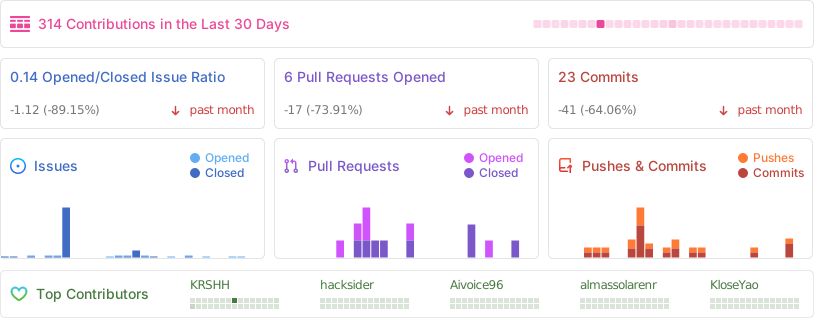
Contribution activity

commits per day, last 52 weeks
AugSepOctNovDecJanFebMarAprMayJunJulAugMonWedFri2025-08-10: 0 commits2025-08-11: 1 commit2025-08-12: 0 commits2025-08-13: 0 commits2025-08-14: 0 commits2025-08-15: 0 commits2025-08-16: 0 commits2025-08-17: 0 commits2025-08-18: 0 commits2025-08-19: 0 commits2025-08-20: 0 commits2025-08-21: 0 commits2025-08-22: 0 commits2025-08-23: 0 commits2025-08-24: 0 commits2025-08-25: 0 commits2025-08-26: 0 commits2025-08-27: 0 commits2025-08-28: 0 commits2025-08-29: 1 commit2025-08-30: 0 commits2025-08-31: 0 commits2025-09-01: 0 commits2025-09-02: 0 commits2025-09-03: 0 commits2025-09-04: 0 commits2025-09-05: 0 commits2025-09-06: 0 commits2025-09-07: 0 commits2025-09-08: 0 commits2025-09-09: 0 commits2025-09-10: 0 commits2025-09-11: 0 commits2025-09-12: 0 commits2025-09-13: 0 commits2025-09-14: 0 commits2025-09-15: 0 commits2025-09-16: 0 commits2025-09-17: 0 commits2025-09-18: 0 commits2025-09-19: 0 commits2025-09-20: 0 commits2025-09-21: 0 commits2025-09-22: 0 commits2025-09-23: 0 commits2025-09-24: 0 commits2025-09-25: 0 commits2025-09-26: 0 commits2025-09-27: 0 commits2025-09-28: 0 commits2025-09-29: 0 commits2025-09-30: 0 commits2025-10-01: 0 commits2025-10-02: 0 commits2025-10-03: 0 commits2025-10-04: 0 commits2025-10-05: 0 commits2025-10-06: 0 commits2025-10-07: 0 commits2025-10-08: 0 commits2025-10-09: 0 commits2025-10-10: 0 commits2025-10-11: 1 commit2025-10-12: 3 commits2025-10-13: 1 commit2025-10-14: 0 commits2025-10-15: 0 commits2025-10-16: 1 commit2025-10-17: 0 commits2025-10-18: 0 commits2025-10-19: 0 commits2025-10-20: 0 commits2025-10-21: 0 commits2025-10-22: 0 commits2025-10-23: 0 commits2025-10-24: 0 commits2025-10-25: 0 commits2025-10-26: 0 commits2025-10-27: 0 commits2025-10-28: 1 commit2025-10-29: 0 commits2025-10-30: 0 commits2025-10-31: 0 commits2025-11-01: 0 commits2025-11-02: 0 commits2025-11-03: 0 commits2025-11-04: 1 commit2025-11-05: 0 commits2025-11-06: 0 commits2025-11-07: 0 commits2025-11-08: 3 commits2025-11-09: 2 commits2025-11-10: 1 commit2025-11-11: 0 commits2025-11-12: 0 commits2025-11-13: 0 commits2025-11-14: 0 commits2025-11-15: 0 commits2025-11-16: 1 commit2025-11-17: 0 commits2025-11-18: 0 commits2025-11-19: 0 commits2025-11-20: 1 commit2025-11-21: 0 commits2025-11-22: 0 commits2025-11-23: 0 commits2025-11-24: 0 commits2025-11-25: 0 commits2025-11-26: 0 commits2025-11-27: 0 commits2025-11-28: 0 commits2025-11-29: 0 commits2025-11-30: 0 commits2025-12-01: 0 commits2025-12-02: 0 commits2025-12-03: 0 commits2025-12-04: 0 commits2025-12-05: 0 commits2025-12-06: 0 commits2025-12-07: 0 commits2025-12-08: 0 commits2025-12-09: 0 commits2025-12-10: 0 commits2025-12-11: 0 commits2025-12-12: 0 commits2025-12-13: 0 commits2025-12-14: 0 commits2025-12-15: 2 commits2025-12-16: 1 commit2025-12-17: 0 commits2025-12-18: 0 commits2025-12-19: 0 commits2025-12-20: 0 commits2025-12-21: 0 commits2025-12-22: 0 commits2025-12-23: 0 commits2025-12-24: 0 commits2025-12-25: 0 commits2025-12-26: 0 commits2025-12-27: 0 commits2025-12-28: 0 commits2025-12-29: 0 commits2025-12-30: 0 commits2025-12-31: 0 commits2026-01-01: 0 commits2026-01-02: 0 commits2026-01-03: 0 commits2026-01-04: 0 commits2026-01-05: 0 commits2026-01-06: 0 commits2026-01-07: 0 commits2026-01-08: 0 commits2026-01-09: 0 commits2026-01-10: 0 commits2026-01-11: 0 commits2026-01-12: 0 commits2026-01-13: 0 commits2026-01-14: 0 commits2026-01-15: 0 commits2026-01-16: 0 commits2026-01-17: 0 commits2026-01-18: 0 commits2026-01-19: 0 commits2026-01-20: 0 commits2026-01-21: 0 commits2026-01-22: 0 commits2026-01-23: 0 commits2026-01-24: 0 commits2026-01-25: 0 commits2026-01-26: 0 commits2026-01-27: 0 commits2026-01-28: 0 commits2026-01-29: 0 commits2026-01-30: 0 commits2026-01-31: 0 commits2026-02-01: 0 commits2026-02-02: 0 commits2026-02-03: 0 commits2026-02-04: 0 commits2026-02-05: 0 commits2026-02-06: 2 commits2026-02-07: 0 commits2026-02-08: 0 commits2026-02-09: 0 commits2026-02-10: 3 commits2026-02-11: 1 commit2026-02-12: 4 commits2026-02-13: 0 commits2026-02-14: 0 commits2026-02-15: 2 commits2026-02-16: 0 commits2026-02-17: 0 commits2026-02-18: 0 commits2026-02-19: 0 commits2026-02-20: 0 commits2026-02-21: 0 commits2026-02-22: 6 commits2026-02-23: 4 commits2026-02-24: 1 commit2026-02-25: 0 commits2026-02-26: 0 commits2026-02-27: 0 commits2026-02-28: 0 commits2026-03-01: 0 commits2026-03-02: 0 commits2026-03-03: 1 commit2026-03-04: 0 commits2026-03-05: 0 commits2026-03-06: 1 commit2026-03-07: 0 commits2026-03-08: 0 commits2026-03-09: 0 commits2026-03-10: 0 commits2026-03-11: 0 commits2026-03-12: 1 commit2026-03-13: 4 commits2026-03-14: 0 commits2026-03-15: 0 commits2026-03-16: 0 commits2026-03-17: 0 commits2026-03-18: 0 commits2026-03-19: 0 commits2026-03-20: 0 commits2026-03-21: 0 commits2026-03-22: 0 commits2026-03-23: 1 commit2026-03-24: 0 commits2026-03-25: 0 commits2026-03-26: 0 commits2026-03-27: 3 commits2026-03-28: 3 commits2026-03-29: 1 commit2026-03-30: 1 commit2026-03-31: 0 commits2026-04-01: 8 commits2026-04-02: 1 commit2026-04-03: 1 commit2026-04-04: 0 commits2026-04-05: 0 commits2026-04-06: 0 commits2026-04-07: 0 commits2026-04-08: 0 commits2026-04-09: 5 commits2026-04-10: 0 commits2026-04-11: 0 commits2026-04-12: 1 commit2026-04-13: 1 commit2026-04-14: 0 commits2026-04-15: 2 commits2026-04-16: 0 commits2026-04-17: 0 commits2026-04-18: 0 commits2026-04-19: 1 commit2026-04-20: 0 commits2026-04-21: 0 commits2026-04-22: 9 commits2026-04-23: 3 commits2026-04-24: 0 commits2026-04-25: 0 commits2026-04-26: 0 commits2026-04-27: 0 commits2026-04-28: 0 commits2026-04-29: 0 commits2026-04-30: 0 commits2026-05-01: 0 commits2026-05-02: 0 commits2026-05-03: 0 commits2026-05-04: 0 commits2026-05-05: 0 commits2026-05-06: 0 commits2026-05-07: 0 commits2026-05-08: 2 commits2026-05-09: 0 commits2026-05-10: 0 commits2026-05-11: 0 commits2026-05-12: 0 commits2026-05-13: 0 commits2026-05-14: 0 commits2026-05-15: 5 commits2026-05-16: 2 commits2026-05-17: 0 commits2026-05-18: 4 commits2026-05-19: 0 commits2026-05-20: 0 commits2026-05-21: 1 commit2026-05-22: 0 commits2026-05-23: 3 commits2026-05-24: 1 commit2026-05-25: 0 commits2026-05-26: 0 commits2026-05-27: 0 commits2026-05-28: 0 commits2026-05-29: 0 commits2026-05-30: 0 commits2026-05-31: 0 commits2026-06-01: 0 commits2026-06-02: 0 commits2026-06-03: 0 commits2026-06-04: 0 commits2026-06-05: 0 commits2026-06-06: 0 commits2026-06-07: 0 commits2026-06-08: 0 commits2026-06-09: 0 commits2026-06-10: 0 commits2026-06-11: 0 commits2026-06-12: 0 commits2026-06-13: 0 commits2026-06-14: 1 commit2026-06-15: 0 commits2026-06-16: 0 commits2026-06-17: 0 commits2026-06-18: 0 commits2026-06-19: 0 commits2026-06-20: 0 commits2026-06-21: 0 commits2026-06-22: 0 commits2026-06-23: 0 commits2026-06-24: 2 commits2026-06-25: 0 commits2026-06-26: 0 commits2026-06-27: 0 commits2026-06-28: 1 commit2026-06-29: 0 commits2026-06-30: 0 commits2026-07-01: 0 commits2026-07-02: 0 commits2026-07-03: 1 commit2026-07-04: 0 commits2026-07-05: 0 commits2026-07-06: 0 commits2026-07-07: 0 commits2026-07-08: 0 commits2026-07-09: 0 commits2026-07-10: 0 commits2026-07-11: 1 commit2026-07-12: 1 commit2026-07-13: 0 commits2026-07-14: 2 commits2026-07-15: 0 commits2026-07-16: 0 commits2026-07-17: 0 commits2026-07-18: 0 commits2026-07-19: 2 commits2026-07-20: 0 commits2026-07-21: 0 commits2026-07-22: 0 commits2026-07-23: 1 commit2026-07-24: 0 commits2026-07-25: 0 commits2026-07-26: 0 commits2026-07-27: 0 commits2026-07-28: 0 commits2026-07-29: 2 commits2026-07-30: 0 commits2026-07-31: 0 commits2026-08-01: 0 commits2026-08-02: 0 commits2026-08-03: 0 commits2026-08-04: 0 commits2026-08-05: 0 commits2026-08-06: 0 commits2026-08-07: 0 commits2026-08-08: 0 commits
124 commits in the last yearLessMore

Signals and awards

derived from tracked data
  • Landmark project

    95,802 stars

  • Continuous integration

    Automated checks passing

  • Repeat trending

    4 trending appearances

  • Top 10% tracked

    Rank 69 of 1058

What Deep-Live-Cam does

Deep-Live-Cam provides an accessible interface for performing high-quality face swaps on live webcam feeds and recorded videos. It utilizes advanced generative adversarial networks (GANs) to achieve this with just a single source image of the target face. The software processes video frames in real-time, making it suitable for live streaming or video conferencing. It includes built-in safety mechanisms to prevent the processing of inappropriate or sensitive content. The project is designed as a productivity tool for the AI-generated media industry.

This software is aimed at digital artists, content creators, and researchers in the AI media space. Users must have a capable GPU for real-time processing and adhere to strict ethical usage guidelines.

  • Single Image Source: Requires only one photo to perform accurate face swapping.
  • Real-Time Processing: Swaps faces on live webcam feeds with minimal latency.
  • Video File Support: Processes pre-recorded video files alongside live inputs.
  • Content Filtering: Includes automated checks to block nudity and graphic material.
  • Accessible Interface: Provides a one-click solution without requiring complex command-line setups.

Where teams use it

Content Creation

Digital artists use it to animate custom characters for social media videos.

Live Streaming

VTubers and streamers alter their appearance in real-time during broadcasts.

Clothing Design

Designers use virtual models to visualize clothing concepts on different faces.

Privacy Protection

Individuals mask their real identity during online meetings while maintaining a human appearance.

Getting started: iex (irm ffmpeg.tc.ht)```

README

main branch

Deep-Live-Cam 2.1.6

Real-time face swap and video deepfake with a single click and only a single image.

hacksider%2FDeep-Live-Cam | Trendshift

Demo GIF

Disclaimer

This deepfake software is designed to be a productive tool for the AI-generated media industry. It can assist artists in animating custom characters, creating engaging content, and even using models for clothing design.

We are aware of the potential for unethical applications and are committed to preventative measures. A built-in check prevents the program from processing inappropriate media (nudity, graphic content, sensitive material like war footage, etc.). We will continue to develop this project responsibly, adhering to the law and ethics. We may shut down the project or add watermarks if legally required.

  • Ethical Use: Users are expected to use this software responsibly and legally. If using a real person's face, obtain their consent and clearly label any output as a deepfake when sharing online.

  • Content Restrictions: The software includes built-in checks to prevent processing inappropriate media, such as nudity, graphic content, or sensitive material.

  • Legal Compliance: We adhere to all relevant laws and ethical guidelines. If legally required, we may shut down the project or add watermarks to the output.

  • User Responsibility: We are not responsible for end-user actions. Users must ensure their use of the software aligns with ethical standards and legal requirements.

By using this software, you agree to these terms and commit to using it in a manner that respects the rights and dignity of others.

Users are expected to use this software responsibly and legally. If using a real person's face, obtain their consent and clearly label any output as a deepfake when sharing online. We are not responsible for end-user actions.

Pre-built Quickstart

Lite / Ultimate Download Banner

Windows     Mac Silicon     CPU

Windows • Mac Silicon • CPU • NVIDIA • AMD

Builds optimized for your hardware.

Download

Ultimate includes 30+ exclusive features, performance optimizations, and priority support.

Perfect if you want the fastest setup with zero manual installation, pre-configured dependencies, and optimized builds for every supported platform.

TLDR; Live Deepfake in just 3 Clicks

easysteps

  1. Select a face
  2. Select which camera to use
  3. Press live!

Features & Uses - Everything is in real-time

Mouth Mask

Retain your original mouth for accurate movement using Mouth Mask

resizable-gif

Face Mapping

Use different faces on multiple subjects simultaneously

face_mapping_source

Your Movie, Your Face

Watch movies with any face in real-time

movie

Live Show

Run Live shows and performances

show

Memes

Create Your Most Viral Meme Yet

show
Created using Many Faces feature in Deep-Live-Cam

Omegle

Surprise people on Omegle

ishowspeed.mp4

Installation (Manual)

Please be aware that the installation requires technical skills and is not for beginners. Consider downloading the quickstart version.

Click to see the process

Installation

This is more likely to work on your computer but will be slower as it utilizes the CPU.

1. Set up Your Platform

2. Clone the Repository

git clone --depth 1 https://github.com/hacksider/Deep-Live-Cam.git
cd Deep-Live-Cam

3. Download the Models

  1. GFPGANv1.4
  2. inswapper_128_fp16.onnx

Place these files in the "models" folder.

4. Install Dependencies

We highly recommend using a venv to avoid issues.

For Windows:

python -m venv venv
venv\Scripts\activate
pip install -r requirements.txt

For Linux:

# Ensure you use the installed Python 3.14
python3 -m venv venv
source venv/bin/activate
pip install -r requirements.txt

For macOS:

Apple Silicon (M1 through M5) requires specific setup:

# Install Python 3.14
brew install python@3.14

# Install tkinter package (required for the GUI)
brew install python-tk@3.14

# Create and activate virtual environment with Python 3.14
python3.14 -m venv venv
source venv/bin/activate

# Install dependencies
pip install -r requirements.txt

** In case something goes wrong and you need to reinstall the virtual environment **

# Deactivate the virtual environment
rm -rf venv

# Reinstall the virtual environment
python -m venv venv
source venv/bin/activate

# install the dependencies again
pip install -r requirements.txt

# gfpgan and basicsrs issue fix
pip install git+https://github.com/xinntao/BasicSR.git@master
pip uninstall gfpgan -y
pip install git+https://github.com/TencentARC/GFPGAN.git@master

Run: If you don't have a GPU, you can run Deep-Live-Cam using python run.py. Note that initial execution will download models (~300MB).

GPU Acceleration

CUDA Execution Provider (Nvidia)

  1. Install CUDA Toolkit 12.8.0
  2. Install cuDNN v8.9.7 for CUDA 12.x (required for onnxruntime-gpu):
    • Download cuDNN v8.9.7 for CUDA 12.x
    • Make sure the cuDNN bin directory is in your system PATH
  3. Install dependencies:
pip install -U torch torchvision torchaudio --index-url https://download.pytorch.org/whl/cu128
pip uninstall onnxruntime onnxruntime-gpu
pip install onnxruntime-gpu==1.21.0
  1. Usage:
python run.py --execution-provider cuda

CoreML Execution Provider (Apple Silicon)

Apple Silicon (M1 through M5) specific installation:

  1. Make sure you've completed the macOS setup above using Python 3.14.
  2. No extra install step is needed — requirements.txt pulls the official onnxruntime build, whose macOS wheels ship the CoreML execution provider. If you previously installed the unmaintained onnxruntime-silicon fork, remove it first, as it shadows the real package:
pip uninstall onnxruntime-silicon
pip install -r requirements.txt
  1. Usage:
python3.14 run.py --execution-provider coreml

Important Notes for macOS:

  • Python 3.11 is the minimum (onnxruntime dropped 3.10); 3.14 is recommended
  • Always run with python3.14 command not just python if you have multiple Python versions installed
  • If you get error about _tkinter missing, reinstall the tkinter package: brew reinstall python-tk@3.14
  • If you get model loading errors, check that your models are in the correct folder
  • If you encounter conflicts with other Python versions, consider uninstalling them:
    # List all installed Python versions
    brew list | grep python
    
    # Uninstall conflicting versions if needed
    brew uninstall --ignore-dependencies python@3.11
    
    # Keep only Python 3.14
    brew cleanup

CoreML Execution Provider (Apple Legacy)

  1. Install dependencies:
pip uninstall onnxruntime onnxruntime-coreml
pip install onnxruntime-coreml==1.21.0
  1. Usage:
python run.py --execution-provider coreml

DirectML Execution Provider (Windows)

  1. Install dependencies:
pip uninstall onnxruntime onnxruntime-directml
pip install onnxruntime-directml==1.21.0
  1. Usage:
python run.py --execution-provider directml

OpenVINO™ Execution Provider (Intel)

  1. Install dependencies:
pip uninstall onnxruntime onnxruntime-openvino
pip install onnxruntime-openvino==1.21.0
  1. Usage:
python run.py --execution-provider openvino

Usage

1. Image/Video Mode

  • Execute python run.py.
  • Choose a source face image and a target image/video.
  • Click "Start".
  • The output will be saved in a directory named after the target video.

2. Webcam Mode

  • Execute python run.py.
  • Select a source face image.
  • Click "Live".
  • Wait for the preview to appear (10-30 seconds).
  • Use a screen capture tool like OBS to stream.
  • To change the face, select a new source image.

Download all models in this huggingface link

Command Line Arguments (Unmaintained)

options:
  -h, --help                                               show this help message and exit
  -s SOURCE_PATH, --source SOURCE_PATH                     select a source image
  -t TARGET_PATH, --target TARGET_PATH                     select a target image or video
  -o OUTPUT_PATH, --output OUTPUT_PATH                     select output file or directory
  --frame-processor FRAME_PROCESSOR [FRAME_PROCESSOR ...]  frame processors (choices: face_swapper, face_enhancer, ...)
  --keep-fps                                               keep original fps
  --keep-audio                                             keep original audio
  --keep-frames                                            keep temporary frames
  --many-faces                                             process every face
  --map-faces                                              map source target faces
  --mouth-mask                                             mask the mouth region
  --video-encoder {libx264,libx265,libvpx-vp9}             adjust output video encoder
  --video-quality [0-51]                                   adjust output video quality
  --live-mirror                                            the live camera display as you see it in the front-facing camera frame
  --live-resizable                                         the live camera frame is resizable
  --max-memory MAX_MEMORY                                  maximum amount of RAM in GB
  --execution-provider {cpu} [{cpu} ...]                   available execution provider (choices: cpu, ...)
  --execution-threads EXECUTION_THREADS                    number of execution threads
  -v, --version                                            show program's version number and exit

Looking for a CLI mode? Using the -s/--source argument will make the run program in cli mode.

Press

  • Ars Technica - "Deep-Live-Cam goes viral, allowing anyone to become a digital doppelganger"
  • Yahoo! - "OK, this viral AI live stream software is truly terrifying"
  • CNN Brasil - "AI can clone faces on webcam; understand how it works"
  • Bloomberg Technoz - "Get to know Deep Live Cam technology, it can be used as a tool for deception."
  • TrendMicro - "AI vs AI: DeepFakes and eKYC"
  • PetaPixel - "Deepfake AI Tool Lets You Become Anyone in a Video Call With Single Photo"
  • SomeOrdinaryGamers - "That's Crazy, Oh God. That's Fucking Freaky Dude... That's So Wild Dude"
  • IShowSpeed - "Alright look look look, now look chat, we can do any face we want to look like chat"
  • TechLinked (Linus Tech Tips) - "They do a pretty good job matching poses, expression and even the lighting"
  • IShowSpeed - "What the F**! Why do I look like Vinny Jr? I look exactly like Vinny Jr!? No, this shit is crazy! Bro This is F*** Crazy!"*

Credits

Stargazers

Contributions

Alt

Stars to the Moon 🚀

Star History Chart
View on GitHub

Recent activity

commits and pull requests

Recent open issues

view all

Discussions

all 211

Releases and announcements

13 total
  1. 2.7 Ultimate2.7-ultimateAug 1, 2026

    The largest update in Deep‑Live‑Cam’s history is here. Version 2.7 adds over 35,000 lines of new code — a full rewrite focused on speed, reliability, and creative power. 🔥 Performance - Integrated TensorRT acceleration for NVIDIA GPUs (up to 3× faster, no quality loss) - Removed heavy dependencies (PyTorch, TensorFlow, InsightFace, GFPGAN) → smaller install, faster startup, lower memory use - Face enhancer rebuilt fully on ONNX - Batched multi‑face inference (swap many faces at once) - Async face detection (camera never stalls) - Smart caching + optimized image handling, masks, and rendering - Tuned for smooth performance even on lower‑end GPUs 🎬 New Features Flux Live — edit faces with text prompts - RTX Upscaler — GPU sharpening for crisp frames - Real‑time frame interpolation for smoother motion - New Reswapper face model - Target face selection & mapping 🎨 Quality Improvements - Seamless blending (Poisson + feathering) - Fixed lip‑mask symmetry, ghosting, and edge artifacts - Better color matching between source and target - Sharper, flicker‑free exports - More accurate face alignment with detailed landmarks 🖥️ Interface & Experience - Brand‑ne

  2. 2.7-RC62.7-RC1May 20, 2026

    **_✨ New Features_** **Live Modes** - Decart Live — Cloud-powered realtime diffusion. Select decart from the Model dropdown, enter your API key and prompt, and stream your webcam through Decart's cloud GPUs. Supports both Lucy 2.0 and Lucy 2.1 variants. - FLUX Live (prompt-edit) — Real-time prompt-driven face editing at 30fps, powered by FluxRT. Includes a Quality dropdown for performance tuning. Available on RTX 5090 and RTX 6000-class GPUs only. - ReSwapper — New face-swap engine, selectable from the Model dropdown alongside Inswapper and Hyperswap. **UI / UX** - Classic / Modern View Toggle — One-click switch between two complete UI layouts, accessible from the status bar. - Language Dropdown — Full UI localization with 5 supported languages: -- English -- 中文 (Chinese) -- 日本語 (Japanese) -- Français (French) العربية (Arabic - - RTX Upscaler — New toggle in the settings panel that uses RTX hardware to upscale output beyond source resolution. Surfaced automatically on compatible GPUs. **🔧 Improvements** - Window Projection — Now automatically resizes during live sessions. - Window Projection — Added a dedicated close button on the overlay. - Live Mode Cl

  3. 2.7 beta2.7-betaMar 11, 2026

    This is the beta version of 2.7 and this is to celebrate the 80k stars on github! Changelogs - Realtime face enhancer - Inswapper optimizer - 2 new face enhancer models (GPEN 512 and GPEN 256) - Face enhancer Scaler - Quick lip mask - Interpolation - Lip Mask - Chin Mask - Eyes Mask - GPU changer for multi GPU support - LUT's for easy grading - Window Projection - In window preview - Realtime Video Watching - Window Projection full screen mode to watch realtime videos - Camera Refresh - Resolution Changer - Better UI Oh, did I say 27fps with face enhancer on? https://github.com/user-attachments/assets/ddbd9493-9515-47bd-9f97-623efe82963a And a lot more! This is the largest update of deeplivecam ever! [Get the quickstart exclusively at our website!](https://deeplivecam.net/index.php/plans?plan_id=0&group_id=0)

  4. 2.6d2.6Feb 10, 2026

    **Version 2.5 was too small for us... Welcome to 2.6!** We’ve been working hard behind the scenes and decided that the progress we made deserved more than just a "point five" update. We’re officially skipping 2.5 and jumping straight into the 2.6 Power Update! **What’s under the hood?** - Virtual Camera support is officially here! Hook it up via OBS and go live on any platform with ease. - We’ve gutted and rebuilt the core. Rendering is now significantly faster across the board—whether you’re running live, generating images, or processing video. The minified version of this is on the github version as well! - Use the new "Refresh" button to grab your latest camera feed without the annoying app restart. - Various bug fixes and stability tweaks to keep things running cool. This will be the baseline of the future versions so expect it to run smoother than ever!

  5. 2.42.4Dec 15, 2025

    **Change Logs – Big Improvements Ahead!** ✅ Dropdown fixed – smoother navigation, no more hiccups! ⚡ Forced GPU usage on laptops – unleash that extra power for faster, sharper performance. 🎨 Poisson Blending upgrade – say goodbye to those translucent boxes on swaps, plus cleaner ears for a more natural look. 👄 Mouthmask adjustment – now optimized for inswapper, making expressions more seamless than ever. ✨ Other minor tweaks & polish – because the little details matter too! [Exclusively available at our official website!](https://deeplivecam.net/index.php/quickstart) Oh I forgot, the preview on videos and image swapping is now working really fast! This will serve as the base of version 2.5 with realtime preview (watch swapped videos on realtime!)

Code frequency

additions and deletions
+2K-2KWeek of 2025-08-10: +1 linesWeek of 2025-08-10: -1 linesWeek of 2025-08-17: +0 linesWeek of 2025-08-17: -0 linesWeek of 2025-08-24: +5 linesWeek of 2025-08-24: -0 linesWeek of 2025-08-31: +0 linesWeek of 2025-08-31: -0 linesWeek of 2025-09-07: +0 linesWeek of 2025-09-07: -0 linesWeek of 2025-09-14: +0 linesWeek of 2025-09-14: -0 linesWeek of 2025-09-21: +0 linesWeek of 2025-09-21: -0 linesWeek of 2025-09-28: +0 linesWeek of 2025-09-28: -0 linesWeek of 2025-10-05: +45 linesWeek of 2025-10-05: -0 linesWeek of 2025-10-12: +1,933 linesWeek of 2025-10-12: -594 linesWeek of 2025-10-19: +0 linesWeek of 2025-10-19: -0 linesWeek of 2025-10-26: +22 linesWeek of 2025-10-26: -4 linesWeek of 2025-11-02: +5 linesWeek of 2025-11-02: -3 linesWeek of 2025-11-09: +12 linesWeek of 2025-11-09: -12 linesWeek of 2025-11-16: +93 linesWeek of 2025-11-16: -45 linesWeek of 2025-11-23: +0 linesWeek of 2025-11-23: -0 linesWeek of 2025-11-30: +0 linesWeek of 2025-11-30: -0 linesWeek of 2025-12-07: +0 linesWeek of 2025-12-07: -0 linesWeek of 2025-12-14: +68 linesWeek of 2025-12-14: -23 linesWeek of 2025-12-21: +0 linesWeek of 2025-12-21: -0 linesWeek of 2025-12-28: +0 linesWeek of 2025-12-28: -0 linesWeek of 2026-01-04: +0 linesWeek of 2026-01-04: -0 linesWeek of 2026-01-11: +0 linesWeek of 2026-01-11: -0 linesWeek of 2026-01-18: +0 linesWeek of 2026-01-18: -0 linesWeek of 2026-01-25: +0 linesWeek of 2026-01-25: -0 linesWeek of 2026-02-01: +208 linesWeek of 2026-02-01: -43 linesWeek of 2026-02-08: +568 linesWeek of 2026-02-08: -201 linesWeek of 2026-02-15: +2 linesWeek of 2026-02-15: -2 linesWeek of 2026-02-22: +1,001 linesWeek of 2026-02-22: -243 linesWeek of 2026-03-01: +36 linesWeek of 2026-03-01: -24 linesWeek of 2026-03-08: +213 linesWeek of 2026-03-08: -191 linesWeek of 2026-03-15: +0 linesWeek of 2026-03-15: -0 linesWeek of 2026-03-22: +215 linesWeek of 2026-03-22: -102 linesWeek of 2026-03-29: +151 linesWeek of 2026-03-29: -243 linesWeek of 2026-04-05: +609 linesWeek of 2026-04-05: -127 linesWeek of 2026-04-12: +132 linesWeek of 2026-04-12: -7 linesWeek of 2026-04-19: +2,041 linesWeek of 2026-04-19: -879 linesWeek of 2026-04-26: +0 linesWeek of 2026-04-26: -0 linesWeek of 2026-05-03: +105 linesWeek of 2026-05-03: -7 linesWeek of 2026-05-10: +1,428 linesWeek of 2026-05-10: -1,398 linesWeek of 2026-05-17: +316 linesWeek of 2026-05-17: -95 linesWeek of 2026-05-24: +1 linesWeek of 2026-05-24: -1 linesWeek of 2026-05-31: +0 linesWeek of 2026-05-31: -0 linesWeek of 2026-06-07: +0 linesWeek of 2026-06-07: -0 linesWeek of 2026-06-14: +73 linesWeek of 2026-06-14: -52 linesWeek of 2026-06-21: +2 linesWeek of 2026-06-21: -2 linesWeek of 2026-06-28: +32 linesWeek of 2026-06-28: -3 linesWeek of 2026-07-05: +19 linesWeek of 2026-07-05: -13 linesWeek of 2026-07-12: +41 linesWeek of 2026-07-12: -11 linesWeek of 2026-07-19: +39 linesWeek of 2026-07-19: -8 linesWeek of 2026-07-26: +50 linesWeek of 2026-07-26: -33 linesWeek of 2026-08-02: +0 linesWeek of 2026-08-02: -0 linesAug 10, 2025Aug 2, 2026
+9.5K lines added, -4.4K removed over the last year.

Commits per week

last 52 weeks
130Week of 2025-08-10: 1 commitsWeek of 2025-08-17: 0 commitsWeek of 2025-08-24: 1 commitsWeek of 2025-08-31: 0 commitsWeek of 2025-09-07: 0 commitsWeek of 2025-09-14: 0 commitsWeek of 2025-09-21: 0 commitsWeek of 2025-09-28: 0 commitsWeek of 2025-10-05: 1 commitsWeek of 2025-10-12: 5 commitsWeek of 2025-10-19: 0 commitsWeek of 2025-10-26: 1 commitsWeek of 2025-11-02: 4 commitsWeek of 2025-11-09: 3 commitsWeek of 2025-11-16: 2 commitsWeek of 2025-11-23: 0 commitsWeek of 2025-11-30: 0 commitsWeek of 2025-12-07: 0 commitsWeek of 2025-12-14: 3 commitsWeek of 2025-12-21: 0 commitsWeek of 2025-12-28: 0 commitsWeek of 2026-01-04: 0 commitsWeek of 2026-01-11: 0 commitsWeek of 2026-01-18: 0 commitsWeek of 2026-01-25: 0 commitsWeek of 2026-02-01: 2 commitsWeek of 2026-02-08: 8 commitsWeek of 2026-02-15: 2 commitsWeek of 2026-02-22: 11 commitsWeek of 2026-03-01: 2 commitsWeek of 2026-03-08: 5 commitsWeek of 2026-03-15: 0 commitsWeek of 2026-03-22: 7 commitsWeek of 2026-03-29: 12 commitsWeek of 2026-04-05: 5 commitsWeek of 2026-04-12: 4 commitsWeek of 2026-04-19: 13 commitsWeek of 2026-04-26: 0 commitsWeek of 2026-05-03: 2 commitsWeek of 2026-05-10: 7 commitsWeek of 2026-05-17: 8 commitsWeek of 2026-05-24: 1 commitsWeek of 2026-05-31: 0 commitsWeek of 2026-06-07: 0 commitsWeek of 2026-06-14: 1 commitsWeek of 2026-06-21: 2 commitsWeek of 2026-06-28: 2 commitsWeek of 2026-07-05: 1 commitsWeek of 2026-07-12: 3 commitsWeek of 2026-07-19: 3 commitsWeek of 2026-07-26: 2 commitsWeek of 2026-08-02: 0 commitsAug 10, 2025Aug 2, 2026
124 commits in the last 52 weeks.

When work happens

weekday and hour
SunMonTueWedThuFriSat036912151821Sun 0:00 — 3 commitsSun 1:00 — 3 commitsSun 2:00 — 1 commitsSun 3:00 — 8 commitsSun 4:00 — 1 commitsSun 5:00 — 0 commitsSun 6:00 — 0 commitsSun 7:00 — 0 commitsSun 8:00 — 0 commitsSun 9:00 — 0 commitsSun 10:00 — 0 commitsSun 11:00 — 1 commitsSun 12:00 — 2 commitsSun 13:00 — 1 commitsSun 14:00 — 7 commitsSun 15:00 — 3 commitsSun 16:00 — 3 commitsSun 17:00 — 4 commitsSun 18:00 — 4 commitsSun 19:00 — 2 commitsSun 20:00 — 7 commitsSun 21:00 — 13 commitsSun 22:00 — 8 commitsSun 23:00 — 8 commitsMon 0:00 — 12 commitsMon 1:00 — 5 commitsMon 2:00 — 1 commitsMon 3:00 — 0 commitsMon 4:00 — 4 commitsMon 5:00 — 0 commitsMon 6:00 — 2 commitsMon 7:00 — 0 commitsMon 8:00 — 1 commitsMon 9:00 — 2 commitsMon 10:00 — 1 commitsMon 11:00 — 1 commitsMon 12:00 — 2 commitsMon 13:00 — 5 commitsMon 14:00 — 4 commitsMon 15:00 — 3 commitsMon 16:00 — 3 commitsMon 17:00 — 4 commitsMon 18:00 — 12 commitsMon 19:00 — 4 commitsMon 20:00 — 5 commitsMon 21:00 — 5 commitsMon 22:00 — 4 commitsMon 23:00 — 9 commitsTue 0:00 — 5 commitsTue 1:00 — 3 commitsTue 2:00 — 0 commitsTue 3:00 — 3 commitsTue 4:00 — 2 commitsTue 5:00 — 0 commitsTue 6:00 — 0 commitsTue 7:00 — 0 commitsTue 8:00 — 0 commitsTue 9:00 — 2 commitsTue 10:00 — 1 commitsTue 11:00 — 1 commitsTue 12:00 — 2 commitsTue 13:00 — 5 commitsTue 14:00 — 6 commitsTue 15:00 — 0 commitsTue 16:00 — 3 commitsTue 17:00 — 3 commitsTue 18:00 — 14 commitsTue 19:00 — 4 commitsTue 20:00 — 1 commitsTue 21:00 — 5 commitsTue 22:00 — 1 commitsTue 23:00 — 2 commitsWed 0:00 — 7 commitsWed 1:00 — 4 commitsWed 2:00 — 3 commitsWed 3:00 — 2 commitsWed 4:00 — 2 commitsWed 5:00 — 1 commitsWed 6:00 — 0 commitsWed 7:00 — 0 commitsWed 8:00 — 0 commitsWed 9:00 — 2 commitsWed 10:00 — 3 commitsWed 11:00 — 5 commitsWed 12:00 — 3 commitsWed 13:00 — 7 commitsWed 14:00 — 5 commitsWed 15:00 — 3 commitsWed 16:00 — 6 commitsWed 17:00 — 4 commitsWed 18:00 — 6 commitsWed 19:00 — 3 commitsWed 20:00 — 1 commitsWed 21:00 — 3 commitsWed 22:00 — 8 commitsWed 23:00 — 4 commitsThu 0:00 — 6 commitsThu 1:00 — 1 commitsThu 2:00 — 8 commitsThu 3:00 — 1 commitsThu 4:00 — 0 commitsThu 5:00 — 1 commitsThu 6:00 — 0 commitsThu 7:00 — 0 commitsThu 8:00 — 0 commitsThu 9:00 — 1 commitsThu 10:00 — 1 commitsThu 11:00 — 1 commitsThu 12:00 — 1 commitsThu 13:00 — 1 commitsThu 14:00 — 5 commitsThu 15:00 — 2 commitsThu 16:00 — 6 commitsThu 17:00 — 2 commitsThu 18:00 — 3 commitsThu 19:00 — 3 commitsThu 20:00 — 3 commitsThu 21:00 — 5 commitsThu 22:00 — 8 commitsThu 23:00 — 0 commitsFri 0:00 — 0 commitsFri 1:00 — 5 commitsFri 2:00 — 1 commitsFri 3:00 — 0 commitsFri 4:00 — 0 commitsFri 5:00 — 0 commitsFri 6:00 — 0 commitsFri 7:00 — 0 commitsFri 8:00 — 0 commitsFri 9:00 — 1 commitsFri 10:00 — 2 commitsFri 11:00 — 0 commitsFri 12:00 — 1 commitsFri 13:00 — 1 commitsFri 14:00 — 7 commitsFri 15:00 — 5 commitsFri 16:00 — 11 commitsFri 17:00 — 2 commitsFri 18:00 — 2 commitsFri 19:00 — 8 commitsFri 20:00 — 10 commitsFri 21:00 — 9 commitsFri 22:00 — 7 commitsFri 23:00 — 4 commitsSat 0:00 — 2 commitsSat 1:00 — 4 commitsSat 2:00 — 4 commitsSat 3:00 — 3 commitsSat 4:00 — 0 commitsSat 5:00 — 3 commitsSat 6:00 — 0 commitsSat 7:00 — 0 commitsSat 8:00 — 0 commitsSat 9:00 — 1 commitsSat 10:00 — 1 commitsSat 11:00 — 2 commitsSat 12:00 — 4 commitsSat 13:00 — 4 commitsSat 14:00 — 6 commitsSat 15:00 — 3 commitsSat 16:00 — 5 commitsSat 17:00 — 5 commitsSat 18:00 — 0 commitsSat 19:00 — 5 commitsSat 20:00 — 3 commitsSat 21:00 — 3 commitsSat 22:00 — 6 commitsSat 23:00 — 5 commits
Commit volume by weekday and hour (UTC). Larger dots mean more commits.

Who is committing

last 52 weeks
Maintainer commits93 (58%)
Community commits67 (42%)

160 commits in total over the last year.

DateListRankStars gained
Mar 30, 2026daily#21+106
Mar 29, 2026daily#18+199
Mar 28, 2026daily#8+209
Mar 27, 2026daily#7+190
  • public-apis/public-apis

    A collective list of free APIs

    454.9K stars · Python

  • openclaw/openclaw

    Your own personal AI assistant. Any OS. Any Platform. The lobster way. 🦞

    385.5K stars · TypeScript

  • openclaw/openclaw

    Your own personal AI assistant. Any OS. Any Platform. The lobster way. 🦞

    384.4K stars · TypeScript

  • openclaw/openclaw

    Your own personal AI assistant. Any OS. Any Platform. The lobster way. 🦞

    384.4K stars · TypeScript

  • openclaw/openclaw

    Your own personal AI assistant. Any OS. Any Platform. The lobster way. 🦞

    384.4K stars · TypeScript

  • donnemartin/system-design-primer

    Learn how to design large-scale systems. Prep for the system design interview. Includes Anki flashcards.

    362.2K stars · Python