hugohe3/ppt-masterPublic

AI turns documents or topics into real, native PowerPoint decks—with native shapes, transitions and animations, data-backed charts and tables on demand, audio narration from speaker notes, and support for your own .pptx templates. · by Hugo He

AI summary: An automated tool that generates professional PowerPoint presentations directly from markdown text or structured data.

Stars
43.7K
+462 today
Forks
3.6K
Watchers
91
Open issues
3
Open PRs
0
Contributors
~16
Commits
1.4K
Branches
1

PythonMITCreated Dec 10, 2025Last push todayLatest release v4.2.0+1.7K stars this week+2K this month

Star history

since Dec 7, 2025
020K40KDec 2025Feb 2026May 2026Aug 2026
43.7K stars as of Aug 7, 2026, tracked back to Dec 7, 2025. Historical curve reconstructed from public GitHub event archives, calibrated to the current total.

Contribution activity

commits per day, last 52 weeks
AugSepOctNovDecJanFebMarAprMayJunJulMonWedFri2025-08-02: 0 commits2025-08-03: 0 commits2025-08-04: 0 commits2025-08-05: 0 commits2025-08-06: 0 commits2025-08-07: 0 commits2025-08-08: 0 commits2025-08-09: 0 commits2025-08-10: 0 commits2025-08-11: 0 commits2025-08-12: 0 commits2025-08-13: 0 commits2025-08-14: 0 commits2025-08-15: 0 commits2025-08-16: 0 commits2025-08-17: 0 commits2025-08-18: 0 commits2025-08-19: 0 commits2025-08-20: 0 commits2025-08-21: 0 commits2025-08-22: 0 commits2025-08-23: 0 commits2025-08-24: 0 commits2025-08-25: 0 commits2025-08-26: 0 commits2025-08-27: 0 commits2025-08-28: 0 commits2025-08-29: 0 commits2025-08-30: 0 commits2025-08-31: 0 commits2025-09-01: 0 commits2025-09-02: 0 commits2025-09-03: 0 commits2025-09-04: 0 commits2025-09-05: 0 commits2025-09-06: 0 commits2025-09-07: 0 commits2025-09-08: 0 commits2025-09-09: 0 commits2025-09-10: 0 commits2025-09-11: 0 commits2025-09-12: 0 commits2025-09-13: 0 commits2025-09-14: 0 commits2025-09-15: 0 commits2025-09-16: 0 commits2025-09-17: 0 commits2025-09-18: 0 commits2025-09-19: 0 commits2025-09-20: 0 commits2025-09-21: 0 commits2025-09-22: 0 commits2025-09-23: 0 commits2025-09-24: 0 commits2025-09-25: 0 commits2025-09-26: 0 commits2025-09-27: 0 commits2025-09-28: 0 commits2025-09-29: 0 commits2025-09-30: 0 commits2025-10-01: 0 commits2025-10-02: 0 commits2025-10-03: 0 commits2025-10-04: 0 commits2025-10-05: 0 commits2025-10-06: 0 commits2025-10-07: 0 commits2025-10-08: 0 commits2025-10-09: 0 commits2025-10-10: 0 commits2025-10-11: 0 commits2025-10-12: 0 commits2025-10-13: 0 commits2025-10-14: 0 commits2025-10-15: 0 commits2025-10-16: 0 commits2025-10-17: 0 commits2025-10-18: 0 commits2025-10-19: 0 commits2025-10-20: 0 commits2025-10-21: 0 commits2025-10-22: 0 commits2025-10-23: 0 commits2025-10-24: 0 commits2025-10-25: 0 commits2025-10-26: 0 commits2025-10-27: 0 commits2025-10-28: 0 commits2025-10-29: 0 commits2025-10-30: 0 commits2025-10-31: 0 commits2025-11-01: 0 commits2025-11-02: 0 commits2025-11-03: 0 commits2025-11-04: 0 commits2025-11-05: 0 commits2025-11-06: 0 commits2025-11-07: 0 commits2025-11-09: 0 commits2025-11-10: 0 commits2025-11-11: 0 commits2025-11-12: 0 commits2025-11-13: 0 commits2025-11-14: 0 commits2025-11-15: 0 commits2025-11-16: 0 commits2025-11-17: 0 commits2025-11-18: 0 commits2025-11-19: 0 commits2025-11-20: 0 commits2025-11-21: 0 commits2025-11-22: 0 commits2025-11-23: 0 commits2025-11-24: 0 commits2025-11-25: 0 commits2025-11-26: 0 commits2025-11-27: 0 commits2025-11-28: 0 commits2025-11-29: 0 commits2025-11-30: 0 commits2025-12-01: 0 commits2025-12-02: 0 commits2025-12-03: 0 commits2025-12-04: 0 commits2025-12-05: 0 commits2025-12-06: 0 commits2025-12-07: 0 commits2025-12-08: 0 commits2025-12-09: 0 commits2025-12-10: 0 commits2025-12-11: 10 commits2025-12-12: 5 commits2025-12-13: 8 commits2025-12-14: 0 commits2025-12-15: 2 commits2025-12-16: 0 commits2025-12-17: 4 commits2025-12-18: 2 commits2025-12-19: 0 commits2025-12-20: 1 commit2025-12-21: 0 commits2025-12-22: 0 commits2025-12-23: 2 commits2025-12-24: 0 commits2025-12-25: 0 commits2025-12-26: 0 commits2025-12-27: 0 commits2025-12-28: 0 commits2025-12-29: 1 commit2025-12-30: 0 commits2025-12-31: 1 commit2026-01-01: 0 commits2026-01-02: 0 commits2026-01-03: 0 commits2026-01-04: 0 commits2026-01-05: 0 commits2026-01-06: 3 commits2026-01-07: 4 commits2026-01-08: 5 commits2026-01-09: 3 commits2026-01-10: 0 commits2026-01-11: 1 commit2026-01-12: 1 commit2026-01-13: 0 commits2026-01-14: 0 commits2026-01-15: 7 commits2026-01-16: 1 commit2026-01-17: 5 commits2026-01-18: 0 commits2026-01-19: 8 commits2026-01-20: 0 commits2026-01-21: 0 commits2026-01-22: 3 commits2026-01-23: 2 commits2026-01-24: 0 commits2026-01-25: 3 commits2026-01-26: 2 commits2026-01-27: 6 commits2026-01-28: 0 commits2026-01-29: 2 commits2026-01-30: 16 commits2026-01-31: 12 commits2026-02-01: 2 commits2026-02-02: 1 commit2026-02-03: 4 commits2026-02-04: 3 commits2026-02-05: 1 commit2026-02-06: 0 commits2026-02-07: 1 commit2026-02-08: 0 commits2026-02-09: 0 commits2026-02-10: 0 commits2026-02-11: 0 commits2026-02-12: 0 commits2026-02-13: 1 commit2026-02-14: 0 commits2026-02-15: 0 commits2026-02-16: 0 commits2026-02-17: 0 commits2026-02-18: 2 commits2026-02-19: 1 commit2026-02-20: 0 commits2026-02-21: 0 commits2026-02-22: 0 commits2026-02-23: 0 commits2026-02-24: 0 commits2026-02-25: 0 commits2026-02-26: 0 commits2026-02-27: 0 commits2026-02-28: 0 commits2026-03-01: 3 commits2026-03-02: 0 commits2026-03-03: 1 commit2026-03-04: 1 commit2026-03-05: 0 commits2026-03-06: 0 commits2026-03-07: 1 commit2026-03-08: 1 commit2026-03-09: 1 commit2026-03-10: 0 commits2026-03-11: 0 commits2026-03-12: 0 commits2026-03-13: 4 commits2026-03-14: 3 commits2026-03-15: 0 commits2026-03-16: 0 commits2026-03-17: 2 commits2026-03-18: 1 commit2026-03-19: 0 commits2026-03-20: 4 commits2026-03-21: 8 commits2026-03-22: 8 commits2026-03-23: 3 commits2026-03-24: 8 commits2026-03-25: 3 commits2026-03-26: 8 commits2026-03-27: 7 commits2026-03-28: 8 commits2026-03-29: 0 commits2026-03-30: 1 commit2026-03-31: 2 commits2026-04-01: 2 commits2026-04-02: 2 commits2026-04-03: 4 commits2026-04-04: 0 commits2026-04-05: 6 commits2026-04-06: 2 commits2026-04-07: 3 commits2026-04-08: 6 commits2026-04-09: 3 commits2026-04-10: 4 commits2026-04-11: 13 commits2026-04-12: 10 commits2026-04-13: 7 commits2026-04-14: 4 commits2026-04-15: 3 commits2026-04-16: 1 commit2026-04-17: 0 commits2026-04-18: 2 commits2026-04-19: 2 commits2026-04-20: 3 commits2026-04-21: 15 commits2026-04-22: 15 commits2026-04-23: 7 commits2026-04-24: 4 commits2026-04-25: 27 commits2026-04-26: 23 commits2026-04-27: 18 commits2026-04-28: 9 commits2026-04-29: 18 commits2026-04-30: 9 commits2026-05-01: 10 commits2026-05-02: 27 commits2026-05-03: 0 commits2026-05-04: 17 commits2026-05-05: 9 commits2026-05-06: 10 commits2026-05-07: 6 commits2026-05-08: 8 commits2026-05-09: 5 commits2026-05-10: 6 commits2026-05-11: 4 commits2026-05-12: 3 commits2026-05-13: 16 commits2026-05-14: 14 commits2026-05-15: 19 commits2026-05-16: 7 commits2026-05-17: 3 commits2026-05-18: 7 commits2026-05-19: 13 commits2026-05-20: 5 commits2026-05-21: 11 commits2026-05-22: 18 commits2026-05-23: 9 commits2026-05-24: 4 commits2026-05-25: 1 commit2026-05-26: 2 commits2026-05-27: 3 commits2026-05-28: 0 commits2026-05-29: 0 commits2026-05-30: 2 commits2026-05-31: 8 commits2026-06-01: 1 commit2026-06-02: 5 commits2026-06-03: 4 commits2026-06-04: 6 commits2026-06-05: 0 commits2026-06-06: 0 commits2026-06-07: 7 commits2026-06-08: 3 commits2026-06-09: 0 commits2026-06-10: 1 commit2026-06-11: 0 commits2026-06-12: 0 commits2026-06-13: 15 commits2026-06-14: 10 commits2026-06-15: 5 commits2026-06-16: 15 commits2026-06-17: 0 commits2026-06-18: 10 commits2026-06-19: 14 commits2026-06-20: 16 commits2026-06-21: 1 commit2026-06-22: 8 commits2026-06-23: 8 commits2026-06-24: 8 commits2026-06-25: 2 commits2026-06-26: 6 commits2026-06-27: 5 commits2026-06-28: 30 commits2026-06-29: 7 commits2026-06-30: 1 commit2026-07-01: 7 commits2026-07-02: 9 commits2026-07-03: 42 commits2026-07-04: 19 commits2026-07-05: 4 commits2026-07-06: 0 commits2026-07-07: 4 commits2026-07-08: 1 commit2026-07-09: 16 commits2026-07-10: 40 commits2026-07-11: 19 commits2026-07-12: 34 commits2026-07-13: 20 commits2026-07-14: 81 commits2026-07-15: 53 commits2026-07-16: 18 commits2026-07-17: 11 commits2026-07-18: 18 commits2026-07-19: 20 commits2026-07-20: 8 commits2026-07-21: 20 commits2026-07-22: 18 commits2026-07-23: 11 commits2026-07-24: 13 commits2026-07-25: 2 commits2026-07-26: 1 commit2026-07-27: 15 commits2026-07-28: 24 commits2026-07-29: 11 commits2026-07-30: 0 commits2026-07-31: 0 commits2026-08-01: 0 commits
1,410 commits in the last yearLessMore

Signals and awards

derived from tracked data
  • Widely adopted

    43,706 stars

  • Very active

    1,410 commits in 52 weeks

  • Well documented

    High community health score

  • Permissive license

    MIT

  • Continuous integration

    Automated checks passing

  • Repeat trending

    8 trending appearances

What ppt-master does

PPT-Master is a command-line utility and library designed to automate the tedious process of creating slide decks. It takes simple markdown files, JSON structures, or direct text inputs and intelligently converts them into beautifully formatted, native PowerPoint (.pptx) files. The tool utilizes intelligent layout algorithms and customizable templating systems to automatically handle text fitting, image placement, and thematic styling without requiring manual adjustments in the Office GUI. By treating presentation generation as code, PPT-Master allows data scientists, educators, and developers to programmatically generate reports and slide decks at scale.

This tool is perfect for data analysts, educators, marketers, and developers who frequently create presentations and want to automate the design and layout process.

  • Markdown to PPTX Conversion: Instantly translates standard markdown formatting (headers, lists, bold text) into structured, individual slides.
  • Intelligent Auto-Layout: Automatically adjusts font sizes and positions elements to prevent text overflow and ensure a clean aesthetic.
  • Custom Master Templates: Supports ingesting custom corporate .pptx templates to ensure all generated slides adhere to specific brand guidelines.
  • Data-Driven Charts: Capable of parsing JSON data arrays to automatically generate native, editable PowerPoint charts and graphs on slides.
  • Programmatic Pipeline Integration: Can be easily integrated into CI/CD pipelines or automated reporting scripts via its robust Python API.

Where teams use it

Automated Reporting

For data analysts who need to generate weekly performance slide decks automatically by pulling data directly from a database or dashboard into a template.

Course Material Generation

For educators and instructional designers looking to quickly convert their extensive text-based lesson notes into presentation slides.

Developer Documentation

For engineering teams wanting to automatically generate architectural overview presentations directly from their repository's markdown documentation.

Dynamic Sales Decks

For marketing teams constructing personalized sales pitches dynamically by injecting client-specific data into predefined presentation templates.

Getting started: Install via `pip install ppt-master`, then run `ppt-master build my-presentation.md -t corporate_template.pptx`.

README

main branch

PPT Master — AI generates native PowerPoint from any document

Version License: MIT GitHub stars AtomGit stars The Agentic Leaderboard

hugohe3%2Fppt-master | Trendshift

English | 中文

This project is kept free and open source with the support of Kimi, PackyCode, APIKEY.FUN, RunAPI, YouYun ZhiSuan and other sponsors.

Kimi

Thanks to Kimi for sponsoring this project! Kimi K3 is the world's first open 3T-class model, featuring native vision and a 1-million-token context window. With PPT Master, K3 can understand source materials such as PDFs, DOCX files, and web pages, identify key points, structure the narrative, and generate a natively editable PPTX that you can continue refining in PowerPoint.

Try Kimi Code, or access the API through the Kimi Open Platform (中文站 | Global).


PackyCode Thanks to PackyCode for sponsoring this project! PackyCode is a reliable and efficient API relay service provider, offering relay services for Claude Code, Codex, Gemini, and more. PackyCode provides special discounts for our project users: register using this link and enter the promo code ppt-master during recharge to get 10% off.
APIKEY.FUN Thanks to APIKEY.FUN for sponsoring this project! APIKEY.FUN is a professional enterprise-grade AI relay service committed to stable, efficient, and low-cost AI access for businesses and developers. The platform supports mainstream models including Claude, OpenAI, and Gemini, with prices as low as 7% of official rates. Register through our dedicated link for an exclusive perk: up to 5% off on top-ups, permanently.
RunAPI Thanks to RunAPI for sponsoring this project! RunAPI is an efficient and stable API platform — a single API Key gives you access to 150+ leading models, including OpenAI, Claude, Gemini, DeepSeek, and Grok, at prices as low as 10% of official rates, with exceptional stability and seamless compatibility with tools like Claude Code. RunAPI offers an exclusive perk for PPT Master users: register and contact an administrator via our dedicated link to claim ¥7 in free credit.
YouYun ZhiSuan Thanks to YouYun ZhiSuan for sponsoring this project! YouYun ZhiSuan is UCloud's AI cloud platform, providing one-stop API services for mainstream domestic and international models, all accessible with a single key. The platform features cost-effective CodingPlan packages for domestic models (including GLM5.2, Deepseek-v4, and more), along with official channels for stable access to overseas models, meeting diverse development needs. It's compatible with mainstream AI coding tools like Claude Code and Codex, as well as general API calls. The platform supports enterprise-level high concurrency, 24/7 technical support, and self-service invoicing. Register through this link to receive up to ¥10 in free credits. This project has been built into an Agent — PPT Master — ready to use without local deployment.

Editable is already table stakes — what sets PPT Master apart is native depth. It hands you a real PowerPoint: slide masters, native shapes, data-backed charts and tables — not flat text boxes, and not a filled-in template. It also does more than lay slides out nicely — it reasons the argument into shape first, then designs; and that native depth keeps converging with PowerPoint itself, adding more of its native capabilities release after release. In form, it's a workflow that runs inside any agent-capable AI tool: hand the AI your topic or material, and it generates on your machine — your data stays local, no platform or model lock-in. How it works and where the limits are → Product Positioning.

Live Demo · Examples · FAQ · Roadmap

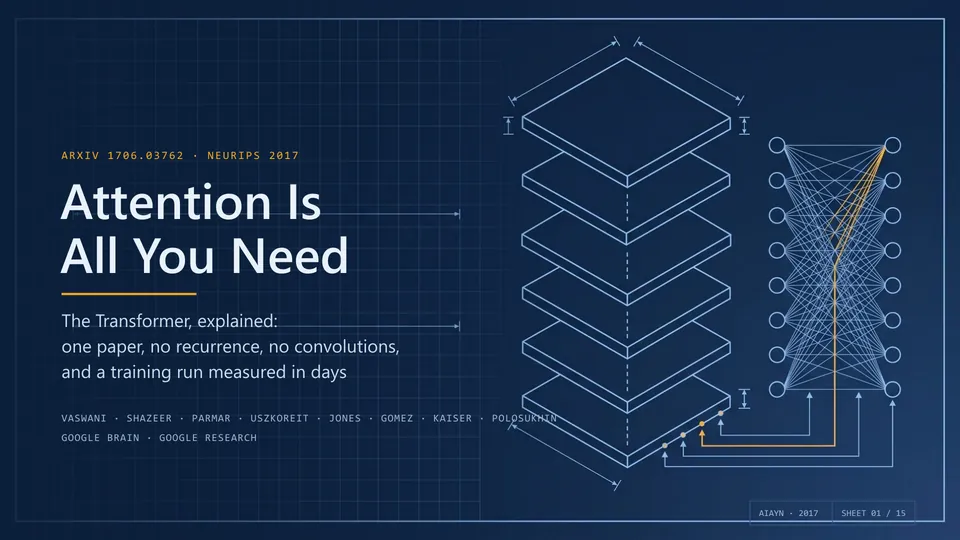
Download the new narrated Attention Is All You Need deck — play it in PowerPoint and every slide reads itself out loud. That's just the tip of what PPT Master can do.

Editorial magazine — Pritzker 2026 architecture review
Editorial Magazine — architecture photography, calm typographic grid
Flip online · Download .pptx
Data journalism — Global AI Capital 2026
Data Journalism — Bloomberg-style dark dashboard, chart-driven
Flip online · Download .pptx
Swiss typographic grid — Grid Systems primer
Swiss Grid — strict modular grid, restrained type, red-accent
Flip online · Download .pptx
Glassmorphism SaaS — AI Agent engineering demo
Glassmorphism SaaS — translucent layers, gradient depth, product UI
Flip online · Download .pptx
Memphis pop — Sugar Rush festival
Memphis Pop — bold primaries, geometric patterns, playful energy
Flip online · Download .pptx
Risograph zine — Indie bookstore guide
Risograph Zine — duotone print, hand-made bookstore-culture feel
Flip online · Download .pptx

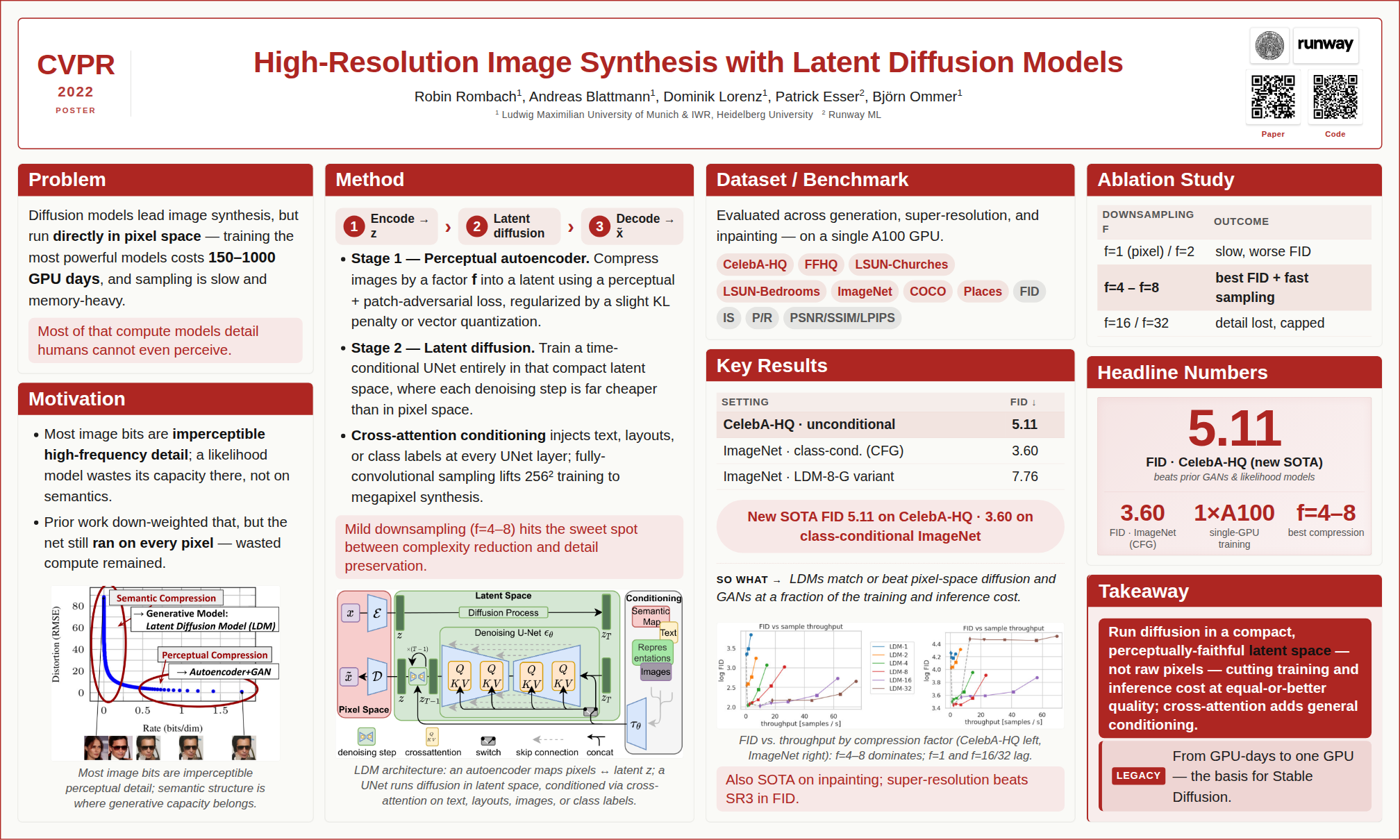
All examples above were generated in a single pass, with no manual polish (Claude Opus 4.7 + gpt-image-2). Downloading any .pptx and opening it in PowerPoint is the fastest way to see what it can really do.
Flip through all examples online → · examples/ directory · Why PPT Master?


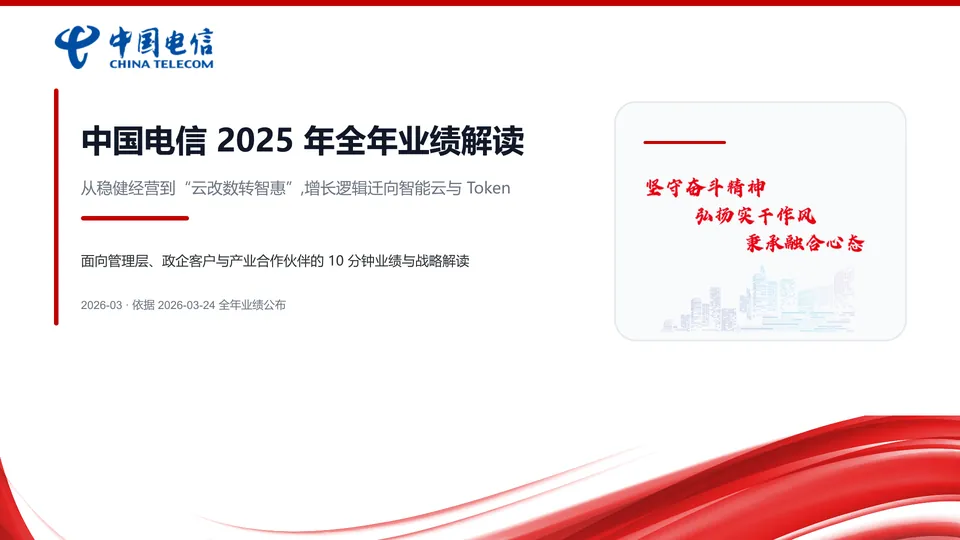
Drop in your source material, and what you get back isn't a static layout you can edit — it's a complete deck with real PowerPoint behavior: native slide transitions, opt-in entrance / emphasis / motion-path / exit animations (off by default), speaker notes that can become audio narration and even video, charts and tables that can ship as real data-backed PowerPoint objects, and it can follow your own PPT template — present it as-is, and keep refining. How to use each capability → Getting Started.

Product Positioning

Editable is now table stakes — the real question is how much of PowerPoint you actually get. PPT Master delivers PowerPoint's native object model itself, and in depth: native shapes and connectors with working adjustment handles, data-backed charts and tables on demand, and the full text / picture / fill / effect model — click any element and keep editing it as a native PowerPoint object; and through the template / structured route, it can hand you a deck with real slide masters and layouts (p:sldMaster / p:sldLayout inheritance).

And that depth is a direction of travel, not a fixed checklist. PPT Master's north star is to keep converging with PowerPoint itself: an ongoing effort to build and integrate more of PowerPoint's native capabilities, release after release, closing the gap between what an AI can generate for you and what you could build by hand in PowerPoint. The PowerPoint ↔ SVG Mapping Guide is the honest, feature-by-feature record of how far that reaches today — and SmartArt is a deliberate omission, not a gap.

In form, it's a workflow (a "skill") that runs inside any agent-capable AI tool: tell it in chat — "make a deck from this PDF" — and it runs the workflow on your machine and exports a natively editable .pptx. No coding on your side; you do exactly three things — install Python, install an AI tool, drop in your material.

Generating a new deck from source documents is the main pipeline, but not the only route. PPT Master can also distill reusable brand / layout / deck templates from your references, fill an existing .pptx with new content while preserving its design, and add native transitions, animations, and narration to a finished deck — each route with an explicit contract for what gets preserved.

On top of that native depth, this form comes with three promises:

  • Transparent, predictable cost — free and open source; the only cost is your AI model usage, with no PPT subscription on top
  • Data stays local — apart from AI model communication, the entire pipeline runs on your machine
  • No platform lock-in — any agent-capable AI IDE can drive it; Claude, GPT, Gemini, Kimi, and other models all work

Why you'd choose it, and where it isn't the right fit → Why PPT Master; the long-term capability boundaries behind these promises → Project Positioning.

Important

This is a tool, not a wishing well

harness + model = agent — PPT Master only owns the workflow; the model sets the ceiling. Recommended: Kimi K3 (or Claude) with a large context window (~1M tokens) + AI image generation (gpt-image-2 or Google gemini-3.1-flash-image); other models can run the pipeline, with a quality gap.

And don't expect a finished, perfect deck in one shot. The tool's value is taking most of the tedious work off your plate; the polishing that's left is yours — a natively editable deck exists precisely so you can keep working on it, not a flat image you can't touch. The cheaper the model, the more there is to do; if results disappoint, upgrade the model first, then check your usage against Getting Started and the example projects.


Built by Hugo He

I'm a finance professional (CPA · CPV · Consulting Engineer (Investment)) who regularly reviews and edits presentation decks. I wanted AI-generated slides to remain editable in PowerPoint, not flattened into images — so I built this.

Knowing how to use Python and AI agents will matter more and more, and this project is also meant to show how far you can go with just those two things. There's a learning curve if you're starting cold, but it's the curve worth climbing — making a deck is just the excuse; what I'm really pushing is Python and agents.


You Might Also Like

A Microsoft open-source project I recently joined — from paper to talk video, poster, and blog, automating the last mile of research dissemination.

📦 Repo: microsoft/ResearchStudio · 📄 Paper: arXiv:2607.04438
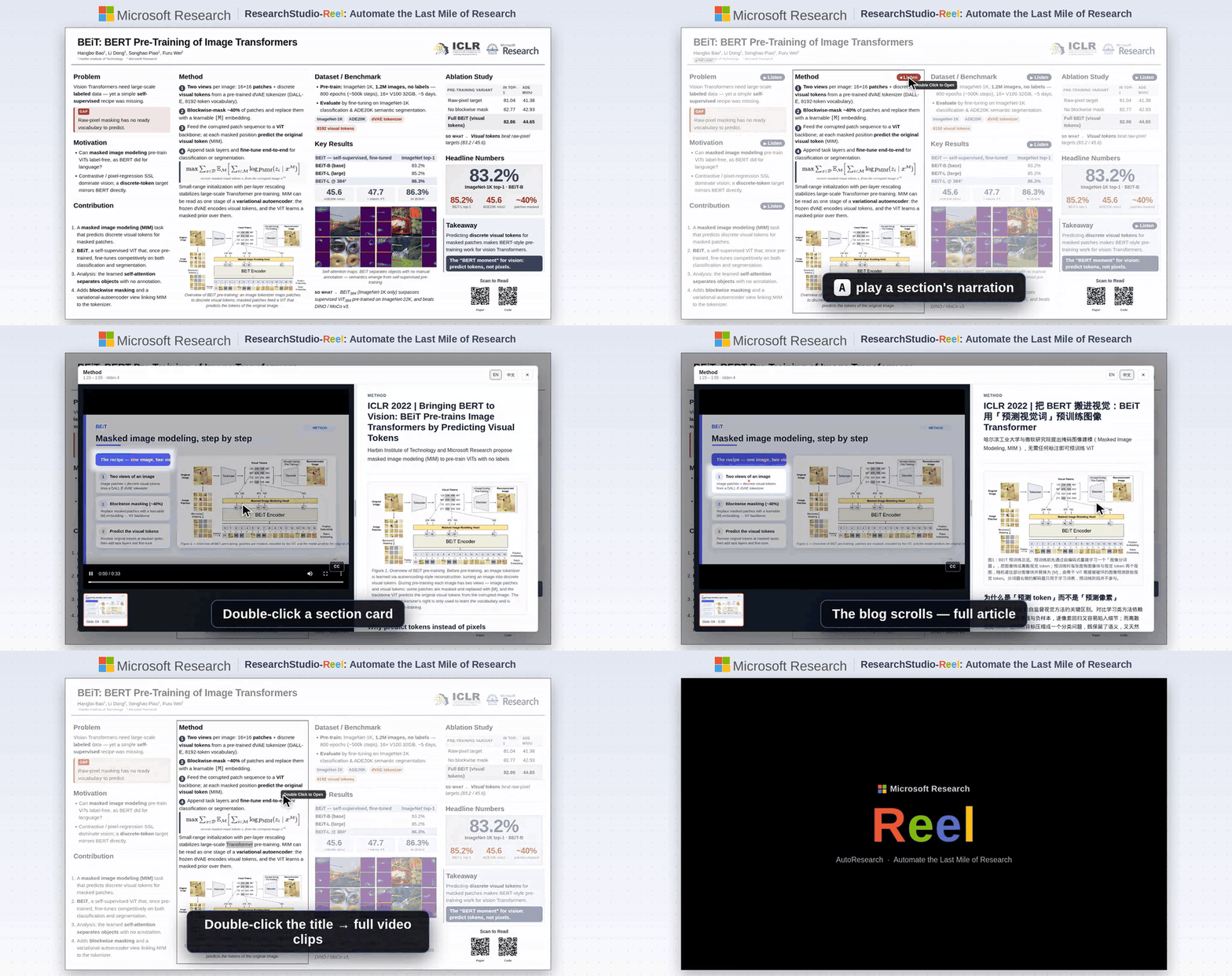
ResearchStudio-Reel demo ResearchStudio-Reel generated poster
BibTeX — if you use ResearchStudio-Reel in your research
@article{xiao2026researchstudioreel,
  title   = {ResearchStudio-Reel: Automate the Last Mile of Research from Paper to Poster, Video, and Blog},
  author  = {Lingao Xiao and Yalun Dai and Yangyu Huang and Qihao Zhao and Wenshan Wu and Hugo He and Ruishuo Chen and Jin Jiang and Qianli Ma and Jiahuan Zhang and Xin Zhang and Ying Xin and Yang Ou and Yan Xia and Scarlett Li and Longbo Huang and Zhipeng Zhang and Yang He and Yap Kim Hui and Yan Lu},
  journal = {arXiv preprint arXiv:2607.04438},
  year    = {2026},
  url     = {https://arxiv.org/abs/2607.04438}
}

Quick Start

1. Prerequisites

All you need to install is Python 3.10+. Everything else comes with one line — pip install -r requirements.txt — after you download the project in Step 3.

Windows — see the dedicated step-by-step guide ⚠️

Windows requires a few extra steps (PATH setup, execution policy, etc.). We wrote a step-by-step guide specifically for Windows users:

📖 Windows Installation Guide — from zero to a working presentation in 10 minutes.

Quick version: download Python from python.orgcheck "Add to PATH" during install → done; dependencies are installed in Step 3.

macOS / Linux — install and go
# macOS
brew install python

# Ubuntu / Debian
sudo apt install python3 python3-pip
Edge-case fallback — 99% of users don't need this

Pandoc — only needed for legacy document formats: .doc, .odt, .rtf, .tex, .rst, .org, or .typ. .docx, .html, .epub, .ipynb are handled natively by Python — no pandoc required.

# macOS
brew install pandoc

# Ubuntu / Debian
sudo apt install pandoc

2. Pick an Agent

PPT Master runs in any tool with agent capability — read/write files, execute commands, and sustain multi-turn conversation.

Never used one of these? Don't worry — in this project they play exactly one role: an AI chat window that can read and write files. Pick any tool from the table, install it, and you'll only ever use its chat panel. No coding involved.

Author's pick: Claude Code — the environment this project is developed and tested on most thoroughly, as the CLI or the VS Code / JetBrains extension.

Type Examples Notes
IDE-native agent • VS Code architecture (VS Code itself, plus forks & derivatives): Cursor, Trae, Codebuddy IDE, Windsurf, etc.
• Other architectures: Zed, etc.
Editor with a built-in agent
IDE plugin / extension Claude Code (VS Code / JetBrains extension), GitHub Copilot, Cline, etc. Installed inside hosts like VS Code or JetBrains
CLI agent Claude Code CLI, Codex CLI, Gemini CLI, etc. Runs in the terminal; suits scripting, remote, or server use

Model recommendation: for the best results, use Kimi K3 (or Claude) to drive the pipeline, paired with AI image generation — gpt-image-2 (OpenAI) or gemini-3.1-flash-image (Google). Kimi Code, the project sponsor, is a great pick for pay-as-you-go access.

🔑 Want to use Claude / GPT / Gemini but don't have access yet? Project sponsors PackyCode, APIKEY.FUN and RunAPI offer pay-as-you-go access to Claude, GPT, Gemini and more — no subscription required, with exclusive discounts for our users (details at the top of this page).

🔀 Juggling several providers? Once you hold keys from more than one of them, cc-switch — a cross-platform desktop app — lets you one-click switch API providers for Claude Code, Codex, Gemini CLI and more, no manual config editing.

3. Set Up

Option A — Git clone (recommended; requires Git installed): the preferred path, since a clone can pull the latest version at any time.

git clone https://github.com/hugohe3/ppt-master.git
cd ppt-master

Then install dependencies:

pip install -r requirements.txt

Option B — Download ZIP (no Git required; best for a quick trial): click Code → Download ZIP on the GitHub page, then unzip, and install dependencies with pip install -r requirements.txt. A ZIP has no Git history, so it can't git pull — see Updating Later. If that download is too large or fails, grab the skill-only package ppt-master-skill-*.zip (~50 MB, fully functional but without the bundled example decks) from the Releases page instead.

Updating Later

Git clone installs:

python3 skills/ppt-master/scripts/update_repo.py

The script pulls the latest version and syncs Python dependencies when requirements.txt changes.

Download ZIP installs:

ZIP folders do not include Git history, so they cannot run git pull. To update, download the latest ZIP, unzip it into a new folder, copy your old .env and projects/ folder into the new folder, then run:

pip install -r requirements.txt

Option C — Skill marketplace: the repo ships .claude-plugin/marketplace.json, so it can be installed through the Claude Code plugin marketplace ecosystem:

# Cross-agent CLI (Claude Code, Cursor, Codex, etc.)
npx skills add hugohe3/ppt-master

# Or inside Claude Code
/plugin marketplace add hugohe3/ppt-master
/plugin install ppt-master@ppt-master

Both install paths above only fetch the skill files (not the full repo); you still need to pip install -r requirements.txt from the installed location for the post-processing scripts to run.

4. Create

First, open the project folder in your agent: the goal is to point the AI at the ppt-master directory you unzipped / cloned in the previous step. In an IDE-type tool, use File → Open Folder — the AI chat panel is usually in the sidebar; in a CLI agent, cd ppt-master first, then launch it. Everything from here on happens in the chat.

Provide source materials (recommended): Place your PDF, DOCX, images, or other files in the projects/ directory, then tell the AI chat panel which files to use. The quickest way to get the path: right-click the file in your file manager or IDE sidebar → Copy Path (or Copy Relative Path) and paste it directly into the chat.

You: Please create a PPT from projects/q3-report/sources/report.pdf

Paste content directly: You can also paste text content straight into the chat window and the AI will generate a PPT from it.

You: Please turn the following into a PPT: [paste your content here...]

Either way, the AI will first confirm the design spec:

AI:  Sure. Let's confirm the design spec:
     [Template] B) Free design
     [Format]   PPT 16:9
     [Pages]    8-10 pages
     ...

The AI handles everything — content analysis, visual design, SVG generation, and PPTX export.

Output: The SVG pipeline has one PPTX converter: it reads svg_output/ and writes a directly editable native DrawingML deck to exports/<name>_<timestamp>.pptx. The normal delivery flow runs finalize_svg.py, produces self-contained previews in svg_final/, and snapshots svg_output/ to backup/<timestamp>/svg_output/; PowerPoint's manual Convert to Shape command is outside the supported contract. Explicit disposable few-page tests may instead use quick-test mode, which writes only the authored SVGs and one PPTX—no planning, preview, notes, validation, or backup artifacts. By default charts and tables export as individually editable SVG-derived DrawingML shapes, which prioritize cross-app visual consistency. Pass --native-charts-and-tables to replace eligible groups with PowerPoint-native Chart/Table objects backed by data, which provide Edit Data and object-specific controls but may render differently across apps; this variant is saved as exports/<name>_<timestamp>_native_charts_tables.pptx. Both routes are editable—the distinction is the PowerPoint object model, not editability itself.

Already have a .pptx you want to reuse? Hand the AI that deck plus your material and ask it to "fill this deck with the new content" — it fills text, table, and chart data into your existing design and exports only the pages you pick, staying natively editable. See the FAQ and template-fill workflow.

Something went wrong? If the AI loses context, ask it to read skills/ppt-master/SKILL.md; for everything else, check the FAQ — it covers model selection, layout issues, export problems, and more. Continuously updated from real user reports.

5. Image Acquisition (Optional)

Two paths for non-user images, mixable per image in the same deck:

A) AI generationimage_gen.py. Set IMAGE_BACKEND plus the provider's *_API_KEY (OPENAI_API_KEY, GEMINI_API_KEY, etc.), and the pipeline calls it automatically. Run python3 skills/ppt-master/scripts/image_gen.py --list-backends for the full backend list. gpt-image-2 is currently the best default.

B) Web image searchimage_search.py. Zero-config works; configure PEXELS_API_KEY / PIXABAY_API_KEY (both free) for consistently higher-quality results:

  • Without keys, search uses Openverse / Wikimedia Commons only — useful as a fallback, but image quality can be uneven because many results are ordinary user uploads
  • With keys, the default provider chain also appends Pexels / Pixabay, which materially improves modern stock photography, people, workplace, lifestyle, and illustration coverage
  • Licensing is handled automatically: CC0, Public Domain, Pexels / Pixabay no-attribution licenses, CC BY, and CC BY-SA are all considered together, and Executor adds a small inline credit whenever the selected image requires attribution. Use --strict-no-attribution only when a slide cannot tolerate any credit line
  • For high-impact covers, product shots, portraits, and branded scenes, prefer this order: user-provided high-resolution assets / AI generation > web search with Pexels / Pixabay keys > zero-config web search

The API keys above all live in .env. Clone installs can use cp .env.example .env; skill marketplace installs should use a persistent user config:

mkdir -p ~/.ppt-master
cp /path/to/installed/ppt-master/.env.example ~/.ppt-master/.env

PPT Master reads the current process environment first, then the first .env found in this order: current working directory, skill directory (e.g. ~/.agents/skills/ppt-master/.env), clone repo root, ~/.ppt-master/.env.

Full reference: image-generator.md (AI) · image-searcher.md (web).


Documentation

Document Description
📘 Getting Started First deck in 3 steps, plus how to use templates, live preview, animations, narration, voice cloning (new users start here)
🆚 Why PPT Master Why choose it, and where it's not the right fit
🧭 Project Positioning Long-term positioning, product promises, and capability boundaries
🪟 Windows Installation Step-by-step setup guide for Windows users
📖 SKILL.md Core workflow and rules
📐 Canvas Formats PPT 16:9, Xiaohongshu, WeChat, and 10+ formats
🛠️ Scripts & Tools All scripts and commands
💼 Examples All example projects
🏗️ Technical Design Architecture, design philosophy, why SVG
FAQ Model selection, cost, layout troubleshooting, custom templates

Full documentation index → docs/


Contributing

See CONTRIBUTING.md for how to get involved.

License

MIT

Acknowledgments

SVG Repo · Tabler Icons · Simple Icons · Phosphor Icons · Robin Williams (CRAP principles)

Related Tools

cc-switch — one-click switching of API providers across Claude Code / Codex / Gemini CLI and more.

Contact & Collaboration

Looking to collaborate, integrate PPT Master into your workflow, or just have questions?


Sponsors & Support

PPT Master is currently built and maintained primarily by me. Every new template, bug fix, and documentation update takes ongoing resources — currently shared by the sponsors and individual supporters below.

Corporate sponsors

Kimi   PackyCode   APIKEY.FUN   RunAPI   YouYun ZhiSuan   Powered by DigitalOcean

Individual support

If PPT Master has been helpful to you, individual support of any amount helps keep the project moving and free.

Sponsor via PayPal

Alipay QR Code


Made with ❤️ by Hugo He — if this project helps you, please give it a ⭐ and consider sponsoring.

Official distribution: GitHub (primary) · AtomGit (mirror). Redistributions on other platforms are unofficial. MIT licensed — attribution required.

⬆ Back to Top

View on GitHub

Recent activity

commits and pull requests

Recent open issues

view all

Discussions

all 43

Releases and announcements

16 total
  1. v4.2.0v4.2.0Jul 25, 20262.2K downloads

    v4.1.0 finished a deck at the PPTX boundary: transitions, opt-in animations, speaker notes, audio narration. This release carries that same deck one step further — to a video you can publish, with subtitles that actually line up with what the narrator is saying and what the slide is doing. The rest is a steady pass over planning, typography, and the confirmation flow, fixing boundaries that recent generation runs exposed. ## Narration & video - **Native PowerPoint video export.** A narrated deck can now continue straight to MP4 through installed PowerPoint's own `CreateVideo`, polled to completion — animations and transitions render with real PowerPoint fidelity because PowerPoint is doing the rendering. This requires **Windows with PowerPoint installed**; macOS limitations and failure boundaries are documented rather than silently degraded. - **Subtitles synchronized with animations, then recalibrated against the exported video.** Page-local SRT comes from the same Edge word-boundary stream that produces the audio, click-free animation timing is rebuilt from cue maps, and the merged total SRT is derived from the final PPTX timings. After video export, each page's narration is a

  2. v4.1.0v4.1.0Jul 21, 20262.4K downloads

    ## First, an apology The architectural cleanup that shipped with v4.0.0 carried changes it did not need to make, and those changes suffocated the project's creativity. That is on me, and I'm sorry. It also taught me something I had underweighted: this project is not only its code. The prompts and the orchestration of the workflow matter just as much — arguably more. A quota tightened by one line, a reference demoted to a lock, a permission rewritten as a limit: none of that shows up as a failing test, but it decides whether the AI is allowed to design at all. In my own testing, the deck aesthetics have recovered a good deal, so I'm publishing this fix right away rather than batching it. The wider lesson is that a great many details hide inside every small design decision here. Every future change deserves extreme care, and I need to slow the rate of change down. --- The v4.0.0 refactor compressed the prompt contract hard. Some of that compression turned permissions into quotas, references into locks, and flexible realization into silent constraint — the AI had less room to design than the system intends. This release restores that range and pins down *why* each remaining boun

  3. v4.0.0v4.0.0Jul 20, 2026710 downloads

    ## Project positioning — now explicit - New canonical charter: [Project Positioning and Capability Boundary](https://github.com/hugohe3/ppt-master/blob/main/docs/project-positioning.md) (English canonical, synchronized Chinese). The one-line thesis: **PPT Master is an open-source, chat-driven workflow that lets AI reason the argument into shape first, then design and produce a real, editable PowerPoint — not slide images or a thin editable skin. Its defining axis is native depth: author or preserve more of PowerPoint's own object model, behavior, and reusable structure, release after release.** - Editable is table stakes; the direction of travel is **converging with PowerPoint itself** — the [PowerPoint ↔ SVG Mapping Guide](https://github.com/hugohe3/ppt-master/blob/main/docs/powerpoint-svg-mapping.md) records the current boundary honestly, feature by feature - README and the doc set are aligned to this framing throughout, with doc indexes added ## Native slide masters & layouts - Repeated page chrome and shared backgrounds are promoted to **real slide masters** (`p:sldMaster` / `p:sldLayout` inheritance); explicit per-deck layout contracts are compiled on export - Exported deck

  4. v3.1.0v3.1.0Jul 4, 20267.7K downloads

    ## Native chart fidelity - Export native chart chrome metadata (titles, overlays, axis labels) and mirror SVG fallback styling into native charts - Inherit typography from the SVG fallback; preserve explicit bounds, point colors, and overlays - Guard chart chrome against invisible fallback text ## Checker / export validation hardening - viewBox is now the single source of truth for canvas size (preview + export aligned) - Error on silent-loss paint colors (hsl, alpha-hex); validate exported PPTX typefaces; harden spec_lock drift scanning ## Internals - Split `native_objects` into a subpackage; group drawingml/package modules; centralize SVG resource path resolution; parse each SVG once across DOM checks ## Docs - Require human review for AI-assisted PRs; sharpen image strategy & preview checkpoints

  5. v3.0.0v3.0.0Jul 3, 2026253 downloads

    Native PowerPoint **tables and charts** graduate from an experimental marker into a production-quality opt-in export path — the milestone behind the major version bump. Plus a restaged three-stage confirmation UI, a third UI language (Japanese), and a batch of SVG → PPTX converter robustness fixes. > **The default export route is unchanged.** Charts and tables still render as SVG-derived DrawingML shapes for pixel fidelity across PowerPoint / Keynote / LibreOffice / WPS. Native objects are a deliberate **opt-in** (`--native-objects`) for users who want PowerPoint-side editability on those objects and accept the cross-renderer tradeoff. ## Native tables & charts — `--native-objects` - Opt-in export of `data-pptx-native`-marked charts and pure text-grid tables as **real, editable PowerPoint objects** (Excel-backed chart data + native tables), skipping the SVG fallback children to avoid duplicates. - **Chart coverage**: bar / column (incl. stacked & percent-stacked), line / area (incl. stacking), radar (line / filled / marker), scatter styles, combo (dual-axis), pie / of-pie / doughnut, plus chartEx types (treemap, sunburst, histogram, pareto, box & whisker, waterfall, funnel) and n

Code frequency

additions and deletions
+141.2K-141.2KWeek of 2025-12-07: +110,961 linesWeek of 2025-12-07: -12,755 linesWeek of 2025-12-14: +3,948 linesWeek of 2025-12-14: -174 linesWeek of 2025-12-21: +476 linesWeek of 2025-12-21: -10 linesWeek of 2025-12-28: +207 linesWeek of 2025-12-28: -20 linesWeek of 2026-01-04: +4,177 linesWeek of 2026-01-04: -914 linesWeek of 2026-01-11: +2,430 linesWeek of 2026-01-11: -840 linesWeek of 2026-01-18: +12,334 linesWeek of 2026-01-18: -1,284 linesWeek of 2026-01-25: +9,375 linesWeek of 2026-01-25: -6,883 linesWeek of 2026-02-01: +1,604 linesWeek of 2026-02-01: -719 linesWeek of 2026-02-08: +40 linesWeek of 2026-02-08: -38 linesWeek of 2026-02-15: +119 linesWeek of 2026-02-15: -6 linesWeek of 2026-02-22: +0 linesWeek of 2026-02-22: -0 linesWeek of 2026-03-01: +2,276 linesWeek of 2026-03-01: -808 linesWeek of 2026-03-08: +752 linesWeek of 2026-03-08: -394 linesWeek of 2026-03-15: +73,320 linesWeek of 2026-03-15: -76,513 linesWeek of 2026-03-22: +17,866 linesWeek of 2026-03-22: -15,858 linesWeek of 2026-03-29: +3,993 linesWeek of 2026-03-29: -3,536 linesWeek of 2026-04-05: +141,199 linesWeek of 2026-04-05: -12,513 linesWeek of 2026-04-12: +2,958 linesWeek of 2026-04-12: -515 linesWeek of 2026-04-19: +17,924 linesWeek of 2026-04-19: -18,449 linesWeek of 2026-04-26: +44,028 linesWeek of 2026-04-26: -6,227 linesWeek of 2026-05-03: +12,598 linesWeek of 2026-05-03: -6,458 linesWeek of 2026-05-10: +21,589 linesWeek of 2026-05-10: -7,620 linesWeek of 2026-05-17: +49,321 linesWeek of 2026-05-17: -80,436 linesWeek of 2026-05-24: +4,388 linesWeek of 2026-05-24: -66 linesWeek of 2026-05-31: +5,700 linesWeek of 2026-05-31: -305 linesWeek of 2026-06-07: +1,584 linesWeek of 2026-06-07: -730 linesWeek of 2026-06-14: +7,200 linesWeek of 2026-06-14: -848 linesWeek of 2026-06-21: +5,705 linesWeek of 2026-06-21: -3,574 linesWeek of 2026-06-28: +28,753 linesWeek of 2026-06-28: -15,356 linesWeek of 2026-07-05: +53,432 linesWeek of 2026-07-05: -6,187 linesWeek of 2026-07-12: +84,701 linesWeek of 2026-07-12: -48,836 linesWeek of 2026-07-19: +15,684 linesWeek of 2026-07-19: -10,556 linesWeek of 2026-07-26: +26,219 linesWeek of 2026-07-26: -5,156 linesDec 7, 2025Jul 26, 2026
+766.9K lines added, -344.6K removed over the last year.

Commits per week

last 52 weeks
2350Week of 2025-08-02: 0 commitsWeek of 2025-08-09: 0 commitsWeek of 2025-08-16: 0 commitsWeek of 2025-08-23: 0 commitsWeek of 2025-08-30: 0 commitsWeek of 2025-09-06: 0 commitsWeek of 2025-09-13: 0 commitsWeek of 2025-09-20: 0 commitsWeek of 2025-09-27: 0 commitsWeek of 2025-10-04: 0 commitsWeek of 2025-10-11: 0 commitsWeek of 2025-10-18: 0 commitsWeek of 2025-10-25: 0 commitsWeek of 2025-11-01: 0 commitsWeek of 2025-11-09: 0 commitsWeek of 2025-11-16: 0 commitsWeek of 2025-11-23: 0 commitsWeek of 2025-11-30: 0 commitsWeek of 2025-12-07: 23 commitsWeek of 2025-12-14: 9 commitsWeek of 2025-12-21: 2 commitsWeek of 2025-12-28: 2 commitsWeek of 2026-01-04: 15 commitsWeek of 2026-01-11: 15 commitsWeek of 2026-01-18: 13 commitsWeek of 2026-01-25: 41 commitsWeek of 2026-02-01: 12 commitsWeek of 2026-02-08: 1 commitsWeek of 2026-02-15: 3 commitsWeek of 2026-02-22: 0 commitsWeek of 2026-03-01: 6 commitsWeek of 2026-03-08: 9 commitsWeek of 2026-03-15: 15 commitsWeek of 2026-03-22: 45 commitsWeek of 2026-03-29: 11 commitsWeek of 2026-04-05: 37 commitsWeek of 2026-04-12: 27 commitsWeek of 2026-04-19: 73 commitsWeek of 2026-04-26: 114 commitsWeek of 2026-05-03: 55 commitsWeek of 2026-05-10: 69 commitsWeek of 2026-05-17: 66 commitsWeek of 2026-05-24: 12 commitsWeek of 2026-05-31: 24 commitsWeek of 2026-06-07: 26 commitsWeek of 2026-06-14: 70 commitsWeek of 2026-06-21: 38 commitsWeek of 2026-06-28: 115 commitsWeek of 2026-07-05: 84 commitsWeek of 2026-07-12: 235 commitsWeek of 2026-07-19: 92 commitsWeek of 2026-07-26: 51 commitsAug 2, 2025Jul 26, 2026
1.4K commits in the last 52 weeks.

When work happens

weekday and hour
SunMonTueWedThuFriSat036912151821Sun 0:00 — 5 commitsSun 1:00 — 10 commitsSun 2:00 — 4 commitsSun 3:00 — 7 commitsSun 4:00 — 8 commitsSun 5:00 — 6 commitsSun 6:00 — 3 commitsSun 7:00 — 7 commitsSun 8:00 — 8 commitsSun 9:00 — 5 commitsSun 10:00 — 12 commitsSun 11:00 — 19 commitsSun 12:00 — 12 commitsSun 13:00 — 19 commitsSun 14:00 — 24 commitsSun 15:00 — 11 commitsSun 16:00 — 4 commitsSun 17:00 — 4 commitsSun 18:00 — 2 commitsSun 19:00 — 10 commitsSun 20:00 — 3 commitsSun 21:00 — 2 commitsSun 22:00 — 0 commitsSun 23:00 — 2 commitsMon 0:00 — 2 commitsMon 1:00 — 13 commitsMon 2:00 — 10 commitsMon 3:00 — 5 commitsMon 4:00 — 5 commitsMon 5:00 — 8 commitsMon 6:00 — 9 commitsMon 7:00 — 5 commitsMon 8:00 — 3 commitsMon 9:00 — 4 commitsMon 10:00 — 5 commitsMon 11:00 — 6 commitsMon 12:00 — 4 commitsMon 13:00 — 8 commitsMon 14:00 — 10 commitsMon 15:00 — 13 commitsMon 16:00 — 9 commitsMon 17:00 — 3 commitsMon 18:00 — 3 commitsMon 19:00 — 5 commitsMon 20:00 — 3 commitsMon 21:00 — 4 commitsMon 22:00 — 6 commitsMon 23:00 — 3 commitsTue 0:00 — 3 commitsTue 1:00 — 5 commitsTue 2:00 — 6 commitsTue 3:00 — 8 commitsTue 4:00 — 8 commitsTue 5:00 — 3 commitsTue 6:00 — 12 commitsTue 7:00 — 7 commitsTue 8:00 — 5 commitsTue 9:00 — 15 commitsTue 10:00 — 7 commitsTue 11:00 — 11 commitsTue 12:00 — 13 commitsTue 13:00 — 23 commitsTue 14:00 — 9 commitsTue 15:00 — 10 commitsTue 16:00 — 8 commitsTue 17:00 — 2 commitsTue 18:00 — 6 commitsTue 19:00 — 15 commitsTue 20:00 — 6 commitsTue 21:00 — 12 commitsTue 22:00 — 22 commitsTue 23:00 — 29 commitsWed 0:00 — 26 commitsWed 1:00 — 11 commitsWed 2:00 — 6 commitsWed 3:00 — 17 commitsWed 4:00 — 6 commitsWed 5:00 — 13 commitsWed 6:00 — 9 commitsWed 7:00 — 3 commitsWed 8:00 — 3 commitsWed 9:00 — 16 commitsWed 10:00 — 7 commitsWed 11:00 — 7 commitsWed 12:00 — 13 commitsWed 13:00 — 9 commitsWed 14:00 — 19 commitsWed 15:00 — 8 commitsWed 16:00 — 4 commitsWed 17:00 — 1 commitsWed 18:00 — 0 commitsWed 19:00 — 2 commitsWed 20:00 — 7 commitsWed 21:00 — 6 commitsWed 22:00 — 3 commitsWed 23:00 — 4 commitsThu 0:00 — 0 commitsThu 1:00 — 9 commitsThu 2:00 — 12 commitsThu 3:00 — 5 commitsThu 4:00 — 3 commitsThu 5:00 — 6 commitsThu 6:00 — 4 commitsThu 7:00 — 0 commitsThu 8:00 — 2 commitsThu 9:00 — 6 commitsThu 10:00 — 4 commitsThu 11:00 — 10 commitsThu 12:00 — 11 commitsThu 13:00 — 10 commitsThu 14:00 — 12 commitsThu 15:00 — 15 commitsThu 16:00 — 9 commitsThu 17:00 — 9 commitsThu 18:00 — 3 commitsThu 19:00 — 2 commitsThu 20:00 — 8 commitsThu 21:00 — 11 commitsThu 22:00 — 6 commitsThu 23:00 — 7 commitsFri 0:00 — 3 commitsFri 1:00 — 4 commitsFri 2:00 — 5 commitsFri 3:00 — 8 commitsFri 4:00 — 4 commitsFri 5:00 — 6 commitsFri 6:00 — 6 commitsFri 7:00 — 5 commitsFri 8:00 — 9 commitsFri 9:00 — 9 commitsFri 10:00 — 7 commitsFri 11:00 — 18 commitsFri 12:00 — 16 commitsFri 13:00 — 14 commitsFri 14:00 — 18 commitsFri 15:00 — 24 commitsFri 16:00 — 24 commitsFri 17:00 — 7 commitsFri 18:00 — 4 commitsFri 19:00 — 3 commitsFri 20:00 — 2 commitsFri 21:00 — 4 commitsFri 22:00 — 14 commitsFri 23:00 — 22 commitsSat 0:00 — 6 commitsSat 1:00 — 1 commitsSat 2:00 — 10 commitsSat 3:00 — 13 commitsSat 4:00 — 9 commitsSat 5:00 — 9 commitsSat 6:00 — 10 commitsSat 7:00 — 6 commitsSat 8:00 — 8 commitsSat 9:00 — 5 commitsSat 10:00 — 16 commitsSat 11:00 — 18 commitsSat 12:00 — 6 commitsSat 13:00 — 16 commitsSat 14:00 — 14 commitsSat 15:00 — 16 commitsSat 16:00 — 18 commitsSat 17:00 — 11 commitsSat 18:00 — 5 commitsSat 19:00 — 4 commitsSat 20:00 — 10 commitsSat 21:00 — 5 commitsSat 22:00 — 10 commitsSat 23:00 — 7 commits
Commit volume by weekday and hour (UTC). Larger dots mean more commits.

Who is committing

last 52 weeks
Maintainer commits1,376 (97%)
Community commits45 (3%)

1,421 commits in total over the last year.

DateListRankStars gained
Jul 15, 2026daily#23+5
Jun 30, 2026daily#24+15
Jun 28, 2026daily#10+29
Jun 27, 2026daily#22+28
Jun 26, 2026daily#20+16
Jun 17, 2026daily#15+14
Jun 11, 2026daily#24+17
May 8, 2026daily#18+53