
liustack/modlensPublic

The first vision plugin for DeepSeek Harness, and the vision bridge for every text-only coding agent. Paste an image, get structured JSON evidence (OCR, layout, semantics). | 全网最强 DeepSeek Harness 外挂视觉插件,为 DeepSeek、GLM 等纯文本模型外挂视觉能力,粘贴图片即得结构化 JSON 证据(OCR、版面、语义)。

AI summary: A powerful vision plugin for DeepSeek Harness that enables text-only AI models to analyze and understand images.

Stars
3.9K
+31 today
Forks
115
Watchers
4
Open issues
3
Open PRs
0
Contributors
~1
Commits
451
Branches
11

TypeScriptMITCreated Feb 22, 2026Last push 2d agoLatest release v3.25.4+83 stars this week+260 this month

Star history

since Feb 22, 2026
01K2K3KFeb 2026Apr 2026Jul 2026Sep 2026
3.9K stars as of Sep 9, 2026, tracked back to Feb 22, 2026. Historical curve reconstructed from public GitHub event archives, calibrated to the current total.

Contribution activity

commits per day, last 52 weeks
SepOctNovDecJanFebMarAprMayJunJulAugMonWedFri2025-09-06: 0 commits2025-09-07: 0 commits2025-09-08: 0 commits2025-09-09: 0 commits2025-09-10: 0 commits2025-09-11: 0 commits2025-09-12: 0 commits2025-09-13: 0 commits2025-09-14: 0 commits2025-09-15: 0 commits2025-09-16: 0 commits2025-09-17: 0 commits2025-09-18: 0 commits2025-09-19: 0 commits2025-09-20: 0 commits2025-09-21: 0 commits2025-09-22: 0 commits2025-09-23: 0 commits2025-09-24: 0 commits2025-09-25: 0 commits2025-09-26: 0 commits2025-09-27: 0 commits2025-09-28: 0 commits2025-09-29: 0 commits2025-09-30: 0 commits2025-10-01: 0 commits2025-10-02: 0 commits2025-10-03: 0 commits2025-10-04: 0 commits2025-10-05: 0 commits2025-10-06: 0 commits2025-10-07: 0 commits2025-10-08: 0 commits2025-10-09: 0 commits2025-10-10: 0 commits2025-10-11: 0 commits2025-10-12: 0 commits2025-10-13: 0 commits2025-10-14: 0 commits2025-10-15: 0 commits2025-10-16: 0 commits2025-10-17: 0 commits2025-10-18: 0 commits2025-10-19: 0 commits2025-10-20: 0 commits2025-10-21: 0 commits2025-10-22: 0 commits2025-10-23: 0 commits2025-10-24: 0 commits2025-10-25: 0 commits2025-10-26: 0 commits2025-10-27: 0 commits2025-10-28: 0 commits2025-10-29: 0 commits2025-10-30: 0 commits2025-10-31: 0 commits2025-11-01: 0 commits2025-11-02: 0 commits2025-11-03: 0 commits2025-11-04: 0 commits2025-11-05: 0 commits2025-11-06: 0 commits2025-11-07: 0 commits2025-11-09: 0 commits2025-11-10: 0 commits2025-11-11: 0 commits2025-11-12: 0 commits2025-11-13: 0 commits2025-11-14: 0 commits2025-11-15: 0 commits2025-11-16: 0 commits2025-11-17: 0 commits2025-11-18: 0 commits2025-11-19: 0 commits2025-11-20: 0 commits2025-11-21: 0 commits2025-11-22: 0 commits2025-11-23: 0 commits2025-11-24: 0 commits2025-11-25: 0 commits2025-11-26: 0 commits2025-11-27: 0 commits2025-11-28: 0 commits2025-11-29: 0 commits2025-11-30: 0 commits2025-12-01: 0 commits2025-12-02: 0 commits2025-12-03: 0 commits2025-12-04: 0 commits2025-12-05: 0 commits2025-12-06: 0 commits2025-12-07: 0 commits2025-12-08: 0 commits2025-12-09: 0 commits2025-12-10: 0 commits2025-12-11: 0 commits2025-12-12: 0 commits2025-12-13: 0 commits2025-12-14: 0 commits2025-12-15: 0 commits2025-12-16: 0 commits2025-12-17: 0 commits2025-12-18: 0 commits2025-12-19: 0 commits2025-12-20: 0 commits2025-12-21: 0 commits2025-12-22: 0 commits2025-12-23: 0 commits2025-12-24: 0 commits2025-12-25: 0 commits2025-12-26: 0 commits2025-12-27: 0 commits2025-12-28: 0 commits2025-12-29: 0 commits2025-12-30: 0 commits2025-12-31: 0 commits2026-01-01: 0 commits2026-01-02: 0 commits2026-01-03: 0 commits2026-01-04: 0 commits2026-01-05: 0 commits2026-01-06: 0 commits2026-01-07: 0 commits2026-01-08: 0 commits2026-01-09: 0 commits2026-01-10: 0 commits2026-01-11: 0 commits2026-01-12: 0 commits2026-01-13: 0 commits2026-01-14: 0 commits2026-01-15: 0 commits2026-01-16: 0 commits2026-01-17: 0 commits2026-01-18: 0 commits2026-01-19: 0 commits2026-01-20: 0 commits2026-01-21: 0 commits2026-01-22: 0 commits2026-01-23: 0 commits2026-01-24: 0 commits2026-01-25: 0 commits2026-01-26: 0 commits2026-01-27: 0 commits2026-01-28: 0 commits2026-01-29: 0 commits2026-01-30: 0 commits2026-01-31: 0 commits2026-02-01: 0 commits2026-02-02: 0 commits2026-02-03: 0 commits2026-02-04: 0 commits2026-02-05: 0 commits2026-02-06: 0 commits2026-02-07: 0 commits2026-02-08: 0 commits2026-02-09: 0 commits2026-02-10: 0 commits2026-02-11: 0 commits2026-02-12: 0 commits2026-02-13: 0 commits2026-02-14: 0 commits2026-02-15: 0 commits2026-02-16: 0 commits2026-02-17: 0 commits2026-02-18: 0 commits2026-02-19: 0 commits2026-02-20: 0 commits2026-02-21: 0 commits2026-02-22: 3 commits2026-02-23: 0 commits2026-02-24: 0 commits2026-02-25: 0 commits2026-02-26: 0 commits2026-02-27: 0 commits2026-02-28: 0 commits2026-03-01: 0 commits2026-03-02: 0 commits2026-03-03: 0 commits2026-03-04: 0 commits2026-03-05: 0 commits2026-03-06: 0 commits2026-03-07: 0 commits2026-03-08: 0 commits2026-03-09: 0 commits2026-03-10: 0 commits2026-03-11: 0 commits2026-03-12: 0 commits2026-03-13: 0 commits2026-03-14: 0 commits2026-03-15: 0 commits2026-03-16: 0 commits2026-03-17: 0 commits2026-03-18: 0 commits2026-03-19: 0 commits2026-03-20: 0 commits2026-03-21: 0 commits2026-03-22: 0 commits2026-03-23: 0 commits2026-03-24: 0 commits2026-03-25: 0 commits2026-03-26: 0 commits2026-03-27: 0 commits2026-03-28: 0 commits2026-03-29: 0 commits2026-03-30: 0 commits2026-03-31: 0 commits2026-04-01: 0 commits2026-04-02: 0 commits2026-04-03: 0 commits2026-04-04: 0 commits2026-04-05: 0 commits2026-04-06: 0 commits2026-04-07: 0 commits2026-04-08: 0 commits2026-04-09: 0 commits2026-04-10: 0 commits2026-04-11: 0 commits2026-04-12: 0 commits2026-04-13: 0 commits2026-04-14: 0 commits2026-04-15: 0 commits2026-04-16: 0 commits2026-04-17: 0 commits2026-04-18: 0 commits2026-04-19: 0 commits2026-04-20: 0 commits2026-04-21: 0 commits2026-04-22: 0 commits2026-04-23: 0 commits2026-04-24: 0 commits2026-04-25: 0 commits2026-04-26: 0 commits2026-04-27: 0 commits2026-04-28: 0 commits2026-04-29: 0 commits2026-04-30: 0 commits2026-05-01: 0 commits2026-05-02: 0 commits2026-05-03: 0 commits2026-05-04: 0 commits2026-05-05: 0 commits2026-05-06: 0 commits2026-05-07: 0 commits2026-05-08: 0 commits2026-05-09: 0 commits2026-05-10: 0 commits2026-05-11: 0 commits2026-05-12: 0 commits2026-05-13: 0 commits2026-05-14: 0 commits2026-05-15: 0 commits2026-05-16: 0 commits2026-05-17: 0 commits2026-05-18: 0 commits2026-05-19: 0 commits2026-05-20: 0 commits2026-05-21: 0 commits2026-05-22: 0 commits2026-05-23: 0 commits2026-05-24: 0 commits2026-05-25: 0 commits2026-05-26: 0 commits2026-05-27: 0 commits2026-05-28: 0 commits2026-05-29: 0 commits2026-05-30: 0 commits2026-05-31: 0 commits2026-06-01: 0 commits2026-06-02: 0 commits2026-06-03: 0 commits2026-06-04: 0 commits2026-06-05: 0 commits2026-06-06: 0 commits2026-06-07: 0 commits2026-06-08: 0 commits2026-06-09: 0 commits2026-06-10: 0 commits2026-06-11: 0 commits2026-06-12: 0 commits2026-06-13: 0 commits2026-06-14: 0 commits2026-06-15: 0 commits2026-06-16: 0 commits2026-06-17: 0 commits2026-06-18: 0 commits2026-06-19: 0 commits2026-06-20: 0 commits2026-06-21: 0 commits2026-06-22: 0 commits2026-06-23: 0 commits2026-06-24: 0 commits2026-06-25: 0 commits2026-06-26: 0 commits2026-06-27: 0 commits2026-06-28: 0 commits2026-06-29: 0 commits2026-06-30: 0 commits2026-07-01: 0 commits2026-07-02: 0 commits2026-07-03: 0 commits2026-07-04: 0 commits2026-07-05: 0 commits2026-07-06: 0 commits2026-07-07: 0 commits2026-07-08: 0 commits2026-07-09: 0 commits2026-07-10: 0 commits2026-07-11: 0 commits2026-07-12: 0 commits2026-07-13: 0 commits2026-07-14: 0 commits2026-07-15: 0 commits2026-07-16: 0 commits2026-07-17: 0 commits2026-07-18: 0 commits2026-07-19: 0 commits2026-07-20: 0 commits2026-07-21: 0 commits2026-07-22: 0 commits2026-07-23: 0 commits2026-07-24: 0 commits2026-07-25: 0 commits2026-07-26: 0 commits2026-07-27: 0 commits2026-07-28: 0 commits2026-07-29: 0 commits2026-07-30: 0 commits2026-07-31: 0 commits2026-08-01: 2 commits2026-08-02: 9 commits2026-08-03: 15 commits2026-08-04: 2 commits2026-08-05: 10 commits2026-08-06: 52 commits2026-08-07: 45 commits2026-08-08: 0 commits2026-08-09: 0 commits2026-08-10: 0 commits2026-08-11: 1 commit2026-08-12: 15 commits2026-08-13: 42 commits2026-08-14: 87 commits2026-08-15: 39 commits2026-08-16: 27 commits2026-08-17: 14 commits2026-08-18: 31 commits2026-08-19: 4 commits2026-08-20: 11 commits2026-08-21: 12 commits2026-08-22: 6 commits2026-08-23: 0 commits2026-08-24: 5 commits2026-08-25: 4 commits2026-08-26: 0 commits2026-08-27: 4 commits2026-08-28: 4 commits2026-08-29: 0 commits2026-08-30: 3 commits2026-08-31: 0 commits2026-09-01: 4 commits2026-09-02: 0 commits2026-09-03: 0 commits2026-09-04: 0 commits2026-09-05: 0 commits
451 commits in the last yearLessMore

Signals and awards

derived from tracked data
  • Well documented

    High community health score

  • Permissive license

    MIT

  • Continuous integration

    Automated checks passing

What modlens does

ModLens serves as a highly capable vision bridge for text-only coding agents like DeepSeek Harness. By simply pasting an image, the plugin processes it and returns structured JSON evidence containing OCR data, layout analysis, and semantic understanding. This allows fundamentally text-based models to 'see' and interact with visual inputs without requiring expensive multimodal architectures. It is the premier vision plugin for DeepSeek Harness, providing essential visual capabilities for UI development, data extraction, and visual debugging. ModLens ensures that coding agents can comprehend visual context just as well as textual code.

AI engineers and frontend developers using text-only coding agents who need to bridge the gap between visual design and code generation. It is specifically essential for users of DeepSeek Harness who require image understanding.

  • Structured vision extraction: Converts images into highly structured JSON containing precise OCR text, UI layouts, and semantic descriptions.
  • DeepSeek Harness integration: Functions natively as a premier, high-performance plugin for the official DeepSeek dsh environment.
  • Text-model bridging: Grants powerful visual understanding capabilities to lightweight, text-only LLMs.
  • Instant image processing: Allows developers to simply paste an image into the terminal to immediately provide visual context to the agent.
  • Cross-agent compatibility: Designed to work effectively as a vision bridge for various coding agents, including GLM and OpenClaw.
  • Automated layout analysis: Accurately identifies structural elements like buttons, tables, and text blocks within UI screenshots.

Where teams use it

Image-to-code generation

Paste a screenshot of a UI mockup and have a text-only agent generate the corresponding HTML/CSS based on the extracted layout data.

Visual debugging

Provide a screenshot of an error message or visual glitch, allowing the agent to read the OCR text and diagnose the issue.

Data extraction from images

Extract structured tables or text blocks from diagrams and infographics directly into the agent's context window.

Enhancing local LLMs

Add robust vision capabilities to small, locally hosted text models without the overhead of running a large multimodal transformer.

Getting started: https://github.com/liustack/modlens/blob/main/skills/modlens/references/configure.md

README

main branch

ModLens

ModLens

Give a text-only model sight, and just paste the image.

🥇 The most capable vision plugin for DeepSeek Harness (dsh) 🥇

简体中文 · Configuration · Troubleshooting · Security · 🔍 ModSearch (the best free web search plugin for DSH)

Follow @liustack on X npm Node.js License Not backed by Y Combinator Users unknown

DeepSeek's flagship chat models, and GLM-5.3 itself, are text-only and cannot read images. GLM-5.3-Flash is native multimodal. ModLens is a plug-in vision engine that gives a text-only model sight. ModLens reads images pasted straight into the chat, no saving to a file and passing a path first.

Talk to us

Issues are welcome any time: open one. Follow the liustack WeChat official account, and come find me on X: @liustack. What you built with it, which harness you are on, and what should come next are all shared on WeChat and X. A proper community space is on the way.

Highlights

🥇 The most capable vision plugin for DeepSeek Harness (dsh): install it instantly with one command: npx -y @deepseek-ai/dsh plugin --profile web add @liustack/modlens@3.25.4. See the setup guide for installation and update details. If the command line is not your thing but you still want to try DSH, check out AIManager, the lightest desktop wrapper for DeepSeek Harness. It gets you started with zero code or configuration and installs every dependency for you with one click.

Pasting an image works two ways. ① Just paste. On a text-only model the pasted image lands as a private temp file and its path enters the composer (the same interaction OpenCode and Pi ship), then the modlens_read_image tool takes it from there. ② Pick a (modlens vision) entry in the model selector (it remembers your choice, so once is enough), then paste: the thumbnail stays visible in your message, closer to the Codex app feel, and the image is converted to structured evidence at request time, answered by the same underlying route. The plugin auto-discovers every provider route carrying eligible text-only DeepSeek, GLM, or MiMo Pro models and adds a wrapped entry per route. A stock install gets DeepSeek-V4-Flash (modlens vision) and DeepSeek-V4-Pro (modlens vision), while extra routes like opencode-go or zai get their own. Native vision models in those families, including GLM-5.3-Flash, are excluded automatically. Which paste route applies is the host's per-model call: only a model its metadata positively confirms text-only is taken over, anything unconfirmed is left alone, so vision models keep their native paste (details).

Paste images directly in every harness. No saving to a file and passing a path first.

A hotkey that captures the screen into DeepSeek Harness is a separate plugin: dsh-screenshot.

  • The lightest touch on the market. No hooks, no wrappers, no local proxy daemon, not a single line changed in any harness config: on the skill harnesses it is exactly one skill folder, on dsh exactly one plugin. Uninstalling is deleting a folder, and your agents are back to stock.
  • Zero-config start. Reuses existing setup in Claude Code, Codex, OpenCode, and Pi, plus other multimodal models already on your machine. Nothing installed locally? Antigravity CLI is a free no-key channel, and a free Gemini key brings a read down to 5-10 seconds. API keys from every major OpenAI-compatible provider work too.
  • Comma-separated keys rotate on auth, rate-limit, or quota failures. Other failures skip remaining keys and keep the existing provider failover.
  • Evidence, not imagination. Full transcription, reading-order layout regions, entity and relation lists. The model quotes specifics.
  • Install once, use everywhere. Verified on real machines in Claude Code, Codex, Pi, and OpenCode.

Install in other harnesses

Step 1, hand it to your AI. Send it this line:

Install and configure the modlens skill following https://github.com/liustack/modlens/blob/main/INSTALL.md, then run the health check and tell me the result.

The install starts by checking what your machine already has. An existing login in Claude Code, Codex, OpenCode, or Pi can be enough: modlens asks before reusing any of them, and the health check tells you where things stand.

Step 2, only if the health check comes back empty, set up a free engine. The recommended choice is a free Gemini API key (about three minutes at Google AI Studio, no credit card), which also makes every read 5-10 seconds. A free OpenAI-compatible key from another platform works too. To avoid any sign-up, install Antigravity CLI instead, then sign in:

curl -fsSL https://antigravity.google/cli/install.sh | bash
agy                                                           # sign in, then exit

The install also inventories vision reachable through your other local harness CLIs (Codex, OpenCode, Pi) and asks, per harness, whether modlens may reuse it. Granted logins join the engine pool as equals, and every reused read is labeled with whose quota it spent.

On DeepSeek Harness the command line is not the only way in. Settings → Plugins → Plugin config carries a ModLens card: switch the engine, tick which local CLIs auto mode may reuse, hit save and it takes effect.

The ModLens vision-engine card in the dsh settings page, shown in Chinese: switch the engine, tick which local CLIs auto mode reuses

Usage

Once installed, just chat. Paste an image or drop a path, ask anything, and the skill triggers on its own: the image goes to a vision engine and the answer comes back grounded in what it read. Paste once, and later questions about the same image do not need another paste.

Vision engines: six built-in providers, four reusable CLIs, one failover chain

ModLens does not depend on any single vision service. Ten sources of vision in total: six built-in providers, any one of which is enough, plus four local agent CLIs whose logins can be reused. The built-ins:

Provider What it needs Speed per read Good for
gemini-api a free Gemini API key (3 minutes, no card) 5-10s the recommended default
openai any OpenAI-compatible endpoint (key + baseUrl + model) 5-10s qwen-vl, GLM, self-hosted gateways
anthropic an Anthropic API key 5-10s machines already holding one
antigravity-cli the free agy CLI, one browser sign-in, no key 15-45s zero-signup starts
claude-cli a signed-in Claude Code 20-45s riding your existing Claude subscription
kimi-cli a signed-in Kimi Code 20-45s riding your existing Kimi subscription, named explicitly

Without a pinned provider, every configured engine forms one failover chain: the fast API providers try first, the agent CLIs back them up, the first good result wins, and meta.attempts records every attempt so a fallback is never silent.

openai is a universal socket, not just OpenAI

Any endpoint speaking the OpenAI chat-completions protocol with image input plugs straight in — that covers most of the vision-model world:

modlens config set openai.baseUrl https://dashscope.aliyuncs.com/compatible-mode/v1   # qwen-vl
modlens config set openai.apiKey  <key>
modlens config set openai.model   qwen3-vl-plus

apiKey (and the matching env var) also accepts a comma-separated list. ModLens rotates to the next key after authentication, rate-limit, or quota failures. Network, 5xx, and parse failures skip remaining keys and keep provider failover.

The same three keys work for GLM's open platform, SiliconFlow, OpenRouter, a self-hosted vLLM/Ollama, or any gateway of your own. If your favorite vision model has an OpenAI-compatible API, ModLens can drive it.

Reusing what your machine already has

Two more sources of vision need zero new keys, each behind one explicit consent recorded in config:

  • The harness you are talking in right now. Running inside Claude Code with a subscription signed in? claude-cli reads images through it out of the box. The install flow asks the same question for whichever harness you install into.
  • Every other agent CLI on the machine. modlens doctor discovers them, you grant per harness, and they join the same failover chain with no priority over your own keys. Every reused read is labeled in meta.warnings with whose quota it spent, so nothing is ever silently billed:
Reused CLI What it needs Grant with Rides as
Codex a signed-in Codex CLI with a vision model config set reuse.codex true agent lane, 15-45s
OpenCode a vision model configured in OpenCode config set reuse.opencode true agent lane, 15-45s
Pi model credentials held by Pi config set reuse.pi true an API key upgrades to the 5-10s inline lane, OAuth drives Pi itself
Grok a signed-in Grok CLI (SuperGrok) config set reuse.grok true agent lane, 15-45s

Picking and routing

Two knobs: modlens config set provider <name> states a preference (the chain still backs it up), -p <name> pins exactly one with no fallback. Machines behind a proxy set HTTPS_PROXY or modlens config set proxy <url> and the API providers route through it. Details: the CLI manual for defaults and flags, Configuration for every key, and Security for who fetches what on remote URLs.

See it work

Unedited runs, all driving a text-only DeepSeek-V4-Flash.

The newest one first: pasting a screenshot straight into DeepSeek Harness on the DeepSeek-V4-Flash (modlens vision) variant. The paste keeps its native thumbnail, the trajectory shows the image arriving "already transcribed by the modlens vision bridge", and the answer walks the UI element by element.
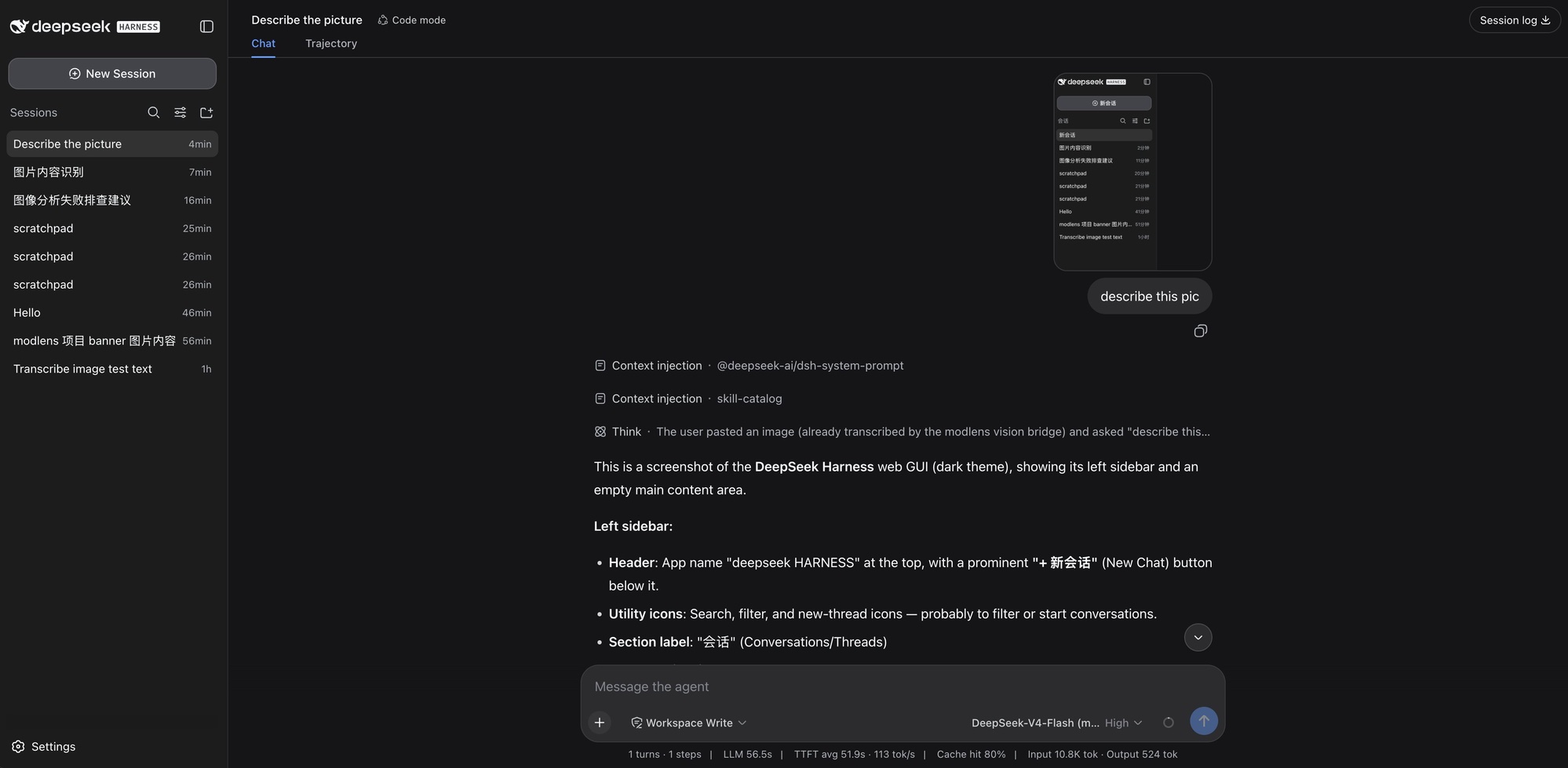
Pasting an image straight into DeepSeek Harness, read through the modlens vision plugin

A tweet screenshot in the Codex desktop app. It reads the author, the caption, the photo itself (down to what both people are wearing), the timestamp, and every engagement number: 5.4M views, 1.6K replies, 5.7K reposts, 116K likes.
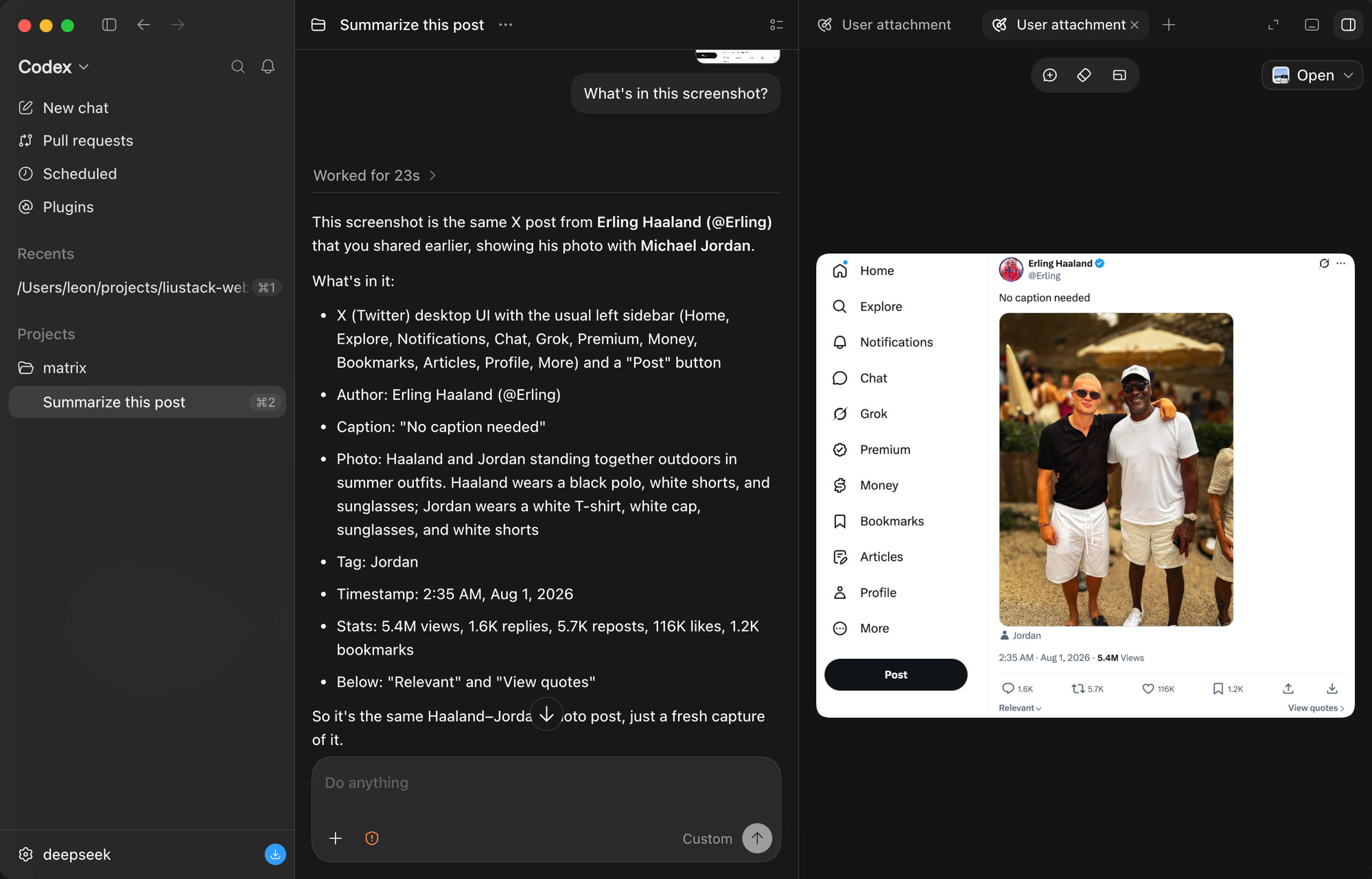
Text-only DeepSeek reading a tweet screenshot in full detail via ModLens

Three images pasted at once. The model reads them one by one, spots that they belong to one visual family, and describes each illustration's content and style.
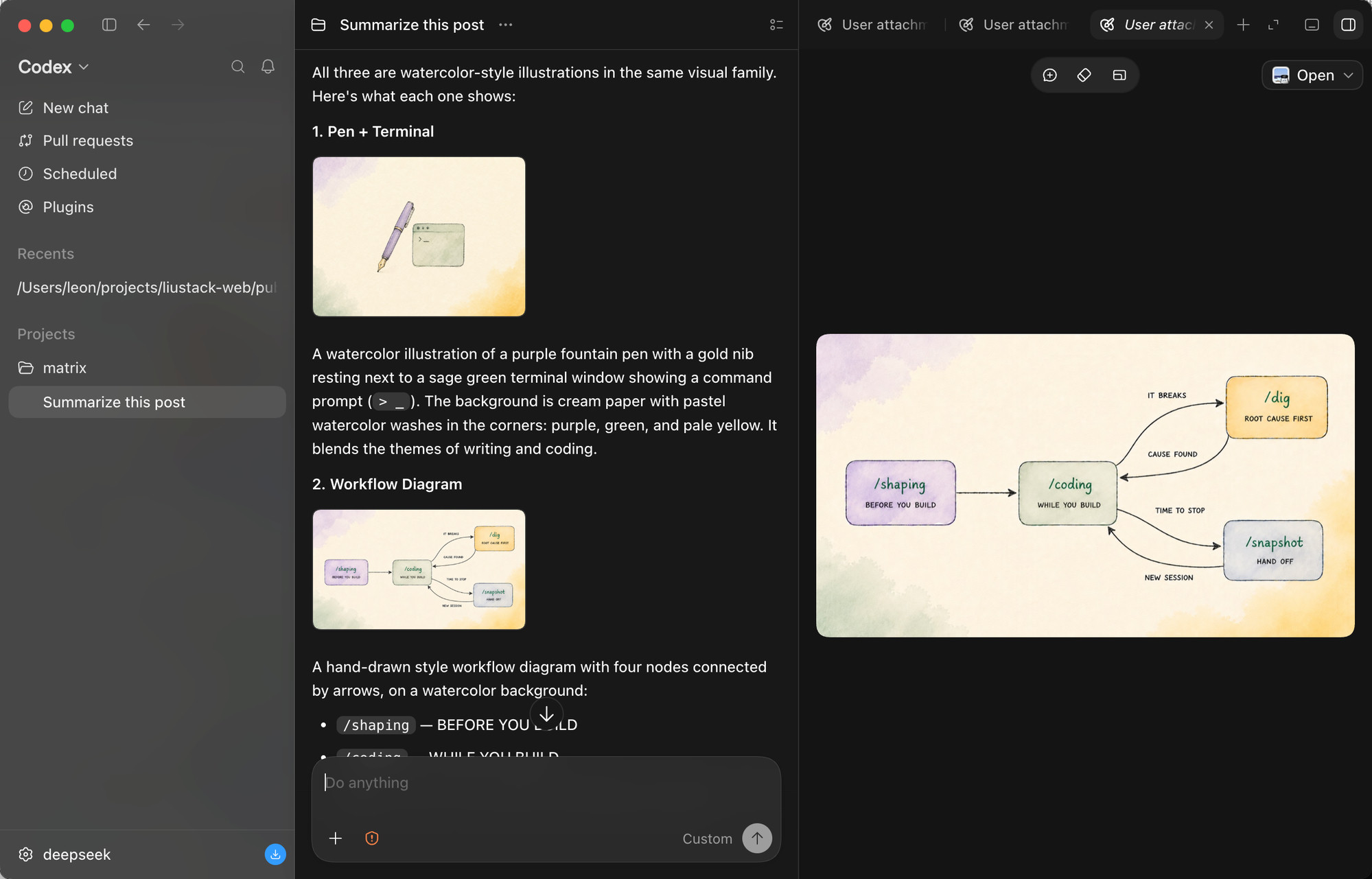
Three images dropped together, read one by one

The stress test: a scatter plot comparing 128 AI models. It reads both axes, the log scale, the per-provider color coding, the highlighted region, and every DeepSeek model called out with dashed markers. Dense charts are where vision bridges most often fail.
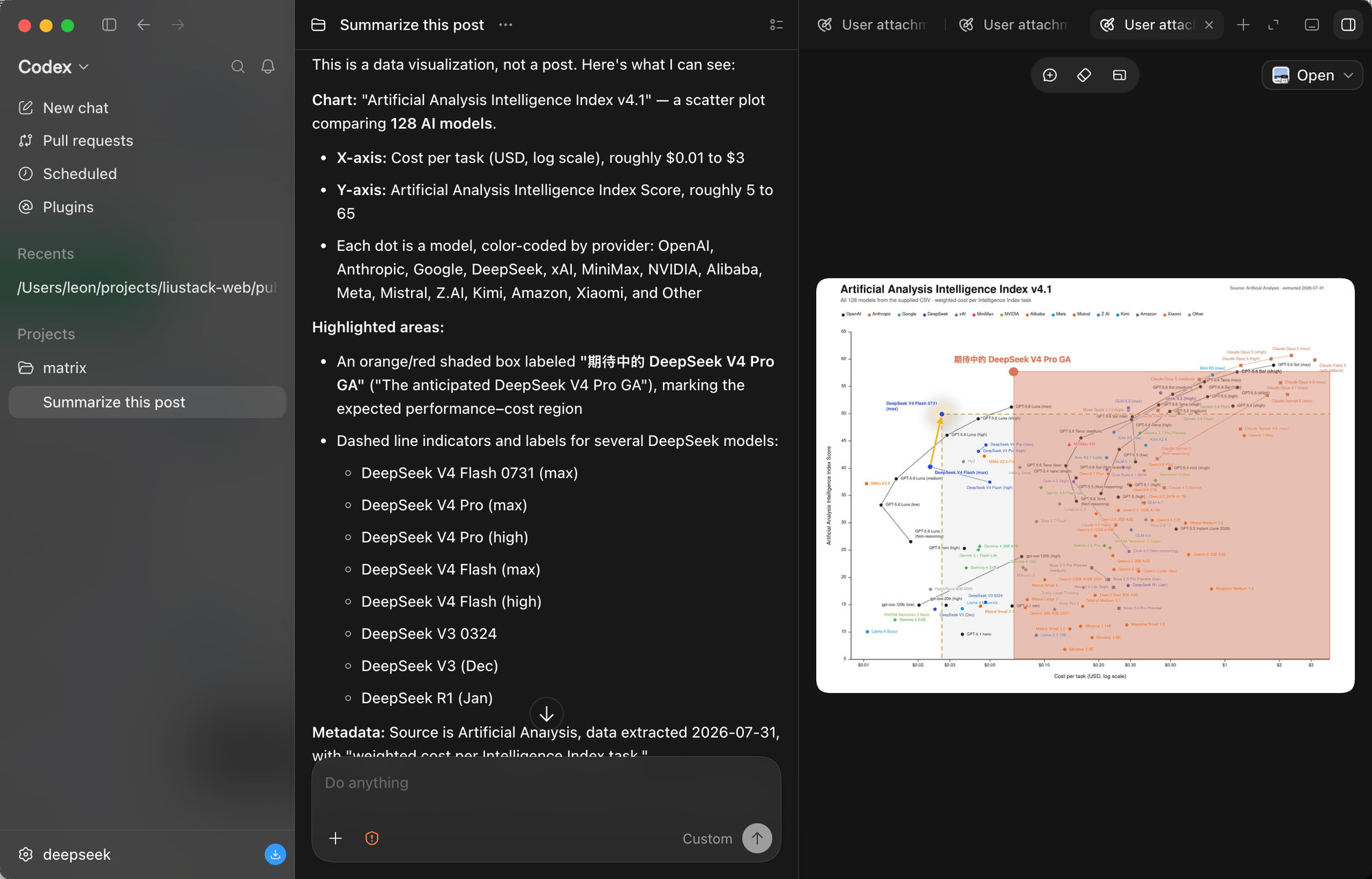
The 128-model scatter plot read in full: axes, log scale, and highlighted region

And the paste path, end to end, in a Claude Code terminal on DeepSeek. The pasted image arrives as a path rather than pixels, the skill triggers on its own, the guard confirms the model truly has no vision, and the slide's full content comes back: titles, layout, background, plus an honestly stated uncertainty about the truncated filename.
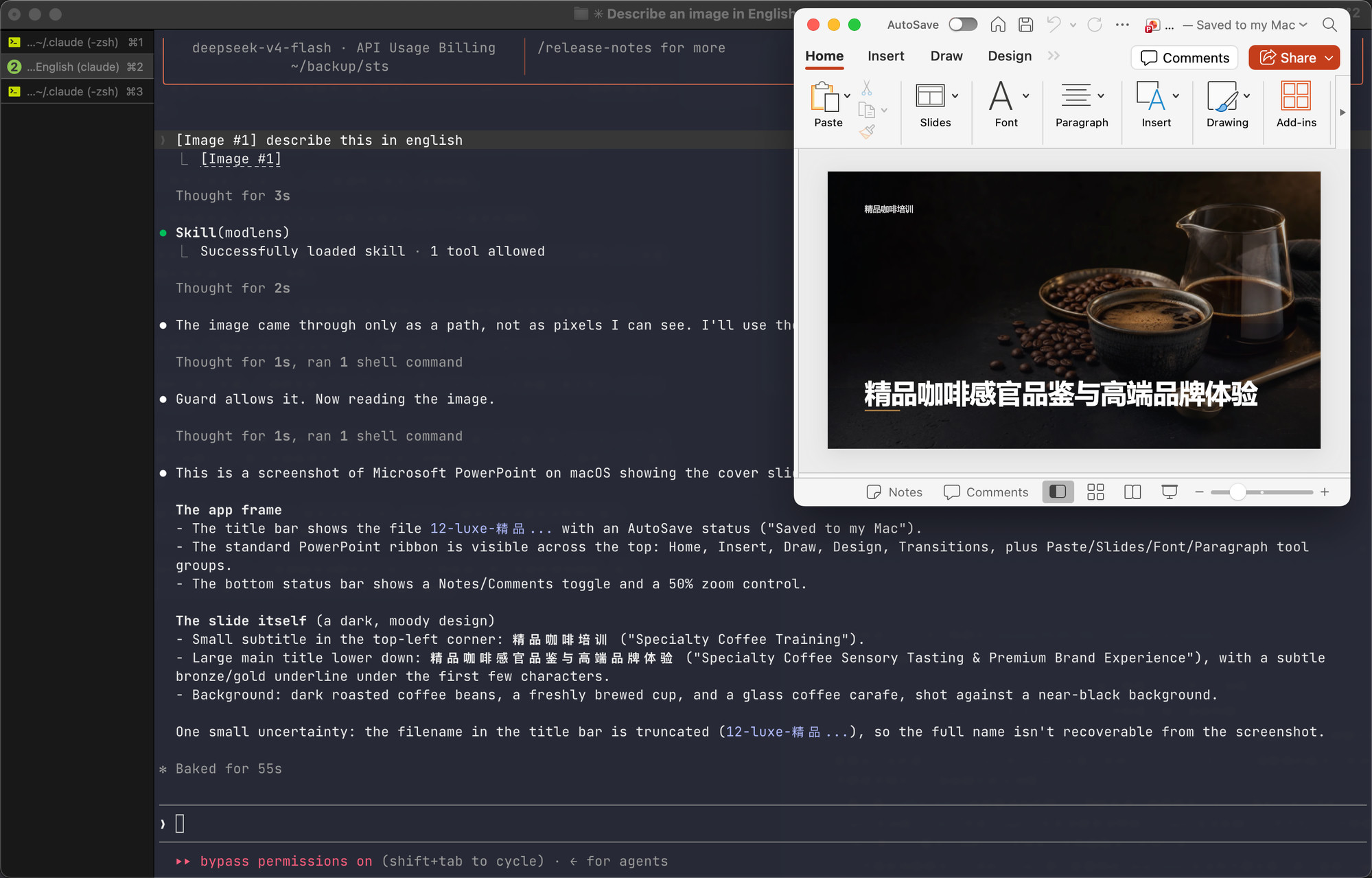
The skill triggering on its own in a DeepSeek Claude Code session and reading a pasted slide

Documentation

Doc Read it when
Install guide Installing the skill step by step (written for an agent)
CLI manual The CLI the skill drives: flags, config, doctor
Troubleshooting A command failed and the message needs decoding
Configuration Setting a key, switching providers, fixing config
Output contract Parsing the JSON or building on it
Harness setup Wiring it into Codex, Claude Code, Pi, or OpenCode
Security File permissions, image content as untrusted input
CHANGELOG Finding what changed in a version

Contributing

ModLens does not accept pull requests. The project is maintained by a single author who reviews every line, which is a deliberate choice for reliability. Two effective ways to contribute:

  • Open an issue. Bugs, suggestions, confusing errors, unclear docs. Issues are read and shape what gets built next.
  • Fork it. Under MIT your copy is fully yours to modify and publish.

Shameless plug

ModSearch is ModLens's sibling project, the same craft applied to another missing sense: it gives models with no web access web search, X search, and single-page fetch. Free, no signup, no API key. A model that needs ModLens for its eyes usually needs ModSearch for the web:

npx -y @deepseek-ai/dsh plugin --profile web add @liustack/modsearch@latest

Follow the liustack WeChat official account: AI startup opportunities, indie-dev insights, and hands-on AI tooling, delivered as they happen. Scan the QR code in WeChat, or search for "liustack":

liustack WeChat official account

⭐ If it helps, star ModLens and ModSearch. Stars are how the next developer finds them.

Key ecosystem partners

The projects worth recommending in the DeepSeek Harness ecosystem.

  • 🛒 dsh-market — The plugin market inside DeepSeek Harness. Browse 800+ community plugins with category filters and screenshot previews, one-click install and update, and live theme switching. Most need no restart. DeepSeek Harness 的可视化插件市场。设置页里直接逛社区全部 800+ 插件:分类筛选、截图预览、一键安装与更新、主题即点即换,装完多数免重启。
  • 🖥️ DeepSeek Harness Desktop — A desktop front end for DeepSeek Harness. Start and manage the Harness service on your own machine without installing Node.js or running a command. A plugin market, remote control from a phone, and IM channels are on its roadmap. Site 为 DeepSeek Harness 生态打造的现代化桌面端。不用配置 Node.js,也不用敲命令,就能启动和管理本机的 Harness 服务。后续还会支持插件市场、移动端远程控制和 IM Channels。官网

Star History

Star History Chart

Disclaimer

Provided as-is under the MIT License below. The author makes no warranty and gives no endorsement for any particular use, commercial use included. Your use of upstream engines (Antigravity CLI, the Gemini, OpenAI, and Anthropic APIs, and any OpenAI-compatible endpoint) is governed by their own terms and quotas, which you are responsible for.

License

MIT

View on GitHub

Recent activity

commits and pull requests

Releases and announcements

82 total
  1. v3.25.4v3.25.4Sep 1, 2026

    - **openai-compat requests say `stream: false` out loud ([#94](https://github.com/liustack/modlens/issues/94)).** The OpenAI spec defaults `stream` to false when the field is absent, but some self-hosted and regional gateways default the other way and answer an SSE body, which `response.json()` rejects with `Unexpected token 'd', "data:{"id""... is not valid JSON` — making modlens unusable against such a gateway. The request body now carries `stream: false` explicitly, so the response is plain JSON regardless of what the gateway assumes. The field was already on `mergeExtraBody`'s reserved list, so `extraBody` could never override it; it just was never actually sent. Thanks to @moyi497475207 for a report that arrived with curl proof of the gateway's behavior and the exact one-line patch. - **dsh >= 0.1.2: compact works on `(modlens vision)` routes ([#93](https://github.com/liustack/modlens/issues/93)).** dsh 0.1.2 gave its `LlmAdapter` base class a new `imageRequestPricing` default, and `LlmRuntime` forwards to it synchronously while measuring token pressure — no feature check, same shape as the 0.1.1 `prepareCall` dispatch ([#73](https://github.com/liustack/modlens/issues/73)). T

  2. v3.25.3v3.25.3Aug 30, 2026

    - **API provider requests survive Node 26.0's built-in fetch (empty headers, still-gzipped body) ([#91](https://github.com/liustack/modlens/issues/91)).** Importing npm undici — which modlens resolves from node_modules since #23 — claims the process-wide `undici.globalDispatcher.2` slot at load time. Node 26.0.0's built-in fetch is undici 8.0.2 and reads that same slot, so on the no-proxy path (which used the host fetch) it drove npm undici 8.10.0's Agent. The two disagree about HTTP/2 response headers: 8.0.2's fetch walks `rawHeaders` as a flat array while 8.10.0's h2 client hands over an object, so the walk runs zero times and every header is dropped — `content-encoding` included. The gzip body was never decompressed and `response.json()` threw `Unexpected token '\x1f'` on the raw bytes. Gemini's endpoint negotiates HTTP/2, which is why `gemini-api` surfaced it; HTTP/1.1 headers are already an array and are immune, as are Node 24 (built-in undici 7.x on the `.1` slot, with h2 forced off by the compat wrapper) and Node 26.8+ (built-in 8.10.0 agrees with the npm copy). `apiFetch` now never touches the host fetch: with or without a proxy it uses npm undici's own fetch with a same-s

  3. v3.25.2v3.25.2Aug 27, 2026

    - **GLM-5.3-Flash is recognized as native vision.** Z.ai released `glm-5.3-flash` on 2026-08-26 as the GLM-5 line's first natively multimodal model, and its name carries neither `v` nor `vision`. The reuse vision table matches the complete slug and delimited suffixes (`:free`, `-air`), so the bare slug, OpenRouter's `z-ai/glm-5.3-flash`, HuggingFace's `zai-org/GLM-5.3-Flash`, and `glm-5.3-flash:free` are judged image-capable, while a run-on name like `glm-5.3-flashlight` is not. The dsh wrapper's name gate uses the same boundary, so a catalog that copies the id without modalities does not mint a `(modlens vision)` twin and strip native sight. GLM-5.3 itself stays text-only. The guard example in `configure.md` drops the broad `glm-5.*` allow in favour of the known text spellings on both bare and namespaced forms (`glm-5.2*`, `*/glm-5.2*`, `glm-5.3`, `*/glm-5.3`). Vision denials are also namespaced: `glm-*v*` and `*/glm-*v*` carve `z-ai/glm-5.2v` and `z-ai/glm-5.2-vision` out of `*/glm-5.2*`, and flash denials use delimited patterns rather than a trailing `*`. Docs also note that GLM-5.3 and GLM-5.3-Flash cannot disable thinking.

  4. v3.25.1v3.25.1Aug 27, 2026

    - **Aborted provider calls fail over again on Node 24 ([#85](https://github.com/liustack/modlens/issues/85)).** Node 24's `DOMException` — including the `AbortError` thrown when `AbortSignal.timeout` fires or a call is cancelled — exposes `message` as a read-only getter, and two places assigned to it directly: the failover loop in `analyze()` while contextualizing a provider failure, and `runCommand()` while redacting secrets from the explained error. The assignment threw `Cannot set property message of #<AbortError> which has only a getter`, replacing the abort with a hard crash, so a timed-out provider took the whole read down instead of falling through to the next provider in the chain. On dsh this surfaced as "the vision engine failed" for any paste slow enough to hit the timeout. Both sites now write through one helper that assigns when it can and redefines the property on the same object when the getter refuses, so the error keeps its identity (`instanceof`, quota classification) and failover proceeds. Regression tests cover a real `DOMException('AbortError')` and both call paths. Thanks to @Dialong for a report that had already located both assignments and the fix. - **dsh:

  5. v3.25.0v3.25.0Aug 25, 2026

    - **dsh: Xiaomi MiMo's text-only models get their `(modlens vision)` variants ([#80](https://github.com/liustack/modlens/issues/80), [#82](https://github.com/liustack/modlens/issues/82)).** Auto-discovery's default families now include `mimo`, but with the gate reversed: only ids carrying a `-pro` segment (`mimo-v2.5-pro`, `mimo-v2.5-pro-ultraspeed`, `mimo-v2-pro`, and a `:free`-style qualifier after it) are wrapped. Xiaomi's naming convention — verified against the official model catalog for both the v2 and v2.5 generations — marks bare version ids as native omni models (`mimo-v2.5` takes text, image, video, and audio) and `-pro` as the text-only flagship, so there is no vision marker in the name to exclude; only the named text subset is safe to include. The bare omni model keeps its native sight, and the `asr`/`tts`/`voiceclone`/`voicedesign` speech line falls outside the gate on its own. A declared image modality still vetoes a wrap first, and an explicit `families` list keeps the same MiMo gate. Thanks to @MagicSquarekey and @375578951 for the reports. - **dsh: the settings card renders its form immediately instead of waiting out a full local-agent probe ([#83](https://github.

Code frequency

additions and deletions
+18.9K-18.9KWeek of 2026-02-22: +2,497 linesWeek of 2026-02-22: -86 linesWeek of 2026-03-01: +0 linesWeek of 2026-03-01: -0 linesWeek of 2026-03-08: +0 linesWeek of 2026-03-08: -0 linesWeek of 2026-03-15: +0 linesWeek of 2026-03-15: -0 linesWeek of 2026-03-22: +0 linesWeek of 2026-03-22: -0 linesWeek of 2026-03-29: +0 linesWeek of 2026-03-29: -0 linesWeek of 2026-04-05: +0 linesWeek of 2026-04-05: -0 linesWeek of 2026-04-12: +0 linesWeek of 2026-04-12: -0 linesWeek of 2026-04-19: +0 linesWeek of 2026-04-19: -0 linesWeek of 2026-04-26: +0 linesWeek of 2026-04-26: -0 linesWeek of 2026-05-03: +0 linesWeek of 2026-05-03: -0 linesWeek of 2026-05-10: +0 linesWeek of 2026-05-10: -0 linesWeek of 2026-05-17: +0 linesWeek of 2026-05-17: -0 linesWeek of 2026-05-24: +0 linesWeek of 2026-05-24: -0 linesWeek of 2026-05-31: +0 linesWeek of 2026-05-31: -0 linesWeek of 2026-06-07: +0 linesWeek of 2026-06-07: -0 linesWeek of 2026-06-14: +0 linesWeek of 2026-06-14: -0 linesWeek of 2026-06-21: +0 linesWeek of 2026-06-21: -0 linesWeek of 2026-06-28: +0 linesWeek of 2026-06-28: -0 linesWeek of 2026-07-05: +0 linesWeek of 2026-07-05: -0 linesWeek of 2026-07-12: +0 linesWeek of 2026-07-12: -0 linesWeek of 2026-07-19: +0 linesWeek of 2026-07-19: -0 linesWeek of 2026-07-26: +788 linesWeek of 2026-07-26: -563 linesWeek of 2026-08-02: +14,122 linesWeek of 2026-08-02: -4,602 linesWeek of 2026-08-09: +18,916 linesWeek of 2026-08-09: -4,262 linesWeek of 2026-08-16: +12,455 linesWeek of 2026-08-16: -1,986 linesWeek of 2026-08-23: +947 linesWeek of 2026-08-23: -127 linesFeb 22, 2026Aug 23, 2026
+49.7K lines added, -11.6K removed over the last year.

Commits per week

last 52 weeks
1840Week of 2025-09-06: 0 commitsWeek of 2025-09-13: 0 commitsWeek of 2025-09-20: 0 commitsWeek of 2025-09-27: 0 commitsWeek of 2025-10-04: 0 commitsWeek of 2025-10-11: 0 commitsWeek of 2025-10-18: 0 commitsWeek of 2025-10-25: 0 commitsWeek of 2025-11-01: 0 commitsWeek of 2025-11-09: 0 commitsWeek of 2025-11-16: 0 commitsWeek of 2025-11-23: 0 commitsWeek of 2025-11-30: 0 commitsWeek of 2025-12-07: 0 commitsWeek of 2025-12-14: 0 commitsWeek of 2025-12-21: 0 commitsWeek of 2025-12-28: 0 commitsWeek of 2026-01-04: 0 commitsWeek of 2026-01-11: 0 commitsWeek of 2026-01-18: 0 commitsWeek of 2026-01-25: 0 commitsWeek of 2026-02-01: 0 commitsWeek of 2026-02-08: 0 commitsWeek of 2026-02-15: 0 commitsWeek of 2026-02-22: 3 commitsWeek of 2026-03-01: 0 commitsWeek of 2026-03-08: 0 commitsWeek of 2026-03-15: 0 commitsWeek of 2026-03-22: 0 commitsWeek of 2026-03-29: 0 commitsWeek of 2026-04-05: 0 commitsWeek of 2026-04-12: 0 commitsWeek of 2026-04-19: 0 commitsWeek of 2026-04-26: 0 commitsWeek of 2026-05-03: 0 commitsWeek of 2026-05-10: 0 commitsWeek of 2026-05-17: 0 commitsWeek of 2026-05-24: 0 commitsWeek of 2026-05-31: 0 commitsWeek of 2026-06-07: 0 commitsWeek of 2026-06-14: 0 commitsWeek of 2026-06-21: 0 commitsWeek of 2026-06-28: 0 commitsWeek of 2026-07-05: 0 commitsWeek of 2026-07-12: 0 commitsWeek of 2026-07-19: 0 commitsWeek of 2026-07-26: 2 commitsWeek of 2026-08-02: 133 commitsWeek of 2026-08-09: 184 commitsWeek of 2026-08-16: 105 commitsWeek of 2026-08-23: 17 commitsWeek of 2026-08-30: 7 commitsSep 6, 2025Aug 30, 2026
451 commits in the last 52 weeks.

When work happens

weekday and hour
SunMonTueWedThuFriSat036912151821Sun 0:00 — 6 commitsSun 1:00 — 0 commitsSun 2:00 — 0 commitsSun 3:00 — 0 commitsSun 4:00 — 0 commitsSun 5:00 — 0 commitsSun 6:00 — 0 commitsSun 7:00 — 0 commitsSun 8:00 — 0 commitsSun 9:00 — 1 commitsSun 10:00 — 1 commitsSun 11:00 — 3 commitsSun 12:00 — 0 commitsSun 13:00 — 0 commitsSun 14:00 — 4 commitsSun 15:00 — 6 commitsSun 16:00 — 3 commitsSun 17:00 — 6 commitsSun 18:00 — 0 commitsSun 19:00 — 0 commitsSun 20:00 — 1 commitsSun 21:00 — 2 commitsSun 22:00 — 4 commitsSun 23:00 — 5 commitsMon 0:00 — 8 commitsMon 1:00 — 8 commitsMon 2:00 — 5 commitsMon 3:00 — 0 commitsMon 4:00 — 0 commitsMon 5:00 — 0 commitsMon 6:00 — 0 commitsMon 7:00 — 0 commitsMon 8:00 — 0 commitsMon 9:00 — 0 commitsMon 10:00 — 0 commitsMon 11:00 — 0 commitsMon 12:00 — 0 commitsMon 13:00 — 0 commitsMon 14:00 — 0 commitsMon 15:00 — 0 commitsMon 16:00 — 1 commitsMon 17:00 — 0 commitsMon 18:00 — 0 commitsMon 19:00 — 3 commitsMon 20:00 — 0 commitsMon 21:00 — 1 commitsMon 22:00 — 3 commitsMon 23:00 — 5 commitsTue 0:00 — 2 commitsTue 1:00 — 0 commitsTue 2:00 — 6 commitsTue 3:00 — 0 commitsTue 4:00 — 0 commitsTue 5:00 — 0 commitsTue 6:00 — 0 commitsTue 7:00 — 0 commitsTue 8:00 — 0 commitsTue 9:00 — 0 commitsTue 10:00 — 0 commitsTue 11:00 — 0 commitsTue 12:00 — 0 commitsTue 13:00 — 0 commitsTue 14:00 — 4 commitsTue 15:00 — 0 commitsTue 16:00 — 9 commitsTue 17:00 — 12 commitsTue 18:00 — 3 commitsTue 19:00 — 0 commitsTue 20:00 — 2 commitsTue 21:00 — 0 commitsTue 22:00 — 1 commitsTue 23:00 — 3 commitsWed 0:00 — 0 commitsWed 1:00 — 4 commitsWed 2:00 — 0 commitsWed 3:00 — 0 commitsWed 4:00 — 0 commitsWed 5:00 — 0 commitsWed 6:00 — 0 commitsWed 7:00 — 0 commitsWed 8:00 — 0 commitsWed 9:00 — 0 commitsWed 10:00 — 0 commitsWed 11:00 — 0 commitsWed 12:00 — 3 commitsWed 13:00 — 1 commitsWed 14:00 — 2 commitsWed 15:00 — 1 commitsWed 16:00 — 3 commitsWed 17:00 — 8 commitsWed 18:00 — 1 commitsWed 19:00 — 2 commitsWed 20:00 — 0 commitsWed 21:00 — 2 commitsWed 22:00 — 1 commitsWed 23:00 — 1 commitsThu 0:00 — 13 commitsThu 1:00 — 23 commitsThu 2:00 — 4 commitsThu 3:00 — 10 commitsThu 4:00 — 0 commitsThu 5:00 — 0 commitsThu 6:00 — 0 commitsThu 7:00 — 0 commitsThu 8:00 — 0 commitsThu 9:00 — 0 commitsThu 10:00 — 3 commitsThu 11:00 — 1 commitsThu 12:00 — 2 commitsThu 13:00 — 0 commitsThu 14:00 — 5 commitsThu 15:00 — 2 commitsThu 16:00 — 0 commitsThu 17:00 — 4 commitsThu 18:00 — 5 commitsThu 19:00 — 3 commitsThu 20:00 — 5 commitsThu 21:00 — 7 commitsThu 22:00 — 16 commitsThu 23:00 — 6 commitsFri 0:00 — 3 commitsFri 1:00 — 12 commitsFri 2:00 — 10 commitsFri 3:00 — 9 commitsFri 4:00 — 14 commitsFri 5:00 — 5 commitsFri 6:00 — 0 commitsFri 7:00 — 0 commitsFri 8:00 — 0 commitsFri 9:00 — 0 commitsFri 10:00 — 0 commitsFri 11:00 — 3 commitsFri 12:00 — 4 commitsFri 13:00 — 0 commitsFri 14:00 — 8 commitsFri 15:00 — 13 commitsFri 16:00 — 1 commitsFri 17:00 — 9 commitsFri 18:00 — 13 commitsFri 19:00 — 13 commitsFri 20:00 — 4 commitsFri 21:00 — 2 commitsFri 22:00 — 8 commitsFri 23:00 — 17 commitsSat 0:00 — 4 commitsSat 1:00 — 5 commitsSat 2:00 — 4 commitsSat 3:00 — 6 commitsSat 4:00 — 7 commitsSat 5:00 — 0 commitsSat 6:00 — 0 commitsSat 7:00 — 0 commitsSat 8:00 — 0 commitsSat 9:00 — 0 commitsSat 10:00 — 0 commitsSat 11:00 — 0 commitsSat 12:00 — 0 commitsSat 13:00 — 2 commitsSat 14:00 — 1 commitsSat 15:00 — 0 commitsSat 16:00 — 4 commitsSat 17:00 — 0 commitsSat 18:00 — 0 commitsSat 19:00 — 0 commitsSat 20:00 — 0 commitsSat 21:00 — 1 commitsSat 22:00 — 4 commitsSat 23:00 — 9 commits
Commit volume by weekday and hour (UTC). Larger dots mean more commits.

Who is committing

last 52 weeks
Maintainer commits451 (100%)
Community commits0 (0%)

451 commits in total over the last year.

DateListRankStars gained
Aug 26, 2026weekly#11+809
Aug 25, 2026weekly#11+809
  • freeCodeCamp/freeCodeCamp

    freeCodeCamp.org's open-source codebase and curriculum. Learn math, programming, and computer science for free.

    455.3K stars · TypeScript

  • openclaw/openclaw

    The AI that really does things. Any OS. Any Platform. The lobster way. 🦞

    389.4K stars · TypeScript

  • openclaw/openclaw

    Your own personal AI assistant. Any OS. Any Platform. The lobster way. 🦞

    384.4K stars · TypeScript

  • openclaw/openclaw

    Your own personal AI assistant. Any OS. Any Platform. The lobster way. 🦞

    384.4K stars · TypeScript

  • openclaw/openclaw

    Your own personal AI assistant. Any OS. Any Platform. The lobster way. 🦞

    384.4K stars · TypeScript

  • affaan-m/ECC

    The agent harness performance optimization system. Skills, instincts, memory, security, and research-first development for Claude Code, Codex, Opencode, Cursor and beyond.

    255.9K stars · JavaScript