localgpt-app/localgptPublic

Documents, songs and screenplays become walkable 3D worlds that you and your own coding agents edit together. A Rust desktop app on the Open World Format.

AI summary: A local-first AI assistant and world-building engine powered by Rust and Bevy.

Stars
1.1K
+3 today
Forks
105
Watchers
6
Open issues
0
Open PRs
0
Contributors
~13
Commits
1K
Branches
1

RustApache-2.0Created Feb 1, 2026Last push 5d agoLatest release desktop-v0.5.0+6 stars this week+8 this month

Quick answers

What is localgpt?
A local-first AI assistant and world-building engine powered by Rust and Bevy.
What does localgpt do?
LocalGPT is an innovative, local-first artificial intelligence assistant that doubles as a sophisticated 3D world-building engine. Developed in the high-performance Rust programming language, it leverages the Bevy game engine to allow users to construct explorable virtual environments entirely through natural language prompts. The system translates text descriptions into complex geometry, lighting setups, spatial audio, and interactive behavioral logic in real-time. Operating completely offline, it ensures that all generated assets, conversations, and long-term agent memories remain strictly on the user's hardware. It provides a unique interface where users can physically navigate and interact with the physical manifestations of the AI's creative outputs.
Who is localgpt for?
This tool is intended for Rust developers, 3D artists, and AI researchers interested in procedural generation and embodied AI. It requires modern hardware capable of running local LLMs and a 3D engine.
How do I get started with localgpt?
cargo install localgpt-gen && cargo install localgpt
How popular is localgpt on GitHub?
localgpt-app/localgpt has 1,132 stars and 105 forks on GitHub, and gained 6 stars in the last 7 days.
What license does localgpt use?
localgpt-app/localgpt is released under the Apache-2.0 license.

Star history

since Jul 29, 2026
05001KJul 2026Sep 2026Oct 2026Nov 2026
1.1K stars as of Nov 19, 2026. Measured daily since Jul 29, 2026; GitHub no longer exposes earlier star timestamps.

Update history

1 recorded
  • Nov 12, 2026Description changed from "Local AI assistant, dreaming explorable worlds." to "Documents, songs and screenplays become walkable 3D worlds that you and your own coding agents edit together. A Rust des".

Contribution activity

commits per day, last 52 weeks
NovDecJanFebMarAprMayJunJulAugSepOctNovMonWedFri2025-11-23: 0 commits2025-11-24: 0 commits2025-11-25: 0 commits2025-11-26: 0 commits2025-11-27: 0 commits2025-11-28: 0 commits2025-11-29: 0 commits2025-11-30: 0 commits2025-12-01: 0 commits2025-12-02: 0 commits2025-12-03: 0 commits2025-12-04: 0 commits2025-12-05: 0 commits2025-12-06: 0 commits2025-12-07: 0 commits2025-12-08: 0 commits2025-12-09: 0 commits2025-12-10: 0 commits2025-12-11: 0 commits2025-12-12: 0 commits2025-12-13: 0 commits2025-12-14: 0 commits2025-12-15: 0 commits2025-12-16: 0 commits2025-12-17: 0 commits2025-12-18: 0 commits2025-12-19: 0 commits2025-12-20: 0 commits2025-12-21: 0 commits2025-12-22: 0 commits2025-12-23: 0 commits2025-12-24: 0 commits2025-12-25: 0 commits2025-12-26: 0 commits2025-12-27: 0 commits2025-12-28: 0 commits2025-12-29: 0 commits2025-12-30: 0 commits2025-12-31: 0 commits2026-01-01: 0 commits2026-01-02: 0 commits2026-01-03: 0 commits2026-01-04: 0 commits2026-01-05: 0 commits2026-01-06: 0 commits2026-01-07: 0 commits2026-01-08: 0 commits2026-01-09: 0 commits2026-01-10: 0 commits2026-01-11: 0 commits2026-01-12: 0 commits2026-01-13: 0 commits2026-01-14: 0 commits2026-01-15: 0 commits2026-01-16: 0 commits2026-01-17: 0 commits2026-01-18: 0 commits2026-01-19: 0 commits2026-01-20: 0 commits2026-01-21: 0 commits2026-01-22: 0 commits2026-01-23: 0 commits2026-01-24: 0 commits2026-01-25: 0 commits2026-01-26: 0 commits2026-01-27: 0 commits2026-01-28: 0 commits2026-01-29: 0 commits2026-01-30: 0 commits2026-01-31: 0 commits2026-02-01: 2 commits2026-02-02: 20 commits2026-02-03: 42 commits2026-02-04: 16 commits2026-02-05: 3 commits2026-02-06: 3 commits2026-02-07: 9 commits2026-02-08: 11 commits2026-02-09: 6 commits2026-02-10: 5 commits2026-02-11: 5 commits2026-02-12: 9 commits2026-02-13: 6 commits2026-02-14: 9 commits2026-02-15: 1 commit2026-02-16: 17 commits2026-02-17: 19 commits2026-02-18: 11 commits2026-02-19: 31 commits2026-02-20: 11 commits2026-02-21: 28 commits2026-02-22: 28 commits2026-02-23: 14 commits2026-02-24: 5 commits2026-02-25: 7 commits2026-02-26: 2 commits2026-02-27: 5 commits2026-02-28: 20 commits2026-03-01: 34 commits2026-03-02: 17 commits2026-03-03: 6 commits2026-03-04: 1 commit2026-03-05: 1 commit2026-03-06: 0 commits2026-03-07: 16 commits2026-03-08: 8 commits2026-03-09: 6 commits2026-03-10: 5 commits2026-03-11: 1 commit2026-03-12: 2 commits2026-03-13: 1 commit2026-03-14: 9 commits2026-03-15: 8 commits2026-03-16: 25 commits2026-03-17: 7 commits2026-03-18: 15 commits2026-03-19: 5 commits2026-03-20: 2 commits2026-03-21: 19 commits2026-03-22: 21 commits2026-03-23: 0 commits2026-03-24: 1 commit2026-03-25: 4 commits2026-03-26: 0 commits2026-03-27: 0 commits2026-03-28: 4 commits2026-03-29: 1 commit2026-03-30: 0 commits2026-03-31: 0 commits2026-04-01: 0 commits2026-04-02: 0 commits2026-04-03: 0 commits2026-04-04: 0 commits2026-04-05: 0 commits2026-04-06: 0 commits2026-04-07: 0 commits2026-04-08: 0 commits2026-04-09: 1 commit2026-04-10: 14 commits2026-04-11: 17 commits2026-04-12: 5 commits2026-04-13: 0 commits2026-04-14: 0 commits2026-04-15: 0 commits2026-04-16: 0 commits2026-04-17: 0 commits2026-04-18: 0 commits2026-04-19: 5 commits2026-04-20: 0 commits2026-04-21: 0 commits2026-04-22: 0 commits2026-04-23: 0 commits2026-04-24: 0 commits2026-04-25: 0 commits2026-04-26: 0 commits2026-04-27: 0 commits2026-04-28: 0 commits2026-04-29: 0 commits2026-04-30: 0 commits2026-05-01: 0 commits2026-05-02: 0 commits2026-05-03: 0 commits2026-05-04: 0 commits2026-05-05: 0 commits2026-05-06: 1 commit2026-05-07: 0 commits2026-05-08: 0 commits2026-05-09: 0 commits2026-05-10: 0 commits2026-05-11: 0 commits2026-05-12: 0 commits2026-05-13: 0 commits2026-05-14: 0 commits2026-05-15: 0 commits2026-05-16: 0 commits2026-05-17: 0 commits2026-05-18: 0 commits2026-05-19: 0 commits2026-05-20: 0 commits2026-05-21: 0 commits2026-05-22: 0 commits2026-05-23: 0 commits2026-05-24: 0 commits2026-05-25: 0 commits2026-05-26: 0 commits2026-05-27: 0 commits2026-05-28: 0 commits2026-05-29: 0 commits2026-05-30: 0 commits2026-05-31: 0 commits2026-06-01: 0 commits2026-06-02: 0 commits2026-06-03: 0 commits2026-06-04: 0 commits2026-06-05: 0 commits2026-06-06: 0 commits2026-06-07: 0 commits2026-06-08: 0 commits2026-06-09: 0 commits2026-06-10: 1 commit2026-06-11: 0 commits2026-06-12: 0 commits2026-06-13: 2 commits2026-06-14: 1 commit2026-06-15: 0 commits2026-06-16: 0 commits2026-06-17: 0 commits2026-06-18: 1 commit2026-06-19: 0 commits2026-06-20: 0 commits2026-06-21: 1 commit2026-06-22: 0 commits2026-06-23: 0 commits2026-06-24: 0 commits2026-06-25: 0 commits2026-06-26: 0 commits2026-06-27: 0 commits2026-06-28: 0 commits2026-06-29: 0 commits2026-06-30: 0 commits2026-07-01: 0 commits2026-07-02: 0 commits2026-07-03: 0 commits2026-07-04: 0 commits2026-07-05: 0 commits2026-07-06: 0 commits2026-07-07: 0 commits2026-07-08: 0 commits2026-07-09: 0 commits2026-07-10: 0 commits2026-07-11: 0 commits2026-07-12: 0 commits2026-07-13: 0 commits2026-07-14: 0 commits2026-07-15: 0 commits2026-07-16: 0 commits2026-07-17: 0 commits2026-07-18: 0 commits2026-07-19: 0 commits2026-07-20: 0 commits2026-07-21: 0 commits2026-07-22: 0 commits2026-07-23: 2 commits2026-07-24: 0 commits2026-07-25: 0 commits2026-07-26: 0 commits2026-07-27: 0 commits2026-07-28: 0 commits2026-07-29: 0 commits2026-07-30: 0 commits2026-07-31: 0 commits2026-08-01: 0 commits2026-08-02: 0 commits2026-08-03: 0 commits2026-08-04: 0 commits2026-08-05: 0 commits2026-08-06: 0 commits2026-08-07: 0 commits2026-08-08: 0 commits2026-08-09: 0 commits2026-08-10: 0 commits2026-08-11: 0 commits2026-08-12: 0 commits2026-08-13: 0 commits2026-08-14: 0 commits2026-08-15: 0 commits2026-08-16: 1 commit2026-08-17: 0 commits2026-08-18: 0 commits2026-08-19: 0 commits2026-08-20: 0 commits2026-08-21: 0 commits2026-08-22: 0 commits2026-08-23: 0 commits2026-08-24: 0 commits2026-08-25: 0 commits2026-08-26: 0 commits2026-08-27: 0 commits2026-08-28: 0 commits2026-08-29: 0 commits2026-08-30: 0 commits2026-08-31: 0 commits2026-09-01: 0 commits2026-09-02: 0 commits2026-09-03: 0 commits2026-09-04: 0 commits2026-09-05: 0 commits2026-09-06: 0 commits2026-09-07: 0 commits2026-09-08: 0 commits2026-09-09: 0 commits2026-09-10: 0 commits2026-09-11: 0 commits2026-09-12: 0 commits2026-09-13: 0 commits2026-09-14: 0 commits2026-09-15: 0 commits2026-09-16: 0 commits2026-09-17: 0 commits2026-09-18: 0 commits2026-09-19: 0 commits2026-09-20: 5 commits2026-09-21: 4 commits2026-09-22: 3 commits2026-09-23: 3 commits2026-09-24: 0 commits2026-09-25: 11 commits2026-09-26: 27 commits2026-09-27: 14 commits2026-09-28: 40 commits2026-09-29: 14 commits2026-09-30: 4 commits2026-10-01: 5 commits2026-10-02: 0 commits2026-10-03: 3 commits2026-10-04: 32 commits2026-10-05: 1 commit2026-10-06: 0 commits2026-10-07: 0 commits2026-10-08: 0 commits2026-10-09: 2 commits2026-10-10: 1 commit2026-10-11: 8 commits2026-10-12: 10 commits2026-10-13: 2 commits2026-10-14: 4 commits2026-10-15: 14 commits2026-10-16: 12 commits2026-10-17: 8 commits2026-10-18: 1 commit2026-10-19: 5 commits2026-10-20: 1 commit2026-10-21: 1 commit2026-10-22: 0 commits2026-10-23: 0 commits2026-10-24: 7 commits2026-10-25: 6 commits2026-10-26: 1 commit2026-10-27: 6 commits2026-10-28: 0 commits2026-10-29: 0 commits2026-10-30: 5 commits2026-10-31: 28 commits2026-11-01: 7 commits2026-11-02: 0 commits2026-11-03: 3 commits2026-11-04: 10 commits2026-11-05: 8 commits2026-11-06: 40 commits2026-11-07: 7 commits2026-11-08: 0 commits2026-11-09: 2 commits2026-11-10: 0 commits2026-11-11: 18 commits2026-11-12: 15 commits2026-11-13: 11 commits2026-11-14: 9 commits2026-11-15: 4 commits2026-11-16: 0 commits2026-11-17: 0 commits2026-11-18: 0 commits2026-11-19: 0 commits2026-11-20: 0 commits2026-11-21: 0 commits
1,038 commits in the last yearLessMore

Signals and awards

derived from tracked data
  • Very active

    1,038 commits in 52 weeks

  • Permissive license

    Apache-2.0

  • Continuous integration

    Automated checks passing

What localgpt does

LocalGPT is an innovative, local-first artificial intelligence assistant that doubles as a sophisticated 3D world-building engine. Developed in the high-performance Rust programming language, it leverages the Bevy game engine to allow users to construct explorable virtual environments entirely through natural language prompts. The system translates text descriptions into complex geometry, lighting setups, spatial audio, and interactive behavioral logic in real-time. Operating completely offline, it ensures that all generated assets, conversations, and long-term agent memories remain strictly on the user's hardware. It provides a unique interface where users can physically navigate and interact with the physical manifestations of the AI's creative outputs.

This tool is intended for Rust developers, 3D artists, and AI researchers interested in procedural generation and embodied AI. It requires modern hardware capable of running local LLMs and a 3D engine.

  • Natural Language World Building: Translates descriptive text prompts into complex 3D geometry, dynamic lighting, and environmental materials in real-time.
  • Bevy Engine Integration: Utilizes the highly optimized, data-driven Rust game engine to render explorable virtual environments smoothly on consumer hardware.
  • Local-First AI Architecture: Runs all language processing, memory management, and rendering entirely offline, ensuring absolute data privacy and sovereignty.
  • Dynamic Behavioral Logic: Allows users to dictate complex interactive behaviors and spatial audio cues for entities within the generated 3D world.
  • Persistent Agent Memory: Maintains a long-term, localized database of user interactions, allowing the AI assistant to recall past world-building decisions.
  • Command-Line Daemon Interface: Provides separate executable binaries for managing the underlying AI chat memory daemon and the visual world-generation engine.

Where teams use it

Rapid Game Prototyping

Indie game developers can quickly generate rough 3D level layouts and test spatial audio ideas simply by typing descriptive commands.

Interactive Architectural Visualization

Designers can instantly spawn walls, adjust lighting, and manipulate materials in a 3D space to visualize interior design concepts on the fly.

Offline Creative Brainstorming

Writers and artists can use the persistent AI assistant to brainstorm world-building lore in an air-gapped environment without internet access.

Educational Virtual Environments

Teachers can dynamically construct interactive 3D historical scenes or scientific simulations by describing them to the AI engine.

Private AI Companionship

Privacy-conscious individuals can interact with a highly capable, memory-persistent AI assistant that completely guarantees their data is never uploaded to the cloud.

Getting started: cargo install localgpt-gen && cargo install localgpt

README

main branch

LocalGPT LocalGPT

License Crates.io Downloads Docs CI Discord

A desktop app where a document, a song, a screenplay or a prompt becomes a .world you can walk through, with your own coding agents in the terminals beside it. A world is a package with a history: people edit it in the window, agents edit it from outside, and every change is logged, attributed, undoable and branchable. LocalGPT runs no model, calls no service and holds no key; the agents bring their own, whichever coding agent you use. Open source, Apache 2.0.
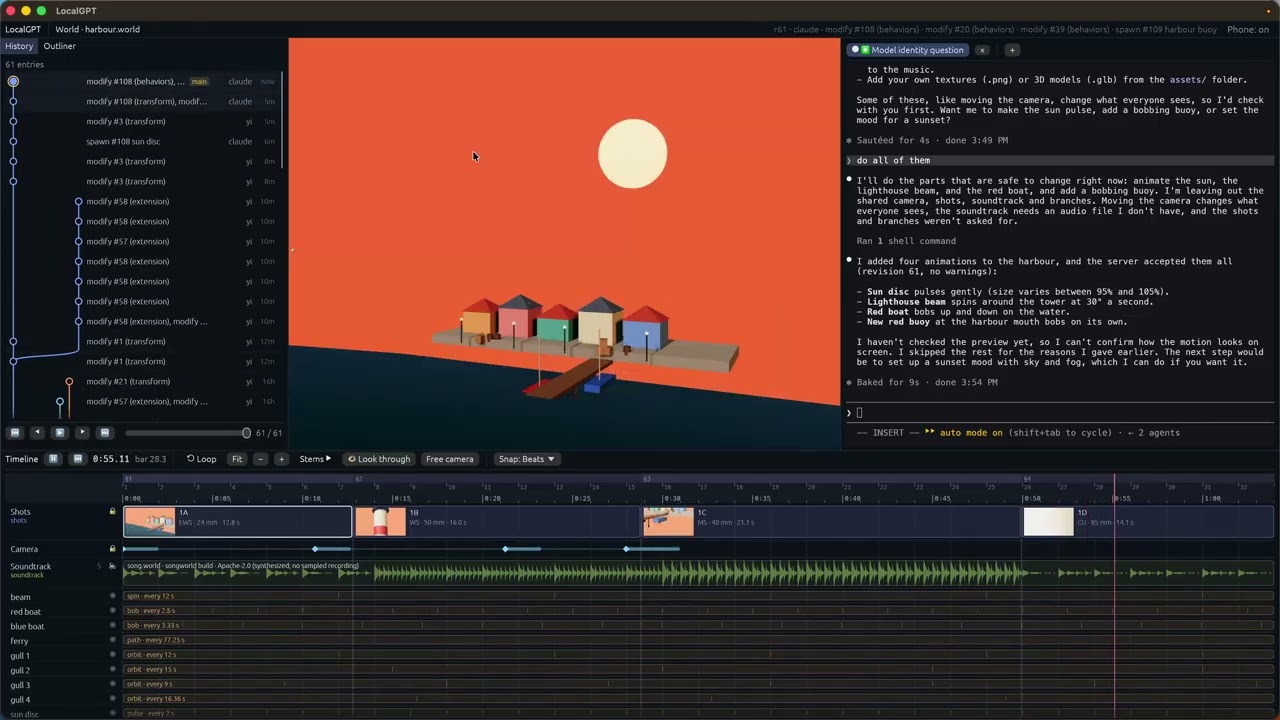
LocalGPT desktop app demo

What is in this repository

Where What
LocalGPT, the desktop app crates/app One window, every mode: a world from a prompt (Gen), from a Markdown document (Document) or from a song (Verse), or any .world package opened as a live canvas.
LocalGPT Gen, the binary crates/gen · cargo install localgpt-gen The world builder on its own: its 88 tools over MCP for Claude Desktop, Claude Code, Codex, Gemini CLI and editors, a relay so an agent drives the window you are looking at, the live canvas, headless, collaborative sessions on the LAN or through a relay.
Previs crates/previs · localgpt previs · localgpt.md A screenplay in — PDF, Final Draft, Fountain or Markdown — and per scene a .world with the set, the cast and the coverage, plus a printable board and a shot list. Deterministic, no model; the same code runs in the browser tab.
localgpt, the command line crates/cli · cargo install localgpt · npm install -g localgpt · brew install localgpt-app/tap/localgpt localgpt world: commit, undo, log, tips, verify, lint (what each camera sees and what is probably a mistake), find (which entities a phrase means), link (the world in a link, nothing uploaded), screenshot; localgpt world mcp, the shim that serves an open world's tools to any MCP agent; and localgpt previs, screenplay to board. No model, key or configuration file.
The world crates crates/world-* world-types, world-bevy, world-audio, world-export, world-sync, world-editor, world-agent: one format for every app, over the Open World Format reference crate.
The sites website*/ localgpt.app (hub and the only docs site) · localgpt.md (previs) · localgpt.world (gallery and web viewer) · localgpt.rs (devlog)

Install

# Prebuilt (no Rust toolchain needed)
npm install -g localgpt                         # macOS, Linux, Windows: the `localgpt` CLI and MCP shim
brew install localgpt-app/tap/localgpt          # macOS, Linux: the same `localgpt`, through Homebrew

# From crates.io
cargo install localgpt-gen       # the world builder: MCP server, the relay, headless, sessions
cargo install localgpt           # `localgpt world`, the MCP shim (`world mcp`), and `localgpt previs`

# From source — the desktop app ships as a build, not a crate
git clone https://github.com/localgpt-app/localgpt.git
cd localgpt
(cd crates/app/ui && npm ci && npm run build)         # the paired phone/tablet page, once (node 22)
cargo run -p localgpt-app                             # reopens what was opened last
cargo run -p localgpt-app -- --doc notes.md            # a document as a world
cargo run -p localgpt-app -- --song track.mp3         # a song as a world that performs it
cargo run -p localgpt-app -- --world scene-1.world    # a package, opened as a live canvas
cargo xtask bundle                                    # LocalGPT.app for macOS

# The shared download, once per machine, read by every app
cargo xtask fetch-assets   # the 522 MB CC0 asset pack (Poly Haven models)

Rust stable (edition 2024, so 1.85 or newer). On Linux the desktop crates need Bevy's system packages: libasound2-dev libudev-dev libwayland-dev libxkbcommon-dev libfontconfig1-dev libdbus-1-dev pkg-config. Full options, feature flags and headless builds: Installation.

The desktop app: one window, every mode

localgpt-app is Gen's world rendered by Bevy into native eframe/egui panels (crates/app/src/shell), with your own coding agents in terminals beside it. Each tab is a plain login shell started in the folder of what is open; you run whichever agent you like in it. The app runs no language model, holds no key, knows no agent by name and manages no agent's configuration. Open… at the top of the window takes a document, a song or a world; the launch flags above do the same.

  • A document. The outline, the selected section's place and the text in an editor beside the world. The file saves and the world rebuilds shortly after typing stops, in place, changing only the sections whose text changed. The cursor moving into a section flies the camera there, and clicking a thing in the world brings its section into view. Scenery beyond the draft comes from Document's sidecar beside the document, written by an agent working on the file; the outline labels each section with where its place came from.
  • A song. Verse's on-device analysis — tempo, a beat grid, sections, an energy curve, a mood — picks and furnishes the world; the soundtrack plays on the shared mixer, the world's modulations follow it, and a transport under the world pauses it. No model, no key, no upload.
  • A package. A .world folder opens as a live canvas: the window holds the authority and serves the folder's API, the history is drawn as a graph you step and play through, and agents edit from outside (next section) — from the tabs beside it, or anywhere else.

The native panels run on macOS, Windows and Linux, though the last two are newer and less tried. A timeline across the window plays the world's clock — the song, the shots, the tour — and trims and moves a package's shots, each drag an entry in the history. Docs: The desktop app. localgpt-app gen … and localgpt-app mcp-server run Gen's CLI and MCP modes inside the desktop binary (localgpt gen … forwards to it when installed, or falls back to localgpt-gen); localgpt-gen remains a standalone binary for crates.io installs without LocalGPT.app. There is one desktop bundle, LocalGPT.app, built by apps/app-desktop/.

A world is a package, and agents edit it from outside

A .world is a folder: manifest.json is the world now, ops.jsonl is every change ever made to it, assets/ holds meshes, textures and sounds by content hash, and AGENTS.md tells an agent how to change it. The format is the Open World Format: the state at any revision is a fold of the log over the base, and manifest.json is that fold at the head, written down. Rendering, editing, undo, branches, replay and multiplayer are reads over one history.

Open one as a live canvas. No agent runs in the window:

localgpt-gen --live scene-1.world      # or: localgpt-app --world scene-1.world
# [live] scene-1.world · revision 0 · API http://127.0.0.1:57822 (see scene-1.world/AGENTS.md)

Any agent that can read the folder can change the world — Claude Code, Codex, a script, localgpt itself. It sends a batch of ops to the API in .live/endpoint.json; the batch commits whole, or is refused with a reason per op that the agent can act on:

URL=$(jq -r .url scene-1.world/.live/endpoint.json); TOKEN=$(jq -r .token scene-1.world/.live/endpoint.json)
curl -s -X POST "$URL/ops" -H "Authorization: Bearer $TOKEN" -d '{
  "author": "claude", "message": "a lantern by the door",
  "ops": [{"SpawnEntity": {"entity": {"name": "lantern",
            "transform": {"position": [2.0, 0.5, 1.0]},
            "shape": {"Cylinder": {"radius": 0.1, "height": 1.0}},
            "material": {"emissive": [4.0, 2.8, 1.2, 1.0]}}}},
          {"ModifyEntity": {"id": "bench", "patch": {"transform": {"position": [0.0, 0.0, 3.0]}}}}]}'

The cheapest way to put an MCP agent on it is the shim, which serves the open canvas's tools over stdio:

localgpt world mcp scene-1.world
claude mcp add scene -- localgpt world mcp scene-1.world     # then ask Claude Code to change the world
  • People edit too. Handles in the viewport (move, turn, scale, with snapping), and keys to group, duplicate and delete. Every gesture is one batch through the same authority, one entry in the history, undone with Cmd+Z. Undo is per author, with redo. With --review, an agent's batch shows on the canvas before it commits and you accept or reject it.
  • History is a tree. A batch sent at an earlier entry starts a branch while the head stays put. The desktop app draws the log as a graph, a lane per branch, with a transport that steps, scrubs and plays it, so you watch the world being made. POST /goto moves the canvas to any point without writing anything. localgpt-gen --replay plays a session back as a time-lapse.
  • Git, if you want it. localgpt world init demo.world --git makes every batch a commit by whoever sent it; a checkout under the open app is followed; verify checks that folding the log gives the manifest.
  • Guards. A direct write to manifest.json is put back and noted; a batch may carry the revision it was decided on and is refused if the world moved; a name nothing has refuses the batch, naming it.

The headless half is localgpt world — the same authority with no window, for scripts and CI:

localgpt world init demo.world --git
localgpt world submit demo.world batch.json --author me --message "lift the cube"
localgpt world submit demo.world batch.json --at <entry-id>     # an earlier entry: a branch
localgpt world log demo.world        # every committed batch, oldest first
localgpt world tips demo.world       # every branch end
localgpt world undo demo.world --author me
localgpt world verify demo.world     # the fold still equals the head
localgpt world history demo.world    # the git history, when the world is in git

Docs: Live canvas · localgpt world · the decisions: docs/rfcs/authoring/.

Previs: a screenplay becomes a board, the board becomes a canvas

The first audience is film previsualization: people who previs today by hand, or with a generator that cannot measure. Greybox is the norm there, iteration is the work, and the deliverables — boards, shot lists — are things a .world with a history can produce.

  1. Script → board. Drop the script on localgpt.md — the PDF, a Final Draft .fdx, .fountain, or Markdown script pages. The page draws the board in the tab and offers board.html, shotlist.csv (scene, shot, size, lens, sensor, aspect, camera height, distance, in and out) and a zip with one .world per scene: a set, a stand-in per speaking character, a master and a single on everyone, with real lenses and measured camera positions. Nothing is installed and nothing is uploaded. The same draft runs on the command line, with no ceiling on scenes:

    localgpt previs script.fdx --out previs/
    # previs/scene-1.world/  previs/scene-2.world/  previs/shotlist.csv  previs/board.html

    It is deterministic and model-free: the same pages give the same board, byte for byte, on the page and on the command line, from any of the four file kinds.

  2. Board → canvas. Open a scene live and look through any shot (click its card, or press 1–9); drag cards to reorder; open the board from the shot strip.

    localgpt-gen --live previs/scene-1.world
  3. Revise by asking. Put an agent on the folder (localgpt world mcp previs/scene-1.world) and ask: "make 1B a 35", "stay on her", "from the doorway". A revision is an ordinary patch on a camera entity's ext-cinematography block. A batch sent at an earlier entry is a treatment; two treatments' boards go side by side with the changed shots marked (GET /board?tip=<a>&vs=<b>).

Posing, animatics and a generated look wait until people who previs today have used these two steps on their own pages. Docs: Previs · why previs first: docs/world-strategy.md · the observation sheet: docs/previs-user-test.md.

LocalGPT LocalGPT Gen, the binary

localgpt-gen is the world builder with the Bevy engine: the window, the 88 tools that build in it, and nothing that prompts them. It runs no model and holds no key; an agent outside the window drives it over MCP or through a live package's API.

localgpt-gen --mcp-relay                            # the window, with a relay beside it for the agent in your terminal
localgpt-gen mcp-server --connect                   # the agent's process: its tool calls reach that window
localgpt-gen mcp-server                             # a window of its own, as the agent's process: Claude Desktop, Codex, Gemini CLI, VS Code, Zed, Cursor
localgpt-gen mcp-server --headless --mcp-http 8765  # no window: CI, batch generation, an HTTP transport
localgpt-gen --world https://localgpt.world/worlds/gen-basalt-lighthouse.world/manifest.json   # open a world folder, a saved name, a manifest or a URL
localgpt-gen --live demo.world                      # the live canvas (above)
localgpt-gen --host --web                           # host a session; friends join from a browser with the invite link
localgpt-gen --join 192.168.1.5 --pin 482913        # or from their own Gen window
localgpt-gen --host --relay https://relay.example   # reach guests beyond the LAN
  • What it builds. Parametric shapes (box, sphere, cylinder, cone, capsule, plane, torus, pyramid, wedge and more), PBR materials, point/spot/directional lights, sky and fog, glTF meshes, data-driven behaviors (orbit, spin, bob, look-at, pulse, swing, path-follow, bounce), procedural audio (ambient wind, rain, forest, ocean, cave, stream; spatial emitters), NPCs with dialogue, triggers and collectibles, terrain and water, optional physics, and a blockout-first WorldGen pipeline with a navmesh and a screenshot evaluation loop.

  • Tools. 88 gen_* tools, the same set over every transport: stdio MCP, the streamable HTTP transport (--mcp-http), and the relay. None calls a model or a service.

  • Two ways to drive it. A coding agent in a terminal (Claude Code, Codex, Gemini CLI, any MCP client) whose tool calls reach the window you are looking at through the relay — localgpt-gen --mcp-relay beside the window, localgpt-gen mcp-server --connect as the agent's MCP server — with the agent's own login and nothing of it in LocalGPT; or an app that runs localgpt-gen mcp-server as its own process and gets a window with it.

    { "mcpServers": { "localgpt-gen": { "command": "localgpt-gen", "args": ["mcp-server"] } } }
  • Together. One machine hosts and owns the world; others join from their own Gen window or from a browser, walk the same world live and chat, and the host's agent builds where they ask. --web-edit lets browser guests move things directly; --relay reaches guests beyond the LAN through localgpt-relay, a small binary that forwards frames and never holds world state. Every session is a package — a base world plus one log — with per-user undo, --resume and --replay.

  • Export. .world packages and world.ron skills, glTF/GLB for Blender, Unity and Unreal, a self-contained HTML page with the same three.js viewer localgpt.world serves, and screenshots.

Docs: LocalGPT Gen · MCP Server · Collaborative Sessions · Headless Mode. Built something? Share it on Discord or YouTube.

localgpt, the world's command line

localgpt is a .world package's command line and the services other agents use — not another coding agent. It runs no language model, holds no key and has no configuration file.

localgpt world init demo.world          # a folder becomes a package (--git makes every batch a commit)
localgpt world submit demo.world -m "a lantern" <<'EOF'   # a batch of ops, whole or not at all; --at <id> forks
[{"SpawnEntity": {"entity": {"name": "lantern", "shape": {"Cylinder": {"radius": 0.1, "height": 1.0}}}}}]
EOF
localgpt world log | undo | redo | tips  # the history, and every branch end
localgpt world show | get | verify       # the world at an entry; a fold checked against the manifest
localgpt world screenshot | goto | selection | proposals   # with an app showing the world
localgpt world mcp                       # the shim: an open world's tools over stdio, for any MCP client
localgpt previs script.fdx --out previs/ # screenplay → per-scene .world packages, shotlist.csv, board.html
localgpt completion zsh                  # shell completions

One authority at a time: while an app has the world open and answers at its .live/endpoint.json, every command is a call to that app's API and the package is never opened twice; with nothing open, the command commits to the folder itself. The folder is the first argument, else $LOCALGPT_WORLD_DIR (the desktop app's terminals set it), else the world the shell is in.

Docs: CLI Commands · Quick Start · Architecture.

The format, and the crates that carry it

Every app reads and writes one format, so a document world, a song world and a drafted set are the same kind of file, and a .world made here opens in any viewer of the Open World Format — the spec, the JSON Schema, the conformance worlds and five reference parse-and-fold packages (npm, PyPI, crates.io, SwiftPM, Kotlin) live in their own repository. This workspace consumes the openworldformat crate and adds LocalGPT's own surface on top:

Crate What it is
localgpt-world-types The data model: the format's types re-exported unchanged, plus NPCs, behavior libraries, regions and the sync machinery. Serde only; schema writes world.schema.json.
localgpt-world-bevy The one Bevy mapping of the format — meshes, materials, lights, environment, camera, modulations — used by every app.
localgpt-world-audio The one mapping of the format's audio to sound: FunDSP graphs as sources inside a kira mixer, ambience, spatial emitters, soundtracks.
localgpt-world-export The web side with no Bevy: the three.js viewer (vendored from the format's npm package) and self-contained HTML export.
localgpt-world-sync Collaborative rooms: the shared document, validated ops, the wire protocol and the room authority. No Bevy, no I/O.
localgpt-world-editor The non-linear editing model: tips, forks, folds and deltas, fast enough to scrub. No engine, no I/O.
localgpt-world-agent The live authority (LiveWorld), packages, the headless commands behind localgpt world, the Tool trait and the MCP servers (stdio and HTTP) Gen and the shim run on, the environment an agent in a shell reads, and the shared paths for the apps' directories and the asset pack.
localgpt-previs Script to board, deterministic.

Two renderers draw the conformance worlds, Bevy and three.js; website-world's headless render check runs in CI and is the automated check on the web renderer. The rule inside the workspace: add fields to world-types, never a parallel format.

Develop

cargo build                                   # the CLI (default member)
cargo build --workspace                       # everything
# localgpt/audio is the CLI's audio models, which no default build compiles
cargo test --workspace --features localgpt/audio
cargo clippy --workspace --features localgpt/audio -- -D warnings   # required before commits
cargo fmt --check
cargo run -p localgpt-doc -- notes.md          # Document and Verse still run on their own
cargo run -p localgpt-verse

CI runs fmt, clippy and tests, the Bevy crates in their own job, a job for the opt-in feature tier (Verse's ml), the headless render check of the web viewer and the previs page, and cargo-deny. A signed vX.Y.Z tag publishes every crate to crates.io and the localgpt package to npm, and a desktop-vX.Y.Z tag drafts the desktop app's release: docs/releasing.md. CLAUDE.md is the map of the workspace, AGENTS.md the tool catalog, docs/ the living references and active designs, and world-strategy.md, the current product direction.

Devlog

localgpt.rs is the build-in-public log, in Rust: Why I Built LocalGPT in 4 Nights · Explorable World as Agent Skill.

Built With

Rust, Tokio, Axum, Bevy, eframe and egui, alacritty_terminal, kira and FunDSP, three.js and the Open World Format viewer, React and xterm.js for the paired-device page, wasm-bindgen, Zola, Cloudflare Workers

Contributors

License

Apache-2.0

View on GitHub

Recent activity

commits and pull requests

Releases and announcements

1 total
  1. LocalGPT 0.5.0desktop-v0.5.0Nov 10, 202611 downloads

    LocalGPT.app for macOS: LocalGPT-0.5.0-arm64.dmg for Apple silicon, LocalGPT-0.5.0-x86_64.dmg for Intel. Open the .dmg and drag LocalGPT to Applications. localgpt.rb is the Homebrew cask for this release, for the tap. Docs: https://localgpt.app/docs/app/

Code frequency

additions and deletions
+168.3K-168.3KWeek of 2025-11-23: +0 linesWeek of 2025-11-23: -0 linesWeek of 2025-11-30: +0 linesWeek of 2025-11-30: -0 linesWeek of 2025-12-07: +0 linesWeek of 2025-12-07: -0 linesWeek of 2025-12-14: +0 linesWeek of 2025-12-14: -0 linesWeek of 2025-12-21: +0 linesWeek of 2025-12-21: -0 linesWeek of 2025-12-28: +0 linesWeek of 2025-12-28: -0 linesWeek of 2026-01-04: +0 linesWeek of 2026-01-04: -0 linesWeek of 2026-01-11: +0 linesWeek of 2026-01-11: -0 linesWeek of 2026-01-18: +0 linesWeek of 2026-01-18: -0 linesWeek of 2026-01-25: +0 linesWeek of 2026-01-25: -0 linesWeek of 2026-02-01: +42,102 linesWeek of 2026-02-01: -10,923 linesWeek of 2026-02-08: +18,140 linesWeek of 2026-02-08: -3,413 linesWeek of 2026-02-15: +52,990 linesWeek of 2026-02-15: -35,732 linesWeek of 2026-02-22: +28,877 linesWeek of 2026-02-22: -7,333 linesWeek of 2026-03-01: +23,548 linesWeek of 2026-03-01: -9,143 linesWeek of 2026-03-08: +28,597 linesWeek of 2026-03-08: -6,335 linesWeek of 2026-03-15: +42,346 linesWeek of 2026-03-15: -12,231 linesWeek of 2026-03-22: +61,445 linesWeek of 2026-03-22: -27,133 linesWeek of 2026-03-29: +11 linesWeek of 2026-03-29: -9 linesWeek of 2026-04-05: +7,038 linesWeek of 2026-04-05: -943 linesWeek of 2026-04-12: +619 linesWeek of 2026-04-12: -615 linesWeek of 2026-04-19: +298 linesWeek of 2026-04-19: -49 linesWeek of 2026-04-26: +0 linesWeek of 2026-04-26: -0 linesWeek of 2026-05-03: +180 linesWeek of 2026-05-03: -111 linesWeek of 2026-05-10: +0 linesWeek of 2026-05-10: -0 linesWeek of 2026-05-17: +0 linesWeek of 2026-05-17: -0 linesWeek of 2026-05-24: +0 linesWeek of 2026-05-24: -0 linesWeek of 2026-05-31: +0 linesWeek of 2026-05-31: -0 linesWeek of 2026-06-07: +4,007 linesWeek of 2026-06-07: -1,444 linesWeek of 2026-06-14: +52 linesWeek of 2026-06-14: -17 linesWeek of 2026-06-21: +1 linesWeek of 2026-06-21: -42 linesWeek of 2026-06-28: +0 linesWeek of 2026-06-28: -0 linesWeek of 2026-07-05: +0 linesWeek of 2026-07-05: -0 linesWeek of 2026-07-12: +0 linesWeek of 2026-07-12: -0 linesWeek of 2026-07-19: +3,778 linesWeek of 2026-07-19: -2,246 linesWeek of 2026-07-26: +0 linesWeek of 2026-07-26: -0 linesWeek of 2026-08-02: +0 linesWeek of 2026-08-02: -0 linesWeek of 2026-08-09: +0 linesWeek of 2026-08-09: -0 linesWeek of 2026-08-16: +1,126 linesWeek of 2026-08-16: -0 linesWeek of 2026-08-23: +0 linesWeek of 2026-08-23: -0 linesWeek of 2026-08-30: +0 linesWeek of 2026-08-30: -0 linesWeek of 2026-09-06: +0 linesWeek of 2026-09-06: -0 linesWeek of 2026-09-13: +0 linesWeek of 2026-09-13: -0 linesWeek of 2026-09-20: +104,897 linesWeek of 2026-09-20: -20,790 linesWeek of 2026-09-27: +110,268 linesWeek of 2026-09-27: -15,042 linesWeek of 2026-10-04: +27,480 linesWeek of 2026-10-04: -34,353 linesWeek of 2026-10-11: +22,097 linesWeek of 2026-10-11: -3,855 linesWeek of 2026-10-18: +1,810 linesWeek of 2026-10-18: -722 linesWeek of 2026-10-25: +37,619 linesWeek of 2026-10-25: -70,976 linesWeek of 2026-11-01: +71,189 linesWeek of 2026-11-01: -168,300 linesWeek of 2026-11-08: +25,272 linesWeek of 2026-11-08: -12,403 linesWeek of 2026-11-15: +69 linesWeek of 2026-11-15: -92 linesNov 23, 2025Nov 15, 2026
+715.9K lines added, -444.3K removed over the last year.

Commits per week

last 52 weeks
1180Week of 2025-11-23: 0 commitsWeek of 2025-11-30: 0 commitsWeek of 2025-12-07: 0 commitsWeek of 2025-12-14: 0 commitsWeek of 2025-12-21: 0 commitsWeek of 2025-12-28: 0 commitsWeek of 2026-01-04: 0 commitsWeek of 2026-01-11: 0 commitsWeek of 2026-01-18: 0 commitsWeek of 2026-01-25: 0 commitsWeek of 2026-02-01: 95 commitsWeek of 2026-02-08: 51 commitsWeek of 2026-02-15: 118 commitsWeek of 2026-02-22: 81 commitsWeek of 2026-03-01: 75 commitsWeek of 2026-03-08: 32 commitsWeek of 2026-03-15: 81 commitsWeek of 2026-03-22: 30 commitsWeek of 2026-03-29: 1 commitsWeek of 2026-04-05: 32 commitsWeek of 2026-04-12: 5 commitsWeek of 2026-04-19: 5 commitsWeek of 2026-04-26: 0 commitsWeek of 2026-05-03: 1 commitsWeek of 2026-05-10: 0 commitsWeek of 2026-05-17: 0 commitsWeek of 2026-05-24: 0 commitsWeek of 2026-05-31: 0 commitsWeek of 2026-06-07: 3 commitsWeek of 2026-06-14: 2 commitsWeek of 2026-06-21: 1 commitsWeek of 2026-06-28: 0 commitsWeek of 2026-07-05: 0 commitsWeek of 2026-07-12: 0 commitsWeek of 2026-07-19: 2 commitsWeek of 2026-07-26: 0 commitsWeek of 2026-08-02: 0 commitsWeek of 2026-08-09: 0 commitsWeek of 2026-08-16: 1 commitsWeek of 2026-08-23: 0 commitsWeek of 2026-08-30: 0 commitsWeek of 2026-09-06: 0 commitsWeek of 2026-09-13: 0 commitsWeek of 2026-09-20: 53 commitsWeek of 2026-09-27: 80 commitsWeek of 2026-10-04: 36 commitsWeek of 2026-10-11: 58 commitsWeek of 2026-10-18: 15 commitsWeek of 2026-10-25: 46 commitsWeek of 2026-11-01: 75 commitsWeek of 2026-11-08: 55 commitsWeek of 2026-11-15: 4 commitsNov 23, 2025Nov 15, 2026
1K commits in the last 52 weeks.

When work happens

weekday and hour
SunMonTueWedThuFriSat036912151821Sun 0:00 — 19 commitsSun 1:00 — 10 commitsSun 2:00 — 0 commitsSun 3:00 — 0 commitsSun 4:00 — 0 commitsSun 5:00 — 0 commitsSun 6:00 — 2 commitsSun 7:00 — 0 commitsSun 8:00 — 6 commitsSun 9:00 — 4 commitsSun 10:00 — 9 commitsSun 11:00 — 20 commitsSun 12:00 — 15 commitsSun 13:00 — 0 commitsSun 14:00 — 9 commitsSun 15:00 — 0 commitsSun 16:00 — 14 commitsSun 17:00 — 11 commitsSun 18:00 — 12 commitsSun 19:00 — 13 commitsSun 20:00 — 20 commitsSun 21:00 — 18 commitsSun 22:00 — 13 commitsSun 23:00 — 12 commitsMon 0:00 — 23 commitsMon 1:00 — 10 commitsMon 2:00 — 4 commitsMon 3:00 — 0 commitsMon 4:00 — 0 commitsMon 5:00 — 0 commitsMon 6:00 — 1 commitsMon 7:00 — 3 commitsMon 8:00 — 9 commitsMon 9:00 — 2 commitsMon 10:00 — 1 commitsMon 11:00 — 0 commitsMon 12:00 — 2 commitsMon 13:00 — 2 commitsMon 14:00 — 2 commitsMon 15:00 — 4 commitsMon 16:00 — 4 commitsMon 17:00 — 12 commitsMon 18:00 — 9 commitsMon 19:00 — 22 commitsMon 20:00 — 15 commitsMon 21:00 — 11 commitsMon 22:00 — 8 commitsMon 23:00 — 25 commitsTue 0:00 — 21 commitsTue 1:00 — 10 commitsTue 2:00 — 1 commitsTue 3:00 — 0 commitsTue 4:00 — 2 commitsTue 5:00 — 1 commitsTue 6:00 — 0 commitsTue 7:00 — 2 commitsTue 8:00 — 1 commitsTue 9:00 — 1 commitsTue 10:00 — 0 commitsTue 11:00 — 0 commitsTue 12:00 — 0 commitsTue 13:00 — 0 commitsTue 14:00 — 3 commitsTue 15:00 — 1 commitsTue 16:00 — 2 commitsTue 17:00 — 24 commitsTue 18:00 — 10 commitsTue 19:00 — 6 commitsTue 20:00 — 8 commitsTue 21:00 — 10 commitsTue 22:00 — 4 commitsTue 23:00 — 12 commitsWed 0:00 — 8 commitsWed 1:00 — 9 commitsWed 2:00 — 2 commitsWed 3:00 — 0 commitsWed 4:00 — 0 commitsWed 5:00 — 0 commitsWed 6:00 — 0 commitsWed 7:00 — 1 commitsWed 8:00 — 6 commitsWed 9:00 — 2 commitsWed 10:00 — 0 commitsWed 11:00 — 0 commitsWed 12:00 — 1 commitsWed 13:00 — 1 commitsWed 14:00 — 0 commitsWed 15:00 — 0 commitsWed 16:00 — 2 commitsWed 17:00 — 2 commitsWed 18:00 — 6 commitsWed 19:00 — 6 commitsWed 20:00 — 12 commitsWed 21:00 — 8 commitsWed 22:00 — 17 commitsWed 23:00 — 19 commitsThu 0:00 — 20 commitsThu 1:00 — 10 commitsThu 2:00 — 8 commitsThu 3:00 — 8 commitsThu 4:00 — 6 commitsThu 5:00 — 2 commitsThu 6:00 — 1 commitsThu 7:00 — 6 commitsThu 8:00 — 1 commitsThu 9:00 — 1 commitsThu 10:00 — 0 commitsThu 11:00 — 0 commitsThu 12:00 — 1 commitsThu 13:00 — 3 commitsThu 14:00 — 0 commitsThu 15:00 — 1 commitsThu 16:00 — 0 commitsThu 17:00 — 3 commitsThu 18:00 — 7 commitsThu 19:00 — 0 commitsThu 20:00 — 4 commitsThu 21:00 — 5 commitsThu 22:00 — 4 commitsThu 23:00 — 8 commitsFri 0:00 — 14 commitsFri 1:00 — 9 commitsFri 2:00 — 21 commitsFri 3:00 — 6 commitsFri 4:00 — 3 commitsFri 5:00 — 4 commitsFri 6:00 — 0 commitsFri 7:00 — 0 commitsFri 8:00 — 1 commitsFri 9:00 — 0 commitsFri 10:00 — 0 commitsFri 11:00 — 0 commitsFri 12:00 — 1 commitsFri 13:00 — 0 commitsFri 14:00 — 0 commitsFri 15:00 — 0 commitsFri 16:00 — 0 commitsFri 17:00 — 16 commitsFri 18:00 — 13 commitsFri 19:00 — 9 commitsFri 20:00 — 3 commitsFri 21:00 — 6 commitsFri 22:00 — 12 commitsFri 23:00 — 5 commitsSat 0:00 — 28 commitsSat 1:00 — 8 commitsSat 2:00 — 5 commitsSat 3:00 — 4 commitsSat 4:00 — 0 commitsSat 5:00 — 0 commitsSat 6:00 — 0 commitsSat 7:00 — 0 commitsSat 8:00 — 0 commitsSat 9:00 — 5 commitsSat 10:00 — 10 commitsSat 11:00 — 18 commitsSat 12:00 — 6 commitsSat 13:00 — 9 commitsSat 14:00 — 12 commitsSat 15:00 — 10 commitsSat 16:00 — 9 commitsSat 17:00 — 12 commitsSat 18:00 — 10 commitsSat 19:00 — 7 commitsSat 20:00 — 10 commitsSat 21:00 — 7 commitsSat 22:00 — 23 commitsSat 23:00 — 31 commits
Commit volume by weekday and hour (UTC). Larger dots mean more commits.
DateListRankStars gained
Feb 8, 2026daily#11+261
  • morluto/rea

    Reverse engineer anything with agents, from app behavior down to native binaries.

    471.6K stars · TypeScript

  • openclaw/openclaw

    The AI that really does things. Any OS. Any Platform. The lobster way. 🦞

    394.9K stars · TypeScript

  • obra/superpowers

    An agentic skills framework & software development methodology that works.

    322.9K stars · Shell

  • NousResearch/hermes-agent

    The agent that grows with you

    265K stars · Python

  • n8n-io/n8n

    Fair-code workflow automation platform with native AI capabilities. Combine visual building with custom code, self-host or cloud, 400+ integrations.

    211.6K stars · TypeScript

  • firecrawl/firecrawl

    Knowledge infrastructure to make your agents smarter. Search, scrape and access 550+ data providers through one API.

    205.3K stars · TypeScript