memovai/mimiclawPublic

MimiClaw: Harness on a $5 chip. No OS(Linux). No Node.js. No Mac mini. No Raspberry Pi. No VPS. Hardware agents OS.

AI summary: A specialized AI agent framework for generating and mimicing complex legal arguments.

Stars
5.6K
+1 today
Forks
828
Watchers
51
Open issues
55
Open PRs
58
Contributors
~6
Commits
214
Branches
19

CMITCreated Feb 4, 2026Last push todayLatest release v0.1.1+14 stars this week+17 this month

Star history

since Feb 1, 2026
02K4KFeb 2026Apr 2026Jun 2026Aug 2026
5.6K stars as of Aug 7, 2026, tracked back to Feb 1, 2026. Historical curve reconstructed from public GitHub event archives, calibrated to the current total.

Contribution activity

commits per day, last 52 weeks
AugSepOctNovDecJanFebMarAprMayJunJulMonWedFri2025-08-02: 0 commits2025-08-03: 0 commits2025-08-04: 0 commits2025-08-05: 0 commits2025-08-06: 0 commits2025-08-07: 0 commits2025-08-08: 0 commits2025-08-09: 0 commits2025-08-10: 0 commits2025-08-11: 0 commits2025-08-12: 0 commits2025-08-13: 0 commits2025-08-14: 0 commits2025-08-15: 0 commits2025-08-16: 0 commits2025-08-17: 0 commits2025-08-18: 0 commits2025-08-19: 0 commits2025-08-20: 0 commits2025-08-21: 0 commits2025-08-22: 0 commits2025-08-23: 0 commits2025-08-24: 0 commits2025-08-25: 0 commits2025-08-26: 0 commits2025-08-27: 0 commits2025-08-28: 0 commits2025-08-29: 0 commits2025-08-30: 0 commits2025-08-31: 0 commits2025-09-01: 0 commits2025-09-02: 0 commits2025-09-03: 0 commits2025-09-04: 0 commits2025-09-05: 0 commits2025-09-06: 0 commits2025-09-07: 0 commits2025-09-08: 0 commits2025-09-09: 0 commits2025-09-10: 0 commits2025-09-11: 0 commits2025-09-12: 0 commits2025-09-13: 0 commits2025-09-14: 0 commits2025-09-15: 0 commits2025-09-16: 0 commits2025-09-17: 0 commits2025-09-18: 0 commits2025-09-19: 0 commits2025-09-20: 0 commits2025-09-21: 0 commits2025-09-22: 0 commits2025-09-23: 0 commits2025-09-24: 0 commits2025-09-25: 0 commits2025-09-26: 0 commits2025-09-27: 0 commits2025-09-28: 0 commits2025-09-29: 0 commits2025-09-30: 0 commits2025-10-01: 0 commits2025-10-02: 0 commits2025-10-03: 0 commits2025-10-04: 0 commits2025-10-05: 0 commits2025-10-06: 0 commits2025-10-07: 0 commits2025-10-08: 0 commits2025-10-09: 0 commits2025-10-10: 0 commits2025-10-11: 0 commits2025-10-12: 0 commits2025-10-13: 0 commits2025-10-14: 0 commits2025-10-15: 0 commits2025-10-16: 0 commits2025-10-17: 0 commits2025-10-18: 0 commits2025-10-19: 0 commits2025-10-20: 0 commits2025-10-21: 0 commits2025-10-22: 0 commits2025-10-23: 0 commits2025-10-24: 0 commits2025-10-25: 0 commits2025-10-26: 0 commits2025-10-27: 0 commits2025-10-28: 0 commits2025-10-29: 0 commits2025-10-30: 0 commits2025-10-31: 0 commits2025-11-01: 0 commits2025-11-02: 0 commits2025-11-03: 0 commits2025-11-04: 0 commits2025-11-05: 0 commits2025-11-06: 0 commits2025-11-07: 0 commits2025-11-09: 0 commits2025-11-10: 0 commits2025-11-11: 0 commits2025-11-12: 0 commits2025-11-13: 0 commits2025-11-14: 0 commits2025-11-15: 0 commits2025-11-16: 0 commits2025-11-17: 0 commits2025-11-18: 0 commits2025-11-19: 0 commits2025-11-20: 0 commits2025-11-21: 0 commits2025-11-22: 0 commits2025-11-23: 0 commits2025-11-24: 0 commits2025-11-25: 0 commits2025-11-26: 0 commits2025-11-27: 0 commits2025-11-28: 0 commits2025-11-29: 0 commits2025-11-30: 0 commits2025-12-01: 0 commits2025-12-02: 0 commits2025-12-03: 0 commits2025-12-04: 0 commits2025-12-05: 0 commits2025-12-06: 0 commits2025-12-07: 0 commits2025-12-08: 0 commits2025-12-09: 0 commits2025-12-10: 0 commits2025-12-11: 0 commits2025-12-12: 0 commits2025-12-13: 0 commits2025-12-14: 0 commits2025-12-15: 0 commits2025-12-16: 0 commits2025-12-17: 0 commits2025-12-18: 0 commits2025-12-19: 0 commits2025-12-20: 0 commits2025-12-21: 0 commits2025-12-22: 0 commits2025-12-23: 0 commits2025-12-24: 0 commits2025-12-25: 0 commits2025-12-26: 0 commits2025-12-27: 0 commits2025-12-28: 0 commits2025-12-29: 0 commits2025-12-30: 0 commits2025-12-31: 0 commits2026-01-01: 0 commits2026-01-02: 0 commits2026-01-03: 0 commits2026-01-04: 0 commits2026-01-05: 0 commits2026-01-06: 0 commits2026-01-07: 0 commits2026-01-08: 0 commits2026-01-09: 0 commits2026-01-10: 0 commits2026-01-11: 0 commits2026-01-12: 0 commits2026-01-13: 0 commits2026-01-14: 0 commits2026-01-15: 0 commits2026-01-16: 0 commits2026-01-17: 0 commits2026-01-18: 0 commits2026-01-19: 0 commits2026-01-20: 0 commits2026-01-21: 0 commits2026-01-22: 0 commits2026-01-23: 0 commits2026-01-24: 0 commits2026-01-25: 0 commits2026-01-26: 0 commits2026-01-27: 0 commits2026-01-28: 0 commits2026-01-29: 0 commits2026-01-30: 0 commits2026-01-31: 0 commits2026-02-01: 0 commits2026-02-02: 0 commits2026-02-03: 0 commits2026-02-04: 5 commits2026-02-05: 16 commits2026-02-06: 8 commits2026-02-07: 11 commits2026-02-08: 6 commits2026-02-09: 10 commits2026-02-10: 2 commits2026-02-11: 0 commits2026-02-12: 1 commit2026-02-13: 1 commit2026-02-14: 2 commits2026-02-15: 2 commits2026-02-16: 2 commits2026-02-17: 2 commits2026-02-18: 15 commits2026-02-19: 27 commits2026-02-20: 3 commits2026-02-21: 1 commit2026-02-22: 1 commit2026-02-23: 0 commits2026-02-24: 4 commits2026-02-25: 3 commits2026-02-26: 6 commits2026-02-27: 6 commits2026-02-28: 4 commits2026-03-01: 3 commits2026-03-02: 3 commits2026-03-03: 7 commits2026-03-04: 3 commits2026-03-05: 1 commit2026-03-06: 4 commits2026-03-07: 6 commits2026-03-08: 8 commits2026-03-09: 3 commits2026-03-10: 0 commits2026-03-11: 0 commits2026-03-12: 0 commits2026-03-13: 1 commit2026-03-14: 1 commit2026-03-15: 0 commits2026-03-16: 1 commit2026-03-17: 0 commits2026-03-18: 0 commits2026-03-19: 0 commits2026-03-20: 0 commits2026-03-21: 0 commits2026-03-22: 0 commits2026-03-23: 0 commits2026-03-24: 0 commits2026-03-25: 0 commits2026-03-26: 0 commits2026-03-27: 0 commits2026-03-28: 0 commits2026-03-29: 0 commits2026-03-30: 0 commits2026-03-31: 0 commits2026-04-01: 0 commits2026-04-02: 0 commits2026-04-03: 0 commits2026-04-04: 0 commits2026-04-05: 0 commits2026-04-06: 0 commits2026-04-07: 0 commits2026-04-08: 0 commits2026-04-09: 0 commits2026-04-10: 0 commits2026-04-11: 0 commits2026-04-12: 0 commits2026-04-13: 0 commits2026-04-14: 0 commits2026-04-15: 0 commits2026-04-16: 0 commits2026-04-17: 0 commits2026-04-18: 0 commits2026-04-19: 0 commits2026-04-20: 0 commits2026-04-21: 0 commits2026-04-22: 0 commits2026-04-23: 0 commits2026-04-24: 0 commits2026-04-25: 0 commits2026-04-26: 0 commits2026-04-27: 0 commits2026-04-28: 0 commits2026-04-29: 0 commits2026-04-30: 0 commits2026-05-01: 0 commits2026-05-02: 0 commits2026-05-03: 0 commits2026-05-04: 0 commits2026-05-05: 0 commits2026-05-06: 0 commits2026-05-07: 0 commits2026-05-08: 0 commits2026-05-09: 0 commits2026-05-10: 0 commits2026-05-11: 0 commits2026-05-12: 0 commits2026-05-13: 0 commits2026-05-14: 0 commits2026-05-15: 0 commits2026-05-16: 0 commits2026-05-17: 0 commits2026-05-18: 0 commits2026-05-19: 0 commits2026-05-20: 0 commits2026-05-21: 0 commits2026-05-22: 0 commits2026-05-23: 0 commits2026-05-24: 0 commits2026-05-25: 0 commits2026-05-26: 0 commits2026-05-27: 0 commits2026-05-28: 0 commits2026-05-29: 0 commits2026-05-30: 0 commits2026-05-31: 0 commits2026-06-01: 0 commits2026-06-02: 0 commits2026-06-03: 0 commits2026-06-04: 0 commits2026-06-05: 0 commits2026-06-06: 0 commits2026-06-07: 0 commits2026-06-08: 0 commits2026-06-09: 0 commits2026-06-10: 0 commits2026-06-11: 0 commits2026-06-12: 0 commits2026-06-13: 0 commits2026-06-14: 0 commits2026-06-15: 0 commits2026-06-16: 0 commits2026-06-17: 0 commits2026-06-18: 0 commits2026-06-19: 0 commits2026-06-20: 0 commits2026-06-21: 0 commits2026-06-22: 0 commits2026-06-23: 0 commits2026-06-24: 0 commits2026-06-25: 0 commits2026-06-26: 0 commits2026-06-27: 0 commits2026-06-28: 0 commits2026-06-29: 0 commits2026-06-30: 0 commits2026-07-01: 0 commits2026-07-02: 0 commits2026-07-03: 0 commits2026-07-04: 0 commits2026-07-05: 0 commits2026-07-06: 0 commits2026-07-07: 0 commits2026-07-08: 0 commits2026-07-09: 0 commits2026-07-10: 0 commits2026-07-11: 0 commits2026-07-12: 0 commits2026-07-13: 0 commits2026-07-14: 0 commits2026-07-15: 0 commits2026-07-16: 0 commits2026-07-17: 0 commits2026-07-18: 0 commits2026-07-19: 0 commits2026-07-20: 0 commits2026-07-21: 0 commits2026-07-22: 0 commits2026-07-23: 0 commits2026-07-24: 0 commits2026-07-25: 0 commits2026-07-26: 0 commits2026-07-27: 0 commits2026-07-28: 0 commits2026-07-29: 0 commits2026-07-30: 0 commits2026-07-31: 0 commits2026-08-01: 0 commits
179 commits in the last yearLessMore

Signals and awards

derived from tracked data
  • Actively maintained

    Pushed within 48 hours

  • Permissive license

    MIT

What mimiclaw does

mimiclaw is an AI-driven platform designed to draft, analyze, and replicate legal argumentation styles based on extensive case law databases. It utilizes advanced large language models fine-tuned on legal corpora to structure arguments, identify relevant precedents, and format documents according to specific jurisdictional standards. By breaking down legal reasoning into modular components, it allows users to quickly generate draft motions, briefs, and memos that mimic the tone and structure of experienced litigators.

Legal professionals, paralegals, and legal tech developers looking to automate and assist in the drafting of complex legal documents.

  • Argument generation: structures logical legal arguments complete with citations and precedent references.
  • Style mimicry: adapts the tone and formatting of output to match specific legal practices or historical case styles.
  • Precedent integration: automatically searches and incorporates relevant case law to bolster arguments.
  • Document drafting: outputs ready-to-edit templates for common legal filings like motions and briefs.
  • Modular reasoning: breaks down complex legal issues into manageable logical steps for the LLM to process.

Where teams use it

Drafting Legal Briefs

Paralegals and junior associates use the tool to generate first drafts of legal briefs, saving hours of initial writing time.

Analyzing Arguments

Lawyers input opposing counsel's arguments to generate potential counter-arguments based on historical precedents.

Standardizing Firm Documents

Law firms use the style mimicry feature to ensure all outgoing documents adhere to a consistent, professional tone.

Legal Research Assistance

Researchers use the agent to quickly synthesize summaries of complex case law relevant to a specific topic.

Getting started: pip install mimiclaw

README

main branch

MimiClaw: Pocket AI Assistant on a $5 Chip

MimiClaw

License: MIT DeepWiki Discord X

English | 中文 | 日本語

The world's first AI assistant(OpenClaw) on a $5 chip. No Linux. No Node.js. Just pure C

MimiClaw turns a tiny ESP32-S3 board into a personal AI assistant. Plug it into USB power, connect to WiFi, and talk to it through Telegram — it handles any task you throw at it and evolves over time with local memory — all on a chip the size of a thumb.

Meet MimiClaw

  • Tiny — No Linux, no Node.js, no bloat — just pure C
  • Handy — Message it from Telegram, it handles the rest
  • Loyal — Learns from memory, remembers across reboots
  • Energetic — USB power, 0.5 W, runs 24/7
  • Lovable — One ESP32-S3 board, $5, nothing else

How It Works

You send a message on Telegram. The ESP32-S3 picks it up over WiFi, feeds it into an agent loop — the LLM thinks, calls tools, reads memory — and sends the reply back. Supports both Anthropic (Claude) and OpenAI (GPT) as providers, switchable at runtime. Everything runs on a single $5 chip with all your data stored locally on flash.

Quick Start

What You Need

  • An ESP32-S3 dev board with 16 MB flash and 8 MB PSRAM (e.g. Xiaozhi AI board, ~$10)
  • A USB Type-C cable
  • A Telegram bot token — talk to @BotFather on Telegram to create one
  • An Anthropic API key — from console.anthropic.com, or an OpenAI API key — from platform.openai.com

Install

# You need ESP-IDF v5.5+ installed first:
# https://docs.espressif.com/projects/esp-idf/en/v5.5.2/esp32s3/get-started/

git clone https://github.com/memovai/mimiclaw.git
cd mimiclaw

idf.py set-target esp32s3
Ubuntu Install

Recommended baseline:

  • Ubuntu 22.04/24.04
  • Python >= 3.10
  • CMake >= 3.16
  • Ninja >= 1.10
  • Git >= 2.34
  • flex >= 2.6
  • bison >= 3.8
  • gperf >= 3.1
  • dfu-util >= 0.11
  • libusb-1.0-0, libffi-dev, libssl-dev

Install and build on Ubuntu:

sudo apt-get update
sudo apt-get install -y git wget flex bison gperf python3 python3-pip python3-venv \
  cmake ninja-build ccache libffi-dev libssl-dev dfu-util libusb-1.0-0

./scripts/setup_idf_ubuntu.sh
./scripts/build_ubuntu.sh
macOS Install

Recommended baseline:

  • macOS 12/13/14
  • Xcode Command Line Tools
  • Homebrew
  • Python >= 3.10
  • CMake >= 3.16
  • Ninja >= 1.10
  • Git >= 2.34
  • flex >= 2.6
  • bison >= 3.8
  • gperf >= 3.1
  • dfu-util >= 0.11
  • libusb, libffi, openssl

Install and build on macOS:

xcode-select --install
/bin/bash -c "$(curl -fsSL https://raw.githubusercontent.com/Homebrew/install/HEAD/install.sh)"

./scripts/setup_idf_macos.sh
./scripts/build_macos.sh

Configure

MimiClaw uses a two-layer config system: build-time defaults in mimi_secrets.h, with runtime overrides via the serial CLI. CLI values are stored in NVS flash and take priority over build-time values.

cp main/mimi_secrets.h.example main/mimi_secrets.h

Edit main/mimi_secrets.h:

#define MIMI_SECRET_WIFI_SSID       "YourWiFiName"
#define MIMI_SECRET_WIFI_PASS       "YourWiFiPassword"
#define MIMI_SECRET_TG_TOKEN        "123456:ABC-DEF1234ghIkl-zyx57W2v1u123ew11"
#define MIMI_SECRET_API_KEY         "sk-ant-api03-xxxxx"
#define MIMI_SECRET_MODEL_PROVIDER  "anthropic"     // "anthropic" or "openai"
#define MIMI_SECRET_SEARCH_KEY      ""              // optional: Brave Search API key
#define MIMI_SECRET_TAVILY_KEY      ""              // optional: Tavily API key (preferred)
#define MIMI_SECRET_PROXY_HOST      ""              // optional: e.g. "10.0.0.1"
#define MIMI_SECRET_PROXY_PORT      ""              // optional: e.g. "7897"

Then build and flash:

# Clean build (required after any mimi_secrets.h change)
idf.py fullclean && idf.py build

# Find your serial port
ls /dev/cu.usb*          # macOS
ls /dev/ttyACM*          # Linux

# Flash and monitor (replace PORT with your port)
# USB adapter: likely /dev/cu.usbmodem11401 (macOS) or /dev/ttyACM0 (Linux)
idf.py -p PORT flash monitor

Important: Plug into the correct USB port! Most ESP32-S3 boards have two USB-C ports. You must use the one labeled USB (native USB Serial/JTAG), not the one labeled COM (external UART bridge). Plugging into the wrong port will cause flash/monitor failures.

Show reference photo Plug into the USB port, not COM
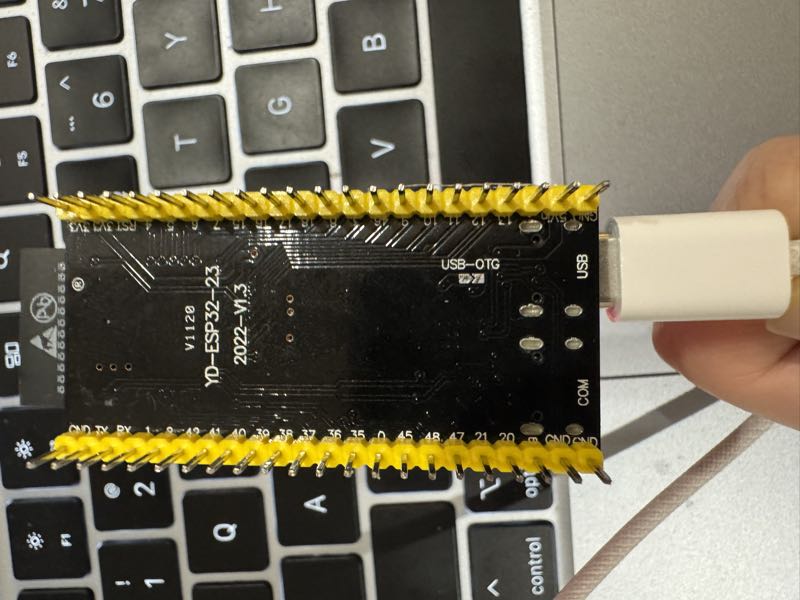
CLI Commands (via UART/COM port)

Connect via serial to configure or debug. Config commands let you change settings without recompiling — just plug in a USB cable anywhere.

Runtime config (saved to NVS, overrides build-time defaults):

mimi> wifi_set MySSID MyPassword   # change WiFi network
mimi> set_tg_token 123456:ABC...   # change Telegram bot token
mimi> set_api_key sk-ant-api03-... # change API key (Anthropic or OpenAI)
mimi> set_model_provider openai    # switch provider (anthropic|openai)
mimi> set_model gpt-4o             # change LLM model
mimi> set_proxy 127.0.0.1 7897  # set HTTP proxy
mimi> clear_proxy                  # remove proxy
mimi> set_search_key BSA...        # set Brave Search API key
mimi> set_tavily_key tvly-...      # set Tavily API key (preferred)
mimi> config_show                  # show all config (masked)
mimi> config_reset                 # clear NVS, revert to build-time defaults

Debug & maintenance:

mimi> wifi_status              # am I connected?
mimi> memory_read              # see what the bot remembers
mimi> memory_write "content"   # write to MEMORY.md
mimi> heap_info                # how much RAM is free?
mimi> session_list             # list all chat sessions
mimi> session_clear 12345      # wipe a conversation
mimi> heartbeat_trigger           # manually trigger a heartbeat check
mimi> cron_start                  # start cron scheduler now
mimi> restart                     # reboot

USB (JTAG) vs UART: Which Port for What

Most ESP32-S3 dev boards expose two USB-C ports:

Port Use for
USB (JTAG) idf.py flash, JTAG debugging
COM (UART) REPL CLI, serial console

REPL requires the UART (COM) port. The USB (JTAG) port does not support interactive REPL input.

Port details & recommended workflow
Port Label Protocol
USB USB / JTAG Native USB Serial/JTAG
COM UART / COM External UART bridge (CP2102/CH340)

The ESP-IDF console/REPL is configured to use UART by default (CONFIG_ESP_CONSOLE_UART_DEFAULT=y).

If you have both ports connected simultaneously:

  • USB (JTAG) handles flash/download and provides secondary serial output
  • UART (COM) provides the primary interactive console for the REPL
  • macOS: both appear as /dev/cu.usbmodem* or /dev/cu.usbserial-* — run ls /dev/cu.usb* to identify
  • Linux: USB (JTAG) → /dev/ttyACM0, UART → /dev/ttyUSB0

Recommended workflow:

# Flash via USB (JTAG) port
idf.py -p /dev/cu.usbmodem11401 flash

# Open REPL via UART (COM) port
idf.py -p /dev/cu.usbserial-110 monitor
# or use any serial terminal: screen, minicom, PuTTY at 115200 baud

Memory

MimiClaw stores everything as plain text files you can read and edit:

File What it is
SOUL.md The bot's personality — edit this to change how it behaves
USER.md Info about you — name, preferences, language
MEMORY.md Long-term memory — things the bot should always remember
HEARTBEAT.md Task list the bot checks periodically and acts on autonomously
cron.json Scheduled jobs — recurring or one-shot tasks created by the AI
2026-02-05.md Daily notes — what happened today
tg_12345.jsonl Chat history — your conversation with the bot

Tools

MimiClaw supports tool calling for both Anthropic and OpenAI — the LLM can call tools during a conversation and loop until the task is done (ReAct pattern).

Tool Description
web_search Search the web via Tavily (preferred) or Brave for current information
get_current_time Fetch current date/time via HTTP and set the system clock
cron_add Schedule a recurring or one-shot task (the LLM creates cron jobs on its own)
cron_list List all scheduled cron jobs
cron_remove Remove a cron job by ID

To enable web search, set a Tavily API key via MIMI_SECRET_TAVILY_KEY (preferred), or a Brave Search API key via MIMI_SECRET_SEARCH_KEY in mimi_secrets.h.

Cron Tasks

MimiClaw has a built-in cron scheduler that lets the AI schedule its own tasks. The LLM can create recurring jobs ("every N seconds") or one-shot jobs ("at unix timestamp") via the cron_add tool. When a job fires, its message is injected into the agent loop — so the AI wakes up, processes the task, and responds.

Jobs are persisted to SPIFFS (cron.json) and survive reboots. Example use cases: daily summaries, periodic reminders, scheduled check-ins.

Heartbeat

The heartbeat service periodically reads HEARTBEAT.md from SPIFFS and checks for actionable tasks. If uncompleted items are found (anything that isn't an empty line, a header, or a checked - [x] box), it sends a prompt to the agent loop so the AI can act on them autonomously.

This turns MimiClaw into a proactive assistant — write tasks to HEARTBEAT.md and the bot will pick them up on the next heartbeat cycle (default: every 30 minutes).

Also Included

  • WebSocket gateway on port 18789 — connect from your LAN with any WebSocket client
  • OTA updates — flash new firmware over WiFi, no USB needed
  • Dual-core — network I/O and AI processing run on separate CPU cores
  • HTTP proxy — CONNECT tunnel support for restricted networks
  • Multi-provider — supports both Anthropic (Claude) and OpenAI (GPT), switchable at runtime
  • Cron scheduler — the AI can schedule its own recurring and one-shot tasks, persisted across reboots
  • Heartbeat — periodically checks a task file and prompts the AI to act autonomously
  • Tool use — ReAct agent loop with tool calling for both providers

For Developers

Technical details live in the docs/ folder:

Contributing

Please read CONTRIBUTING.md before opening issues or pull requests.

Contributors

Thanks to everyone who has contributed to MimiClaw.

MimiClaw contributors

License

MIT

Acknowledgments

Inspired by OpenClaw and Nanobot. MimiClaw reimplements the core AI agent architecture for embedded hardware — no Linux, no server, just a $5 chip.

Star History

Star History Chart
View on GitHub

Recent activity

commits and pull requests

Recent open issues

view all

Discussions

all 2

Releases and announcements

2 total
  1. v0.1.1v0.1.1Mar 17, 20261.1K downloads

    ## Flashing Guide ### 1. Merged firmware (easiest) Download `mimiclaw-full-v0.1.1.bin` and flash with a single command: ```bash esptool.py --chip esp32s3 -b 460800 write_flash 0x0 mimiclaw-full-v0.1.1.bin ``` ### 2. Individual binaries (advanced) ```bash esptool.py --chip esp32s3 -b 460800 write_flash \ 0x0 bootloader-v0.1.1.bin \ 0x8000 partition-table-v0.1.1.bin \ 0xf000 ota_data_initial-v0.1.1.bin \ 0x20000 mimiclaw-v0.1.1.bin \ 0x420000 spiffs-v0.1.1.bin ``` ### 3. OTA update (for devices already running MimiClaw) Upload `mimiclaw-v0.1.1.bin` via the OTA endpoint. ### 4. First-time setup After flashing, connect via serial (115200 baud) and configure: ``` wifi <ssid> <password> tg_token <your-telegram-bot-token> api_key <your-anthropic-api-key> reboot ``` ## What's Changed * feat: add wifi scaner in uart and support basic openai endpoint. by @IRONICBo in https://github.com/memovai/mimiclaw/pull/27 * feat: add interactive onboarding view by @IRONICBo in https://github.com/memovai/mimiclaw/pull/28 * feat: add cron scheduled task service with tool_use integration by @crispyberry in https://github.com/memovai/mimiclaw/pull/4 * feat: add skills system

  2. v0.1.0v0.1.0Feb 9, 2026678 downloads

    ## Flashing Guide ### 1. Merged firmware (easiest) Download `mimiclaw-full-v0.1.0.bin` and flash with a single command: ```bash esptool.py --chip esp32s3 -b 460800 write_flash 0x0 mimiclaw-full-v0.1.0.bin ``` ### 2. Individual binaries (advanced) ```bash esptool.py --chip esp32s3 -b 460800 write_flash \ 0x0 bootloader-v0.1.0.bin \ 0x8000 partition-table-v0.1.0.bin \ 0xf000 ota_data_initial-v0.1.0.bin \ 0x20000 mimiclaw-v0.1.0.bin ``` ### 3. OTA update (for devices already running MimiClaw) Upload `mimiclaw-v0.1.0.bin` via the OTA endpoint. ### 4. First-time setup After flashing, connect via serial (115200 baud) and configure: ``` wifi <ssid> <password> tg_token <your-telegram-bot-token> api_key <your-anthropic-api-key> reboot ``` ## What's Changed * feat: add mimiclaw architecture. by @IRONICBo in https://github.com/memovai/mimiclaw/pull/8 ## New Contributors * @IRONICBo made their first contribution in https://github.com/memovai/mimiclaw/pull/8 **Full Changelog**: https://github.com/memovai/mimiclaw/commits/v0.1.0

Commits per week

last 52 weeks
520Week of 2025-08-02: 0 commitsWeek of 2025-08-09: 0 commitsWeek of 2025-08-16: 0 commitsWeek of 2025-08-23: 0 commitsWeek of 2025-08-30: 0 commitsWeek of 2025-09-06: 0 commitsWeek of 2025-09-13: 0 commitsWeek of 2025-09-20: 0 commitsWeek of 2025-09-27: 0 commitsWeek of 2025-10-04: 0 commitsWeek of 2025-10-11: 0 commitsWeek of 2025-10-18: 0 commitsWeek of 2025-10-25: 0 commitsWeek of 2025-11-01: 0 commitsWeek of 2025-11-09: 0 commitsWeek of 2025-11-16: 0 commitsWeek of 2025-11-23: 0 commitsWeek of 2025-11-30: 0 commitsWeek of 2025-12-07: 0 commitsWeek of 2025-12-14: 0 commitsWeek of 2025-12-21: 0 commitsWeek of 2025-12-28: 0 commitsWeek of 2026-01-04: 0 commitsWeek of 2026-01-11: 0 commitsWeek of 2026-01-18: 0 commitsWeek of 2026-01-25: 0 commitsWeek of 2026-02-01: 40 commitsWeek of 2026-02-08: 22 commitsWeek of 2026-02-15: 52 commitsWeek of 2026-02-22: 24 commitsWeek of 2026-03-01: 27 commitsWeek of 2026-03-08: 13 commitsWeek of 2026-03-15: 1 commitsWeek of 2026-03-22: 0 commitsWeek of 2026-03-29: 0 commitsWeek of 2026-04-05: 0 commitsWeek of 2026-04-12: 0 commitsWeek of 2026-04-19: 0 commitsWeek of 2026-04-26: 0 commitsWeek of 2026-05-03: 0 commitsWeek of 2026-05-10: 0 commitsWeek of 2026-05-17: 0 commitsWeek of 2026-05-24: 0 commitsWeek of 2026-05-31: 0 commitsWeek of 2026-06-07: 0 commitsWeek of 2026-06-14: 0 commitsWeek of 2026-06-21: 0 commitsWeek of 2026-06-28: 0 commitsWeek of 2026-07-05: 0 commitsWeek of 2026-07-12: 0 commitsWeek of 2026-07-19: 0 commitsWeek of 2026-07-26: 0 commitsAug 2, 2025Jul 26, 2026
179 commits in the last 52 weeks.

When work happens

weekday and hour
SunMonTueWedThuFriSat036912151821Sun 0:00 — 1 commitsSun 1:00 — 0 commitsSun 2:00 — 0 commitsSun 3:00 — 0 commitsSun 4:00 — 0 commitsSun 5:00 — 0 commitsSun 6:00 — 0 commitsSun 7:00 — 0 commitsSun 8:00 — 0 commitsSun 9:00 — 0 commitsSun 10:00 — 1 commitsSun 11:00 — 1 commitsSun 12:00 — 2 commitsSun 13:00 — 1 commitsSun 14:00 — 1 commitsSun 15:00 — 1 commitsSun 16:00 — 1 commitsSun 17:00 — 0 commitsSun 18:00 — 0 commitsSun 19:00 — 2 commitsSun 20:00 — 1 commitsSun 21:00 — 0 commitsSun 22:00 — 2 commitsSun 23:00 — 6 commitsMon 0:00 — 2 commitsMon 1:00 — 4 commitsMon 2:00 — 1 commitsMon 3:00 — 0 commitsMon 4:00 — 0 commitsMon 5:00 — 0 commitsMon 6:00 — 0 commitsMon 7:00 — 0 commitsMon 8:00 — 0 commitsMon 9:00 — 0 commitsMon 10:00 — 0 commitsMon 11:00 — 3 commitsMon 12:00 — 0 commitsMon 13:00 — 0 commitsMon 14:00 — 1 commitsMon 15:00 — 0 commitsMon 16:00 — 0 commitsMon 17:00 — 0 commitsMon 18:00 — 0 commitsMon 19:00 — 1 commitsMon 20:00 — 3 commitsMon 21:00 — 0 commitsMon 22:00 — 3 commitsMon 23:00 — 1 commitsTue 0:00 — 0 commitsTue 1:00 — 5 commitsTue 2:00 — 0 commitsTue 3:00 — 2 commitsTue 4:00 — 0 commitsTue 5:00 — 0 commitsTue 6:00 — 0 commitsTue 7:00 — 0 commitsTue 8:00 — 0 commitsTue 9:00 — 0 commitsTue 10:00 — 2 commitsTue 11:00 — 0 commitsTue 12:00 — 0 commitsTue 13:00 — 0 commitsTue 14:00 — 1 commitsTue 15:00 — 0 commitsTue 16:00 — 0 commitsTue 17:00 — 0 commitsTue 18:00 — 0 commitsTue 19:00 — 2 commitsTue 20:00 — 2 commitsTue 21:00 — 1 commitsTue 22:00 — 0 commitsTue 23:00 — 0 commitsWed 0:00 — 1 commitsWed 1:00 — 0 commitsWed 2:00 — 0 commitsWed 3:00 — 0 commitsWed 4:00 — 0 commitsWed 5:00 — 0 commitsWed 6:00 — 0 commitsWed 7:00 — 0 commitsWed 8:00 — 0 commitsWed 9:00 — 1 commitsWed 10:00 — 1 commitsWed 11:00 — 0 commitsWed 12:00 — 3 commitsWed 13:00 — 1 commitsWed 14:00 — 1 commitsWed 15:00 — 0 commitsWed 16:00 — 1 commitsWed 17:00 — 3 commitsWed 18:00 — 0 commitsWed 19:00 — 11 commitsWed 20:00 — 1 commitsWed 21:00 — 2 commitsWed 22:00 — 0 commitsWed 23:00 — 0 commitsThu 0:00 — 0 commitsThu 1:00 — 0 commitsThu 2:00 — 0 commitsThu 3:00 — 0 commitsThu 4:00 — 0 commitsThu 5:00 — 0 commitsThu 6:00 — 1 commitsThu 7:00 — 0 commitsThu 8:00 — 0 commitsThu 9:00 — 3 commitsThu 10:00 — 7 commitsThu 11:00 — 2 commitsThu 12:00 — 5 commitsThu 13:00 — 1 commitsThu 14:00 — 1 commitsThu 15:00 — 4 commitsThu 16:00 — 3 commitsThu 17:00 — 3 commitsThu 18:00 — 14 commitsThu 19:00 — 1 commitsThu 20:00 — 3 commitsThu 21:00 — 1 commitsThu 22:00 — 2 commitsThu 23:00 — 0 commitsFri 0:00 — 2 commitsFri 1:00 — 1 commitsFri 2:00 — 0 commitsFri 3:00 — 0 commitsFri 4:00 — 0 commitsFri 5:00 — 0 commitsFri 6:00 — 0 commitsFri 7:00 — 0 commitsFri 8:00 — 0 commitsFri 9:00 — 0 commitsFri 10:00 — 2 commitsFri 11:00 — 1 commitsFri 12:00 — 0 commitsFri 13:00 — 1 commitsFri 14:00 — 2 commitsFri 15:00 — 1 commitsFri 16:00 — 2 commitsFri 17:00 — 0 commitsFri 18:00 — 3 commitsFri 19:00 — 1 commitsFri 20:00 — 1 commitsFri 21:00 — 1 commitsFri 22:00 — 1 commitsFri 23:00 — 4 commitsSat 0:00 — 3 commitsSat 1:00 — 0 commitsSat 2:00 — 2 commitsSat 3:00 — 0 commitsSat 4:00 — 0 commitsSat 5:00 — 0 commitsSat 6:00 — 0 commitsSat 7:00 — 0 commitsSat 8:00 — 0 commitsSat 9:00 — 1 commitsSat 10:00 — 1 commitsSat 11:00 — 1 commitsSat 12:00 — 0 commitsSat 13:00 — 1 commitsSat 14:00 — 0 commitsSat 15:00 — 1 commitsSat 16:00 — 6 commitsSat 17:00 — 2 commitsSat 18:00 — 3 commitsSat 19:00 — 1 commitsSat 20:00 — 0 commitsSat 21:00 — 0 commitsSat 22:00 — 0 commitsSat 23:00 — 3 commits
Commit volume by weekday and hour (UTC). Larger dots mean more commits.
DateListRankStars gained
Feb 9, 2026daily#25+136
  • openclaw/openclaw

    Your own personal AI assistant. Any OS. Any Platform. The lobster way. 🦞

    385.5K stars · TypeScript

  • openclaw/openclaw

    Your own personal AI assistant. Any OS. Any Platform. The lobster way. 🦞

    384.4K stars · TypeScript

  • openclaw/openclaw

    Your own personal AI assistant. Any OS. Any Platform. The lobster way. 🦞

    384.4K stars · TypeScript

  • openclaw/openclaw

    Your own personal AI assistant. Any OS. Any Platform. The lobster way. 🦞

    384.4K stars · TypeScript

  • obra/superpowers

    An agentic skills framework & software development methodology that works.

    268.6K stars · Shell

  • NousResearch/hermes-agent

    The agent that grows with you

    227K stars · Python

