modem-dev/hunkPublic

Review-first terminal diff viewer for agentic coders

AI summary: A terminal-based, review-first diff viewer optimized for agent-authored changesets with interactive AI annotations.

Stars
9.9K
+19 today
Forks
338
Watchers
12
Open issues
83
Open PRs
77
Contributors
~105
Commits
1K
Branches
696

TypeScriptMITCreated Mar 17, 2026Last push 3d agoLatest release v0.25.0+30 stars this week+210 this month

Quick answers

What is hunk?
A terminal-based, review-first diff viewer optimized for agent-authored changesets with interactive AI annotations.
What does hunk do?
Hunk provides an interactive terminal UI specifically built for reviewing codebase changes, natively integrating with version control systems like Git, Jujutsu, and Sapling. It moves beyond standard diff outputs by enabling a multi-file review stream with sidebar navigation and responsive auto layouts like split or stacked views. Uniquely, it is designed for the era of AI coding, supporting inline AI and agent annotations directly alongside the code so developers can review agent-generated patches in context. It operates in real-time, utilizing watch mode to automatically reload as the working tree changes during automated refactors.
Who is hunk for?
Software engineers and AI tool builders who work extensively in the terminal and need a richer way to review complex changesets, especially those generated by autonomous AI agents. Ideal for teams requiring efficient terminal UI.
How do I get started with hunk?
Install globally via npm (npm i -g hunkdiff) and run it against your repository.
How popular is hunk on GitHub?
modem-dev/hunk has 9,854 stars and 338 forks on GitHub, and gained 30 stars in the last 7 days.
What license does hunk use?
modem-dev/hunk is released under the MIT license.

Star history

since Jul 29, 2026
02.5K5K7.5KJul 2026Sep 2026Oct 2026Nov 2026
9.9K stars as of Nov 19, 2026. Measured daily since Jul 29, 2026; GitHub no longer exposes earlier star timestamps.

Update history

4 recorded
  • Nov 12, 2026New release v0.25.0 (previously v0.24.1).
  • Nov 1, 2026New release v0.24.1 (previously v0.24.0).
  • Oct 20, 2026New release v0.24.0 (previously v0.23.0).
  • Oct 9, 2026New release v0.23.0 (previously v0.22.0).

Contribution activity

commits per day, last 52 weeks
NovDecJanFebMarAprMayJunJulAugSepOctNovMonWedFri2025-11-16: 0 commits2025-11-17: 0 commits2025-11-18: 0 commits2025-11-19: 0 commits2025-11-20: 0 commits2025-11-21: 0 commits2025-11-22: 0 commits2025-11-23: 0 commits2025-11-24: 0 commits2025-11-25: 0 commits2025-11-26: 0 commits2025-11-27: 0 commits2025-11-28: 0 commits2025-11-29: 0 commits2025-11-30: 0 commits2025-12-01: 0 commits2025-12-02: 0 commits2025-12-03: 0 commits2025-12-04: 0 commits2025-12-05: 0 commits2025-12-06: 0 commits2025-12-07: 0 commits2025-12-08: 0 commits2025-12-09: 0 commits2025-12-10: 0 commits2025-12-11: 0 commits2025-12-12: 0 commits2025-12-13: 0 commits2025-12-14: 0 commits2025-12-15: 0 commits2025-12-16: 0 commits2025-12-17: 0 commits2025-12-18: 0 commits2025-12-19: 0 commits2025-12-20: 0 commits2025-12-21: 0 commits2025-12-22: 0 commits2025-12-23: 0 commits2025-12-24: 0 commits2025-12-25: 0 commits2025-12-26: 0 commits2025-12-27: 0 commits2025-12-28: 0 commits2025-12-29: 0 commits2025-12-30: 0 commits2025-12-31: 0 commits2026-01-01: 0 commits2026-01-02: 0 commits2026-01-03: 0 commits2026-01-04: 0 commits2026-01-05: 0 commits2026-01-06: 0 commits2026-01-07: 0 commits2026-01-08: 0 commits2026-01-09: 0 commits2026-01-10: 0 commits2026-01-11: 0 commits2026-01-12: 0 commits2026-01-13: 0 commits2026-01-14: 0 commits2026-01-15: 0 commits2026-01-16: 0 commits2026-01-17: 0 commits2026-01-18: 0 commits2026-01-19: 0 commits2026-01-20: 0 commits2026-01-21: 0 commits2026-01-22: 0 commits2026-01-23: 0 commits2026-01-24: 0 commits2026-01-25: 0 commits2026-01-26: 0 commits2026-01-27: 0 commits2026-01-28: 0 commits2026-01-29: 0 commits2026-01-30: 0 commits2026-01-31: 0 commits2026-02-01: 0 commits2026-02-02: 0 commits2026-02-03: 0 commits2026-02-04: 0 commits2026-02-05: 0 commits2026-02-06: 0 commits2026-02-07: 0 commits2026-02-08: 0 commits2026-02-09: 0 commits2026-02-10: 0 commits2026-02-11: 0 commits2026-02-12: 0 commits2026-02-13: 0 commits2026-02-14: 0 commits2026-02-15: 0 commits2026-02-16: 0 commits2026-02-17: 0 commits2026-02-18: 0 commits2026-02-19: 0 commits2026-02-20: 0 commits2026-02-21: 0 commits2026-02-22: 0 commits2026-02-23: 0 commits2026-02-24: 0 commits2026-02-25: 0 commits2026-02-26: 0 commits2026-02-27: 0 commits2026-02-28: 0 commits2026-03-01: 0 commits2026-03-02: 0 commits2026-03-03: 0 commits2026-03-04: 0 commits2026-03-05: 0 commits2026-03-06: 0 commits2026-03-07: 0 commits2026-03-08: 0 commits2026-03-09: 0 commits2026-03-10: 0 commits2026-03-11: 0 commits2026-03-12: 0 commits2026-03-13: 0 commits2026-03-14: 0 commits2026-03-15: 0 commits2026-03-16: 0 commits2026-03-17: 36 commits2026-03-18: 65 commits2026-03-19: 7 commits2026-03-20: 5 commits2026-03-21: 8 commits2026-03-22: 64 commits2026-03-23: 24 commits2026-03-24: 10 commits2026-03-25: 4 commits2026-03-26: 3 commits2026-03-27: 1 commit2026-03-28: 2 commits2026-03-29: 10 commits2026-03-30: 8 commits2026-03-31: 7 commits2026-04-01: 4 commits2026-04-02: 1 commit2026-04-03: 2 commits2026-04-04: 2 commits2026-04-05: 1 commit2026-04-06: 12 commits2026-04-07: 5 commits2026-04-08: 6 commits2026-04-09: 1 commit2026-04-10: 6 commits2026-04-11: 1 commit2026-04-12: 1 commit2026-04-13: 3 commits2026-04-14: 2 commits2026-04-15: 0 commits2026-04-16: 1 commit2026-04-17: 1 commit2026-04-18: 4 commits2026-04-19: 2 commits2026-04-20: 0 commits2026-04-21: 0 commits2026-04-22: 0 commits2026-04-23: 0 commits2026-04-24: 0 commits2026-04-25: 0 commits2026-04-26: 1 commit2026-04-27: 0 commits2026-04-28: 0 commits2026-04-29: 1 commit2026-04-30: 0 commits2026-05-01: 0 commits2026-05-02: 0 commits2026-05-03: 0 commits2026-05-04: 0 commits2026-05-05: 0 commits2026-05-06: 0 commits2026-05-07: 0 commits2026-05-08: 8 commits2026-05-09: 12 commits2026-05-10: 13 commits2026-05-11: 6 commits2026-05-12: 4 commits2026-05-13: 1 commit2026-05-14: 7 commits2026-05-15: 0 commits2026-05-16: 5 commits2026-05-17: 1 commit2026-05-18: 3 commits2026-05-19: 8 commits2026-05-20: 1 commit2026-05-21: 3 commits2026-05-22: 1 commit2026-05-23: 15 commits2026-05-24: 9 commits2026-05-25: 6 commits2026-05-26: 1 commit2026-05-27: 0 commits2026-05-28: 0 commits2026-05-29: 3 commits2026-05-30: 1 commit2026-05-31: 0 commits2026-06-01: 2 commits2026-06-02: 1 commit2026-06-03: 0 commits2026-06-04: 0 commits2026-06-05: 8 commits2026-06-06: 0 commits2026-06-07: 0 commits2026-06-08: 2 commits2026-06-09: 7 commits2026-06-10: 1 commit2026-06-11: 1 commit2026-06-12: 0 commits2026-06-13: 17 commits2026-06-14: 0 commits2026-06-15: 3 commits2026-06-16: 5 commits2026-06-17: 0 commits2026-06-18: 3 commits2026-06-19: 4 commits2026-06-20: 1 commit2026-06-21: 1 commit2026-06-22: 0 commits2026-06-23: 0 commits2026-06-24: 0 commits2026-06-25: 0 commits2026-06-26: 0 commits2026-06-27: 0 commits2026-06-28: 1 commit2026-06-29: 1 commit2026-06-30: 0 commits2026-07-01: 0 commits2026-07-02: 6 commits2026-07-03: 9 commits2026-07-04: 1 commit2026-07-05: 0 commits2026-07-06: 0 commits2026-07-07: 3 commits2026-07-08: 0 commits2026-07-09: 0 commits2026-07-10: 0 commits2026-07-11: 0 commits2026-07-12: 0 commits2026-07-13: 1 commit2026-07-14: 2 commits2026-07-15: 2 commits2026-07-16: 1 commit2026-07-17: 1 commit2026-07-18: 6 commits2026-07-19: 2 commits2026-07-20: 0 commits2026-07-21: 1 commit2026-07-22: 0 commits2026-07-23: 2 commits2026-07-24: 3 commits2026-07-25: 2 commits2026-07-26: 13 commits2026-07-27: 4 commits2026-07-28: 18 commits2026-07-29: 6 commits2026-07-30: 1 commit2026-07-31: 9 commits2026-08-01: 2 commits2026-08-02: 1 commit2026-08-03: 0 commits2026-08-04: 0 commits2026-08-05: 7 commits2026-08-06: 2 commits2026-08-07: 0 commits2026-08-08: 8 commits2026-08-09: 3 commits2026-08-10: 7 commits2026-08-11: 5 commits2026-08-12: 2 commits2026-08-13: 7 commits2026-08-14: 12 commits2026-08-15: 7 commits2026-08-16: 16 commits2026-08-17: 6 commits2026-08-18: 10 commits2026-08-19: 2 commits2026-08-20: 1 commit2026-08-21: 0 commits2026-08-22: 0 commits2026-08-23: 1 commit2026-08-24: 11 commits2026-08-25: 6 commits2026-08-26: 14 commits2026-08-27: 8 commits2026-08-28: 7 commits2026-08-29: 18 commits2026-08-30: 21 commits2026-08-31: 8 commits2026-09-01: 7 commits2026-09-02: 4 commits2026-09-03: 0 commits2026-09-04: 5 commits2026-09-05: 7 commits2026-09-06: 14 commits2026-09-07: 33 commits2026-09-08: 14 commits2026-09-09: 9 commits2026-09-10: 4 commits2026-09-11: 3 commits2026-09-12: 0 commits2026-09-13: 2 commits2026-09-14: 0 commits2026-09-15: 0 commits2026-09-16: 0 commits2026-09-17: 0 commits2026-09-18: 1 commit2026-09-19: 0 commits2026-09-20: 1 commit2026-09-21: 1 commit2026-09-22: 0 commits2026-09-23: 6 commits2026-09-24: 1 commit2026-09-25: 0 commits2026-09-26: 0 commits2026-09-27: 0 commits2026-09-28: 2 commits2026-09-29: 0 commits2026-09-30: 2 commits2026-10-01: 0 commits2026-10-02: 1 commit2026-10-03: 1 commit2026-10-04: 1 commit2026-10-05: 1 commit2026-10-06: 1 commit2026-10-07: 1 commit2026-10-08: 0 commits2026-10-09: 0 commits2026-10-10: 1 commit2026-10-11: 5 commits2026-10-12: 34 commits2026-10-13: 6 commits2026-10-14: 3 commits2026-10-15: 2 commits2026-10-16: 1 commit2026-10-17: 0 commits2026-10-18: 5 commits2026-10-19: 4 commits2026-10-20: 2 commits2026-10-21: 2 commits2026-10-22: 0 commits2026-10-23: 1 commit2026-10-24: 6 commits2026-10-25: 2 commits2026-10-26: 0 commits2026-10-27: 0 commits2026-10-28: 0 commits2026-10-29: 0 commits2026-10-30: 0 commits2026-10-31: 4 commits2026-11-01: 2 commits2026-11-02: 1 commit2026-11-03: 0 commits2026-11-04: 1 commit2026-11-05: 1 commit2026-11-06: 1 commit2026-11-07: 4 commits2026-11-08: 8 commits2026-11-09: 2 commits2026-11-10: 4 commits2026-11-11: 3 commits2026-11-12: 0 commits2026-11-13: 0 commits2026-11-14: 0 commits
989 commits in the last yearLessMore

Signals and awards

derived from tracked data
  • Very active

    989 commits in 52 weeks

  • Community-driven

    ~105 contributors

  • Permissive license

    MIT

  • Continuous integration

    Automated checks passing

What hunk does

Hunk provides an interactive terminal UI specifically built for reviewing codebase changes, natively integrating with version control systems like Git, Jujutsu, and Sapling. It moves beyond standard diff outputs by enabling a multi-file review stream with sidebar navigation and responsive auto layouts like split or stacked views. Uniquely, it is designed for the era of AI coding, supporting inline AI and agent annotations directly alongside the code so developers can review agent-generated patches in context. It operates in real-time, utilizing watch mode to automatically reload as the working tree changes during automated refactors.

Software engineers and AI tool builders who work extensively in the terminal and need a richer way to review complex changesets, especially those generated by autonomous AI agents. Ideal for teams requiring efficient terminal UI.

  • Review-first interactive UI: Navigate smoothly through complex changesets with a persistent sidebar and a continuous multi-file review stream.
  • Inline agent annotations: View AI-generated context, explanations, and notes directly inline with code diffs for better auditing.
  • Responsive auto layouts: Dynamically switches between split and stacked views based on the available terminal dimensions.
  • Watch mode: Auto-reloads file and Git-backed reviews instantly when the working tree changes in the background.
  • Cross-VCS native support: Operates natively across different version control tools, including Git, Jujutsu (jj), and Sapling.
  • Rich input handling: Fully interactable via mouse clicks and scrolling, while also supporting a fallback pager-compatible mode.

Where teams use it

Reviewing Agent-Generated Code

Developers use Hunk to review massive patches authored by autonomous coding agents, leveraging inline annotations to understand the agent's context and decisions.

Interactive Local Code Review

Engineers reviewing their own unstaged or staged changes across multiple files using a rich terminal interface rather than scrolling through standard Git diff output.

Live Refactoring Validation

Use watch mode to continuously observe structural or wide-ranging file changes in real-time as a Python script or AST refactoring tool runs.

Jujutsu workflow enhancement

Developers utilizing Jujutsu (jj) use Hunk as their default diff viewer to better visualize parallel branch changes.

Getting started: Install globally via npm (npm i -g hunkdiff) and run it against your repository.

README

main branch

hunk

Hunk is an interactive terminal diff viewer for reviewing code changes, built on OpenTUI and Pierre diffs.


hunk.dev · Documentation

CI status Latest release MIT License Join the Discord community

  • multi-file review stream with sidebar navigation
  • inline AI and agent annotations beside the code
  • split, unified, and responsive auto layouts
  • watch mode for auto-reloading file and Git-backed reviews
  • keyboard, mouse, pager, and Git difftool support
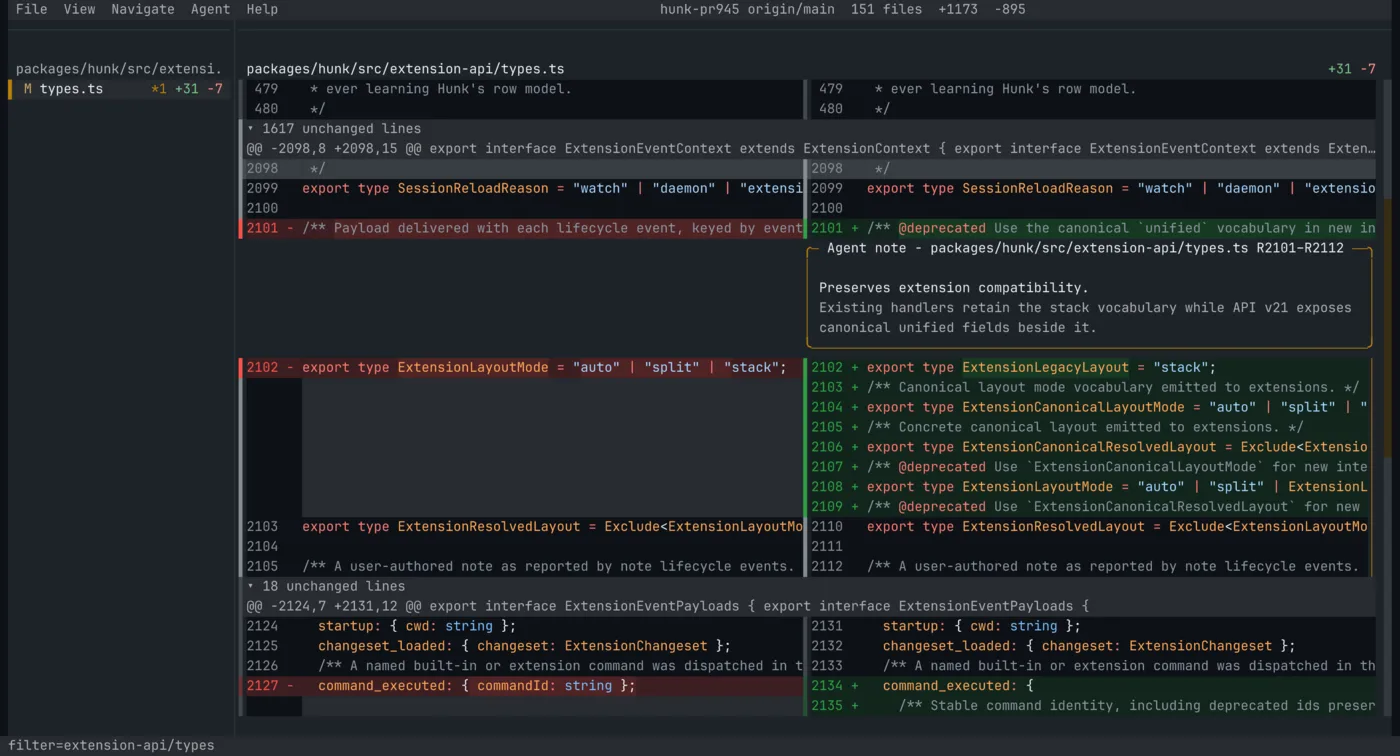
image
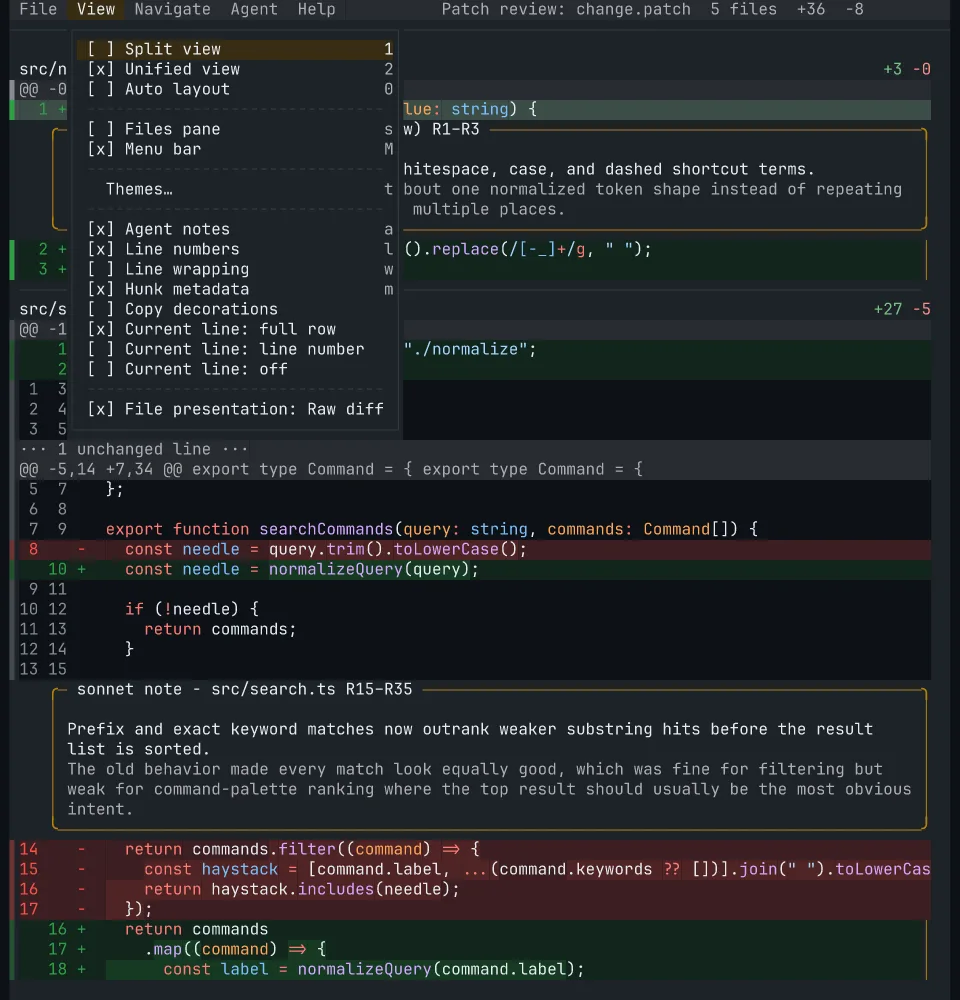
Split view with sidebar and inline AI notes
image
Unified view and mouse-selectable menus

Install

On macOS and Linux, install the standalone binary:

curl -fsSL https://hunk.dev/install.sh | sh

Windows users can install with npm or mise. Other installation methods are also available:

npm i -g hunkdiff                    # macOS, Linux, or Windows; requires Node.js 22+
brew install hunk                    # macOS or Linux
mise use -g hunk                     # macOS, Linux, or Windows

Note

If you previously installed hunk via modem-dev/tap, be sure to uninstall it first with brew uninstall modem-dev/tap/hunk.

Windows requires mise 2026.8.6 or newer. Nix users can use the default package exported in flake.nix; see the Nix guide for details. Hunk also ships as a default tool in Omarchy, installed through mise.

Requirements:

  • macOS (arm64, x64), Linux (arm64, x64; glibc), or Windows (x64); prebuilt binaries are not published for Windows on arm64 or musl-based Linux such as Alpine
  • On x86-64, a CPU with SSE4.2 (Intel Nehalem 2008+, AMD Bulldozer 2011+); arm64 has no CPU feature floor
  • Node.js 22+ for the npm install; the install script, Homebrew, mise, and Nix ship a standalone binary that does not require Node.js
  • Git recommended for most workflows

Update Hunk

For npm, Homebrew, and default install-script installs (Hunk 0.20+):

hunk update          # install the newest release
hunk update --check  # check without installing
hunk update 0.20.0   # select an exact npm or default install-script release

On an older release, update once with the installer or package manager that installed Hunk, then use hunk update going forward. Custom HUNK_INSTALL_DIR installs must re-run the installer with the same directory; mise, Nix, and source installs use their owning tools instead.

Quick start

hunk           # show help
hunk --version # print the installed version

Working with Git

Use familiar Git commands to open changes in Hunk:

hunk diff                      # review current repo changes, including untracked files
hunk diff --watch              # auto-reload as the working tree changes
hunk show                      # review the latest commit
hunk show HEAD~1               # review an earlier commit
hunk log                       # browse history on a terminal; print when redirected
hunk log --static              # force static output, paging when needed
hunk status                    # view workspace status and sibling worktrees (Git)
hunk status --static           # print one read-only workspace snapshot
hunk status --json             # emit one versioned workspace snapshot

hunk status is read-only: it does not fetch or change the repository. See workspace status for details.

hunk log opens an interactive history browser in a terminal and prints text when piped or redirected. Use --oneline for compact output. In the browser, enable Graph view from the View menu to see commit branches, or press v to select a commit range. Quit a commit review to return to history.

Working with GitHub

Hunk bundles hunk gh, so pull requests, commits, and comparisons open directly without the GitHub CLI or a separate extension:

hunk gh pr                         # infer the open PR for the current branch
hunk gh pr 123                     # infer the repository from origin
hunk gh pr 'modem-dev/hunk#123'    # quote this form for shells that treat # as a comment
hunk gh commit a1b2c3d --repo modem-dev/hunk
hunk gh compare main...feature --repo modem-dev/hunk

Public repositories work anonymously. Set GH_TOKEN, or GITHUB_TOKEN when it is absent, for private repositories and higher API limits. GitHub Enterprise is not currently supported.

Working with Jujutsu and Sapling

Hunk auto-detects Jujutsu and Sapling checkouts, so hunk diff [revset] and hunk show [revset] use native revsets inside jj or Sapling workspaces. hunk log --vcs jj also reads JJ history directly, including in a non-colocated workspace. To override VCS detection, set vcs = "git" or vcs = "jj" or vcs = "sl" in config.

Viewing complete files and browsing directories

hunk open                 # browse the current directory
hunk open README.md       # view a complete, syntax-highlighted document
hunk open path/to/project # browse another directory without requiring a repository

Use arrows and Enter to navigate, Tab to switch focus, i to show hidden/Git-ignored entries, and e to edit the displayed file in $EDITOR. See the open workflow for details and file limits.

Working with raw files and patches

hunk diff --files before.ts after.ts        # compare two files directly
hunk diff --files before.ts after.ts --watch # auto-reload when either file changes
git diff --no-color | hunk patch -          # review a patch from stdin

Working with agents

  1. Install the review skill once: npx skills add modem-dev/hunk -g --skill hunk-review.
  2. Open Hunk in another terminal with hunk diff or hunk show.
  3. Ask your agent to use the hunk-review skill against the live Hunk session.
  4. Press a in Hunk to show agent notes; they start hidden.

If your agent has no skill system, ask it to run hunk skill show and follow the output.

See Review with an agent for live sessions, --agent-context, and experimental rich notes.

Feature comparison

Capability hunk lumen difftastic delta diff-so-fancy diff
Review-first interactive UI ✅ ✅ ❌ ❌ ❌ ❌
Multi-file review stream + sidebar ✅ ✅ ❌ ❌ ❌ ❌
Inline agent / AI annotations ✅ ❌ ❌ ❌ ❌ ❌
Responsive auto split/unified layout ✅ ❌ ❌ ❌ ❌ ❌
Mouse support inside the viewer ✅ ✅ ❌ ❌ ❌ ❌
Runtime view toggles ✅ ✅ ❌ ❌ ❌ ❌
Syntax highlighting ✅ ✅ ✅ ✅ ❌ ❌
Structural diffing ❌ ❌ ✅ ❌ ❌ ❌
Pager-compatible mode ✅ ❌ ✅ ✅ ✅ ✅

Advanced

Config

You can persist preferences to a config file:

  • $XDG_CONFIG_HOME/hunk/config.toml (default ~/.config/hunk/config.toml)
  • .hunk/config.toml in a repository

Persistent state uses $XDG_STATE_HOME/hunk/state.json when the variable is absolute, or ~/.local/state/hunk/state.json otherwise. Hunk preserves existing state by copying the old config-directory file on first use, keeping the original and falling back to it if migration fails. Global extension paths are unchanged.

For example:

theme = "github-dark-default"
mode = "auto"               # auto, split, unified
auto_split_min_width = 160  # minimum available diff columns for split in auto mode
line_numbers = true
wrap_lines = false

See the configuration guide for command overrides and examples, the full reference for every option, or the theme guide to customize colors.

Keybindings

Remap shortcuts with a [keybindings] table in your user config. See the keybinding guide for available commands, default keys, and examples.

Git integration

Set Hunk as your Git pager so git diff and git show open in Hunk automatically:

Note

Untracked files are auto-included only for Hunk's own hunk diff working-tree loader. If you open git diff through hunk pager, Git still decides the patch contents, so untracked files will not appear there.

git config --global core.pager "hunk pager"

Or in your Git config:

[core]
    pager = hunk pager

If you want to keep Git's default pager and add opt-in aliases instead:

git config --global alias.hdiff "-c core.pager=\"hunk pager\" diff"
git config --global alias.hshow "-c core.pager=\"hunk pager\" show"

Jujutsu pager integration

To use Hunk as jj's pager, run jj config edit --user and update:

[ui]
pager = ["hunk", "pager"]
diff-formatter = ":git"

Sapling pager integration

To use Hunk as Sapling's pager, run sl config -u and update:

[pager]
pager = hunk pager

Extensions (experimental)

The extension API is experimental and may change in breaking ways between minor releases while it stabilizes; breaking changes are called out in release notes.

Hunk loads plain TypeScript extensions from ~/.config/hunk/extensions/, from a repository's .hunk/extensions/ (after you explicitly trust that repository), and from --extension <path> for development. --no-extensions turns those off for one run; Hunk's own bundled backends (Git, Jujutsu, and Sapling) stay loaded.

Extensions can add commands, themes, VCS backends, custom sidebars, and more. For example, filter lockfiles out of a review:

// ~/.config/hunk/extensions/collapse-lockfiles.ts
import type { HunkExtensionAPI } from "hunkdiff/extension";

export default function (hunk: HunkExtensionAPI) {
  hunk.transformChangeset((changeset, ctx) => {
    const files = changeset.files.filter((file) => !file.path.endsWith(".lock"));
    ctx.notify(`Collapsed ${changeset.files.length - files.length} lockfiles`);
    return { ...changeset, files };
  });
}

Extensions shared as git repositories install straight from their host, and a hunk-extension GitHub topic marks community ones:

hunk extension install acme/[email protected]   # or git:host/path, a URL, a local path
hunk extension list                                 # then update [name] / remove <name>

Browse community extensions at github.com/topics/hunk-extension; publish yours by pushing the extension to a repository root and adding that topic.

See the extension guide for the API, configuration, and publishing instructions. Installable examples include review triage, review snapshot export, an optional rendered Markdown file view, and a Vim navigation mode built from public semantic commands.

OpenTUI component

Hunk also publishes HunkDiffView and lower-level primitives from hunkdiff/opentui for embedding the same diff renderer in your own OpenTUI app.

See the OpenTUI component guide for install, API, and runnable examples.

Examples

Ready-to-run demo diffs live in the examples directory.

Each example includes the exact command to run from the repository root.

Contributing

💬 Chat with users/contributors on the Modem Discord server

See CONTRIBUTING.md for development setup and contribution guidelines.

Sponsor

Sponsored by Modem.

Modem

License

MIT

View on GitHub

Recent activity

commits and pull requests

Recent open issues

view all

Releases and announcements

77 total
  1. v0.25.0v0.25.0Nov 11, 2026709 downloads

    ## What's Changed * docs(website): list hunk-workspace in the extension directory by @GopinathMR in https://github.com/modem-dev/hunk/pull/1204 * Remove the deprecated --fast flag by @masonmcelvain in https://github.com/modem-dev/hunk/pull/1207 * docs(release): publish 0.24.1 changelog by @benvinegar in https://github.com/modem-dev/hunk/pull/1228 * chore(website): limit Vercel deployments to main by @benvinegar in https://github.com/modem-dev/hunk/pull/1229 * fix(website): make brand logo downloads visible in any viewer by @benvinegar in https://github.com/modem-dev/hunk/pull/1230 * fix(skills): fall back to hunk skill path in pointer skills by @ShryukGrandhi in https://github.com/modem-dev/hunk/pull/1220 * fix(ui): route text typed with Tab into the file filter by @ShryukGrandhi in https://github.com/modem-dev/hunk/pull/1221 * fix(ui): keep an open note draft mounted when a live reply arrives by @ShryukGrandhi in https://github.com/modem-dev/hunk/pull/1231 * fix(ui): window unwrapped diffs before viewport measurement by @squad-robert in https://github.com/modem-dev/hunk/pull/1241 * fix(extensions): share host runtime with file-symlinked entries by @squad-robert in https://github.c

  2. v0.24.1v0.24.1Oct 25, 202623.1K downloads

    ## What's Changed * docs(release): publish stable 0.24.0 notes by @benvinegar in https://github.com/modem-dev/hunk/pull/1206 * fix(website): clean vector brand exports, plus a reusable release-video kit by @benvinegar in https://github.com/modem-dev/hunk/pull/1208 * fix(search): stop at every match instead of one per hunk by @HackAttack in https://github.com/modem-dev/hunk/pull/1212 * fix(nix): bundle the syntax-highlighting worker by @matthew-hre in https://github.com/modem-dev/hunk/pull/1211 * build: test that the Nix package compiles every Bun entrypoint by @elucid in https://github.com/modem-dev/hunk/pull/1213 * build(nix): compile through build-bin.ts with Bun's baseline x64 runtime by @elucid in https://github.com/modem-dev/hunk/pull/1214 * build(nix): distrust compromised eMudhra CAs via Node 24.22.1 and Bun 1.4.4 by @elucid in https://github.com/modem-dev/hunk/pull/1218 * fix(ci): use available QEMU user package on Ubuntu by @benvinegar in https://github.com/modem-dev/hunk/pull/1224 * chore(release): prepare 0.24.1 by @benvinegar in https://github.com/modem-dev/hunk/pull/1226 * fix(ci): keep baseline CPU probes on compatible cloud runners by @benvinegar in https://github.co

  3. v0.24.0v0.24.0Oct 19, 20264.9K downloads

    ## Hunk 0.24: beyond the diff Hunk 0.24 brings complete-file and directory browsing, a live workspace compass, npm-installed extensions, and version-matched agent skills into your terminal review workspace. Worker highlighting makes startup interaction smoother, while a round of memory fixes keeps large reviews and long-running sessions leaner. For npm- and curl-managed installs: ```sh hunk update 0.24.0 npm install -g [email protected] ``` Homebrew availability will be verified after publication; until then, Homebrew propagation is pending. The commands above select the exact release for npm- and curl-managed installations. ### Explore the source and find your next review `hunk open` shows complete syntax-highlighted files and browses directories with lazy loading, live refresh, and keyboard or mouse navigation. Inspect the surrounding source without manufacturing a diff. The new read-only workspace status view brings together staging state, tracked and untracked changes, and sibling worktrees, with navigation into history and full diff reviews. Static and versioned JSON status output are available too. [#1148](https://github.com/modem-dev/hunk/pull/1148), [#1067](https://gith

  4. v0.24.0-beta.1v0.24.0-beta.1Oct 15, 2026pre-release32 downloads

    ## What's Changed * fix(ui): keep binary files reachable by file navigation and clicks by @bottercode in https://github.com/modem-dev/hunk/pull/1178 * fix(cli): reject unrecognized nonempty patch input by @benvinegar in https://github.com/modem-dev/hunk/pull/1183 * Add hunk-why to hunk-extension marketplace by @benvinegar in https://github.com/modem-dev/hunk/pull/1179 * fix(ui): distinguish empty reviews from filtered files by @benvinegar in https://github.com/modem-dev/hunk/pull/1182 * fix(ui): keep the selected file visible in the sidebar during held navigation by @Lawgk in https://github.com/modem-dev/hunk/pull/1085 * test(website): allow published prereleases in changelog smoke by @benvinegar in https://github.com/modem-dev/hunk/pull/1185 * docs: correct stale facts and fill gaps across hunk.dev docs by @benvinegar in https://github.com/modem-dev/hunk/pull/1186 * chore(release): prepare 0.24.0-beta.1 by @benvinegar in https://github.com/modem-dev/hunk/pull/1187 ## New Contributors * @Lawgk made their first contribution in https://github.com/modem-dev/hunk/pull/1085 **Full Changelog**: https://github.com/modem-dev/hunk/compare/v0.24.0-beta.0...v0.24.0-beta.1

  5. v0.24.0-beta.0v0.24.0-beta.0Oct 13, 2026pre-release31 downloads

    ## Hunk 0.24 beta: beyond the diff This first 0.24 beta brings complete-file and directory browsing, a live workspace compass, and easier extension and agent setup into the same terminal workspace as your reviews. It also moves syntax highlighting into a worker by default and makes automatic diff layout respond to the space left by your side panes. For npm- and curl-managed installs, select this beta explicitly: ```sh hunk update 0.24.0-beta.0 npm install -g [email protected] ``` This is a prerelease. Stable installs continue to use 0.23.0; Homebrew does not distribute this beta. ### Browse the whole file, then find your next review `hunk open` shows complete syntax-highlighted files and browses directories with lazy loading, live refresh, and keyboard or mouse navigation. You can inspect the surrounding source without manufacturing a diff. [#1148](https://github.com/modem-dev/hunk/pull/1148) The new read-only workspace status view makes tracked and untracked changes, staging state, and sibling worktrees easy to inspect, with navigation into history and full diff reviews. Static and versioned JSON output are available too. [#1067](https://github.com/modem-dev/hunk/pull/

Code frequency

additions and deletions
+222K-222KWeek of 2026-03-15: +16,586 linesWeek of 2026-03-15: -4,780 linesWeek of 2026-03-22: +24,493 linesWeek of 2026-03-22: -7,478 linesWeek of 2026-03-29: +6,826 linesWeek of 2026-03-29: -3,585 linesWeek of 2026-04-05: +23,721 linesWeek of 2026-04-05: -15,709 linesWeek of 2026-04-12: +16,205 linesWeek of 2026-04-12: -12,431 linesWeek of 2026-04-19: +181 linesWeek of 2026-04-19: -7 linesWeek of 2026-04-26: +38 linesWeek of 2026-04-26: -6 linesWeek of 2026-05-03: +3,195 linesWeek of 2026-05-03: -341 linesWeek of 2026-05-10: +10,897 linesWeek of 2026-05-10: -2,449 linesWeek of 2026-05-17: +15,226 linesWeek of 2026-05-17: -3,862 linesWeek of 2026-05-24: +3,233 linesWeek of 2026-05-24: -304 linesWeek of 2026-05-31: +1,987 linesWeek of 2026-05-31: -137 linesWeek of 2026-06-07: +10,367 linesWeek of 2026-06-07: -503 linesWeek of 2026-06-14: +6,522 linesWeek of 2026-06-14: -2,097 linesWeek of 2026-06-21: +238 linesWeek of 2026-06-21: -5 linesWeek of 2026-06-28: +681 linesWeek of 2026-06-28: -163 linesWeek of 2026-07-05: +1,671 linesWeek of 2026-07-05: -1,009 linesWeek of 2026-07-12: +10,758 linesWeek of 2026-07-12: -850 linesWeek of 2026-07-19: +3,613 linesWeek of 2026-07-19: -878 linesWeek of 2026-07-26: +76,667 linesWeek of 2026-07-26: -23,387 linesWeek of 2026-08-02: +17,145 linesWeek of 2026-08-02: -2,022 linesWeek of 2026-08-09: +65,680 linesWeek of 2026-08-09: -25,970 linesWeek of 2026-08-16: +40,487 linesWeek of 2026-08-16: -20,234 linesWeek of 2026-08-23: +46,685 linesWeek of 2026-08-23: -7,453 linesWeek of 2026-08-30: +221,991 linesWeek of 2026-08-30: -178,816 linesWeek of 2026-09-06: +70,551 linesWeek of 2026-09-06: -28,343 linesWeek of 2026-09-13: +9,111 linesWeek of 2026-09-13: -674 linesWeek of 2026-09-20: +1,301 linesWeek of 2026-09-20: -591 linesWeek of 2026-09-27: +10,014 linesWeek of 2026-09-27: -4,352 linesWeek of 2026-10-04: +1,613 linesWeek of 2026-10-04: -170 linesWeek of 2026-10-11: +37,246 linesWeek of 2026-10-11: -4,681 linesWeek of 2026-10-18: +12,663 linesWeek of 2026-10-18: -3,704 linesWeek of 2026-10-25: +651 linesWeek of 2026-10-25: -91 linesWeek of 2026-11-01: +2,311 linesWeek of 2026-11-01: -279 linesWeek of 2026-11-08: +8,037 linesWeek of 2026-11-08: -434 linesMar 15, 2026Nov 8, 2026
+778.6K lines added, -357.8K removed over the last year.

Commits per week

last 52 weeks
1210Week of 2025-11-16: 0 commitsWeek of 2025-11-23: 0 commitsWeek of 2025-11-30: 0 commitsWeek of 2025-12-07: 0 commitsWeek of 2025-12-14: 0 commitsWeek of 2025-12-21: 0 commitsWeek of 2025-12-28: 0 commitsWeek of 2026-01-04: 0 commitsWeek of 2026-01-11: 0 commitsWeek of 2026-01-18: 0 commitsWeek of 2026-01-25: 0 commitsWeek of 2026-02-01: 0 commitsWeek of 2026-02-08: 0 commitsWeek of 2026-02-15: 0 commitsWeek of 2026-02-22: 0 commitsWeek of 2026-03-01: 0 commitsWeek of 2026-03-08: 0 commitsWeek of 2026-03-15: 121 commitsWeek of 2026-03-22: 108 commitsWeek of 2026-03-29: 34 commitsWeek of 2026-04-05: 32 commitsWeek of 2026-04-12: 12 commitsWeek of 2026-04-19: 2 commitsWeek of 2026-04-26: 2 commitsWeek of 2026-05-03: 20 commitsWeek of 2026-05-10: 36 commitsWeek of 2026-05-17: 32 commitsWeek of 2026-05-24: 20 commitsWeek of 2026-05-31: 11 commitsWeek of 2026-06-07: 28 commitsWeek of 2026-06-14: 16 commitsWeek of 2026-06-21: 1 commitsWeek of 2026-06-28: 18 commitsWeek of 2026-07-05: 3 commitsWeek of 2026-07-12: 13 commitsWeek of 2026-07-19: 10 commitsWeek of 2026-07-26: 53 commitsWeek of 2026-08-02: 18 commitsWeek of 2026-08-09: 43 commitsWeek of 2026-08-16: 35 commitsWeek of 2026-08-23: 65 commitsWeek of 2026-08-30: 52 commitsWeek of 2026-09-06: 77 commitsWeek of 2026-09-13: 3 commitsWeek of 2026-09-20: 9 commitsWeek of 2026-09-27: 6 commitsWeek of 2026-10-04: 5 commitsWeek of 2026-10-11: 51 commitsWeek of 2026-10-18: 20 commitsWeek of 2026-10-25: 6 commitsWeek of 2026-11-01: 10 commitsWeek of 2026-11-08: 17 commitsNov 16, 2025Nov 8, 2026
989 commits in the last 52 weeks.

When work happens

weekday and hour
SunMonTueWedThuFriSat036912151821Sun 0:00 — 2 commitsSun 1:00 — 5 commitsSun 2:00 — 1 commitsSun 3:00 — 0 commitsSun 4:00 — 0 commitsSun 5:00 — 2 commitsSun 6:00 — 1 commitsSun 7:00 — 2 commitsSun 8:00 — 7 commitsSun 9:00 — 20 commitsSun 10:00 — 24 commitsSun 11:00 — 16 commitsSun 12:00 — 8 commitsSun 13:00 — 8 commitsSun 14:00 — 10 commitsSun 15:00 — 12 commitsSun 16:00 — 15 commitsSun 17:00 — 9 commitsSun 18:00 — 7 commitsSun 19:00 — 8 commitsSun 20:00 — 9 commitsSun 21:00 — 13 commitsSun 22:00 — 11 commitsSun 23:00 — 12 commitsMon 0:00 — 6 commitsMon 1:00 — 0 commitsMon 2:00 — 2 commitsMon 3:00 — 3 commitsMon 4:00 — 1 commitsMon 5:00 — 3 commitsMon 6:00 — 0 commitsMon 7:00 — 3 commitsMon 8:00 — 16 commitsMon 9:00 — 12 commitsMon 10:00 — 9 commitsMon 11:00 — 9 commitsMon 12:00 — 6 commitsMon 13:00 — 17 commitsMon 14:00 — 17 commitsMon 15:00 — 11 commitsMon 16:00 — 3 commitsMon 17:00 — 6 commitsMon 18:00 — 3 commitsMon 19:00 — 6 commitsMon 20:00 — 12 commitsMon 21:00 — 12 commitsMon 22:00 — 17 commitsMon 23:00 — 12 commitsTue 0:00 — 7 commitsTue 1:00 — 0 commitsTue 2:00 — 0 commitsTue 3:00 — 0 commitsTue 4:00 — 1 commitsTue 5:00 — 0 commitsTue 6:00 — 0 commitsTue 7:00 — 1 commitsTue 8:00 — 11 commitsTue 9:00 — 12 commitsTue 10:00 — 23 commitsTue 11:00 — 14 commitsTue 12:00 — 4 commitsTue 13:00 — 2 commitsTue 14:00 — 13 commitsTue 15:00 — 11 commitsTue 16:00 — 7 commitsTue 17:00 — 9 commitsTue 18:00 — 3 commitsTue 19:00 — 5 commitsTue 20:00 — 5 commitsTue 21:00 — 14 commitsTue 22:00 — 18 commitsTue 23:00 — 5 commitsWed 0:00 — 7 commitsWed 1:00 — 1 commitsWed 2:00 — 0 commitsWed 3:00 — 2 commitsWed 4:00 — 0 commitsWed 5:00 — 1 commitsWed 6:00 — 0 commitsWed 7:00 — 3 commitsWed 8:00 — 2 commitsWed 9:00 — 31 commitsWed 10:00 — 21 commitsWed 11:00 — 14 commitsWed 12:00 — 11 commitsWed 13:00 — 10 commitsWed 14:00 — 2 commitsWed 15:00 — 3 commitsWed 16:00 — 7 commitsWed 17:00 — 0 commitsWed 18:00 — 1 commitsWed 19:00 — 5 commitsWed 20:00 — 5 commitsWed 21:00 — 15 commitsWed 22:00 — 8 commitsWed 23:00 — 0 commitsThu 0:00 — 3 commitsThu 1:00 — 0 commitsThu 2:00 — 1 commitsThu 3:00 — 1 commitsThu 4:00 — 0 commitsThu 5:00 — 0 commitsThu 6:00 — 0 commitsThu 7:00 — 0 commitsThu 8:00 — 4 commitsThu 9:00 — 5 commitsThu 10:00 — 5 commitsThu 11:00 — 1 commitsThu 12:00 — 2 commitsThu 13:00 — 9 commitsThu 14:00 — 7 commitsThu 15:00 — 8 commitsThu 16:00 — 2 commitsThu 17:00 — 1 commitsThu 18:00 — 2 commitsThu 19:00 — 1 commitsThu 20:00 — 6 commitsThu 21:00 — 3 commitsThu 22:00 — 1 commitsThu 23:00 — 2 commitsFri 0:00 — 0 commitsFri 1:00 — 1 commitsFri 2:00 — 1 commitsFri 3:00 — 0 commitsFri 4:00 — 0 commitsFri 5:00 — 0 commitsFri 6:00 — 1 commitsFri 7:00 — 0 commitsFri 8:00 — 1 commitsFri 9:00 — 3 commitsFri 10:00 — 7 commitsFri 11:00 — 12 commitsFri 12:00 — 8 commitsFri 13:00 — 10 commitsFri 14:00 — 8 commitsFri 15:00 — 4 commitsFri 16:00 — 4 commitsFri 17:00 — 4 commitsFri 18:00 — 6 commitsFri 19:00 — 3 commitsFri 20:00 — 4 commitsFri 21:00 — 8 commitsFri 22:00 — 5 commitsFri 23:00 — 4 commitsSat 0:00 — 1 commitsSat 1:00 — 0 commitsSat 2:00 — 0 commitsSat 3:00 — 2 commitsSat 4:00 — 0 commitsSat 5:00 — 1 commitsSat 6:00 — 1 commitsSat 7:00 — 2 commitsSat 8:00 — 9 commitsSat 9:00 — 7 commitsSat 10:00 — 8 commitsSat 11:00 — 17 commitsSat 12:00 — 8 commitsSat 13:00 — 7 commitsSat 14:00 — 7 commitsSat 15:00 — 6 commitsSat 16:00 — 7 commitsSat 17:00 — 8 commitsSat 18:00 — 5 commitsSat 19:00 — 11 commitsSat 20:00 — 7 commitsSat 21:00 — 16 commitsSat 22:00 — 3 commitsSat 23:00 — 3 commits
Commit volume by weekday and hour (UTC). Larger dots mean more commits.
DateListRankStars gained
May 7, 2026daily#7+122
May 6, 2026daily#22+62
  • morluto/rea

    Reverse engineer anything with agents, from app behavior down to native binaries.

    471.6K stars · TypeScript

  • freeCodeCamp/freeCodeCamp

    freeCodeCamp.org's open-source codebase and curriculum. Learn math, programming, and computer science for free.

    459.4K stars · TypeScript

  • openclaw/openclaw

    The AI that really does things. Any OS. Any Platform. The lobster way. 🦞

    394.9K stars · TypeScript

  • anomalyco/opencode

    The open source coding agent.

    228.3K stars · TypeScript

  • n8n-io/n8n

    Fair-code workflow automation platform with native AI capabilities. Combine visual building with custom code, self-host or cloud, 400+ integrations.

    211.6K stars · TypeScript

  • yt-dlp/yt-dlp

    A feature-rich command-line audio/video downloader

    209.4K stars · Python