t8y2/dbxPublic

25 MB lightweight cross-platform database client for 100+ databases, including MySQL, PostgreSQL, SQLite, Redis, MongoDB, DuckDB, SQL Server, and Dameng. Built-in AI, MCP Server, CLI, desktop and Docker. | 轻量级跨平台数据库管理工具,支持 MySQL、PostgreSQL、SQLite、Redis、MongoDB、达梦等 100+ 数据库,提供桌面端、Docker、CLI、内置 AI 助手和 MCP。

AI summary: Lightweight universal database client with built-in AI assistant and MCP integration.

Stars
24.2K
+719 today
Forks
2.2K
Watchers
103
Open issues
1.2K
Open PRs
65
Contributors
~306
Commits
7.5K
Branches
14

RustApache-2.0Created Apr 29, 2026Last push 1d agoLatest release v0.6.27+2.3K stars this week+2.3K this month

Quick answers

What is dbx?
Lightweight universal database client with built-in AI assistant and MCP integration.
What does dbx do?
DBX is an ultra-compact, universal database client capable of connecting to over 100 different database types. It packages a graphical user interface, a command-line interface, and Docker support into a tiny 25MB footprint. The tool features a built-in AI assistant to help generate and explain queries, alongside Model Context Protocol (MCP) server capabilities. It is designed to be a fast, versatile replacement for bloated, single-database administration tools.
Who is dbx for?
Database administrators, backend developers, and data analysts. Requires basic understanding of database connections and queries.
How popular is dbx on GitHub?
t8y2/dbx has 24,182 stars and 2,216 forks on GitHub, and gained 2,259 stars in the last 7 days.
What license does dbx use?
t8y2/dbx is released under the Apache-2.0 license.

Star history

since Sep 29, 2026
010K20KSep 2026Sep 2026Oct 2026Oct 2026
24.2K stars as of Oct 3, 2026. Measured daily since Sep 29, 2026; GitHub no longer exposes earlier star timestamps.

Contribution activity

commits per day, last 52 weeks
OctNovDecJanFebMarAprMayJunJulAugSepMonWedFri2025-10-05: 0 commits2025-10-06: 0 commits2025-10-07: 0 commits2025-10-08: 0 commits2025-10-09: 0 commits2025-10-10: 0 commits2025-10-11: 0 commits2025-10-12: 0 commits2025-10-13: 0 commits2025-10-14: 0 commits2025-10-15: 0 commits2025-10-16: 0 commits2025-10-17: 0 commits2025-10-18: 0 commits2025-10-19: 0 commits2025-10-20: 0 commits2025-10-21: 0 commits2025-10-22: 0 commits2025-10-23: 0 commits2025-10-24: 0 commits2025-10-25: 0 commits2025-10-26: 0 commits2025-10-27: 0 commits2025-10-28: 0 commits2025-10-29: 0 commits2025-10-30: 0 commits2025-10-31: 0 commits2025-11-01: 0 commits2025-11-02: 0 commits2025-11-03: 0 commits2025-11-04: 0 commits2025-11-05: 0 commits2025-11-06: 0 commits2025-11-07: 0 commits2025-11-08: 0 commits2025-11-09: 0 commits2025-11-10: 0 commits2025-11-11: 0 commits2025-11-12: 0 commits2025-11-13: 0 commits2025-11-14: 0 commits2025-11-15: 0 commits2025-11-16: 0 commits2025-11-17: 0 commits2025-11-18: 0 commits2025-11-19: 0 commits2025-11-20: 0 commits2025-11-21: 0 commits2025-11-22: 0 commits2025-11-23: 0 commits2025-11-24: 0 commits2025-11-25: 0 commits2025-11-26: 0 commits2025-11-27: 0 commits2025-11-28: 0 commits2025-11-29: 0 commits2025-11-30: 0 commits2025-12-01: 0 commits2025-12-02: 0 commits2025-12-03: 0 commits2025-12-04: 0 commits2025-12-05: 0 commits2025-12-06: 0 commits2025-12-07: 0 commits2025-12-08: 0 commits2025-12-09: 0 commits2025-12-10: 0 commits2025-12-11: 0 commits2025-12-12: 0 commits2025-12-13: 0 commits2025-12-14: 0 commits2025-12-15: 0 commits2025-12-16: 0 commits2025-12-17: 0 commits2025-12-18: 0 commits2025-12-19: 0 commits2025-12-20: 0 commits2025-12-21: 0 commits2025-12-22: 0 commits2025-12-23: 0 commits2025-12-24: 0 commits2025-12-25: 0 commits2025-12-26: 0 commits2025-12-27: 0 commits2025-12-28: 0 commits2025-12-29: 0 commits2025-12-30: 0 commits2025-12-31: 0 commits2026-01-01: 0 commits2026-01-02: 0 commits2026-01-03: 0 commits2026-01-04: 0 commits2026-01-05: 0 commits2026-01-06: 0 commits2026-01-07: 0 commits2026-01-08: 0 commits2026-01-09: 0 commits2026-01-10: 0 commits2026-01-11: 0 commits2026-01-12: 0 commits2026-01-13: 0 commits2026-01-14: 0 commits2026-01-15: 0 commits2026-01-16: 0 commits2026-01-17: 0 commits2026-01-18: 0 commits2026-01-19: 0 commits2026-01-20: 0 commits2026-01-21: 0 commits2026-01-22: 0 commits2026-01-23: 0 commits2026-01-24: 0 commits2026-01-25: 0 commits2026-01-26: 0 commits2026-01-27: 0 commits2026-01-28: 0 commits2026-01-29: 0 commits2026-01-30: 0 commits2026-01-31: 0 commits2026-02-01: 0 commits2026-02-02: 0 commits2026-02-03: 0 commits2026-02-04: 0 commits2026-02-05: 0 commits2026-02-06: 0 commits2026-02-07: 0 commits2026-02-08: 0 commits2026-02-09: 0 commits2026-02-10: 0 commits2026-02-11: 0 commits2026-02-12: 0 commits2026-02-13: 0 commits2026-02-14: 0 commits2026-02-15: 0 commits2026-02-16: 0 commits2026-02-17: 0 commits2026-02-18: 0 commits2026-02-19: 0 commits2026-02-20: 0 commits2026-02-21: 0 commits2026-02-22: 0 commits2026-02-23: 0 commits2026-02-24: 0 commits2026-02-25: 0 commits2026-02-26: 0 commits2026-02-27: 0 commits2026-02-28: 0 commits2026-03-01: 0 commits2026-03-02: 0 commits2026-03-03: 0 commits2026-03-04: 0 commits2026-03-05: 0 commits2026-03-06: 0 commits2026-03-07: 0 commits2026-03-08: 0 commits2026-03-09: 0 commits2026-03-10: 0 commits2026-03-11: 0 commits2026-03-12: 0 commits2026-03-13: 0 commits2026-03-14: 0 commits2026-03-15: 0 commits2026-03-16: 0 commits2026-03-17: 0 commits2026-03-18: 0 commits2026-03-19: 0 commits2026-03-20: 0 commits2026-03-21: 0 commits2026-03-22: 0 commits2026-03-23: 0 commits2026-03-24: 0 commits2026-03-25: 0 commits2026-03-26: 0 commits2026-03-27: 0 commits2026-03-28: 0 commits2026-03-29: 0 commits2026-03-30: 0 commits2026-03-31: 0 commits2026-04-01: 0 commits2026-04-02: 0 commits2026-04-03: 0 commits2026-04-04: 0 commits2026-04-05: 0 commits2026-04-06: 0 commits2026-04-07: 0 commits2026-04-08: 0 commits2026-04-09: 0 commits2026-04-10: 0 commits2026-04-11: 0 commits2026-04-12: 0 commits2026-04-13: 0 commits2026-04-14: 0 commits2026-04-15: 0 commits2026-04-16: 0 commits2026-04-17: 0 commits2026-04-18: 0 commits2026-04-19: 0 commits2026-04-20: 0 commits2026-04-21: 0 commits2026-04-22: 0 commits2026-04-23: 0 commits2026-04-24: 0 commits2026-04-25: 0 commits2026-04-26: 0 commits2026-04-27: 0 commits2026-04-28: 0 commits2026-04-29: 26 commits2026-04-30: 56 commits2026-05-01: 30 commits2026-05-02: 64 commits2026-05-03: 29 commits2026-05-04: 42 commits2026-05-05: 49 commits2026-05-06: 29 commits2026-05-07: 57 commits2026-05-08: 35 commits2026-05-09: 54 commits2026-05-10: 78 commits2026-05-11: 37 commits2026-05-12: 29 commits2026-05-13: 71 commits2026-05-14: 40 commits2026-05-15: 33 commits2026-05-16: 19 commits2026-05-17: 38 commits2026-05-18: 84 commits2026-05-19: 49 commits2026-05-20: 28 commits2026-05-21: 43 commits2026-05-22: 47 commits2026-05-23: 25 commits2026-05-24: 19 commits2026-05-25: 34 commits2026-05-26: 46 commits2026-05-27: 38 commits2026-05-28: 47 commits2026-05-29: 33 commits2026-05-30: 50 commits2026-05-31: 20 commits2026-06-01: 43 commits2026-06-02: 57 commits2026-06-03: 63 commits2026-06-04: 32 commits2026-06-05: 23 commits2026-06-06: 24 commits2026-06-07: 26 commits2026-06-08: 38 commits2026-06-09: 49 commits2026-06-10: 63 commits2026-06-11: 52 commits2026-06-12: 54 commits2026-06-13: 28 commits2026-06-14: 16 commits2026-06-15: 44 commits2026-06-16: 55 commits2026-06-17: 38 commits2026-06-18: 64 commits2026-06-19: 23 commits2026-06-20: 20 commits2026-06-21: 16 commits2026-06-22: 34 commits2026-06-23: 38 commits2026-06-24: 52 commits2026-06-25: 63 commits2026-06-26: 77 commits2026-06-27: 41 commits2026-06-28: 33 commits2026-06-29: 35 commits2026-06-30: 53 commits2026-07-01: 53 commits2026-07-02: 61 commits2026-07-03: 45 commits2026-07-04: 26 commits2026-07-05: 22 commits2026-07-06: 63 commits2026-07-07: 67 commits2026-07-08: 55 commits2026-07-09: 53 commits2026-07-10: 61 commits2026-07-11: 53 commits2026-07-12: 34 commits2026-07-13: 60 commits2026-07-14: 42 commits2026-07-15: 68 commits2026-07-16: 52 commits2026-07-17: 61 commits2026-07-18: 26 commits2026-07-19: 30 commits2026-07-20: 55 commits2026-07-21: 70 commits2026-07-22: 70 commits2026-07-23: 53 commits2026-07-24: 49 commits2026-07-25: 17 commits2026-07-26: 27 commits2026-07-27: 58 commits2026-07-28: 37 commits2026-07-29: 52 commits2026-07-30: 85 commits2026-07-31: 76 commits2026-08-01: 37 commits2026-08-02: 57 commits2026-08-03: 42 commits2026-08-04: 36 commits2026-08-05: 54 commits2026-08-06: 52 commits2026-08-07: 54 commits2026-08-08: 27 commits2026-08-09: 30 commits2026-08-10: 52 commits2026-08-11: 56 commits2026-08-12: 96 commits2026-08-13: 85 commits2026-08-14: 72 commits2026-08-15: 44 commits2026-08-16: 31 commits2026-08-17: 38 commits2026-08-18: 67 commits2026-08-19: 52 commits2026-08-20: 75 commits2026-08-21: 41 commits2026-08-22: 47 commits2026-08-23: 33 commits2026-08-24: 80 commits2026-08-25: 59 commits2026-08-26: 67 commits2026-08-27: 53 commits2026-08-28: 36 commits2026-08-29: 3 commits2026-08-30: 28 commits2026-08-31: 46 commits2026-09-01: 71 commits2026-09-02: 57 commits2026-09-03: 58 commits2026-09-04: 78 commits2026-09-05: 62 commits2026-09-06: 22 commits2026-09-07: 28 commits2026-09-08: 72 commits2026-09-09: 64 commits2026-09-10: 57 commits2026-09-11: 50 commits2026-09-12: 25 commits2026-09-13: 35 commits2026-09-14: 69 commits2026-09-15: 64 commits2026-09-16: 57 commits2026-09-17: 54 commits2026-09-18: 64 commits2026-09-19: 39 commits2026-09-20: 86 commits2026-09-21: 66 commits2026-09-22: 80 commits2026-09-23: 49 commits2026-09-24: 81 commits2026-09-25: 49 commits2026-09-26: 71 commits2026-09-27: 59 commits2026-09-28: 66 commits2026-09-29: 55 commits2026-09-30: 0 commits2026-10-01: 0 commits2026-10-02: 0 commits2026-10-03: 0 commits
7,452 commits in the last yearLessMore

Signals and awards

derived from tracked data
  • Widely adopted

    24,182 stars

  • Rising fast

    +2,259 stars this week

  • Very active

    7,452 commits in 52 weeks

  • Community-driven

    ~306 contributors

  • Well documented

    High community health score

  • Permissive license

    Apache-2.0

  • Continuous integration

    Automated checks passing

  • Repeat trending

    3 trending appearances

What dbx does

DBX is an ultra-compact, universal database client capable of connecting to over 100 different database types. It packages a graphical user interface, a command-line interface, and Docker support into a tiny 25MB footprint. The tool features a built-in AI assistant to help generate and explain queries, alongside Model Context Protocol (MCP) server capabilities. It is designed to be a fast, versatile replacement for bloated, single-database administration tools.

Database administrators, backend developers, and data analysts. Requires basic understanding of database connections and queries.

  • Universal connectivity: Supports over 100 different database engines including Postgres, MySQL, MongoDB, and Redis.
  • Ultra-compact footprint: Packages full GUI and CLI functionalities into a binary under 25 megabytes.
  • AI integration: Includes an AI assistant for generating, explaining, and optimizing database queries.
  • MCP Server capability: Can run as an MCP server to expose database access to external AI agents.

Where teams use it

Database administration

Manage multiple disparate databases from a single, lightweight graphical interface.

AI-assisted querying

Use the built-in assistant to write complex SQL joins without consulting documentation.

Agentic database access

Expose database schema and query capabilities to external LLMs via MCP.

README

main branch

100+ databases in 25 MB. Desktop, Docker, CLI, built-in AI assistant, and MCP Server.
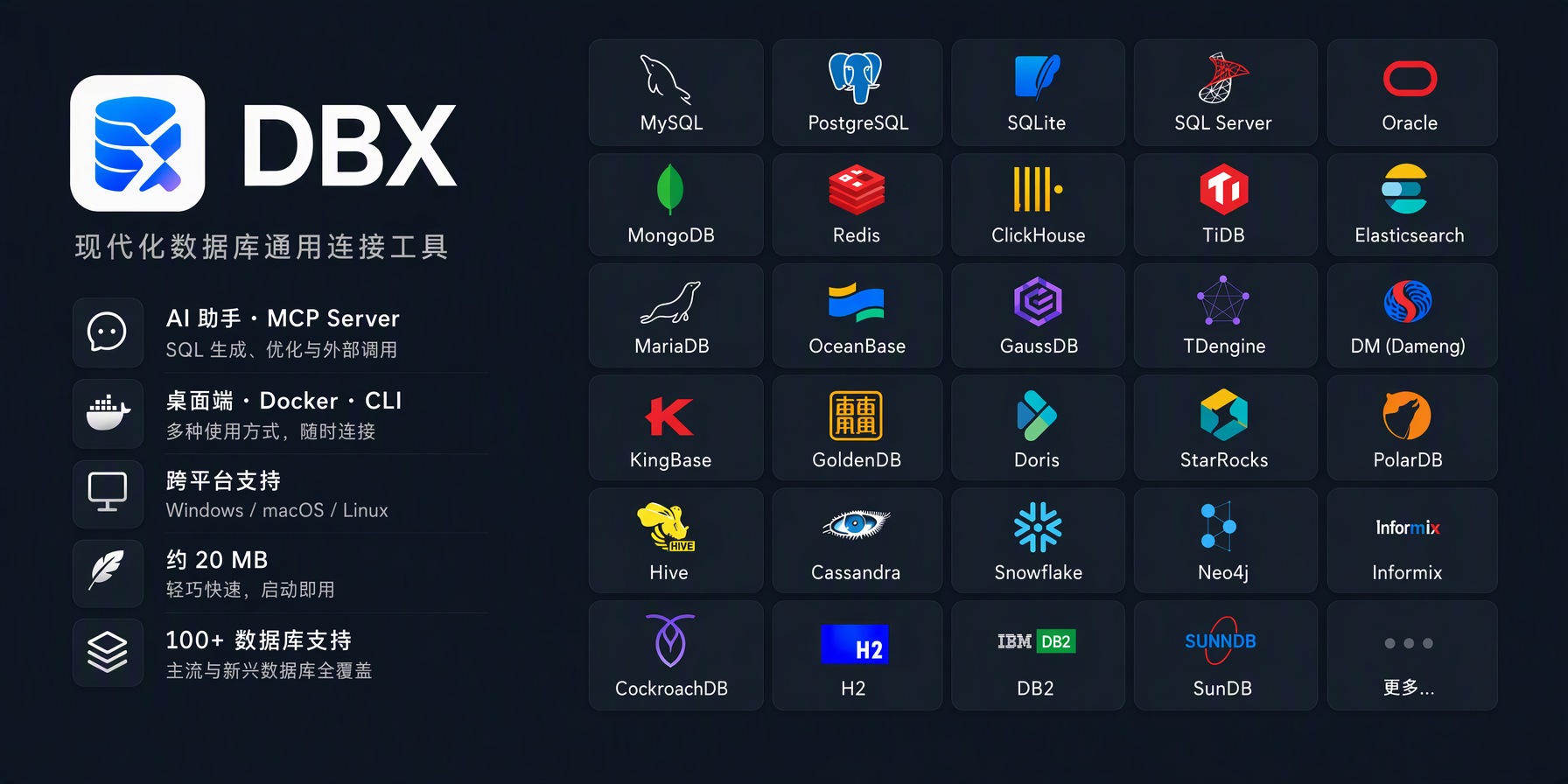

DBX screenshot

Join QQ Group Join WeChat Group Join Feishu Group Join Discord

t8y2%2Fdbx | Trendshift Featured|HelloGitHub DBX - Lightweight open-source database manager built with Rust | Product Hunt

1Panel Partner CNB MCP Toplist

English | 前往中文版本

❤️ Sponsors

RainYun RainYun is a cloud service provider offering cloud servers, physical servers, game hosting, and developer-friendly infrastructure services. Visit RainYun
TrustAsia TrustAsia provides cloud-based code signing service for DBX, enabling trusted software through automated CI/CD builds. Visit TrustAsia
Jalapeño Cloud Jalapeño Cloud is an AI infrastructure and token compute platform, with an exclusive DBX entry offering free credits and top-up bonuses. Visit Jalapeño Cloud
AICodeMirror Special thanks to AICodeMirror for sponsoring this project! AICodeMirror provides a high-stability official relay service for Claude Code / Codex / Gemini CLI, with enterprise-grade concurrency, fast invoicing, and 7×24 dedicated support. Official-channel pricing for Claude Code / Codex / Gemini is as low as 38% / 2% / 9% of list price, with extra discounts on top-ups! AICodeMirror offers a special benefit for DBX users: register through this link to enjoy 20% off your first top-up, and enterprise customers up to 25% off. Visit AICodeMirror
HuaLongAI HuaLongAI is a model API relay built for heavy AI developers, offering 100% official-source Codex and Claude models with transparent token-level billing, enterprise contracts, and invoicing. Visit HuaLongAI
AstraFlow UCloud is the first public cloud provider listed on China's STAR Market, with 28 global regions for cloud hosting, databases, and CDN; its AstraFlow platform offers one-click access to 200+ mainstream LLMs. Visit UCloud
Atlas Cloud Atlas Cloud gives developers one unified API for 400+ AI models across chat, image, video, and audio. Visit Atlas Cloud
Qiniu Cloud Qiniu Cloud provides DBX with object storage, CDN, and other cloud infrastructure resources. Visit Qiniu Cloud

🤝 Partners

1Panel 1Panel is a modern open-source Linux server management panel and lightweight AI management platform, offering an intuitive web interface for one-stop management of AI agents, local LLMs, websites, databases, containers, files, and more. Visit 1Panel
Easysearch Easysearch is an enterprise-grade distributed search engine compatible with Elasticsearch APIs, combining full-text, vector, geospatial search, real-time analytics, and AI capabilities in one platform. Visit Easysearch

Why DBX?

🪶 25 MB, zero runtime bloat

No Java JRE. No Python venv. No bundled Chromium. DBX ships as a single small binary — download, install, connect. DBeaver needs Java; TablePlus is Freemium. DBX runs everywhere with nothing extra.

🤖 AI that lives in your editor

Highlight a table, describe what you want, get SQL back — no copy-paste between tools. Works with Claude, OpenAI, or local models via Ollama. Built-in safety checks review AI-generated SQL before it runs.

🔌 MCP: your databases, AI-ready

DBX speaks the Model Context Protocol. Claude Code, Cursor, Windsurf, and other AI coding agents can query your databases through connections you already set up. One config, everywhere.

🌐 Desktop + Docker + Web

Native app on macOS, Windows, and Linux. Self-host via Docker for team access. Web version for browser-only environments. Same feature set. Same connections.

📨 Not just databases

Message queues and middleware get first-class consoles: Kafka, RocketMQ, RabbitMQ, Pulsar, and MQTT, plus Nacos, Consul, ZooKeeper, and etcd. Inspect topics and messages next to your databases — no extra tool.

🧩 Plugin ecosystem

Extend DBX with signed, sandboxed plugins from the built-in store — S3, Kubernetes, LDAP, and more. Build your own with the Go / TypeScript SDK.

Features

100+ Databases, One Tool

MySQL, PostgreSQL, SQLite, Cloudflare D1, Redis, MongoDB, DuckDB, ClickHouse, SQL Server, Oracle, Elasticsearch, Easysearch, Meilisearch, Qdrant, Milvus, Weaviate, MariaDB, TiDB, OceanBase, openGauss, GaussDB, KWDB, KingbaseES, Vastbase, GoldenDB, Doris, SelectDB, StarRocks, Manticore Search, Redshift, DM, TDengine, XuguDB, CockroachDB, Access, HighGo, UXDB, Dolt, and more. Agent-based profiles extend DBX to H2, Snowflake, Trino, PrestoSQL, Hive, DB2, Informix, Neo4j, Cassandra, BigQuery, Cloud Spanner, Kylin, SunDB, JDBCX, and custom JDBC connections. New native and agent-driven drivers also cover Databricks, SAP HANA, Teradata, Vertica, Firebird, Exasol, YashanDB, GBase 8a/8s, Databend, RQLite, Turso, InfluxDB, QuestDB, IoTDB, etcd, ZooKeeper, Nacos, Consul KV, IRIS, and more. All in a single ~25 MB app. No bundled Chromium.

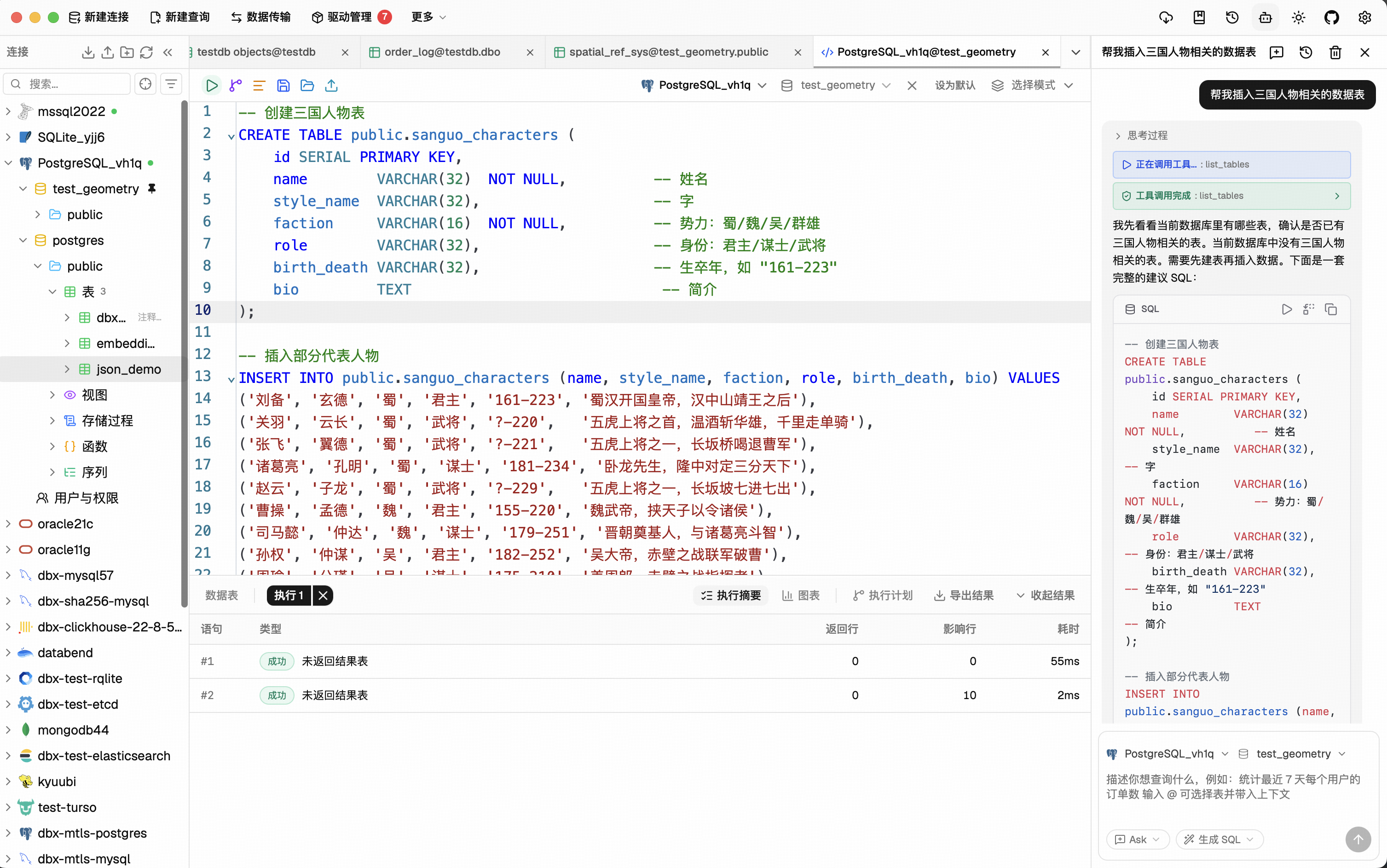
Query Editor

CodeMirror 6 with SQL syntax highlighting, metadata-aware autocomplete, Cmd+Enter execution, selected SQL execution, SQL formatting, diagnostics, and 9 editor themes. Persistent query history, saved SQL snippets, tab restore, and SQL file execution keep repeat work close at hand.

AI SQL Assistant

Describe what you want in plain language — get SQL back. DBX can explain queries, optimize SQL, fix errors, and run AI-generated SQL through built-in safety checks. Works with Claude, OpenAI, local models, or any OpenAI-compatible endpoint.

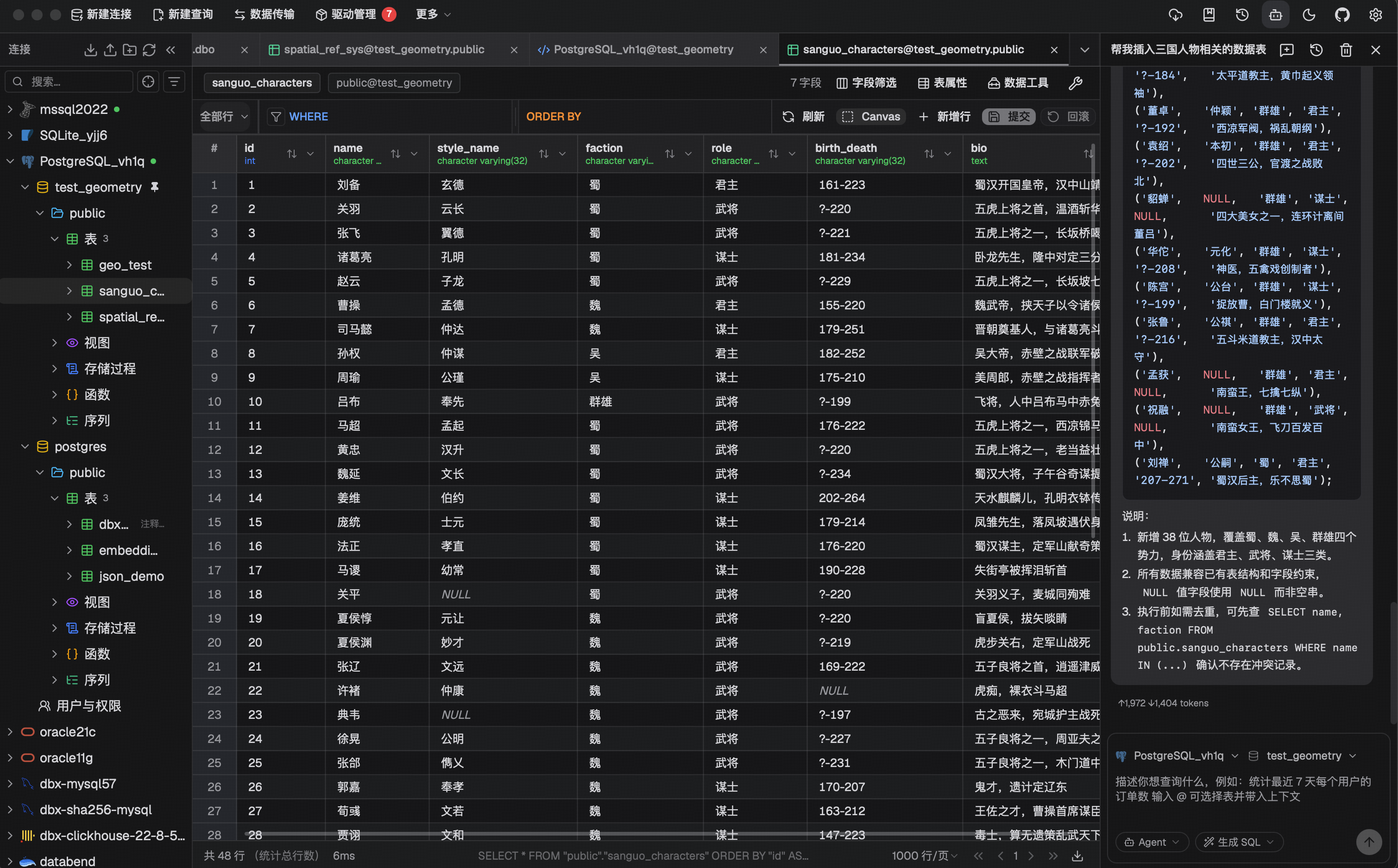
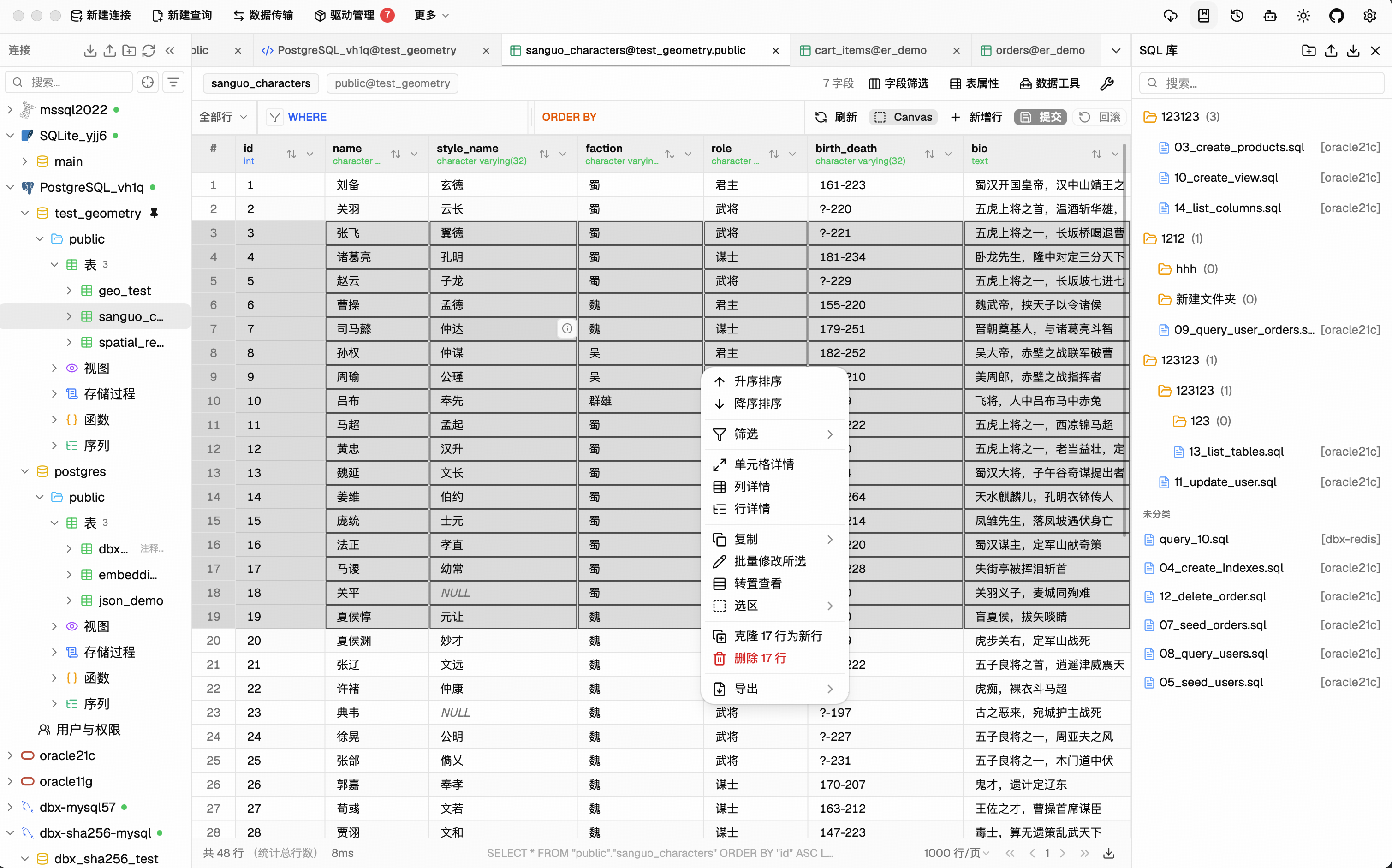
Data Grid

Virtual-scrolled table that handles large result sets. Inline editing, SQL preview before save, WHERE / ORDER BY controls, DataGrip-style filters, LIKE / NOT LIKE context filters, sorting, full-text search, pagination, column resize, auto-fit, row numbers, zebra stripes, and full cell details. Export or copy as CSV, JSON, Markdown, XLSX, or INSERT statements.

Schema Tools

  • Schema browser — databases, schemas, tables, columns, indexes, foreign keys, triggers, with sidebar search & pin
  • Object browser — grouped procedures, functions, views, and source editing where supported
  • Table structure editor — reviewable column and index changes for supported engines
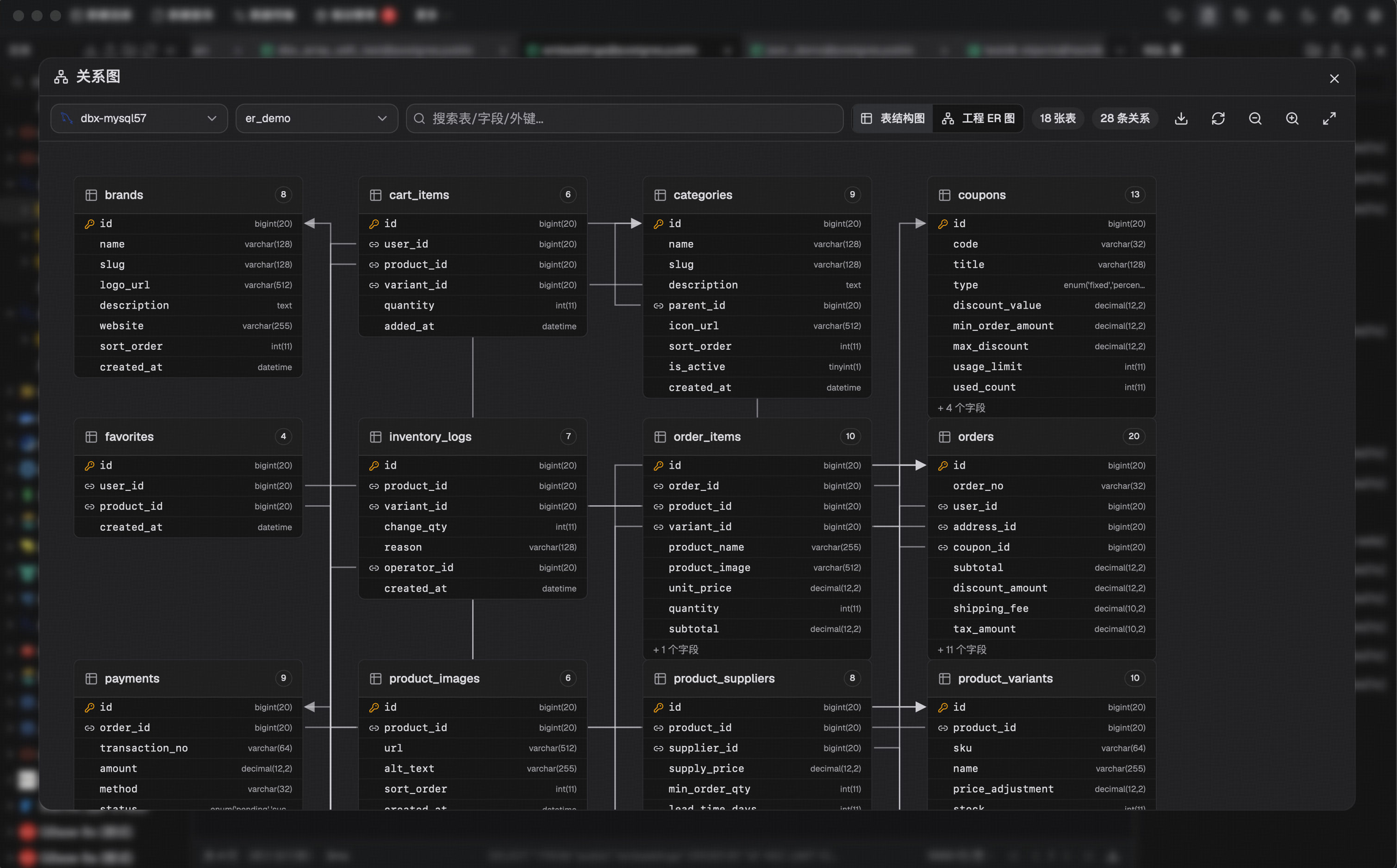
  • ER diagram — visualize table relationships
  • Schema diff — compare structures across connections
  • Explain plan — visual query execution plan
  • Field lineage — column-level lineage analysis
  • Database search — find objects across large schemas

Data Operations

  • Table import — CSV, Excel
  • Data transfer — migrate between databases
  • Database export — full database dump
  • Data compare — compare table data and review synchronization output
  • SQL file execution — run .sql files directly
  • File preview — drag & drop Parquet, CSV, JSON to preview instantly (powered by DuckDB)
  • Connection import — bring connection profiles from DBeaver or Navicat

Specialized Browsers

  • Redis — key pattern search, batch key operations, command runner, TTL editing, and all data types (String, Hash, List, Set, ZSet, Stream)
  • MongoDB — document CRUD with pagination, Atlas & replica set URL connection

Message Queue & Middleware Consoles

  • Kafka / RocketMQ / RabbitMQ / Pulsar — topics, consumer groups, message browsing, query and trace, broker monitoring, permissions and policies
  • MQTT — topic tree navigation, subscribe, and publish
  • Nacos / Consul / ZooKeeper / etcd — service discovery, KV / config browsing, health, and ACL

Plugin System

  • Extensible by design — new connection types and tools arrive as plugins: S3 browsing, Kubernetes, LDAP, and more from the built-in store
  • Signed & sandboxed — every plugin package is signature-verified before install; plugin UI runs sandboxed with its own sidecar process
  • Build your own — Go / TypeScript SDKs with npx @dbx-app/plugin-cli scaffolding; publish to the Marketplace via t8y2/dbx-store

Safety & Connectivity

SSH tunnel (key & password) · database and AI proxy settings · auto-reconnect on connection loss · confirmation dialogs for destructive operations · encrypted config export/import · color-coded connections · driver store and optional JDBC plugin

Polished UI

Dark mode with native title bar sync · 9 editor themes · English, 简体中文 & Español · layout preferences · built-in auto-update

AI Agent Integration (MCP)

DBX provides a separate Rust-powered MCP server that lets AI coding agents query databases using connections configured in DBX. The MCP server is distributed independently from the desktop application, so installing DBX does not automatically install the MCP executable.

npx @dbx-app/mcp-server

Add to your .mcp.json:

{
  "mcpServers": {
    "dbx": { "command": "npx", "args": ["-y", "@dbx-app/mcp-server"] }
  }
}

Manage the connection allowlist and the Read only, Data read/write, and Full access modes in DBX Settings → MCP. The machine-readable values remain read_only, safe_write, and high_risk_write; client configs do not need permission or connection-scope environment variables.

For upgrade compatibility, an existing DBX_MCP_ALLOW_WRITES=0 (or false) remains a read-only restriction only until a central MCP policy is saved for the first time; it can never enable writes or override a saved policy.

Windows portable builds need DBX_DATA_DIR in the MCP config, pointing to the data directory next to DBX.exe (the folder that contains dbx.db).

For DBX Web or Docker deployments, point the MCP server at the Web backend API. If the Web login page requires a password, set DBX_WEB_PASSWORD to the same password used there:

{
  "mcpServers": {
    "dbx": {
      "command": "npx",
      "args": ["-y", "@dbx-app/mcp-server"],
      "env": {
        "DBX_WEB_URL": "http://localhost:4224",
        "DBX_WEB_PASSWORD": "your-web-login-password"
      }
    }
  }
}

Works with Claude Code, Cursor, Windsurf, and any MCP-compatible agent. Supports listing connections, browsing tables, executing SQL, and opening tables directly in DBX's UI.

Precompiled native binaries are also published for macOS, Linux, and Windows in package releases. They run without Node.js and are suitable for offline or server environments. The npm installation uses the same Rust binary through a small Node.js launcher.

DBX also provides a dedicated CLI package for terminal, script, and Codex workflows:

npm install -g @dbx-app/cli
# or via Homebrew
brew tap t8y2/tap && brew install dbx-cli
dbx agent setup
dbx connections list --json
dbx query local "select 1" --json

The CLI includes the official DBX Agent Skill. dbx agent setup installs or updates it offline under ~/.agents/skills/dbx, so shell-capable AI agents know how to use DBX CLI safely.

See the MCP server README and CLI README for details.

Install

Download the latest release from the Releases page.

Homebrew (macOS):

brew install --cask dbx

Scoop (Windows):

scoop bucket add dbx https://github.com/t8y2/scoop-bucket
scoop install dbx

WinGet (Windows):

winget install t8y2.dbx

Flatpak (Linux):

flatpak remote-add --if-not-exists flatpark https://dl.flatpark.org/flatpark.flatpakrepo
flatpak install flatpark com.dbxio.dbx

Updates then arrive through the regular flatpak update. See the DBX page on FlatPark for details.

Self-Hosted (Docker)

For scheduled backups after closing the desktop app or browser, see Background Database Backups, including Windows/macOS/Linux startup and persistent container backup volumes.

DBX provides a web version that can be deployed via Docker. The examples use the latest tag to pull the current release.

# The default keeps the key in the persistent /app/data volume.
docker run -d --pull=always --name dbx -p 4224:4224 \
  -v dbx-data:/app/data \
  t8y2/dbx:latest

This uses the cross-platform dbx-data named volume. Users in China can use the CNB image, docker.cnb.cool/dbxio.com/dbx:latest, for faster pulls.

For Docker Compose, deploy/docker-compose.yml remains the source-build configuration. To deploy a published image, use deploy/docker-compose.release.yml:

docker compose -f deploy/docker-compose.release.yml up -d
services:
  dbx:
    image: t8y2/dbx:latest
    # For faster pulls in China, use the CNB image instead:
    # image: docker.cnb.cool/dbxio.com/dbx:latest
    pull_policy: always
    ports:
      - "4224:4224"
    volumes:
      - dbx-data:/app/data
    restart: unless-stopped

volumes:
  dbx-data:

Open http://localhost:4224 in your browser. Multi-arch images (amd64 / arm64) are available.

Connection, plugin, AI, and tunnel credentials are encrypted before they are written to dbx.db. Desktop builds use the local platform credential store (macOS Keychain, Windows Credential Manager, or Linux Secret Service). Web/Docker and directly running dbx-web use the same managed data-directory key by default: ${DBX_DATA_DIR}/.dbx/secret.key. The key is created only when migration starts or the first sensitive value is written, and must be backed up together with dbx.db. Persisting /app/data is therefore sufficient for a normal Docker deployment. This key protects the database contents, but cannot protect the whole data volume if the volume itself is copied or exposed.

For production deployments, replace the managed key with a Docker/Kubernetes Secret by setting DBX_SECRET_KEY_FILE, or provide DBX_SECRET_KEY through a secret manager. Explicit keys take precedence and must never be rotated while encrypted data is in use. Without a usable key, business APIs remain blocked and the browser displays the data security upgrade screen.

When running the binary directly, set DBX_DATA_DIR=/var/lib/dbx to use /var/lib/dbx/.dbx/secret.key with the same lifecycle and backup rules.

When upgrading from a release that stored credentials in plain text, Desktop and Web display a Data Security Upgrade wizard before opening the main application. Choose Start upgrade to create a restricted backup, migrate legacy database/JSON credentials, and verify that encrypted values can be read. Failures retain the original data and backup; fix the issue shown in the wizard and choose Retry. The backup path is shown after success. Once you have verified your connections, Delete migration backups asks for confirmation and removes the migration backup directory and the legacy JSON .bak files created by that migration. Unrelated backup files are kept. Users with no legacy data proceed directly after the initial check.

Local CLI and standalone MCP can reuse the existing platform credential store on the same device, or read an explicitly configured DBX_SECRET_KEY_FILE/DBX_SECRET_KEY. They do not create keys during the startup check or automatically migrate legacy data. A DATA_MIGRATION_REQUIRED error means that you must first open the same data directory in Desktop or Web and complete its upgrade wizard. For headless hosts without a platform credential store, configure the persistent key.

Cross-device exports use a separate sync passphrase and never contain the local storage key. A direct dbx.db copy is not a cross-platform sync method: platform keys do not move with the database. Use encrypted export/import so the target device stores credentials using its own local key.

For the complete design, migration state machine, implementation map, troubleshooting, and test plan, see DBX Data Security Upgrade and Migration.

To publish DBX under a reverse-proxy context path such as /dbx, set the runtime base path and proxy the same prefix to the container:

environment:
  - DBX_PUBLIC_BASE_PATH=/dbx

When building the frontend yourself with an absolute asset base, set VITE_DBX_BASE_PATH=/dbx/ before pnpm build.

Getting Started

Prerequisites

System Dependencies

macOS:

No additional dependencies required.

Linux (Ubuntu/Debian):

sudo apt-get install -y libwebkit2gtk-4.1-dev libgtk-3-dev libappindicator3-dev librsvg2-dev patchelf libssl-dev

NIXOS/NIX :

See README-NIX.md

Windows:

No additional dependencies required.

Development

make

make installs root dependencies when needed and starts the local Tauri desktop development environment.

Development builds can run alongside an installed DBX instance and share its local data, including connections and history. Avoid changing the same connection or global setting in both windows at once.

Tip

DuckDB compilation takes a while. If you're not working on DuckDB features, skip it to speed up local builds:

# Fast checks (skip DuckDB)
make cargo-check-fast
make cargo-test-fast

# Tauri dev without DuckDB
make dev-fast

The --no-default-features flag only affects local development. Release builds (pnpm tauri build) always include DuckDB.

Web version:

make dev-web       # frontend
make dev-backend   # backend

Documentation site:

make docs

The official DBX documentation site lives in docs/. If you want to improve the website content or documentation pages, edit the files under docs/ and run make docs to preview the site locally.

Plugin authors should start with Develop and Submit DBX Plugins. Plugin source normally stays in its own repository; Marketplace listing pull requests go to t8y2/dbx-store, while plugin host, SDK, and CLI changes go to this repository.

For clean, reproducible local database instances, use the versioned Docker Compose recipes under deploy/database/:

make db-list
make db-verify [email protected]

JDBC agent driver development projects live in agents/:

cd agents
./gradlew test

Build artifacts from agents/drivers/<db-type>/build/libs/ are picked up by local driver install flows when available.

Build

make package

The installer will be in src-tauri/target/release/bundle/.

Tech Stack

Layer Technology
Framework Tauri 2
Frontend Vue 3 + TypeScript
UI shadcn-vue + Tailwind CSS
Editor CodeMirror 6
Backend Rust + sqlx / tiberius / redis-rs / mongodb

Documentation

Support DBX

DBX is free and open source, but ongoing maintenance, database compatibility testing, infrastructure, and release work require sustained time and resources.

Contributors

Recent activity

commits and pull requests

Recent open issues

view all

Discussions

all 146

Releases and announcements

303 total
  1. DBX v0.6.27v0.6.27Sep 28, 202619.3K downloads

    ### 新功能 - 新增星环 Transwarp Inceptor 数据源,支持元数据浏览、SQL 执行、表结构编辑、数据导入与传输,建表可配置分区、分桶、存储格式与事务表 (contributed by @HandSonic) (PR [#10521](https://github.com/t8y2/dbx/pull/10521)) - 云同步新增选择性备份与恢复,连接与 SSH、共享隧道、保存的 SQL、个人设置、敏感信息、插件数据和工作区布局均可按需勾选备份或恢复 (contributed by @ma123456mai) (PR [#10500](https://github.com/t8y2/dbx/pull/10500)) - DuckDB 连接的表导入新增 Parquet 格式,可预览并导入 Parquet 文件 (contributed by @Abeautifulsnow) (PR [#10473](https://github.com/t8y2/dbx/pull/10473)) - SQL 文件导出支持选择列,可只导出部分字段 - SQL 库中的文件支持批量修改所属连接与数据库 - AI 对话新增独立字体设置,可单独调整会话内容字体 - 内置 AI 智能体新增 Redis 只读工具,可在对话中查询已连接 Redis 的数据 (contributed by @Abeautifulsnow) (PR [#10510](https://github.com/t8y2/dbx/pull/10510)) - 插件的 MCP 工具可在内置 AI 与外部 dbx MCP 服务器中选用,外部服务器以统一前缀暴露插件工具 (contributed by @jinpy666) (PR [#10376](https://github.com/t8y2/dbx/pull/10376)) - 编辑器标签页按连接显示颜色,手动配置的连接颜色优先,未配置时按连接稳定生成 (contributed by @eryajf) (PR [#10529](https://github.com/t8y2/dbx/pull/10529)) - 编辑器新增双击字符串选择模式设置,可选「整段内容」或「单个单词」 (contributed by @zipg) (PR [#10424](https://github.com/t8y2/dbx/pull/10424)) - 数据表筛选条件的值输入框新增数据库候选值下拉,支持搜索、多选与全选 (contributed by @hewenkkkkk) (PR [#10405](https://github.com/t8y2/dbx/pull/10405)) - SSH 连接读取 ~/.ssh/config 时支持 Include 指令,覆盖相对、

  2. DBX Packages 0.4.101packages-v0.4.101Sep 28, 202698 downloads

    DBX MCP and CLI 0.4.101 provide precompiled native binaries for macOS, Linux, and Windows. Recommended npm installation: ```bash npm install -g @dbx-app/[email protected] ``` Native archives run without Node.js. Download the archive matching your operating system and CPU, verify it with `SHA256SUMS`, extract `dbx-mcp` (or `dbx-mcp.exe`), and configure your MCP client to run it directly. The CLI archives use the `dbx-cli-*` prefix. Verify them with `CLI-SHA256SUMS`, extract `dbx` (or `dbx.exe`), and run it directly without Node.js. This package release is separate from the DBX desktop application release and is intentionally not marked as the repository's latest release.

  3. agents-v0.2.124agents-v0.2.124Sep 28, 2026952 downloads

    ## 更新内容 ### access (0.1.65 → 0.1.66) - 无驱动专属变更 ### bigquery (0.1.69 → 0.1.70) - 无驱动专属变更 ### cache (0.1.13 → 0.1.14) - 无驱动专属变更 ### Apache Cassandra (0.1.50 → 0.1.51) - fix(cassandra): use cursor pagination for table data and exports - fix(cassandra): return materialized view definitions ### dameng (0.1.79 → 0.1.80) - 无驱动专属变更 ### databend (0.1.56 → 0.1.57) - 无驱动专属变更 ### databricks (0.1.63 → 0.1.64) - 无驱动专属变更 ### db2 (0.1.69 → 0.1.70) - 无驱动专属变更 ### DuckDB (0.1.23 → 0.1.24) - feat(table-import): add DuckDB Parquet imports - feat(ssh): follow Include directives in ~/.ssh/config ### exasol (0.1.63 → 0.1.64) - 无驱动专属变更 ### firebird (0.1.64 → 0.1.65) - 无驱动专属变更 ### gbase8a (0.1.63 → 0.1.64) - 无驱动专属变更 ### gbase8s (0.1.58 → 0.1.59) - 无驱动专属变更 ### goldendb (0.1.68 → 0.1.69) - 无驱动专属变更 ### h2 (0.1.69 → 0.1.70) - 无驱动专属变更 ### h2-legacy (0.1.38 → 0.1.39) - 无驱动专属变更 ### highgo (0.1.66 → 0.1.67) - 无驱动专属变更 ### ignite (0.1.21 → 0.1.22) - 无驱动专属变更 ### ignite3 (0.1.21 → 0.1.22) - 无驱动专属变更 ### informix (0.1.69 → 0.1.70) - 无驱动专属变更 ### iris (0.1.62 → 0.1.63) - 无驱动专属变更 ### kylin (0.1.68 → 0.1.69) - 无驱动专属变更 ### mongodb (0.1.71 → 0.1.72) - fix(mongodb): fall back to authorized databases on li

  4. Agents latestagents-latestJun 23, 202611.3K downloads

    Moving entry point for the latest DBX agent registry. Artifacts are stored on the referenced versioned agents release.

  5. DBX v0.6.26v0.6.26Sep 27, 202626.4K downloads

    ### 新功能 - 数据导入新增主键冲突时更新已有行的选项,冲突行可直接更新而不再只能报错或跳过 - 数据生成与数据传输任务转入后台运行,最小化窗口后仍继续执行 - 导出新增「标准 SQL INSERT」格式,表数据使用可跨库迁移的通用 SQL 语句 - 结构比较新增字符集比较开关,可按需开启字符集差异比对 - 打开 SQL 文件时复用当前标签页的活动连接,不再重新选择连接 - InfluxDB 1.x 数据表格支持删除数据点,删除前需确认 - Redis 命令行查询结果新增仿终端输出模式,可按命令行风格查看命令返回 - DBX CLI 内置官方 Agent Skill,AI 编码工具无需联网检索即可获得 DBX 用法指引 - 连接高级设置新增「自动加载全部表」开关,展开表分组时加载全部分页,表名筛选可覆盖所有表 - 远程 SQLite 的 SSH 连接支持前置 HTTP CONNECT 或 SOCKS5 代理层 - 数据传输支持崖山数据库(YashanDB) - Nacos 服务列表可直接查看各服务实例的健康状态 - MongoDB 文档中的日期字段按结果网格的日期时间格式与时区设置显示 - 工具栏新增数据库备份与 MCP 快捷入口按钮 ### 改进 - 插件 dock「+」启动项标签跟随界面语言本地化,连接目标改为分组树选择并支持搜索,弹窗固定向下弹出不再遮挡 (contributed by @jinpy666) (PR [#10393](https://github.com/t8y2/dbx/pull/10393)) - 数据网格列宽模式默认改为按内容自适应 ### 修复 - macOS 26/27 下 SQL 编辑器全选后右键菜单不再卡顿 (contributed by @zipg) (PR [#10404](https://github.com/t8y2/dbx/pull/10404)) - MongoDB 通过 getSiblingDB 切换目标库后,命令补全针对该库完成 (contributed by @thailoc-dev) (PR [#10401](https://github.com/t8y2/dbx/pull/10401)) - Doris 聚合状态列的查询结果按原始字节保留展示,不再丢失内容 (contributed by @CN-Scars) (PR [#10387](https://github.com/t8y2/dbx/pull/10387)) - IoTDB LIST 查询的结果集正常展示,不再被丢弃 (contributed by @CN-Scars) (PR [#10391](https://github.com/t8y2/dbx/pull/10391)) - ZooKeeper 节点右键菜单完成国际化,导出功能恢复响应

Code frequency

additions and deletions
+531K-531KWeek of 2026-04-26: +52,187 linesWeek of 2026-04-26: -4,449 linesWeek of 2026-05-03: +78,513 linesWeek of 2026-05-03: -30,236 linesWeek of 2026-05-10: +50,953 linesWeek of 2026-05-10: -20,508 linesWeek of 2026-05-17: +120,445 linesWeek of 2026-05-17: -83,915 linesWeek of 2026-05-24: +38,993 linesWeek of 2026-05-24: -16,165 linesWeek of 2026-05-31: +50,441 linesWeek of 2026-05-31: -10,114 linesWeek of 2026-06-07: +68,380 linesWeek of 2026-06-07: -34,856 linesWeek of 2026-06-14: +59,310 linesWeek of 2026-06-14: -6,035 linesWeek of 2026-06-21: +86,781 linesWeek of 2026-06-21: -6,551 linesWeek of 2026-06-28: +107,477 linesWeek of 2026-06-28: -57,428 linesWeek of 2026-07-05: +77,703 linesWeek of 2026-07-05: -9,606 linesWeek of 2026-07-12: +111,413 linesWeek of 2026-07-12: -23,980 linesWeek of 2026-07-19: +114,856 linesWeek of 2026-07-19: -24,171 linesWeek of 2026-07-26: +211,138 linesWeek of 2026-07-26: -43,484 linesWeek of 2026-08-02: +187,322 linesWeek of 2026-08-02: -17,413 linesWeek of 2026-08-09: +174,699 linesWeek of 2026-08-09: -20,346 linesWeek of 2026-08-16: +133,005 linesWeek of 2026-08-16: -10,137 linesWeek of 2026-08-23: +77,228 linesWeek of 2026-08-23: -24,908 linesWeek of 2026-08-30: +191,916 linesWeek of 2026-08-30: -16,417 linesWeek of 2026-09-06: +113,333 linesWeek of 2026-09-06: -14,559 linesWeek of 2026-09-13: +531,014 linesWeek of 2026-09-13: -419,465 linesWeek of 2026-09-20: +386,398 linesWeek of 2026-09-20: -197,041 linesWeek of 2026-09-27: +51,787 linesWeek of 2026-09-27: -6,637 linesApr 26, 2026Sep 27, 2026
+3.1M lines added, -1.1M removed over the last year.

Commits per week

last 52 weeks
4820Week of 2025-10-05: 0 commitsWeek of 2025-10-12: 0 commitsWeek of 2025-10-19: 0 commitsWeek of 2025-10-26: 0 commitsWeek of 2025-11-02: 0 commitsWeek of 2025-11-09: 0 commitsWeek of 2025-11-16: 0 commitsWeek of 2025-11-23: 0 commitsWeek of 2025-11-30: 0 commitsWeek of 2025-12-07: 0 commitsWeek of 2025-12-14: 0 commitsWeek of 2025-12-21: 0 commitsWeek of 2025-12-28: 0 commitsWeek of 2026-01-04: 0 commitsWeek of 2026-01-11: 0 commitsWeek of 2026-01-18: 0 commitsWeek of 2026-01-25: 0 commitsWeek of 2026-02-01: 0 commitsWeek of 2026-02-08: 0 commitsWeek of 2026-02-15: 0 commitsWeek of 2026-02-22: 0 commitsWeek of 2026-03-01: 0 commitsWeek of 2026-03-08: 0 commitsWeek of 2026-03-15: 0 commitsWeek of 2026-03-22: 0 commitsWeek of 2026-03-29: 0 commitsWeek of 2026-04-05: 0 commitsWeek of 2026-04-12: 0 commitsWeek of 2026-04-19: 0 commitsWeek of 2026-04-26: 176 commitsWeek of 2026-05-03: 295 commitsWeek of 2026-05-10: 307 commitsWeek of 2026-05-17: 314 commitsWeek of 2026-05-24: 267 commitsWeek of 2026-05-31: 262 commitsWeek of 2026-06-07: 310 commitsWeek of 2026-06-14: 260 commitsWeek of 2026-06-21: 321 commitsWeek of 2026-06-28: 306 commitsWeek of 2026-07-05: 374 commitsWeek of 2026-07-12: 343 commitsWeek of 2026-07-19: 344 commitsWeek of 2026-07-26: 372 commitsWeek of 2026-08-02: 322 commitsWeek of 2026-08-09: 435 commitsWeek of 2026-08-16: 351 commitsWeek of 2026-08-23: 331 commitsWeek of 2026-08-30: 400 commitsWeek of 2026-09-06: 318 commitsWeek of 2026-09-13: 382 commitsWeek of 2026-09-20: 482 commitsWeek of 2026-09-27: 180 commitsOct 5, 2025Sep 27, 2026
7.5K commits in the last 52 weeks.

When work happens

weekday and hour
SunMonTueWedThuFriSat036912151821Sun 0:00 — 47 commitsSun 1:00 — 39 commitsSun 2:00 — 18 commitsSun 3:00 — 12 commitsSun 4:00 — 4 commitsSun 5:00 — 5 commitsSun 6:00 — 3 commitsSun 7:00 — 4 commitsSun 8:00 — 14 commitsSun 9:00 — 41 commitsSun 10:00 — 77 commitsSun 11:00 — 55 commitsSun 12:00 — 51 commitsSun 13:00 — 43 commitsSun 14:00 — 37 commitsSun 15:00 — 35 commitsSun 16:00 — 38 commitsSun 17:00 — 34 commitsSun 18:00 — 42 commitsSun 19:00 — 45 commitsSun 20:00 — 24 commitsSun 21:00 — 21 commitsSun 22:00 — 49 commitsSun 23:00 — 33 commitsMon 0:00 — 53 commitsMon 1:00 — 49 commitsMon 2:00 — 43 commitsMon 3:00 — 12 commitsMon 4:00 — 3 commitsMon 5:00 — 3 commitsMon 6:00 — 5 commitsMon 7:00 — 4 commitsMon 8:00 — 4 commitsMon 9:00 — 18 commitsMon 10:00 — 44 commitsMon 11:00 — 69 commitsMon 12:00 — 78 commitsMon 13:00 — 74 commitsMon 14:00 — 70 commitsMon 15:00 — 47 commitsMon 16:00 — 75 commitsMon 17:00 — 75 commitsMon 18:00 — 85 commitsMon 19:00 — 52 commitsMon 20:00 — 59 commitsMon 21:00 — 63 commitsMon 22:00 — 64 commitsMon 23:00 — 65 commitsTue 0:00 — 53 commitsTue 1:00 — 85 commitsTue 2:00 — 28 commitsTue 3:00 — 13 commitsTue 4:00 — 11 commitsTue 5:00 — 9 commitsTue 6:00 — 4 commitsTue 7:00 — 2 commitsTue 8:00 — 2 commitsTue 9:00 — 10 commitsTue 10:00 — 64 commitsTue 11:00 — 92 commitsTue 12:00 — 84 commitsTue 13:00 — 76 commitsTue 14:00 — 67 commitsTue 15:00 — 71 commitsTue 16:00 — 89 commitsTue 17:00 — 104 commitsTue 18:00 — 85 commitsTue 19:00 — 47 commitsTue 20:00 — 34 commitsTue 21:00 — 56 commitsTue 22:00 — 66 commitsTue 23:00 — 49 commitsWed 0:00 — 65 commitsWed 1:00 — 57 commitsWed 2:00 — 40 commitsWed 3:00 — 8 commitsWed 4:00 — 19 commitsWed 5:00 — 16 commitsWed 6:00 — 5 commitsWed 7:00 — 4 commitsWed 8:00 — 11 commitsWed 9:00 — 31 commitsWed 10:00 — 55 commitsWed 11:00 — 73 commitsWed 12:00 — 68 commitsWed 13:00 — 59 commitsWed 14:00 — 81 commitsWed 15:00 — 89 commitsWed 16:00 — 78 commitsWed 17:00 — 72 commitsWed 18:00 — 83 commitsWed 19:00 — 59 commitsWed 20:00 — 70 commitsWed 21:00 — 48 commitsWed 22:00 — 54 commitsWed 23:00 — 58 commitsThu 0:00 — 86 commitsThu 1:00 — 55 commitsThu 2:00 — 40 commitsThu 3:00 — 10 commitsThu 4:00 — 9 commitsThu 5:00 — 4 commitsThu 6:00 — 8 commitsThu 7:00 — 4 commitsThu 8:00 — 14 commitsThu 9:00 — 27 commitsThu 10:00 — 38 commitsThu 11:00 — 96 commitsThu 12:00 — 85 commitsThu 13:00 — 70 commitsThu 14:00 — 82 commitsThu 15:00 — 76 commitsThu 16:00 — 80 commitsThu 17:00 — 92 commitsThu 18:00 — 105 commitsThu 19:00 — 73 commitsThu 20:00 — 47 commitsThu 21:00 — 48 commitsThu 22:00 — 71 commitsThu 23:00 — 54 commitsFri 0:00 — 70 commitsFri 1:00 — 71 commitsFri 2:00 — 33 commitsFri 3:00 — 18 commitsFri 4:00 — 7 commitsFri 5:00 — 5 commitsFri 6:00 — 5 commitsFri 7:00 — 4 commitsFri 8:00 — 10 commitsFri 9:00 — 38 commitsFri 10:00 — 54 commitsFri 11:00 — 62 commitsFri 12:00 — 77 commitsFri 13:00 — 66 commitsFri 14:00 — 75 commitsFri 15:00 — 69 commitsFri 16:00 — 80 commitsFri 17:00 — 87 commitsFri 18:00 — 66 commitsFri 19:00 — 39 commitsFri 20:00 — 36 commitsFri 21:00 — 32 commitsFri 22:00 — 41 commitsFri 23:00 — 46 commitsSat 0:00 — 65 commitsSat 1:00 — 35 commitsSat 2:00 — 13 commitsSat 3:00 — 14 commitsSat 4:00 — 14 commitsSat 5:00 — 15 commitsSat 6:00 — 14 commitsSat 7:00 — 4 commitsSat 8:00 — 23 commitsSat 9:00 — 56 commitsSat 10:00 — 39 commitsSat 11:00 — 37 commitsSat 12:00 — 50 commitsSat 13:00 — 50 commitsSat 14:00 — 33 commitsSat 15:00 — 36 commitsSat 16:00 — 36 commitsSat 17:00 — 42 commitsSat 18:00 — 30 commitsSat 19:00 — 43 commitsSat 20:00 — 23 commitsSat 21:00 — 45 commitsSat 22:00 — 44 commitsSat 23:00 — 42 commits
Commit volume by weekday and hour (UTC). Larger dots mean more commits.

Who is committing

last 52 weeks
Maintainer commits3,693 (49%)
Community commits3,797 (51%)

7,490 commits in total over the last year.

DateListRankStars gained
Oct 1, 2026daily#11+1,133
Sep 30, 2026daily#11+1,133
Sep 29, 2026daily#5+460
  • openclaw/openclaw

    The AI that really does things. Any OS. Any Platform. The lobster way. 🦞

    391.3K stars · TypeScript

  • obra/superpowers

    An agentic skills framework & software development methodology that works.

    295.2K stars · Shell

  • affaan-m/ECC

    The agent harness performance optimization system. Skills, instincts, memory, security, and research-first development for Claude Code, Codex, Opencode, Cursor and beyond.

    272.8K stars · JavaScript

  • NousResearch/hermes-agent

    The agent that grows with you

    251.2K stars · Python

  • n8n-io/n8n

    Fair-code workflow automation platform with native AI capabilities. Combine visual building with custom code, self-host or cloud, 400+ integrations.

    206.7K stars · TypeScript

  • yt-dlp/yt-dlp

    A feature-rich command-line audio/video downloader

    195.5K stars · Python