tt-a1i/archifyPublic

Turn any idea, plan, or codebase into a beautiful interactive diagram. An agent skill for Claude Code, Codex, and more.

AI summary: An agent skill that instantly generates interactive, verifiable technical diagrams from codebases or system descriptions.

Stars
77.2K
+512 today
Forks
5.2K
Watchers
227
Open issues
92
Open PRs
91
Contributors
~75
Commits
867
Branches
95

JavaScriptMITCreated Apr 15, 2026Last push todayLatest release v3.0.1+4.5K stars this week+29.3K this month

Quick answers

What is archify?
An agent skill that instantly generates interactive, verifiable technical diagrams from codebases or system descriptions.
What does archify do?
Archify serves as an advanced agent skill compatible with platforms like Cursor and Claude Code to dynamically map system architectures. It converts complex codebases and system descriptions into polished, interactive HTML diagrams without requiring manual charting. The tool supports multiple visual presets, precise Before/Delta/After snapshot comparisons, and exact tracing of upstream and downstream dependencies. By outputting fully self-contained HTML alongside SVG and PNG exports, it ensures diagrams are both trustworthy and easily shareable. This significantly accelerates the process of reviewing architectural changes and documenting complex systems.
Who is archify for?
Archify is built for software architects, technical leads, and developers who need to quickly visualize and communicate complex system designs. It requires familiarity with AI coding agents like Cursor or Claude Code and a basic understanding of software architecture principles.
How do I get started with archify?
npx skills add tt-a1i/archify -g
How popular is archify on GitHub?
tt-a1i/archify has 77,244 stars and 5,208 forks on GitHub, and gained 4,484 stars in the last 7 days.
What license does archify use?
tt-a1i/archify is released under the MIT license.

Star history

since Aug 3, 2026
020K40K60KAug 2026Aug 2026Sep 2026Oct 2026
77.2K stars as of Oct 4, 2026. Measured daily since Aug 3, 2026; GitHub no longer exposes earlier star timestamps.

Contribution activity

commits per day, last 52 weeks
OctNovDecJanFebMarAprMayJunJulAugSepMonWedFri2025-10-05: 0 commits2025-10-06: 0 commits2025-10-07: 0 commits2025-10-08: 0 commits2025-10-09: 0 commits2025-10-10: 0 commits2025-10-11: 0 commits2025-10-12: 0 commits2025-10-13: 0 commits2025-10-14: 0 commits2025-10-15: 0 commits2025-10-16: 0 commits2025-10-17: 0 commits2025-10-18: 0 commits2025-10-19: 0 commits2025-10-20: 0 commits2025-10-21: 0 commits2025-10-22: 0 commits2025-10-23: 0 commits2025-10-24: 0 commits2025-10-25: 0 commits2025-10-26: 0 commits2025-10-27: 0 commits2025-10-28: 0 commits2025-10-29: 0 commits2025-10-30: 0 commits2025-10-31: 0 commits2025-11-01: 0 commits2025-11-02: 0 commits2025-11-03: 0 commits2025-11-04: 0 commits2025-11-05: 0 commits2025-11-06: 0 commits2025-11-07: 0 commits2025-11-08: 0 commits2025-11-09: 0 commits2025-11-10: 0 commits2025-11-11: 0 commits2025-11-12: 0 commits2025-11-13: 0 commits2025-11-14: 0 commits2025-11-15: 0 commits2025-11-16: 0 commits2025-11-17: 0 commits2025-11-18: 0 commits2025-11-19: 0 commits2025-11-20: 0 commits2025-11-21: 0 commits2025-11-22: 0 commits2025-11-23: 0 commits2025-11-24: 0 commits2025-11-25: 0 commits2025-11-26: 0 commits2025-11-27: 0 commits2025-11-28: 0 commits2025-11-29: 0 commits2025-11-30: 0 commits2025-12-01: 0 commits2025-12-02: 0 commits2025-12-03: 0 commits2025-12-04: 0 commits2025-12-05: 0 commits2025-12-06: 0 commits2025-12-07: 0 commits2025-12-08: 0 commits2025-12-09: 0 commits2025-12-10: 0 commits2025-12-11: 0 commits2025-12-12: 0 commits2025-12-13: 0 commits2025-12-14: 0 commits2025-12-15: 0 commits2025-12-16: 0 commits2025-12-17: 0 commits2025-12-18: 0 commits2025-12-19: 0 commits2025-12-20: 0 commits2025-12-21: 0 commits2025-12-22: 0 commits2025-12-23: 0 commits2025-12-24: 0 commits2025-12-25: 0 commits2025-12-26: 0 commits2025-12-27: 0 commits2025-12-28: 0 commits2025-12-29: 0 commits2025-12-30: 0 commits2025-12-31: 0 commits2026-01-01: 0 commits2026-01-02: 0 commits2026-01-03: 0 commits2026-01-04: 0 commits2026-01-05: 0 commits2026-01-06: 0 commits2026-01-07: 0 commits2026-01-08: 0 commits2026-01-09: 0 commits2026-01-10: 0 commits2026-01-11: 0 commits2026-01-12: 0 commits2026-01-13: 0 commits2026-01-14: 0 commits2026-01-15: 0 commits2026-01-16: 0 commits2026-01-17: 0 commits2026-01-18: 0 commits2026-01-19: 0 commits2026-01-20: 0 commits2026-01-21: 0 commits2026-01-22: 0 commits2026-01-23: 0 commits2026-01-24: 0 commits2026-01-25: 0 commits2026-01-26: 0 commits2026-01-27: 0 commits2026-01-28: 0 commits2026-01-29: 0 commits2026-01-30: 0 commits2026-01-31: 0 commits2026-02-01: 0 commits2026-02-02: 0 commits2026-02-03: 0 commits2026-02-04: 0 commits2026-02-05: 0 commits2026-02-06: 0 commits2026-02-07: 0 commits2026-02-08: 0 commits2026-02-09: 0 commits2026-02-10: 0 commits2026-02-11: 0 commits2026-02-12: 0 commits2026-02-13: 0 commits2026-02-14: 0 commits2026-02-15: 0 commits2026-02-16: 0 commits2026-02-17: 0 commits2026-02-18: 0 commits2026-02-19: 0 commits2026-02-20: 0 commits2026-02-21: 0 commits2026-02-22: 0 commits2026-02-23: 0 commits2026-02-24: 0 commits2026-02-25: 0 commits2026-02-26: 0 commits2026-02-27: 0 commits2026-02-28: 0 commits2026-03-01: 0 commits2026-03-02: 0 commits2026-03-03: 0 commits2026-03-04: 0 commits2026-03-05: 0 commits2026-03-06: 0 commits2026-03-07: 0 commits2026-03-08: 0 commits2026-03-09: 0 commits2026-03-10: 0 commits2026-03-11: 0 commits2026-03-12: 0 commits2026-03-13: 0 commits2026-03-14: 0 commits2026-03-15: 0 commits2026-03-16: 0 commits2026-03-17: 0 commits2026-03-18: 0 commits2026-03-19: 0 commits2026-03-20: 0 commits2026-03-21: 0 commits2026-03-22: 0 commits2026-03-23: 0 commits2026-03-24: 0 commits2026-03-25: 0 commits2026-03-26: 0 commits2026-03-27: 0 commits2026-03-28: 0 commits2026-03-29: 0 commits2026-03-30: 0 commits2026-03-31: 0 commits2026-04-01: 0 commits2026-04-02: 0 commits2026-04-03: 0 commits2026-04-04: 0 commits2026-04-05: 0 commits2026-04-06: 0 commits2026-04-07: 0 commits2026-04-08: 0 commits2026-04-09: 0 commits2026-04-10: 0 commits2026-04-11: 0 commits2026-04-12: 0 commits2026-04-13: 0 commits2026-04-14: 0 commits2026-04-15: 10 commits2026-04-16: 3 commits2026-04-17: 0 commits2026-04-18: 2 commits2026-04-19: 0 commits2026-04-20: 0 commits2026-04-21: 0 commits2026-04-22: 0 commits2026-04-23: 2 commits2026-04-24: 13 commits2026-04-25: 0 commits2026-04-26: 3 commits2026-04-27: 0 commits2026-04-28: 0 commits2026-04-29: 0 commits2026-04-30: 0 commits2026-05-01: 0 commits2026-05-02: 0 commits2026-05-03: 0 commits2026-05-04: 0 commits2026-05-05: 0 commits2026-05-06: 0 commits2026-05-07: 0 commits2026-05-08: 0 commits2026-05-09: 0 commits2026-05-10: 0 commits2026-05-11: 0 commits2026-05-12: 0 commits2026-05-13: 0 commits2026-05-14: 0 commits2026-05-15: 0 commits2026-05-16: 0 commits2026-05-17: 0 commits2026-05-18: 0 commits2026-05-19: 0 commits2026-05-20: 0 commits2026-05-21: 0 commits2026-05-22: 0 commits2026-05-23: 0 commits2026-05-24: 0 commits2026-05-25: 0 commits2026-05-26: 1 commit2026-05-27: 0 commits2026-05-28: 0 commits2026-05-29: 0 commits2026-05-30: 0 commits2026-05-31: 0 commits2026-06-01: 0 commits2026-06-02: 0 commits2026-06-03: 0 commits2026-06-04: 0 commits2026-06-05: 0 commits2026-06-06: 0 commits2026-06-07: 0 commits2026-06-08: 0 commits2026-06-09: 0 commits2026-06-10: 0 commits2026-06-11: 0 commits2026-06-12: 4 commits2026-06-13: 0 commits2026-06-14: 2 commits2026-06-15: 0 commits2026-06-16: 0 commits2026-06-17: 0 commits2026-06-18: 0 commits2026-06-19: 0 commits2026-06-20: 0 commits2026-06-21: 0 commits2026-06-22: 0 commits2026-06-23: 0 commits2026-06-24: 0 commits2026-06-25: 0 commits2026-06-26: 0 commits2026-06-27: 0 commits2026-06-28: 1 commit2026-06-29: 0 commits2026-06-30: 0 commits2026-07-01: 0 commits2026-07-02: 0 commits2026-07-03: 4 commits2026-07-04: 1 commit2026-07-05: 5 commits2026-07-06: 1 commit2026-07-07: 0 commits2026-07-08: 0 commits2026-07-09: 0 commits2026-07-10: 1 commit2026-07-11: 1 commit2026-07-12: 0 commits2026-07-13: 1 commit2026-07-14: 0 commits2026-07-15: 4 commits2026-07-16: 1 commit2026-07-17: 0 commits2026-07-18: 0 commits2026-07-19: 0 commits2026-07-20: 0 commits2026-07-21: 3 commits2026-07-22: 16 commits2026-07-23: 16 commits2026-07-24: 1 commit2026-07-25: 1 commit2026-07-26: 20 commits2026-07-27: 3 commits2026-07-28: 0 commits2026-07-29: 2 commits2026-07-30: 0 commits2026-07-31: 0 commits2026-08-01: 0 commits2026-08-02: 2 commits2026-08-03: 1 commit2026-08-04: 2 commits2026-08-05: 1 commit2026-08-06: 1 commit2026-08-07: 0 commits2026-08-08: 0 commits2026-08-09: 0 commits2026-08-10: 2 commits2026-08-11: 5 commits2026-08-12: 0 commits2026-08-13: 1 commit2026-08-14: 4 commits2026-08-15: 0 commits2026-08-16: 0 commits2026-08-17: 3 commits2026-08-18: 0 commits2026-08-19: 1 commit2026-08-20: 1 commit2026-08-21: 3 commits2026-08-22: 3 commits2026-08-23: 0 commits2026-08-24: 0 commits2026-08-25: 1 commit2026-08-26: 12 commits2026-08-27: 10 commits2026-08-28: 6 commits2026-08-29: 5 commits2026-08-30: 17 commits2026-08-31: 4 commits2026-09-01: 13 commits2026-09-02: 6 commits2026-09-03: 4 commits2026-09-04: 4 commits2026-09-05: 5 commits2026-09-06: 3 commits2026-09-07: 6 commits2026-09-08: 13 commits2026-09-09: 1 commit2026-09-10: 8 commits2026-09-11: 3 commits2026-09-12: 4 commits2026-09-13: 4 commits2026-09-14: 7 commits2026-09-15: 10 commits2026-09-16: 16 commits2026-09-17: 53 commits2026-09-18: 9 commits2026-09-19: 12 commits2026-09-20: 6 commits2026-09-21: 11 commits2026-09-22: 44 commits2026-09-23: 53 commits2026-09-24: 10 commits2026-09-25: 6 commits2026-09-26: 33 commits2026-09-27: 23 commits2026-09-28: 17 commits2026-09-29: 9 commits2026-09-30: 8 commits2026-10-01: 0 commits2026-10-02: 0 commits2026-10-03: 0 commits
608 commits in the last yearLessMore

Signals and awards

derived from tracked data
  • Landmark project

    77,244 stars

  • Rising fast

    +4,484 stars this week

  • Very active

    608 commits in 52 weeks

  • Well documented

    High community health score

  • Permissive license

    MIT

  • Continuous integration

    Automated checks passing

  • Repeat trending

    57 trending appearances

  • Top 10% tracked

    Rank 106 of 1135

What archify does

Archify serves as an advanced agent skill compatible with platforms like Cursor and Claude Code to dynamically map system architectures. It converts complex codebases and system descriptions into polished, interactive HTML diagrams without requiring manual charting. The tool supports multiple visual presets, precise Before/Delta/After snapshot comparisons, and exact tracing of upstream and downstream dependencies. By outputting fully self-contained HTML alongside SVG and PNG exports, it ensures diagrams are both trustworthy and easily shareable. This significantly accelerates the process of reviewing architectural changes and documenting complex systems.

Archify is built for software architects, technical leads, and developers who need to quickly visualize and communicate complex system designs. It requires familiarity with AI coding agents like Cursor or Claude Code and a basic understanding of software architecture principles.

  • Interactive diagram generation: Creates five technical diagram types directly from chat prompts, including architecture and data-flow maps.
  • Self-contained HTML output: Produces single-file, shareable HTML documents that include motion and customizable visual themes.
  • Delta snapshot comparisons: Analyzes and highlights exact additions, removals, and rerouted pathways between two validated architecture states.
  • Traceable dependency routing: Allows users to trace upstream and downstream authored reach and verify exact system routes.
  • Multi-agent compatibility: Integrates seamlessly with Raven, Cursor, Claude Code, and OpenCode via the Agent Skills standard.

Where teams use it

Automated Architecture Documentation

Software teams use Archify to instantly generate up-to-date system maps from their current codebase, eliminating the need to manually maintain complex diagrams.

Pre-merge Architecture Review

Tech leads leverage the Before/Delta/After snapshot feature to visually review structural changes and dependency shifts before approving pull requests.

System Onboarding

New engineers use the interactive maps to explore unfamiliar codebases, tracing data flows and understanding component relationships without reading thousands of lines of code.

Technical Presentations

Developer advocates and architects export the generated high-resolution SVGs and PNGs directly into slide decks and design documents for clear communication.

Getting started: npx skills add tt-a1i/archify -g

README

main branch

Archify

Turn anything you want to understand, plan, or share into an interactive visual.

Archify — interactive diagrams

Start with an idea, a question, or a plan. Describe it to your AI agent, and Archify turns it into an interactive HTML you can explore, customize, and share. From travel itineraries and learning maps to complex systems—make it your own.

See what the community is creating—and imagine what you could make next.

Live demos  ·  Get started  ·  Scenario guide  ·  Community  ·  简体中文  ·  日本語

tt-a1i/archify | Trendshift

GitHub stars MIT License Agent Skill Stable version 3.0.1

Archify website Join Archify on Discord Archify WeChat group Archify QQ group Follow the creator on X

❤️ Partners & sponsors: Kimi Work · Supercode · OpenLux

See Archify in action

archify-launch-en-v4.mp4

One sentence. Your repo, mapped. Watch the 35-second demo: explore the diagram, follow source links, and trace a path. Try the interactive examples ↗

Install, then describe your idea

Works with Cursor, Claude Code, Codex CLI, and OpenCode. See installation options below for additional integrations.

npx skills add tt-a1i/archify -g

Send this to your agent:

Use Archify to diagram a web request: Browser calls the API,
the API checks Redis, and a cache miss queries PostgreSQL and fills the cache.

Then continue: “Add authentication”, “Highlight the cache-miss path”, or “Switch to the light theme”.

No repository is required: start with a description, or ask your agent to read a repository for a source-backed architecture diagram.

Choose your agent · Installation details and update checks

❤️ Sponsors
Archify × Kimi Work collaboration banner

Archify × Kimi Work. Find Archify in the Kimi Work plugin store as Interactive Architecture Diagram. Describe your system in one sentence to create an interactive diagram. Try it in Kimi Work →

Supercode
supercode.sh
Supercode sponsors Archify and enhances Codex and Cursor with token optimization, curated Skills, and spec-driven development. Archify is featured as a Supercode Editor’s Choice skill.

Supercode Editor’s Choice — Archify
OpenLux
OpenLux
Thank you to OpenLux for sponsoring this project! OpenLux is an all-in-one AI platform for businesses, bringing together leading AI models from major providers worldwide. With fast, reliable service and responsive technical support, OpenLux offers base pricing for Claude, OpenAI, and Gemini models as low as 8.82%, 4%, and 8% of official rates, respectively.

Exclusive offer for Archify users: Sign up through our referral link and enjoy up to 7.5% off credit top-ups!

Get started with OpenLux →
Archify × Raven
EverMind · Raven
EverMind sponsors Archify and builds memory infrastructure for agents. Its Raven harness supports Archify as a Skill for verified, interactive system maps.

Want to sponsor Archify? Contact us by email.

Show what matters

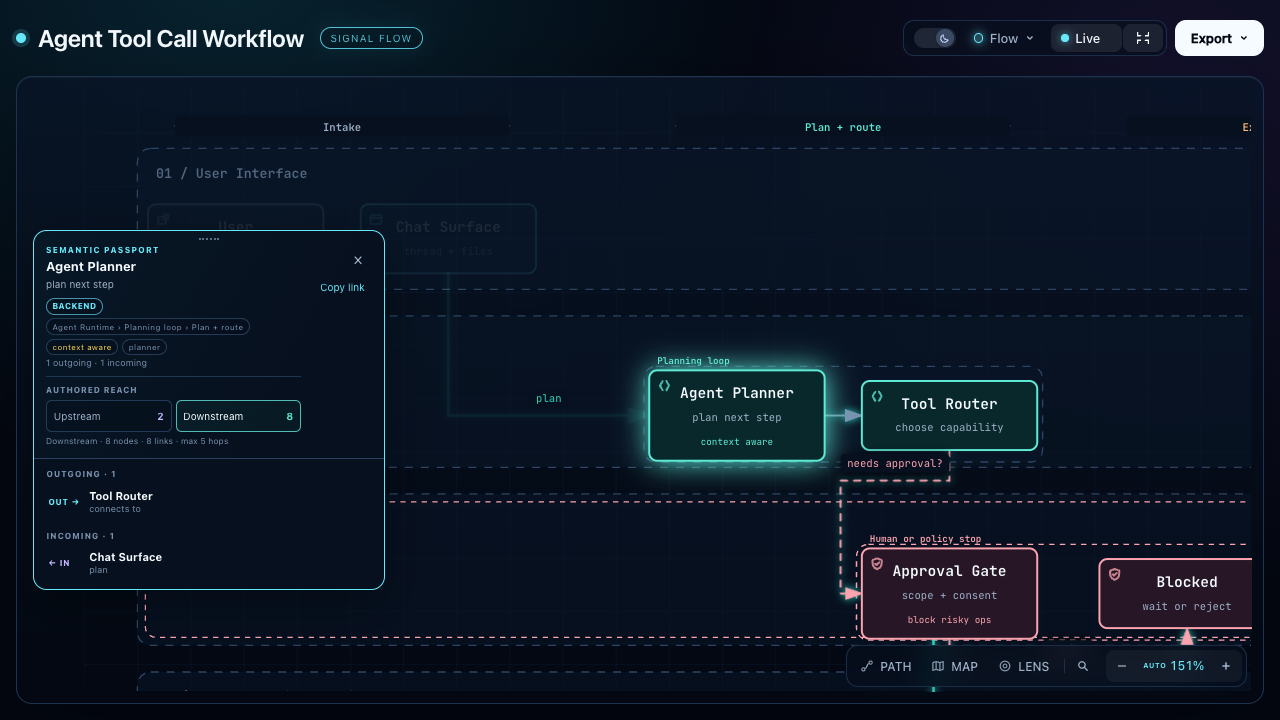
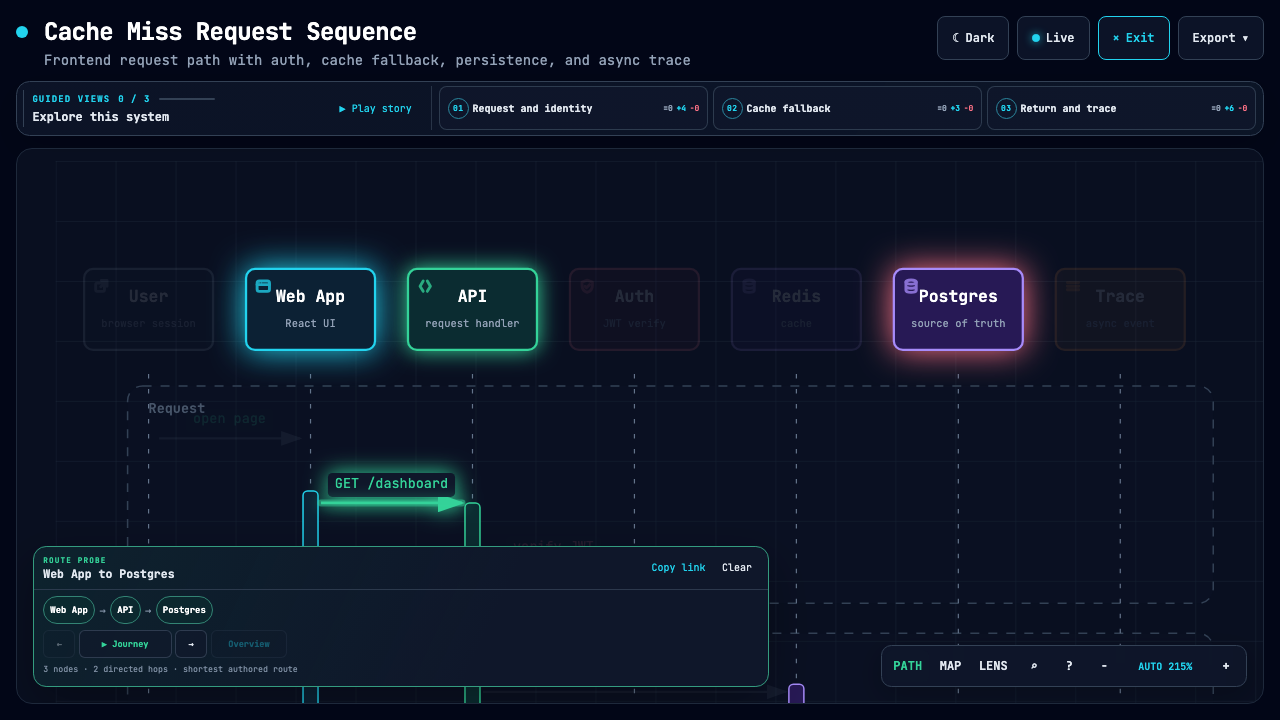
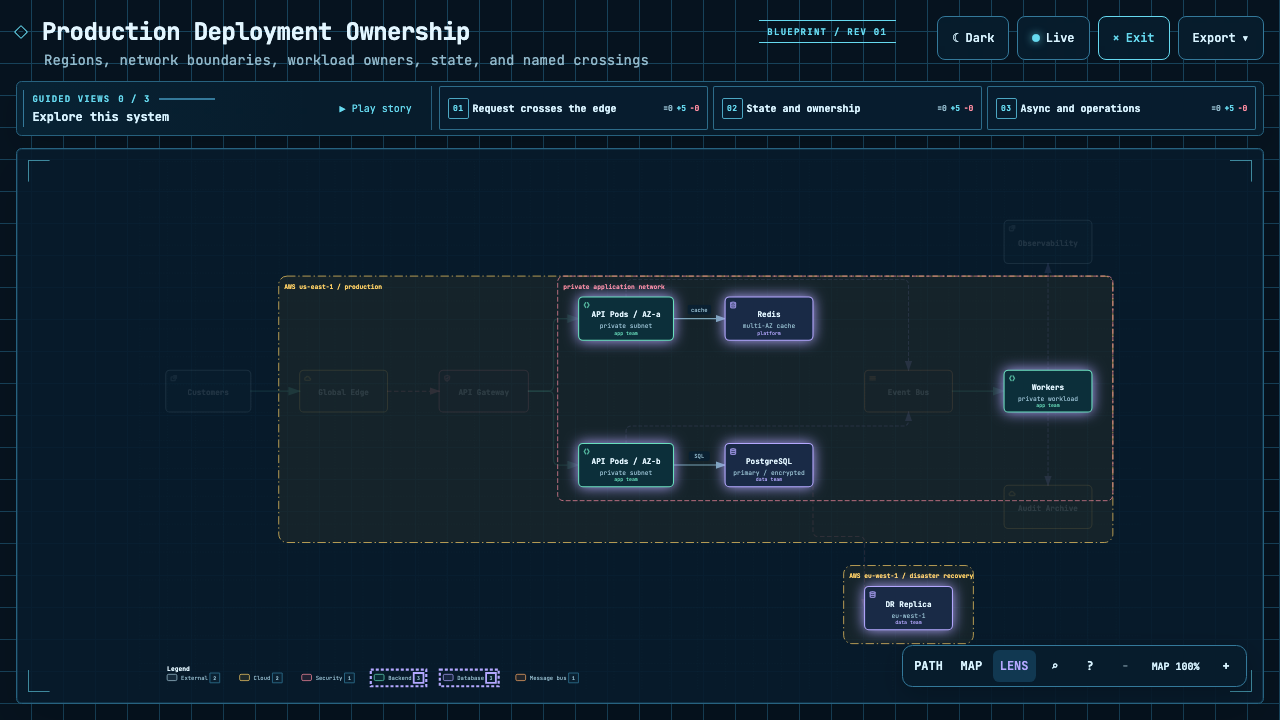
Explain an agent workflow Follow a cache miss Explore service relationships
Agent workflow tracing everything the planner drives Cache-miss sequence showing the Web App to Postgres route Production architecture comparing backend and database roles
Trace everything downstream of one step. Highlight the path from web app to database. Focus on authored backend and database connections.

The Proof Lab contains all 11 checked-in scenarios, their JSON sources, and validation receipts.

Understand a real repository

CODE → DIAGRAM · A source-backed system map
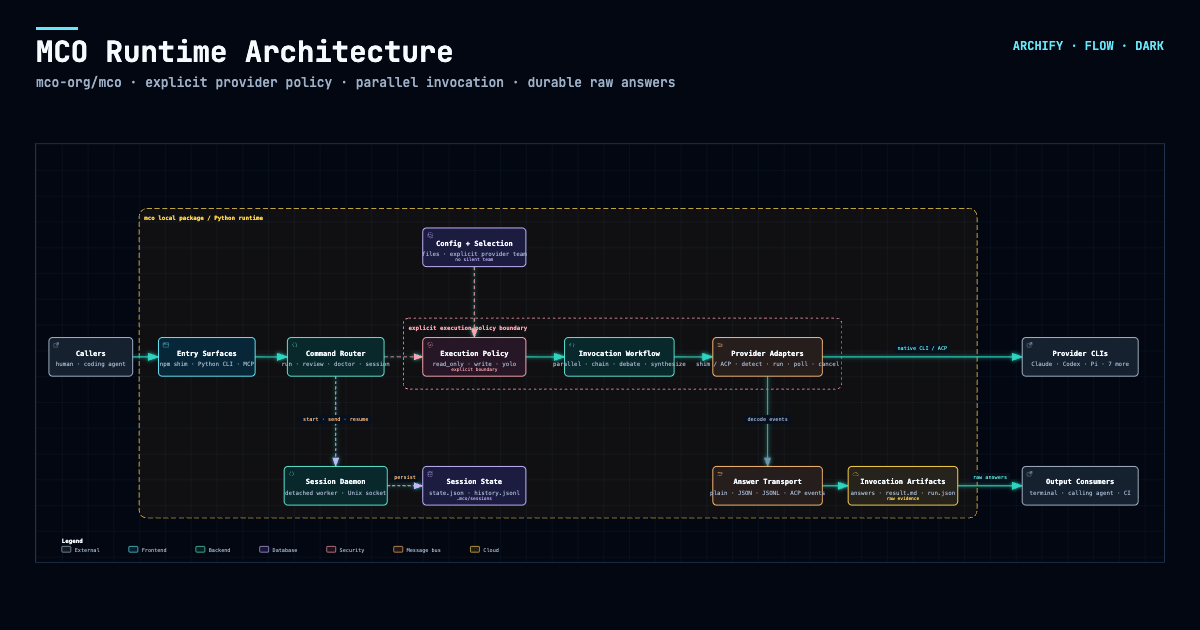
MCO runtime architecture generated from the public mco-org/mco repository

Archify traced mco-org/mco at 9f1a1cf and produced this checked map. Open it ↗ · trace reach ↗ · typed source

Easy to extend. More ways to make it yours.

COMMUNITY STORIES · Selected examples shared by users

Keep building after the diagram is generated. Archify is open source and its output is standalone HTML. Ask your agent to adapt it, connect useful links, or add interactions for your own workflow. Community creations already span team collaboration, travel planning, legal citation checks, contract review, and incident retrospectives. These are just a few examples.

One user started with a hand-drawn multi-agent architecture, turned it into an interactive diagram, then added a Kimi execution pool through conversation. Others asked their agent to read a project and brought the resulting architecture into Feishu or DingTalk for team discussion.

Another user turned a Shanghai CityWalk guide into a four-day itinerary: switch between days, inspect a stop, and jump to Amap, Xiaohongshu, or Dianping. The author also added arrival check-ins and stop notes, turning the itinerary into a small tool to use during the trip. These extensions were added by the community author for this particular artifact.

▶ Explore the interactive Shanghai CityWalk
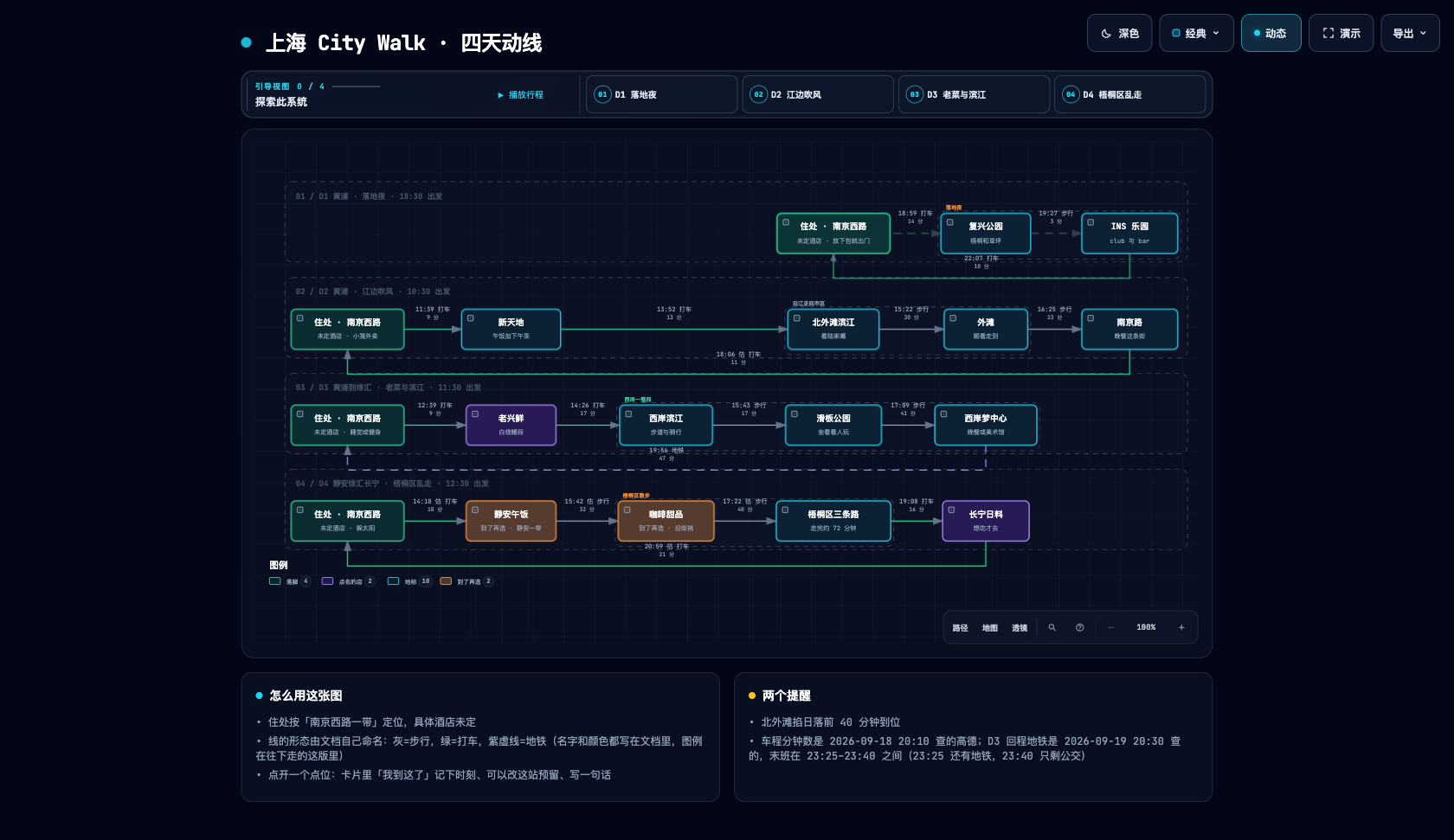
A community-created four-day Shanghai CityWalk itinerary

▶ Try the interactive version · Switch between D1–D4 and click a place to explore.

Community artifact · Shanghai CityWalk · Four days of routes and place links

Download it. Open it. Explore it.

The output is a self-contained HTML file. Download it and open it in your browser to use the node details and path exploration included in that artifact. No Archify installation is needed to view it. Send the HTML to someone else and the interactions go with it; external websites and map links need a network connection.

Explore the Shanghai CityWalk ↗ · Download HTML ↓

Try switching between D1–D4, opening a place card, or following a map link. Times and place information reflect the author's original itinerary.

Community and recognition

A selection of public coverage, community shares, and historical milestones. Follow the links for dates and sources.

Preview

Themes, exports, and share cards

Same diagram, two themes, one click to switch:

Dark Light
Dark theme Light theme

The Export menu copies PNG to the clipboard and downloads static or motion formats:

Export menu

After tracing a route, Export → Route Share Card downloads that authored path as a 1200×630 PNG with the full diagram retained for context.

Route Share Card showing the exact Users to API Server path with the full architecture retained as context

After tracing authored Upstream or Downstream reach, Export → Reach Share Card captures that exact reading without claiming runtime impact.

MCO downstream Reach Share Card showing authored relationships from Command Router

Open examples/web-app.html locally to try the complete viewer.

Quick start

Current stable version: v3.0.1. See Changelog.

1. Install

npx skills add tt-a1i/archify -g
More installation options and update-check details

For an explicit, non-interactive Cursor install:

npx -y skills add tt-a1i/archify --skill archify --agent cursor --global --copy --yes

To try without installing:

npx skills use tt-a1i/archify@archify --agent codex

DSH community opt-in: dsh plugin --profile web add @tt-a1i/[email protected]

The agent switcher covers cursor, codex, claude-code, and opencode.

Archify may GET the fixed stable manifest solely to show an optional reminder; it never downloads or installs updates. Successful checks wait about 24 hours (±20%); active use retries failures after 6, then 24 hours. The server sees normal HTTP metadata (IP and time), but receives no version, Agent, project data, prompts, account/device ID, or ETag. You decide whether and when to update. Set ARCHIFY_UPDATE_CHECK_DISABLED=1 to disable networking and reminder-state writes.

2. Start from a description — no repository required

Use Archify to draw: Browser -> API -> Redis cache -> PostgreSQL fallback.

For source evidence, open a repository and ask:

Analyze this repository, then use archify to create a high-level runtime architecture diagram.
Show 8–12 core components, one primary path, external dependencies, and trust boundaries.
Put supporting detail in cards instead of adding more edges.

3. Refine in chat

Continue with focused requests such as add Redis, move auth to the left, or highlight the rollback path. Archify keeps the typed source available for targeted iteration.

Choose the right diagram

Five diagram types, architecture comparisons, and examples
Type Best for Include in your prompt
Architecture Components, services, storage, boundaries Scope, core components, primary path
Workflow CI/CD, approvals, tool calls, runbooks Participants, order, branches, exceptions
Sequence API calls, cache fallback, auth, async traces Callers, callees, returns, timing
Data Flow Pipelines, lineage, PII, consumers Sources, transforms, stores, boundaries
Lifecycle States, retries, waits, terminal outcomes States, events, retry and cancellation paths

Architecture's optional deployment-ownership profile fails closed when authored owners, region placement, private database scope, or named crossings are missing; it is never implicit and does not inspect live infrastructure. See the checked deployment proof.

For design or PR review, Architecture Delta compares validated Before / Delta / After snapshots with a machine receipt. Select an authored change or play one finite, viewer-only Review; it infers no impact, risk, or merge safety.

node archify/bin/archify.mjs compare architecture base.json head.json architecture-delta.html --json
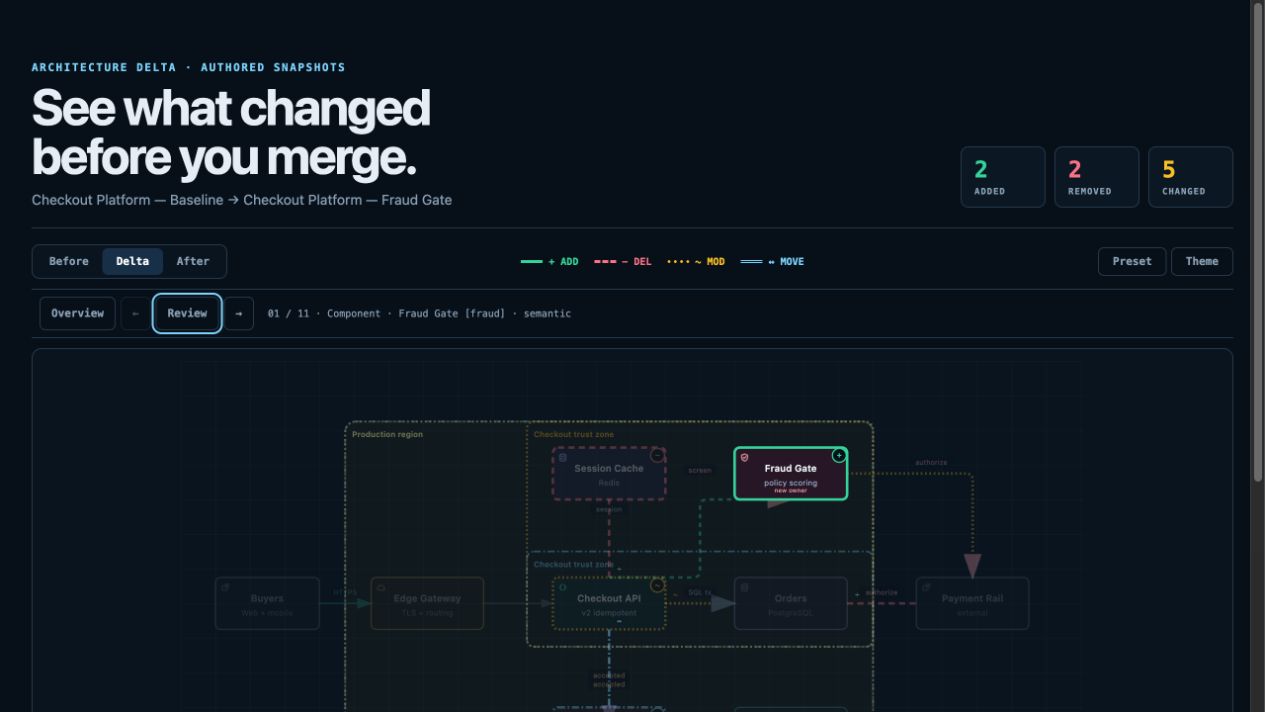
Architecture Delta showing added, removed, changed, and moved authored facts

Not sure which one fits? Use the interactive scenario guide, or ask the zero-dependency CLI:

node archify/bin/archify.mjs guide "Show an API request with Redis cache miss"
node archify/bin/archify.mjs guide "Map Kafka topics, consumer groups, replay, and DLQ" --json

Workflow keeps the happy path clear across lanes:

Workflow example

Sequence explains one interaction over time:

Sequence example

Data Flow makes movement and sensitivity boundaries explicit:

Data Flow example

Lifecycle separates progress, waits, retries, and terminal outcomes:

Lifecycle example

Architecture examples: web-app · Archify pipeline · grid placement · desktop agent

Why Archify

Understand the structure Walk through the story
Map components, workflows, and relationships from code or a description. Explore nodes, follow paths, and share any view as a link.
Extend it your way Share the result
Keep an editable source and build on the open-source code or generated HTML with your own interactions and use cases. Share a self-contained HTML file or export images, video, and share cards.
The engineering behind the experience
  • Layout judgment over generic auto-layout — the agent chooses hierarchy, spacing, routes, and emphasis; shared automatic endpoints spread deterministically instead of piling arrows on one midpoint.
  • Typed JSON IR — every renderer-backed mode has a schema and reproducible source.
  • Atomic validation before delivery — schema, layout, HTML/SVG, route, and label-to-route clearance checks must all pass before a showcase artifact replaces the last known good output.
  • Failures come with a repair receipt — validate --json and deliver --json return stable rule codes, the exact subject, measured evidence, and only supported repair controls instead of a Node stack or an unstructured retry guess.
  • Last-good live preview — an optional desktop loop watches one JSON file, refreshes only after the latest candidate passes every gate, and keeps the previous verified diagram visible when a save is incomplete or invalid.
  • Truthful interaction — focus, upstream/downstream reach, exact routes, role comparison, and stories reuse authored nodes and relationships instead of inventing topology or claiming runtime impact.
  • Source evidence, only when requested — Evidence-backed Architecture nodes mark themselves SRC n and open Git-verified files and line ranges pinned to one public commit; ordinary artifacts stay source-free.
  • Portable by default — the result is one HTML file; exports remain full-diagram and free of temporary viewer state.

Archify is not a general-purpose drawing editor or a Mermaid theme. It turns technical intent into a communication artifact.

How it works

Generation, validation, preview, and delivery details
Step What happens
Generate The agent creates typed JSON IR from your description.
Validate Bundled validators and layout rules check the source; failures identify the exact local repair in machine-readable JSON.
Preview (optional) A loopback-only desktop session watches one source and reloads only verified revisions; failures keep the last-good artifact.
Deliver A same-directory candidate is rendered and checked; only a passing artifact atomically replaces the target, then optional --open launches that exact file.
Iterate The agent updates the source while unrelated structure stays stable.

Useful repository commands:

cd archify
node bin/archify.mjs doctor
node bin/archify.mjs demo /tmp/archify-demo
node bin/archify.mjs guide "Show CI/CD checks, approval, deploy, and rollback"
node bin/archify.mjs validate workflow examples/agent-tool-call.workflow.json --quality showcase --json
node bin/archify.mjs preview workflow examples/agent-tool-call.workflow.json /tmp/workflow.html --quality showcase
node bin/archify.mjs deliver workflow examples/agent-tool-call.workflow.json /tmp/workflow.html --quality showcase --open --json

preview is an explicit loopback-only desktop mode: it watches one JSON file on a random 127.0.0.1 port, keeps the last verified output through failures, stops with Ctrl-C, and adds no generated-HTML runtime. Use --no-open for tests or manual URL opening.

deliver --open is an opt-in one-shot handoff after commit. Opener failure preserves success; JSON remains on stdout and the absolute fallback path goes to stderr.

On failure, validate --json and deliver --json emit one JSON object. Apply only each diagnostics[] subject's supportedFixes, within the Skill's two correction rounds; visual review remains separate.

Settings:

{
  "meta": {
    "locale": "en",
    "animation": "trace",
    "visual_preset": "signal-flow"
  }
}

meta.locale localizes page title, Legend, states/errors, a11y, HTML/SVG lang—never authored content. en/zh-CN are built in; other languages, including Spanish (es), need meta.translations (canonical message key → translated string; see examples/locales/es.json), or the renderer falls back to English and discloses it. Static omits animation; classic defaults.

Explore and share the output

Action Control
Open the factual Diagram Guide ?
Find and focus a semantic node /
Trace upstream/downstream authored reach Focus a node → Upstream / Downstream
Probe a directed route and inspect its journey R or PATH
Compare one or two semantic roles L or LENS
Open the live overview radar M or MAP
Enter Presentation Stage F
Choose visual style (S cycles) / toggle theme / open Export S / T / E
Zoom or reset + / - / 0

Stable links can restore #focus=<id>, #focus=<id>&reach=upstream|downstream, #relation=<id>, #route=<source>~<target>, and #lens=<kind>~<kind>. Reader-driven motion is finite, respects prefers-reduced-motion, and never enters canonical exports.

The complete generation and viewer contract lives in archify/SKILL.md.

Installation options

Surface Install location or method Capability
Claude Code ~/.claude/skills/ or .claude/skills/ Full renderer + validation workflow
Codex CLI ~/.agents/skills/ or .agents/skills/ Full renderer + validation workflow
opencode ~/.config/opencode/skills/, .opencode/skills/, or .agents/skills/ Full renderer + validation workflow
Claude.ai Upload archify.zip under Settings → Capabilities → Skills Depends on Node.js access in the sandbox
Project Knowledge Upload archify.zip to the project Prompt-driven architecture fallback
Hermes Agent Opt-in: hermes skills install skills-sh/tt-a1i/archify/archify -y Community Skill-only integration; Node >=18; not a Nous official product. No telemetry. It is not a switcher target. Details.
DeepSeek Harness Opt-in: dsh plugin --profile web add @tt-a1i/[email protected]. Invoke: Use the archify skill to map this repository's runtime architecture. Remove: dsh plugin --profile web remove @tt-a1i/archify-dsh. Community integration for developer-preview @deepseek-ai/[email protected]; Node ^22.19.0 || >=24.0.0; not an official DeepSeek product. No telemetry. Shell files need exact workspace paths, not Web Produced Files. Details.

Reference and scope

Automatic Mermaid parsing, general-purpose auto-layout, hosted sharing, and WYSIWYG editing are intentionally outside the current scope.

Community

👋 Welcome to the Archify Community!

Connect with other users and developers, share ideas, request features, report bugs, discuss development, and help make Archify better together.

  • Discord
  • WeChat: scan the QR code below. WeChat group codes expire periodically; if this one has expired, ask for the current code through Discord or QQ.
  • QQ group: 1121948602
WeChat
Archify Official WeChat group QR code
QQ
Archify Official QQ group QR code

License

MIT — free to use, modify, and distribute.

Contributing

Issues, pull requests, and real-world diagrams are welcome. Start with the contribution guide, use the reproducible bug form for failures, or submit a validated diagram through the community showcase form. · LINUX DO

Support Archify

If Archify has been useful to you, you can support its continued development. Thank you for helping keep the project going ❤️

Support via WeChat Pay

Scan the QR code below with WeChat, or save it and open it in WeChat to scan.

WeChat Pay QR code to support the Archify maintainer

Support via Alipay

Scan the QR code below with Alipay, or save it and open it in Alipay to scan.

Alipay QR code to support the Archify maintainer (name redacted)

Using Archify, sharing it, reporting bugs, and contributing improvements are also ways to help.

Star History
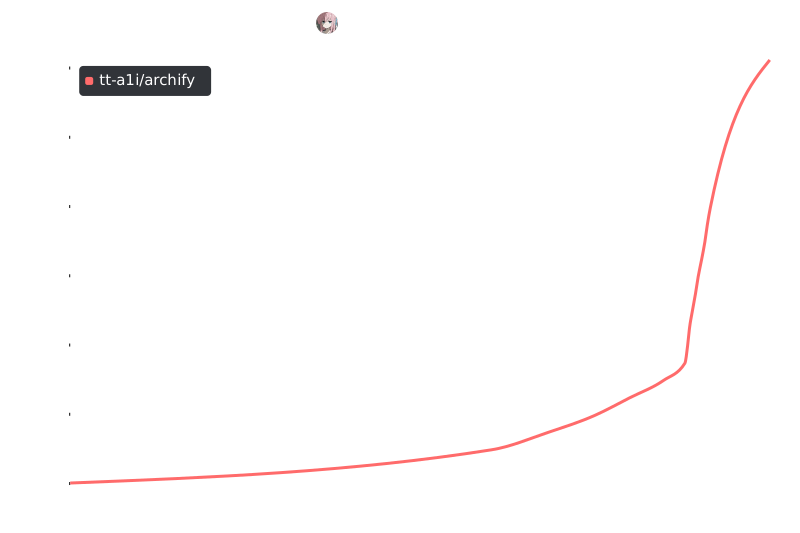
Star History

View on GitHub

Recent activity

commits and pull requests

Releases and announcements

20 total
  1. v3.0.1v3.0.1Sep 28, 20261.4K downloads

    Archify 3.0.1 makes stable update reminders part of normal diagram delivery. `finalize` and standalone `deliver` now include a bounded update result in their receipts and terminal output, and the Skill carries one reminder into its final response when a newer verified release is known. A reminder repeats until the user updates or explicitly asks to snooze it for seven days or ignore that exact release. Checks use the fixed official manifest and cached results; no update installs automatically. The diagram format, generated HTML/SVG content, validation quality gates, and existing path protections are unchanged. See the [changelog](https://github.com/tt-a1i/archify/blob/v3.0.1/CHANGELOG.md) for the full entry. ## What's Changed * Publish v3.0.0 stable update manifest by @tt-a1i in https://github.com/tt-a1i/archify/pull/598 * Keep update notices in diagram delivery receipts by @tt-a1i in https://github.com/tt-a1i/archify/pull/599 * Promote update reminders to stable by @tt-a1i in https://github.com/tt-a1i/archify/pull/610 * Release Archify v3.0.1 by @tt-a1i in https://github.com/tt-a1i/archify/pull/611 **Full Changelog**: https://github.com/tt-a1i/archify/compare/v3.0.0...v3.0.1

  2. # Archify 3.0 — Clearer diagrams, verified delivery Archify 3.0 brings a redesigned diagram reader, clearer layout and routing, and a delivery workflow that verifies the generated artifact before handing it back. It follows the integrated changes and real-project trials on `dev`. ## What changed - **A redesigned reader.** Notes sit below the diagram by default. The reader fits the diagram and controls to the first screen where its readability floors allow, with zoom for detail and scrolling when necessary. Narrow diagrams also retain a usable page layout. - **Clearer diagrams.** Architecture and Workflow placement and routing handle fan-out, return paths, labels and shared corridors more carefully. Lifecycle v2 introduces lane/column layout, state marks and better source-badge spacing while retaining schema-v1 geometry support. - **Sequence diagrams that use their canvas.** Legends sit below all timeline content, can wrap into multiple rows, and no longer intersect lifelines. Message labels follow their line colors. Measured width advice guides one bounded spread repair for new unpinned diagrams, including participants with brand logos. - **Verified delivery across all five type

  3. v2.16.0v2.16.0Aug 30, 202610.4K downloads

    ## What's Changed * fix(viewer): preserve authored direction in Intent Trace by @YunyueLi in https://github.com/tt-a1i/archify/pull/90 * fix(text-fit): count BMP emoji-presentation symbols as two units by @NgoQuocViet2001 in https://github.com/tt-a1i/archify/pull/91 * Add RAG pipeline architecture example by @ClaireXi99 in https://github.com/tt-a1i/archify/pull/67 * add a bilingual authoring cookbook by @smf-h in https://github.com/tt-a1i/archify/pull/78 * fix(renderers): keep automatic routes clear and boundary composition readable by @sunsunsun-java in https://github.com/tt-a1i/archify/pull/96 * 修复 Viewer 导航 Dock 遮挡 SVG Legend by @sunsunsun-java in https://github.com/tt-a1i/archify/pull/101 * Fix Semantic Radar collision handling and dragging by @sunsunsun-java in https://github.com/tt-a1i/archify/pull/100 * docs: strengthen the contribution contract by @tt-a1i in https://github.com/tt-a1i/archify/pull/97 * feat(site): restyle inner pages to the editorial drafted-sheet identity by @tt-a1i in https://github.com/tt-a1i/archify/pull/104 * chore(security): require owner review for automation by @tt-a1i in https://github.com/tt-a1i/archify/pull/109 * feat(i18n): localize Viewer UI fro

  4. v2.15.0v2.15.0Aug 17, 20262.5K downloads

    ## What's Changed * feat(sequence): add opt-in column_fit for viewBox-relative lanes by @pax-d in https://github.com/tt-a1i/archify/pull/64 * feat: add opt-in DeepSeek Harness bundle by @tt-a1i in https://github.com/tt-a1i/archify/pull/69 * fix: make DSH packaging portable on Windows by @tt-a1i in https://github.com/tt-a1i/archify/pull/70 * docs: surface DeepSeek Harness quick start by @tt-a1i in https://github.com/tt-a1i/archify/pull/71 * fix(cli): reject quality flags without values by @NgoQuocViet2001 in https://github.com/tt-a1i/archify/pull/73 * fix(renderers): stop treating non-finite rects as overlapping by @NgoQuocViet2001 in https://github.com/tt-a1i/archify/pull/80 * feat: add authored brand marks and safe URL icon capture by @YunyueLi in https://github.com/tt-a1i/archify/pull/85 * Release v2.15.0 by @tt-a1i in https://github.com/tt-a1i/archify/pull/86 ## New Contributors * @pax-d made their first contribution in https://github.com/tt-a1i/archify/pull/64 * @NgoQuocViet2001 made their first contribution in https://github.com/tt-a1i/archify/pull/73 * @YunyueLi made their first contribution in https://github.com/tt-a1i/archify/pull/85 **Full Changelog**: https://github.com

  5. Archify for DeepSeek Harness v0.1.0archify-dsh-v0.1.0Aug 14, 2026pre-release

    First experimental community release of the opt-in Archify Skill-only bundle for DeepSeek Harness. Install: dsh plugin --profile web add @tt-a1i/[email protected] Compatibility: - @deepseek-ai/[email protected] - Node.js ^22.19.0 or >=24.0.0 - Ubuntu, macOS, and Windows release matrix passed Isolation: - no changes to the default non-DSH Archify path - no telemetry, network client, credentials handling, background service, or lifecycle install hooks - community integration, not an official DeepSeek product npm: https://www.npmjs.com/package/@tt-a1i/archify-dsh Details: https://github.com/tt-a1i/archify/tree/main/integrations/deepseek-harness Validation: https://github.com/tt-a1i/archify/actions/runs/31787427177

Code frequency

additions and deletions
+448.3K-448.3KWeek of 2026-04-12: +5,605 linesWeek of 2026-04-12: -1,393 linesWeek of 2026-04-19: +8,221 linesWeek of 2026-04-19: -823 linesWeek of 2026-04-26: +253 linesWeek of 2026-04-26: -236 linesWeek of 2026-05-03: +0 linesWeek of 2026-05-03: -0 linesWeek of 2026-05-10: +0 linesWeek of 2026-05-10: -0 linesWeek of 2026-05-17: +0 linesWeek of 2026-05-17: -0 linesWeek of 2026-05-24: +705 linesWeek of 2026-05-24: -0 linesWeek of 2026-05-31: +0 linesWeek of 2026-05-31: -0 linesWeek of 2026-06-07: +5,318 linesWeek of 2026-06-07: -1,514 linesWeek of 2026-06-14: +644 linesWeek of 2026-06-14: -238 linesWeek of 2026-06-21: +0 linesWeek of 2026-06-21: -0 linesWeek of 2026-06-28: +1,752 linesWeek of 2026-06-28: -263 linesWeek of 2026-07-05: +8,283 linesWeek of 2026-07-05: -662 linesWeek of 2026-07-12: +428 linesWeek of 2026-07-12: -934 linesWeek of 2026-07-19: +448,269 linesWeek of 2026-07-19: -17,468 linesWeek of 2026-07-26: +21,407 linesWeek of 2026-07-26: -1,147 linesWeek of 2026-08-02: +6,254 linesWeek of 2026-08-02: -976 linesWeek of 2026-08-09: +22,951 linesWeek of 2026-08-09: -6,000 linesWeek of 2026-08-16: +43,498 linesWeek of 2026-08-16: -3,880 linesWeek of 2026-08-23: +52,949 linesWeek of 2026-08-23: -14,322 linesWeek of 2026-08-30: +46,847 linesWeek of 2026-08-30: -7,509 linesWeek of 2026-09-06: +51,377 linesWeek of 2026-09-06: -37,585 linesWeek of 2026-09-13: +55,179 linesWeek of 2026-09-13: -15,325 linesWeek of 2026-09-20: +120,911 linesWeek of 2026-09-20: -110,327 linesWeek of 2026-09-27: +16,670 linesWeek of 2026-09-27: -21,984 linesApr 12, 2026Sep 27, 2026
+917.5K lines added, -242.6K removed over the last year.

Commits per week

last 52 weeks
1630Week of 2025-10-05: 0 commitsWeek of 2025-10-12: 0 commitsWeek of 2025-10-19: 0 commitsWeek of 2025-10-26: 0 commitsWeek of 2025-11-02: 0 commitsWeek of 2025-11-09: 0 commitsWeek of 2025-11-16: 0 commitsWeek of 2025-11-23: 0 commitsWeek of 2025-11-30: 0 commitsWeek of 2025-12-07: 0 commitsWeek of 2025-12-14: 0 commitsWeek of 2025-12-21: 0 commitsWeek of 2025-12-28: 0 commitsWeek of 2026-01-04: 0 commitsWeek of 2026-01-11: 0 commitsWeek of 2026-01-18: 0 commitsWeek of 2026-01-25: 0 commitsWeek of 2026-02-01: 0 commitsWeek of 2026-02-08: 0 commitsWeek of 2026-02-15: 0 commitsWeek of 2026-02-22: 0 commitsWeek of 2026-03-01: 0 commitsWeek of 2026-03-08: 0 commitsWeek of 2026-03-15: 0 commitsWeek of 2026-03-22: 0 commitsWeek of 2026-03-29: 0 commitsWeek of 2026-04-05: 0 commitsWeek of 2026-04-12: 15 commitsWeek of 2026-04-19: 15 commitsWeek of 2026-04-26: 3 commitsWeek of 2026-05-03: 0 commitsWeek of 2026-05-10: 0 commitsWeek of 2026-05-17: 0 commitsWeek of 2026-05-24: 1 commitsWeek of 2026-05-31: 0 commitsWeek of 2026-06-07: 4 commitsWeek of 2026-06-14: 2 commitsWeek of 2026-06-21: 0 commitsWeek of 2026-06-28: 6 commitsWeek of 2026-07-05: 8 commitsWeek of 2026-07-12: 6 commitsWeek of 2026-07-19: 37 commitsWeek of 2026-07-26: 25 commitsWeek of 2026-08-02: 7 commitsWeek of 2026-08-09: 12 commitsWeek of 2026-08-16: 11 commitsWeek of 2026-08-23: 34 commitsWeek of 2026-08-30: 53 commitsWeek of 2026-09-06: 38 commitsWeek of 2026-09-13: 111 commitsWeek of 2026-09-20: 163 commitsWeek of 2026-09-27: 57 commitsOct 5, 2025Sep 27, 2026
608 commits in the last 52 weeks.

When work happens

weekday and hour
SunMonTueWedThuFriSat036912151821Sun 0:00 — 9 commitsSun 1:00 — 2 commitsSun 2:00 — 0 commitsSun 3:00 — 1 commitsSun 4:00 — 0 commitsSun 5:00 — 0 commitsSun 6:00 — 1 commitsSun 7:00 — 0 commitsSun 8:00 — 0 commitsSun 9:00 — 4 commitsSun 10:00 — 12 commitsSun 11:00 — 5 commitsSun 12:00 — 3 commitsSun 13:00 — 5 commitsSun 14:00 — 5 commitsSun 15:00 — 4 commitsSun 16:00 — 3 commitsSun 17:00 — 4 commitsSun 18:00 — 4 commitsSun 19:00 — 4 commitsSun 20:00 — 4 commitsSun 21:00 — 3 commitsSun 22:00 — 5 commitsSun 23:00 — 8 commitsMon 0:00 — 3 commitsMon 1:00 — 2 commitsMon 2:00 — 1 commitsMon 3:00 — 0 commitsMon 4:00 — 0 commitsMon 5:00 — 0 commitsMon 6:00 — 1 commitsMon 7:00 — 0 commitsMon 8:00 — 1 commitsMon 9:00 — 3 commitsMon 10:00 — 1 commitsMon 11:00 — 1 commitsMon 12:00 — 0 commitsMon 13:00 — 3 commitsMon 14:00 — 1 commitsMon 15:00 — 2 commitsMon 16:00 — 3 commitsMon 17:00 — 1 commitsMon 18:00 — 4 commitsMon 19:00 — 2 commitsMon 20:00 — 3 commitsMon 21:00 — 12 commitsMon 22:00 — 4 commitsMon 23:00 — 8 commitsTue 0:00 — 2 commitsTue 1:00 — 1 commitsTue 2:00 — 0 commitsTue 3:00 — 0 commitsTue 4:00 — 2 commitsTue 5:00 — 0 commitsTue 6:00 — 0 commitsTue 7:00 — 0 commitsTue 8:00 — 1 commitsTue 9:00 — 5 commitsTue 10:00 — 1 commitsTue 11:00 — 8 commitsTue 12:00 — 9 commitsTue 13:00 — 3 commitsTue 14:00 — 14 commitsTue 15:00 — 3 commitsTue 16:00 — 4 commitsTue 17:00 — 7 commitsTue 18:00 — 1 commitsTue 19:00 — 2 commitsTue 20:00 — 19 commitsTue 21:00 — 4 commitsTue 22:00 — 9 commitsTue 23:00 — 6 commitsWed 0:00 — 10 commitsWed 1:00 — 3 commitsWed 2:00 — 0 commitsWed 3:00 — 0 commitsWed 4:00 — 0 commitsWed 5:00 — 0 commitsWed 6:00 — 0 commitsWed 7:00 — 0 commitsWed 8:00 — 2 commitsWed 9:00 — 3 commitsWed 10:00 — 5 commitsWed 11:00 — 6 commitsWed 12:00 — 6 commitsWed 13:00 — 12 commitsWed 14:00 — 11 commitsWed 15:00 — 6 commitsWed 16:00 — 9 commitsWed 17:00 — 8 commitsWed 18:00 — 8 commitsWed 19:00 — 8 commitsWed 20:00 — 9 commitsWed 21:00 — 10 commitsWed 22:00 — 6 commitsWed 23:00 — 9 commitsThu 0:00 — 15 commitsThu 1:00 — 10 commitsThu 2:00 — 7 commitsThu 3:00 — 2 commitsThu 4:00 — 2 commitsThu 5:00 — 1 commitsThu 6:00 — 0 commitsThu 7:00 — 0 commitsThu 8:00 — 2 commitsThu 9:00 — 3 commitsThu 10:00 — 12 commitsThu 11:00 — 5 commitsThu 12:00 — 3 commitsThu 13:00 — 4 commitsThu 14:00 — 6 commitsThu 15:00 — 5 commitsThu 16:00 — 11 commitsThu 17:00 — 6 commitsThu 18:00 — 7 commitsThu 19:00 — 3 commitsThu 20:00 — 3 commitsThu 21:00 — 1 commitsThu 22:00 — 0 commitsThu 23:00 — 2 commitsFri 0:00 — 3 commitsFri 1:00 — 1 commitsFri 2:00 — 0 commitsFri 3:00 — 0 commitsFri 4:00 — 0 commitsFri 5:00 — 1 commitsFri 6:00 — 0 commitsFri 7:00 — 1 commitsFri 8:00 — 1 commitsFri 9:00 — 3 commitsFri 10:00 — 4 commitsFri 11:00 — 5 commitsFri 12:00 — 4 commitsFri 13:00 — 2 commitsFri 14:00 — 8 commitsFri 15:00 — 1 commitsFri 16:00 — 4 commitsFri 17:00 — 3 commitsFri 18:00 — 0 commitsFri 19:00 — 1 commitsFri 20:00 — 3 commitsFri 21:00 — 5 commitsFri 22:00 — 3 commitsFri 23:00 — 5 commitsSat 0:00 — 16 commitsSat 1:00 — 13 commitsSat 2:00 — 11 commitsSat 3:00 — 3 commitsSat 4:00 — 4 commitsSat 5:00 — 0 commitsSat 6:00 — 0 commitsSat 7:00 — 0 commitsSat 8:00 — 2 commitsSat 9:00 — 0 commitsSat 10:00 — 3 commitsSat 11:00 — 2 commitsSat 12:00 — 1 commitsSat 13:00 — 0 commitsSat 14:00 — 2 commitsSat 15:00 — 0 commitsSat 16:00 — 0 commitsSat 17:00 — 4 commitsSat 18:00 — 0 commitsSat 19:00 — 3 commitsSat 20:00 — 0 commitsSat 21:00 — 0 commitsSat 22:00 — 1 commitsSat 23:00 — 2 commits
Commit volume by weekday and hour (UTC). Larger dots mean more commits.

Who is committing

last 52 weeks
Maintainer commits541 (62%)
Community commits326 (38%)

867 commits in total over the last year.

DateListRankStars gained
Oct 4, 2026monthly#7+31,939
Oct 3, 2026monthly#7+33,363
Oct 2, 2026monthly#5+35,068
Oct 1, 2026monthly#5+38,190
Sep 30, 2026monthly#4+45,168
Sep 29, 2026monthly#3+48,030
Sep 28, 2026monthly#5+51,711
Sep 27, 2026monthly#3+55,722
Sep 26, 2026monthly#3+56,232
Sep 25, 2026monthly#3+56,351
Sep 24, 2026monthly#3+55,857
Sep 23, 2026monthly#2+55,243
Sep 22, 2026monthly#1+54,494
Sep 21, 2026monthly#1+53,904
Sep 20, 2026monthly#1+53,311
  • affaan-m/ECC

    The agent harness performance optimization system. Skills, instincts, memory, security, and research-first development for Claude Code, Codex, Opencode, Cursor and beyond.

    272.8K stars · JavaScript

  • NousResearch/hermes-agent

    The agent that grows with you

    251.2K stars · Python

  • react/react

    The library for web and native user interfaces.

    250.9K stars · JavaScript

  • firecrawl/firecrawl

    Supercharge your AI agents with data from the web and beyond. Building the library for superintelligence. 🔥

    188.6K stars · TypeScript

  • Significant-Gravitas/AutoGPT

    AutoGPT is the vision of accessible AI for everyone, to use and to build on. Our mission is to provide the tools, so that you can focus on what matters.

    187.7K stars · Python

  • anthropics/skills

    Public repository for Agent Skills

    179.6K stars · Python