unslothai/unslothPublic

Unsloth is a local UI for training and running Kimi K3, Gemma 4, Qwen3.6, DeepSeek-V4, GLM and other models.

AI summary: A local UI and framework for efficiently training and running large language models.

Stars
69.6K
+69 today
Forks
6.3K
Watchers
365
Open issues
738
Open PRs
299
Contributors
~270
Commits
6.7K
Branches
402

PythonApache-2.0Created Nov 29, 2023Last push 1d agoLatest release v0.1.522-beta+407 stars this week+517 this month

Star history

since Nov 26, 2023
020K40K60KNov 2023Oct 2024Sep 2025Aug 2026
69.6K stars as of Aug 6, 2026, tracked back to Nov 26, 2023. Historical curve reconstructed from public GitHub event archives, calibrated to the current total.

Contribution activity

commits per day, last 52 weeks
AugSepOctNovDecJanFebMarAprMayJunJulMonWedFri2025-08-03: 0 commits2025-08-04: 0 commits2025-08-05: 1 commit2025-08-06: 5 commits2025-08-07: 14 commits2025-08-08: 15 commits2025-08-09: 1 commit2025-08-10: 0 commits2025-08-11: 0 commits2025-08-12: 0 commits2025-08-13: 2 commits2025-08-14: 3 commits2025-08-15: 3 commits2025-08-16: 0 commits2025-08-17: 0 commits2025-08-18: 7 commits2025-08-19: 8 commits2025-08-20: 1 commit2025-08-21: 1 commit2025-08-22: 2 commits2025-08-23: 0 commits2025-08-24: 0 commits2025-08-25: 0 commits2025-08-26: 3 commits2025-08-27: 0 commits2025-08-28: 4 commits2025-08-29: 1 commit2025-08-30: 0 commits2025-08-31: 0 commits2025-09-01: 1 commit2025-09-02: 0 commits2025-09-03: 11 commits2025-09-04: 5 commits2025-09-05: 0 commits2025-09-06: 0 commits2025-09-07: 0 commits2025-09-08: 7 commits2025-09-09: 1 commit2025-09-10: 3 commits2025-09-11: 0 commits2025-09-12: 2 commits2025-09-13: 2 commits2025-09-14: 0 commits2025-09-15: 8 commits2025-09-16: 8 commits2025-09-17: 4 commits2025-09-18: 2 commits2025-09-19: 6 commits2025-09-20: 0 commits2025-09-21: 0 commits2025-09-22: 0 commits2025-09-23: 0 commits2025-09-24: 0 commits2025-09-25: 0 commits2025-09-26: 5 commits2025-09-27: 0 commits2025-09-28: 1 commit2025-09-29: 0 commits2025-09-30: 4 commits2025-10-01: 6 commits2025-10-02: 0 commits2025-10-03: 2 commits2025-10-04: 1 commit2025-10-05: 1 commit2025-10-06: 0 commits2025-10-07: 2 commits2025-10-08: 0 commits2025-10-09: 0 commits2025-10-10: 0 commits2025-10-11: 0 commits2025-10-12: 1 commit2025-10-13: 2 commits2025-10-14: 11 commits2025-10-15: 3 commits2025-10-16: 12 commits2025-10-17: 12 commits2025-10-18: 5 commits2025-10-19: 1 commit2025-10-20: 1 commit2025-10-21: 1 commit2025-10-22: 4 commits2025-10-23: 2 commits2025-10-24: 0 commits2025-10-25: 2 commits2025-10-26: 12 commits2025-10-27: 6 commits2025-10-28: 2 commits2025-10-29: 2 commits2025-10-30: 14 commits2025-10-31: 0 commits2025-11-01: 1 commit2025-11-02: 0 commits2025-11-03: 1 commit2025-11-04: 3 commits2025-11-05: 0 commits2025-11-06: 1 commit2025-11-07: 3 commits2025-11-08: 0 commits2025-11-09: 0 commits2025-11-10: 1 commit2025-11-11: 2 commits2025-11-12: 0 commits2025-11-13: 1 commit2025-11-14: 4 commits2025-11-15: 1 commit2025-11-16: 0 commits2025-11-17: 2 commits2025-11-18: 8 commits2025-11-19: 5 commits2025-11-20: 11 commits2025-11-21: 1 commit2025-11-22: 1 commit2025-11-23: 0 commits2025-11-24: 5 commits2025-11-25: 18 commits2025-11-26: 0 commits2025-11-27: 3 commits2025-11-28: 0 commits2025-11-29: 2 commits2025-11-30: 6 commits2025-12-01: 21 commits2025-12-02: 2 commits2025-12-03: 0 commits2025-12-04: 1 commit2025-12-05: 0 commits2025-12-06: 0 commits2025-12-07: 3 commits2025-12-08: 7 commits2025-12-09: 5 commits2025-12-10: 17 commits2025-12-11: 10 commits2025-12-12: 21 commits2025-12-13: 3 commits2025-12-14: 0 commits2025-12-15: 4 commits2025-12-16: 14 commits2025-12-17: 13 commits2025-12-18: 3 commits2025-12-19: 4 commits2025-12-20: 5 commits2025-12-21: 0 commits2025-12-22: 1 commit2025-12-23: 9 commits2025-12-24: 2 commits2025-12-25: 1 commit2025-12-26: 1 commit2025-12-27: 1 commit2025-12-28: 2 commits2025-12-29: 4 commits2025-12-30: 4 commits2025-12-31: 1 commit2026-01-01: 3 commits2026-01-02: 11 commits2026-01-03: 1 commit2026-01-04: 8 commits2026-01-05: 22 commits2026-01-06: 3 commits2026-01-07: 1 commit2026-01-08: 9 commits2026-01-09: 3 commits2026-01-10: 0 commits2026-01-11: 0 commits2026-01-12: 4 commits2026-01-13: 0 commits2026-01-14: 1 commit2026-01-15: 7 commits2026-01-16: 0 commits2026-01-17: 0 commits2026-01-18: 0 commits2026-01-19: 1 commit2026-01-20: 2 commits2026-01-21: 1 commit2026-01-22: 6 commits2026-01-23: 0 commits2026-01-24: 1 commit2026-01-25: 0 commits2026-01-26: 0 commits2026-01-27: 3 commits2026-01-28: 0 commits2026-01-29: 0 commits2026-01-30: 0 commits2026-01-31: 2 commits2026-02-01: 7 commits2026-02-02: 14 commits2026-02-03: 7 commits2026-02-04: 13 commits2026-02-05: 19 commits2026-02-06: 8 commits2026-02-07: 2 commits2026-02-08: 2 commits2026-02-09: 17 commits2026-02-10: 9 commits2026-02-11: 5 commits2026-02-12: 7 commits2026-02-13: 17 commits2026-02-14: 21 commits2026-02-15: 47 commits2026-02-16: 16 commits2026-02-17: 26 commits2026-02-18: 5 commits2026-02-19: 10 commits2026-02-20: 23 commits2026-02-21: 3 commits2026-02-22: 16 commits2026-02-23: 18 commits2026-02-24: 18 commits2026-02-25: 28 commits2026-02-26: 27 commits2026-02-27: 9 commits2026-02-28: 2 commits2026-03-01: 17 commits2026-03-02: 3 commits2026-03-03: 24 commits2026-03-04: 6 commits2026-03-05: 13 commits2026-03-06: 13 commits2026-03-07: 6 commits2026-03-08: 10 commits2026-03-09: 28 commits2026-03-10: 17 commits2026-03-11: 5 commits2026-03-12: 6 commits2026-03-13: 7 commits2026-03-14: 33 commits2026-03-15: 40 commits2026-03-16: 38 commits2026-03-17: 36 commits2026-03-18: 31 commits2026-03-19: 11 commits2026-03-20: 6 commits2026-03-21: 3 commits2026-03-22: 14 commits2026-03-23: 3 commits2026-03-24: 15 commits2026-03-25: 42 commits2026-03-26: 8 commits2026-03-27: 29 commits2026-03-28: 2 commits2026-03-29: 0 commits2026-03-30: 11 commits2026-03-31: 12 commits2026-04-01: 16 commits2026-04-02: 26 commits2026-04-03: 15 commits2026-04-04: 0 commits2026-04-05: 1 commit2026-04-06: 10 commits2026-04-07: 2 commits2026-04-08: 4 commits2026-04-09: 6 commits2026-04-10: 4 commits2026-04-11: 1 commit2026-04-12: 0 commits2026-04-13: 6 commits2026-04-14: 17 commits2026-04-15: 18 commits2026-04-16: 18 commits2026-04-17: 1 commit2026-04-18: 1 commit2026-04-19: 1 commit2026-04-20: 6 commits2026-04-21: 1 commit2026-04-22: 8 commits2026-04-23: 7 commits2026-04-24: 8 commits2026-04-25: 1 commit2026-04-26: 0 commits2026-04-27: 1 commit2026-04-28: 6 commits2026-04-29: 3 commits2026-04-30: 4 commits2026-05-01: 2 commits2026-05-02: 3 commits2026-05-03: 5 commits2026-05-04: 3 commits2026-05-05: 18 commits2026-05-06: 10 commits2026-05-07: 5 commits2026-05-08: 1 commit2026-05-09: 0 commits2026-05-10: 0 commits2026-05-11: 14 commits2026-05-12: 2 commits2026-05-13: 11 commits2026-05-14: 19 commits2026-05-15: 23 commits2026-05-16: 6 commits2026-05-17: 14 commits2026-05-18: 45 commits2026-05-19: 33 commits2026-05-20: 5 commits2026-05-21: 4 commits2026-05-22: 32 commits2026-05-23: 3 commits2026-05-24: 3 commits2026-05-25: 10 commits2026-05-26: 13 commits2026-05-27: 15 commits2026-05-28: 2 commits2026-05-29: 2 commits2026-05-30: 5 commits2026-05-31: 19 commits2026-06-01: 19 commits2026-06-02: 5 commits2026-06-03: 15 commits2026-06-04: 7 commits2026-06-05: 9 commits2026-06-06: 1 commit2026-06-07: 5 commits2026-06-08: 11 commits2026-06-09: 10 commits2026-06-10: 50 commits2026-06-11: 44 commits2026-06-12: 66 commits2026-06-13: 10 commits2026-06-14: 5 commits2026-06-15: 25 commits2026-06-16: 12 commits2026-06-17: 19 commits2026-06-18: 35 commits2026-06-19: 10 commits2026-06-20: 6 commits2026-06-21: 8 commits2026-06-22: 47 commits2026-06-23: 35 commits2026-06-24: 19 commits2026-06-25: 14 commits2026-06-26: 12 commits2026-06-27: 6 commits2026-06-28: 4 commits2026-06-29: 14 commits2026-06-30: 11 commits2026-07-01: 9 commits2026-07-02: 8 commits2026-07-03: 11 commits2026-07-04: 1 commit2026-07-05: 2 commits2026-07-06: 33 commits2026-07-07: 16 commits2026-07-08: 30 commits2026-07-09: 21 commits2026-07-10: 5 commits2026-07-11: 6 commits2026-07-12: 3 commits2026-07-13: 7 commits2026-07-14: 15 commits2026-07-15: 30 commits2026-07-16: 12 commits2026-07-17: 8 commits2026-07-18: 10 commits2026-07-19: 15 commits2026-07-20: 22 commits2026-07-21: 15 commits2026-07-22: 14 commits2026-07-23: 32 commits2026-07-24: 24 commits2026-07-25: 9 commits2026-07-26: 17 commits2026-07-27: 29 commits2026-07-28: 55 commits2026-07-29: 35 commits2026-07-30: 0 commits2026-07-31: 0 commits2026-08-01: 0 commits
3,006 commits in the last yearLessMore

Signals and awards

derived from tracked data
  • Landmark project

    69,627 stars

  • Very active

    3,006 commits in 52 weeks

  • Community-driven

    ~270 contributors

  • Permissive license

    Apache-2.0

What unsloth does

Unsloth provides a streamlined local user interface and optimized backend for training and inferencing various large language models. It supports modern architectures including Kimi K3, Gemma 4, Qwen3.6, DeepSeek-V4, and GLM. The platform focuses on making model fine-tuning and deployment accessible directly on consumer-grade hardware by implementing significant memory and speed optimizations. By providing a graphical interface alongside its core optimization library, it lowers the barrier to entry for local AI experimentation. It enables users to rapidly iterate on custom models without relying on expensive cloud compute.

Unsloth is designed for AI researchers, machine learning engineers, and hobbyists who want to fine-tune models locally. It is particularly valuable for users who prefer a graphical interface over complex CLI workflows for model management.

  • Local user interface: Provides a graphical UI to manage training runs and model inference easily.
  • Broad model support: Works out-of-the-box with architectures like Kimi K3, Gemma 4, DeepSeek-V4, and GLM.
  • Memory optimization: Reduces VRAM requirements, allowing large models to be trained on consumer GPUs.
  • Training acceleration: Implements custom optimizations to drastically speed up the fine-tuning process.
  • Simplified deployment: Streamlines the process of running inference on custom trained models locally.

Where teams use it

Local fine-tuning

Researchers can easily fine-tune supported models on a single consumer GPU using the UI.

Rapid experimentation

AI engineers can quickly test different training datasets and hyperparameters locally.

Cost reduction

Developers can lower their cloud computing bills by conducting initial model training on local hardware.

Accessible AI development

Hobbyists can train and run advanced language models without writing complex command-line scripts.

Getting started: Follow the documentation at unsloth.ai/docs.

README

main branch

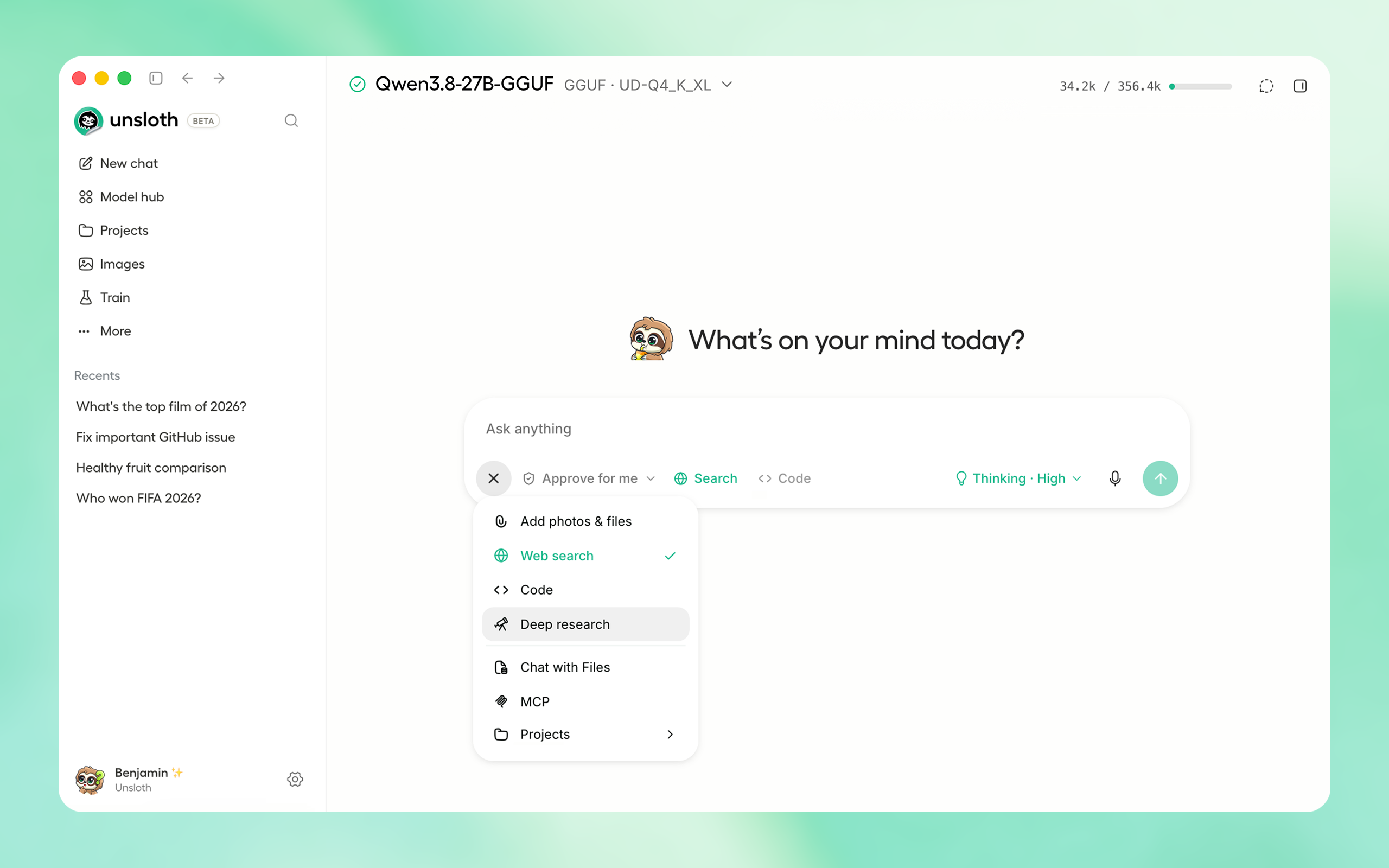
Unsloth Studio lets you run and train models locally.

FeaturesNewsQuickstartNotebooksDocumentation


unsloth studio ui homepage

⚡ Get started

macOS, Linux, WSL:

curl -fsSL https://unsloth.ai/install.sh | sh

Windows:

irm https://unsloth.ai/install.ps1 | iex

Community:

⭐ Features

Unsloth Studio (Beta) lets you run and train text, audio, embedding, vision models on Windows, Linux and macOS.

Inference

  • Search + download + run models including GGUF, LoRA adapters, safetensors
  • Export models: Save or export models to GGUF, 16-bit safetensors and other formats.
  • Tool calling: Support for self-healing tool calling and web search
  • Code execution: lets LLMs test code in Claude artifacts and sandbox environments
  • API inference endpoint: Deploy and run local LLMs in Claude Code, Codex tools with Unsloth
  • Auto set inference settings and customize chat templates.
  • We work directly with teams behind gpt-oss, Qwen3, Llama 4, Mistral, Gemma 1-3, and Phi-4, where we’ve fixed bugs that improve model accuracy.
  • Chat with images, audio, PDFs, code, DOCX and more. Connect API providers (OpenAI, Anthropic) or servers (vLLM, Ollama).
  • Compare any two models side by side with the same prompt.
  • OpenAI/Anthropic-compatible APIs: Serve local models through /v1/chat/completions, /v1/responses and /v1/messages.
  • Connect local models to agents: Use unsloth start with Claude Code, Codex, Hermes and more.
  • Web/PDF search can read PDF papers, manuals and other PDF results.
  • GGUF hardware controls: Choose GPUs/layers, offload MoE experts, use multi-GPU or Tensor Parallelism.
  • The opt-in MCP control endpoint lets AI clients manage models, training, recipes and exports.

Training

  • Train and RL 500+ models up to 2x faster with 70% less VRAM; MoE up to 12x faster.
  • Train and run RL on AMD GPUs across Windows, WSL and Linux.
  • Data Recipes: Auto-create datasets from PDF, CSV, DOCX etc. Edit data in a visual-node workflow.
  • Reinforcement Learning uses 80% less VRAM for GRPO, FP8 and vision RL, with 7x longer contexts.
  • Long-context training: 3x faster, 30% less VRAM and 500K+ context.
  • Supports LoRA/QLoRA, full fine-tuning, RL, pretraining, 4-bit, 16-bit and FP8.
  • Custom Triton and mathematical kernels built with PyTorch and Hugging Face.
  • Observability: Monitor training live, track loss and GPU usage and customize graphs.
  • Multi-GPU training is supported, with major improvements coming soon.

🚀 Unsloth Start

Unsloth Start connects Claude Code, Codex and other agents to local models with one command.

Start Unsloth, load a model, open your project folder, then run:

unsloth start claude

Replace claude with any supported agent:

Agent Command
Claude Code unsloth start claude
OpenAI Codex unsloth start codex
Hermes Agent unsloth start hermes
OpenClaw unsloth start openclaw
OpenCode unsloth start opencode

Claude Code, Codex and OpenCode can keep their current model and use Unsloth as a local subagent:

unsloth start claude --as-subagent --model unsloth/model-GGUF:quant

📥 Install

Unsloth can be used in two ways: through Unsloth Studio, the web UI, or through Unsloth Core, the code-based version. Each has different requirements.

Unsloth Studio (web UI)

Unsloth Studio (Beta) works on Windows, Linux, WSL and macOS.

  • CPU: Supported for Chat and Data Recipes currently
  • NVIDIA: Training works on RTX 30/40/50, Blackwell, DGX Spark, Station and more
  • macOS: Training, MLX and GGUF inference are ALL supported.
  • AMD: Training, RL, chat and deployment work on Windows, WSL and Linux. Read the AMD guide.
  • Vulkan: GGUF inference is supported on compatible GPUs, including Intel GPUs. Vulkan accelerates GGUF inference only; training still requires a supported PyTorch or MLX backend.
  • Multi-GPU: Available now, with a major upgrade on the way

macOS, Linux, WSL:

curl -fsSL https://unsloth.ai/install.sh | sh

Use the same command to update.

To force the Vulkan llama.cpp backend, set UNSLOTH_FORCE_VULKAN=1 before installing or updating. The setting selects the llama.cpp binary bundle, so setting it only when launching Studio cannot replace an existing CPU bundle:

export UNSLOTH_FORCE_VULKAN=1
curl -fsSL https://unsloth.ai/install.sh | sh

Windows:

irm https://unsloth.ai/install.ps1 | iex

Use the same command to update.

To force the Vulkan llama.cpp backend, set the environment variable before running the installer or updater:

$env:UNSLOTH_FORCE_VULKAN=1
irm https://unsloth.ai/install.ps1 | iex

Re-running the current installer replaces a previously selected CPU bundle when the backend differs. A separate Vulkan SDK is not required; the GPU driver must provide a working Vulkan runtime.

Launch

unsloth studio -p 8888

For LAN or cloud access, add -H 0.0.0.0 (raw port only; add --cloudflare for a public URL). By default, Unsloth is accessible only locally.

To reach Unsloth over HTTPS, use unsloth studio --secure. Unsloth stays bound to localhost and is reached only through a free Cloudflare tunnel, which publishes it at a public https://*.trycloudflare.com URL (it fails closed if the tunnel can't start, so the raw port is never exposed). This makes Unsloth reachable from the internet, so anyone with the link and API key can use it and run code: keep your API key private (see Remote access below).

Docker

Use our Docker image unsloth/unsloth container. Run:

docker run -d -e JUPYTER_PASSWORD="mypassword" \
  -p 8888:8888 -p 8000:8000 -p 2222:22 \
  -v $(pwd)/work:/workspace/work \
  --gpus all \
  unsloth/unsloth

Developer, Nightly, Uninstall

To see developer, nightly and uninstallation etc. instructions, see advanced installation.

Unsloth Core (code-based)

Linux, WSL:

curl -LsSf https://astral.sh/uv/install.sh | sh
uv venv unsloth_env --python 3.13
source unsloth_env/bin/activate
uv pip install unsloth --torch-backend=auto

Windows:

winget install -e --id Python.Python.3.13
winget install --id=astral-sh.uv  -e
uv venv unsloth_env --python 3.13
.\unsloth_env\Scripts\activate
uv pip install unsloth --torch-backend=auto

For Windows, pip install unsloth works only if you have PyTorch installed. Read our Windows Guide. You can use the same Docker image as Unsloth Studio.

AMD, Intel:

For RTX 50x, B200, 6000 GPUs: uv pip install unsloth --torch-backend=auto. Read our guides for: Blackwell and DGX Spark.
To install Unsloth on AMD and Intel GPUs, follow our AMD Guide and Intel Guide.

📒 Free Notebooks

Train for free with our notebooks. You can use our new free Unsloth Studio notebook to run and train models for free in a web UI. Read our guide. Add dataset, run, then deploy your trained model.

Model Free Notebooks Performance Memory use
Gemma 4 (E2B) ▶️ Start for free 1.5x faster 50% less
Qwen3.5 (4B) ▶️ Start for free 1.5x faster 60% less
gpt-oss (20B) ▶️ Start for free 2x faster 70% less
Qwen3.5 GSPO ▶️ Start for free 2x faster 70% less
gpt-oss (20B): GRPO ▶️ Start for free 2x faster 80% less
Qwen3: Advanced GRPO ▶️ Start for free 2x faster 70% less
embeddinggemma (300M) ▶️ Start for free 2x faster 20% less
Mistral Ministral 3 (3B) ▶️ Start for free 1.5x faster 60% less
Llama 3.1 (8B) Alpaca ▶️ Start for free 2x faster 70% less
Llama 3.2 Conversational ▶️ Start for free 2x faster 70% less
Orpheus-TTS (3B) ▶️ Start for free 1.5x faster 50% less

🦥 Unsloth News

  • AMD training: Train, run RL, chat and deploy on AMD GPUs across Windows, WSL and Linux. Guide
  • GGUF hardware controls: Choose GPU/layer placement, offload MoE experts and use multi-GPU or Tensor Parallelism. #6414
  • Local models for any agent: Use unsloth start with Claude Code, Codex, Hermes, OpenCode, OpenClaw and more through Unsloth's OpenAI- and Anthropic-compatible APIs. Guide
  • MCP control endpoint: Let compatible clients manage models, training, recipes, checkpoints and exports. #7191
  • Local inference reliability: Resume long chats faster, recover stalled downloads and reuse existing GGUF files. #7204#6858#7209
  • New models: Qwen-AgentWorld, Ornith, Kimi K2.7 Code and MiniMax M3
  • GLM-5.2: Run Z.ai's 744B-parameter, 1M-context open model locally with Unsloth Dynamic GGUFs. Guide
  • DeepSeek-V4: Run DeepSeek-V4-Flash locally with corrected multi-turn and tool-calling behavior. Guide
  • DiffusionGemma: Run and fine-tune Google's diffusion language model with 1.8x faster inference in Unsloth Studio. Guide
  • Qwen3.6: Run and train Qwen3.6 with MTP for 1.4-2.2x faster inference and NVFP4 quants for supported GPUs. Guide
  • Gemma 4: Run and train Gemma 4 text, image and audio models with QAT, MTP, GGUF and MLX support. Guide
  • MCP servers: Connect local models to files, apps, databases and external tools through Model Context Protocol. Guide
  • Connections: Mix local models with API providers (OpenAI, Anthropic) or servers (vLLM, Ollama) in the same interface. Guide
  • Introducing Unsloth Studio: our new web UI for running and training LLMs. Blog
  • Train MoE LLMs 12x faster with 35% less VRAM - DeepSeek, GLM, Qwen and gpt-oss. Blog
  • Embedding models: Unsloth now supports ~1.8-3.3x faster embedding fine-tuning. BlogNotebooks
  • New 7x longer context RL vs. all other setups, via our new batching algorithms. Blog
  • New RoPE & MLP Triton Kernels & Padding Free + Packing: 3x faster training & 30% less VRAM. Blog
  • 500K Context: Training a 20B model with >500K context is now possible on an 80GB GPU. Blog
  • FP8 & Vision RL: You can now do FP8 & VLM GRPO on consumer GPUs. FP8 BlogVision RL

📥 Advanced Installation

The below advanced instructions are for Unsloth Studio. For Unsloth Core advanced installation, view our docs.

Developer / Nightly / Experimental installs: macOS, Linux, WSL:

The developer install builds from the main branch, which is the latest (nightly) source.

git clone https://github.com/unslothai/unsloth
cd unsloth
./install.sh --local
unsloth studio -p 8888

To install into an isolated location (its own virtual env, auth/, studio.db, cache and llama.cpp build), set UNSLOTH_STUDIO_HOME and pass it again at launch:

UNSLOTH_STUDIO_HOME="$PWD/.studio" ./install.sh --local
UNSLOTH_STUDIO_HOME="$PWD/.studio" unsloth studio -p 8888

Then to update :

cd unsloth && git pull
./install.sh --local
unsloth studio -p 8888

Developer / Nightly / Experimental installs: Windows PowerShell:

The developer install builds from the main branch, which is the latest (nightly) source.

git clone https://github.com/unslothai/unsloth.git
cd unsloth
Set-ExecutionPolicy -Scope Process -ExecutionPolicy Bypass
.\install.ps1 --local
unsloth studio -p 8888

To install into an isolated location (its own virtual env, auth/, studio.db, cache and llama.cpp build), set UNSLOTH_STUDIO_HOME and pass it again at launch:

$env:UNSLOTH_STUDIO_HOME="$PWD\.studio"; .\install.ps1 --local
$env:UNSLOTH_STUDIO_HOME="$PWD\.studio"; unsloth studio -p 8888

Then to update :

cd unsloth; git pull
.\install.ps1 --local
unsloth studio -p 8888

Remote access: --secure (HTTPS tunnel) vs raw port

By default unsloth studio binds to 127.0.0.1 (this machine only). To reach it from another device, pick one of:

  • --secure (recommended): serve only through a free Cloudflare HTTPS link. Unsloth stays bound to localhost and the tunnel provides the public URL; it fails closed (does not start) if the tunnel can't come up, so the raw port is never exposed.
unsloth studio --secure -p 8888
  • -H 0.0.0.0: bind the raw port on all network interfaces, reachable from anywhere on the network (subject to your firewall). It does not create a public internet URL; add --cloudflare to also publish an internet-reachable https://*.trycloudflare.com link even behind a firewall. Only use this on a network you trust.
unsloth studio -H 0.0.0.0 -p 8888

The Cloudflare tunnel is off by default: -H 0.0.0.0 exposes the raw port only, not a public internet URL. Pair the wildcard bind with --cloudflare (unsloth studio -H 0.0.0.0 --cloudflare) to also publish a public https://*.trycloudflare.com link, or prefer --secure (above), which keeps the raw port private. --cloudflare has no effect on a loopback bind.

On a wildcard bind Unsloth works out the address to share by asking ifconfig.me for the public IP, then asks check-host.net whether that port is reachable so it can tell you if a firewall is in the way. Both contact a third party. Set UNSLOTH_STUDIO_DISABLE_PUBLIC_CHECK=1 to skip them; the banner then shows the LAN address and no reachability line.

The first time Unsloth is published on a public URL (--secure or --cloudflare) with the auto-generated admin password still in place, it asks for a new admin password in the terminal (masked input with confirmation) before the public link goes up. Without an attached terminal it warns instead and keeps the bootstrap deadline: Unsloth shuts down after UNSLOTH_STUDIO_BOOTSTRAP_TIMEOUT (default 1 hour) unless the password is changed in the web UI.

For headless setups that cannot answer that prompt, set the initial admin password non-interactively with --password (only takes effect when no password is set yet; if one already exists it is a hard error, so rotate later with unsloth studio reset-password):

unsloth studio --secure --password 'your-strong-password'        # visible in `ps`/history
UNSLOTH_STUDIO_PASSWORD='your-strong-password' unsloth studio --secure   # via env var
printf '%s\n' 'your-strong-password' | unsloth studio --secure --password -   # via stdin

A literal --password VALUE is visible in the process list and shell history, so prefer the UNSLOTH_STUDIO_PASSWORD env var or --password - (stdin) for automation. This applies to any launch (public or a headless -H 0.0.0.0 bind), and the password is set in the parent before the server binds, so it never reaches a re-executed child process.

Server-side tools (web search, Python and terminal code execution) run as your user and are on by default. Anyone who can reach the server with the API key can run code on this machine, so keep your API key private and pass --disable-tools when exposing Unsloth.

Advanced launch options

Installer options can be passed as environment variables. On macOS, Linux and WSL place the variable after the pipe so the shell passes it to sh; on Windows set it with $env: before piping to iex.

Skip PyTorch (GGUF-only mode):

curl -fsSL https://unsloth.ai/install.sh | UNSLOTH_NO_TORCH=1 sh
$env:UNSLOTH_NO_TORCH=1; irm https://unsloth.ai/install.ps1 | iex

Skip the post-install prompt that starts Unsloth (useful for automated installs):

curl -fsSL https://unsloth.ai/install.sh | UNSLOTH_SKIP_AUTOSTART=1 sh
$env:UNSLOTH_SKIP_AUTOSTART=1; irm https://unsloth.ai/install.ps1 | iex

Pin the Python version:

curl -fsSL https://unsloth.ai/install.sh | UNSLOTH_PYTHON=3.12 sh
$env:UNSLOTH_PYTHON='3.12'; irm https://unsloth.ai/install.ps1 | iex

Install to a custom location with UNSLOTH_STUDIO_HOME:

curl -fsSL https://unsloth.ai/install.sh | UNSLOTH_STUDIO_HOME=/abs/path sh
$env:UNSLOTH_STUDIO_HOME='C:\path'; irm https://unsloth.ai/install.ps1 | iex

On macOS, the installer defaults to the system certificate store (UV_SYSTEM_CERTS=1) so uv trusts the CAs in your Keychain, needed behind TLS-inspecting proxies (Cisco Umbrella, Zscaler, etc.). Opt out with:

curl -fsSL https://unsloth.ai/install.sh | UV_SYSTEM_CERTS=0 sh

Point the frontend build at a corporate npm mirror/proxy with UNSLOTH_NPM_REGISTRY (for the developer install behind a firewall that blocks registry.npmjs.org):

UNSLOTH_NPM_REGISTRY=https://artifactory.example.com/api/npm/npm/ ./install.sh --local
$env:UNSLOTH_NPM_REGISTRY='https://artifactory.example.com/api/npm/npm/'; .\install.ps1 --local

It is threaded as --registry into the Unsloth frontend npm/bun installs; the supply-chain locks (7-day min-release-age, exact version pins) stay in force.

Cap Unsloth's native CPU thread pools on high-core hosts: UNSLOTH_CPU_THREADS=8 unsloth studio -p 8888.

Uninstall

The recommended way to fully remove Unsloth Studio is the matching uninstall script for your OS. It stops any running servers, removes the install dir, the launcher data dir, the desktop shortcut, and any platform-specific entries (macOS .app bundle + Launch Services on Mac; Start Menu, HKCU\Software\Unsloth registry key and user PATH entries on Windows):

  • MacOS, WSL, Linux: curl -fsSL https://raw.githubusercontent.com/unslothai/unsloth/main/scripts/uninstall.sh | sh
  • Windows (PowerShell): irm https://raw.githubusercontent.com/unslothai/unsloth/main/scripts/uninstall.ps1 | iex

If you only want to drop the install dir and keep the launcher/shortcut for a later reinstall, you can instead run rm -rf ~/.unsloth/studio (Mac/Linux/WSL) or Remove-Item -Recurse -Force "$HOME\.unsloth\studio" (Windows). The model cache at ~/.cache/huggingface is not touched by any of these.

For more info, see our docs.

Deleting model files

You can delete old model files either from the bin icon in model search or by removing the relevant cached model folder from the default Hugging Face cache directory. By default, HF uses:

  • MacOS, Linux, WSL: ~/.cache/huggingface/hub/
  • Windows: %USERPROFILE%\.cache\huggingface\hub\

💚 Community and Links

Type Links
  Discord Join Discord server
  r/unsloth Reddit Join Reddit community
📚 Documentation & Wiki Read Our Docs
  Twitter (aka X) Follow us on X
🔮 Our Models Unsloth Catalog
✍️ Blog Read our Blogs

Citation

You can cite the Unsloth repo as follows:

@software{unsloth,
  author = {Daniel Han, Michael Han and Unsloth team},
  title = {Unsloth},
  url = {https://github.com/unslothai/unsloth},
  year = {2023}
}

If you trained a model with 🦥Unsloth, you can use this cool sticker!  

License

Unsloth uses a dual-licensing model of Apache 2.0 and AGPL-3.0. The core Unsloth package remains licensed under Apache 2.0, while certain optional components, such as the Unsloth Studio UI are licensed under the open-source license AGPL-3.0.

This structure helps support ongoing Unsloth development while keeping the project open source and enabling the broader ecosystem to continue growing.

Thank You to

  • The llama.cpp library that lets users run and save models with Unsloth
  • The Hugging Face team and their libraries: transformers and TRL
  • The Pytorch and Torch AO team for their contributions
  • NVIDIA for their NeMo DataDesigner library and their contributions
  • And of course for every single person who has contributed or has used Unsloth!
View on GitHub

Recent activity

commits and pull requests

Releases and announcements

46 total
  1. Hey everyone! For folks who missed the news - Kimi K3 & DeepSeek v4 Flash can now run locally with Unsloth Dynamic GGUFs! We now added more efficient and faster downloading for Colab, low memory systems and also high memory and CPU systems - we auto fallback to HTTP as well if XET is stuck ## DeepSeek V4 Flash 0731 You can run our [DeepSeek V4 Dynamic GGUFs](https://huggingface.co/unsloth/DeepSeek-V4-Flash-0731-GGUF) through Unsloth. Unsloth automatically detects multi-GPU setups and can offload model layers to system memory. - `UD-IQ1_S` is 83GB in disk space. - `UD-IQ3_XXS` is 104GB in disk space and fits in 128GB machines. - `UD-Q4_K_XL` is 155GB in disk space. - For lossless inference, use `UD-Q8_K_XL`, which is 162TB in disk space. Read our full [DeepSeek V4 Flash guide](https://unsloth.ai/docs/models/deepseek-v4) ## Kimi K3 Moonshot AI’s **Kimi K3** is a 2.8T-parameter MoE model with 104B active parameters, native vision support and a 1M context window. Kimi K3 is thinking-only and Unsloth supports low, high and max reasoning efforts. You can run our [Kimi K3 Dynamic GGUFs](https://huggingface.co/unsloth/Kimi-K3-GGUF) through Unsloth. Unsloth automatic

  2. Hey everyone! Kimi K3 & DeepSeek v4 Flash can now run locally with Unsloth Dynamic GGUFs, Unsloth can keep multiple chats generating in parallel, and the new Deep Research mode plans, reads and cites sources using your local model. This release also brings better AMD and Intel GPU support, DoRA training, and many installer, MLX, export and inference fixes. ## DeepSeek V4 Flash 0731 (August 2 Update) You can run our [DeepSeek V4 Dynamic GGUFs](https://huggingface.co/unsloth/DeepSeek-V4-Flash-0731-GGUF) through Unsloth. Unsloth automatically detects multi-GPU setups and can offload model layers to system memory. - `UD-IQ1_S` is 83GB in disk space. - `UD-IQ3_XXS` is 104GB in disk space and fits in 128GB machines. - `UD-Q4_K_XL` is 155GB in disk space. - For lossless inference, use `UD-Q8_K_XL`, which is 162TB in disk space. Read our full [DeepSeek V4 Flash guide](https://unsloth.ai/docs/models/deepseek-v4) ## Kimi K3 Moonshot AI’s **Kimi K3** is a 2.8T-parameter MoE model with 104B active parameters, native vision support and a 1M context window. Kimi K3 is thinking-only and Unsloth supports low, high and max reasoning efforts. You can run our [Kimi K3 Dynam

  3. Introducing AMD supportv0.1.501-betaJul 20, 2026

    Hey everyone! This release brings local LLM training and inference to AMD GPUs across Windows, WSL and Linux. [Read our AMD Blog + Guide](https://unsloth.ai/docs/basics/amd) Starting today, our AMD collaboration, custom Triton kernels, and math algorithms enables you to train and run 500+ models across AMD's Radeon, Instinct, Ryzen and data center GPUs, up to 2× faster with 70% less VRAM and no accuracy loss. Optimized ROCm builds also support GGUF & Safetensors inference. <img width="500" height="300" alt="AMD in Unsloth" src="https://github.com/user-attachments/assets/bb8bc525-9fb8-405d-98f5-6c9c07128085" /> ## 23rd July Update 1. Added **RDNA2, Gorgon Halo support** + fixed AMD installing not detecting GPUs on Strix Halo / other AMD GPUs 2. Better RDNA4, HIP / ROCm failure auto fixing and catching 3. **2x faster unified memory** AMD safetensors loading + much faster gradient checkpointing for unified memory devices 4. Added **voice dictation / whisper.cpp** preliminary support for fast text to speech 5. Fixed rollback environments during installs eating 5GB of disk space - now auto cleans ## Updating / installing Unsloth To update Unsloth or install a fresh U

  4. Hey guys we got lots of new update for Unsloth, especially customization. Unsloth now yours to personalize: three color palettes plus custom colors and fonts, seven new display languages, and a new Voice settings tab for dictation and read-aloud. Agents get safer with a four-level tool-call permission selector (Ask, Approve for me, Off, Full access) and workspace isolation, and Intel GPUs finally get GPU-accelerated inference through new Vulkan `llama.cpp` support. [Inkling](https://unsloth.ai/docs/models/inkling), a new 975B parameter (41B active) open model with up to a 1M context window. Licensed under Apache 2.0, Inkling accepts text, images, and audio and generates text. Unsloth Studio natively supports it! ## Personalize Your Studio Appearance is now fully customizable, not just light/dark (#7077): - **Three color palettes**, each with its own light and dark scheme: **Standard** (the Unsloth green), **Classic** (a neutral enterprise grey/black/white with a sparing blue accent), and **Minimal** (strictly monochrome). - **Custom accent, background, and foreground colors** through an in-app color picker (hue/saturation, hex, eyedropper), and **custom UI, heading, chat,

  5. DeepSeek-V4 + NVFP4 Exportingv0.1.481-betaJul 7, 2026

    Unsloth Studio can now export to NVFP4, FP8, imatrix GGUFs after training, can act as a llama-swap API system, includes Japanese and Brazilian language support, includes MLX, safetensors tool calling + healing support and much more! Unsloth core makes GRPO 1.3x faster, have HTTP fallback for stalled downloads, better offline mode, makes MoE training 3 to 5x faster, and fixes many bugs! This release series uses `unsloth>=2026.7.2` and tag `v0.1.481-beta` [DeepSeek-V4-Flash](https://unsloth.ai/docs/models/deepseek-v4) is now supported with Thinking toggles and with all our fixes including improved chat template! <img width="500" height="700" alt="Deepseek-v4 in unsloth" src="https://unsloth.ai/docs/~gitbook/image?url=https%3A%2F%2F3215535692-files.gitbook.io%2F%7E%2Ffiles%2Fv0%2Fb%2Fgitbook-x-prod.appspot.com%2Fo%2Fspaces%252FxhOjnexMCB3dmuQFQ2Zq%252Fuploads%252FChQx2DGoDLyhf7mp8G2d%252Fdeepseek%2520v4%2520flashhh.png%3Falt%3Dmedia%26token%3Da84f2fbc-8ab0-44cf-a3a8-0bdaaf80a2a7&width=768&dpr=3&quality=100&sign=79c2dcbb&sv=2" /> ## Update 8th July 2026 `v0.1.481-beta` 1. Fixes Qwen3.5 / Qwen3.6, Gemma-4 finetuning not working well in Studio 2. Adds CPU DiffusionGemma + tool c

Code frequency

additions and deletions
+127.4K-127.4KWeek of 2025-08-03: +994 linesWeek of 2025-08-03: -124 linesWeek of 2025-08-10: +157 linesWeek of 2025-08-10: -39 linesWeek of 2025-08-17: +566 linesWeek of 2025-08-17: -167 linesWeek of 2025-08-24: +222 linesWeek of 2025-08-24: -71 linesWeek of 2025-08-31: +172 linesWeek of 2025-08-31: -106 linesWeek of 2025-09-07: +302 linesWeek of 2025-09-07: -199 linesWeek of 2025-09-14: +851 linesWeek of 2025-09-14: -1,211 linesWeek of 2025-09-21: +361 linesWeek of 2025-09-21: -104 linesWeek of 2025-09-28: +186 linesWeek of 2025-09-28: -219 linesWeek of 2025-10-05: +324 linesWeek of 2025-10-05: -271 linesWeek of 2025-10-12: +1,489 linesWeek of 2025-10-12: -545 linesWeek of 2025-10-19: +260 linesWeek of 2025-10-19: -178 linesWeek of 2025-10-26: +571 linesWeek of 2025-10-26: -266 linesWeek of 2025-11-02: +13,206 linesWeek of 2025-11-02: -9,718 linesWeek of 2025-11-09: +284 linesWeek of 2025-11-09: -98 linesWeek of 2025-11-16: +1,276 linesWeek of 2025-11-16: -358 linesWeek of 2025-11-23: +1,515 linesWeek of 2025-11-23: -436 linesWeek of 2025-11-30: +19,810 linesWeek of 2025-11-30: -19,756 linesWeek of 2025-12-07: +4,643 linesWeek of 2025-12-07: -1,538 linesWeek of 2025-12-14: +603 linesWeek of 2025-12-14: -260 linesWeek of 2025-12-21: +73 linesWeek of 2025-12-21: -45 linesWeek of 2025-12-28: +292 linesWeek of 2025-12-28: -133 linesWeek of 2026-01-04: +958 linesWeek of 2026-01-04: -552 linesWeek of 2026-01-11: +414 linesWeek of 2026-01-11: -121 linesWeek of 2026-01-18: +2,023 linesWeek of 2026-01-18: -24 linesWeek of 2026-01-25: +18,230 linesWeek of 2026-01-25: -9 linesWeek of 2026-02-01: +53,805 linesWeek of 2026-02-01: -26,911 linesWeek of 2026-02-08: +24,697 linesWeek of 2026-02-08: -15,680 linesWeek of 2026-02-15: +18,424 linesWeek of 2026-02-15: -9,623 linesWeek of 2026-02-22: +19,866 linesWeek of 2026-02-22: -7,543 linesWeek of 2026-03-01: +11,144 linesWeek of 2026-03-01: -3,779 linesWeek of 2026-03-08: +118,752 linesWeek of 2026-03-08: -113,851 linesWeek of 2026-03-15: +18,977 linesWeek of 2026-03-15: -6,665 linesWeek of 2026-03-22: +21,599 linesWeek of 2026-03-22: -5,228 linesWeek of 2026-03-29: +21,784 linesWeek of 2026-03-29: -3,536 linesWeek of 2026-04-05: +5,702 linesWeek of 2026-04-05: -730 linesWeek of 2026-04-12: +22,195 linesWeek of 2026-04-12: -4,090 linesWeek of 2026-04-19: +24,562 linesWeek of 2026-04-19: -1,703 linesWeek of 2026-04-26: +8,996 linesWeek of 2026-04-26: -1,057 linesWeek of 2026-05-03: +39,006 linesWeek of 2026-05-03: -3,590 linesWeek of 2026-05-10: +55,080 linesWeek of 2026-05-10: -4,657 linesWeek of 2026-05-17: +38,287 linesWeek of 2026-05-17: -6,280 linesWeek of 2026-05-24: +35,014 linesWeek of 2026-05-24: -3,546 linesWeek of 2026-05-31: +17,756 linesWeek of 2026-05-31: -3,049 linesWeek of 2026-06-07: +127,436 linesWeek of 2026-06-07: -45,301 linesWeek of 2026-06-14: +52,676 linesWeek of 2026-06-14: -11,055 linesWeek of 2026-06-21: +43,748 linesWeek of 2026-06-21: -9,669 linesWeek of 2026-06-28: +38,867 linesWeek of 2026-06-28: -4,779 linesWeek of 2026-07-05: +48,545 linesWeek of 2026-07-05: -5,219 linesWeek of 2026-07-12: +69,823 linesWeek of 2026-07-12: -21,478 linesWeek of 2026-07-19: +92,476 linesWeek of 2026-07-19: -21,458 linesWeek of 2026-07-26: +95,917 linesWeek of 2026-07-26: -7,181 linesAug 3, 2025Jul 26, 2026
+1.2M lines added, -384.2K removed over the last year.

Commits per week

last 52 weeks
1960Week of 2025-08-03: 36 commitsWeek of 2025-08-10: 8 commitsWeek of 2025-08-17: 19 commitsWeek of 2025-08-24: 8 commitsWeek of 2025-08-31: 17 commitsWeek of 2025-09-07: 15 commitsWeek of 2025-09-14: 28 commitsWeek of 2025-09-21: 5 commitsWeek of 2025-09-28: 14 commitsWeek of 2025-10-05: 3 commitsWeek of 2025-10-12: 46 commitsWeek of 2025-10-19: 11 commitsWeek of 2025-10-26: 37 commitsWeek of 2025-11-02: 8 commitsWeek of 2025-11-09: 9 commitsWeek of 2025-11-16: 28 commitsWeek of 2025-11-23: 28 commitsWeek of 2025-11-30: 30 commitsWeek of 2025-12-07: 66 commitsWeek of 2025-12-14: 43 commitsWeek of 2025-12-21: 15 commitsWeek of 2025-12-28: 26 commitsWeek of 2026-01-04: 46 commitsWeek of 2026-01-11: 12 commitsWeek of 2026-01-18: 11 commitsWeek of 2026-01-25: 5 commitsWeek of 2026-02-01: 70 commitsWeek of 2026-02-08: 78 commitsWeek of 2026-02-15: 130 commitsWeek of 2026-02-22: 118 commitsWeek of 2026-03-01: 82 commitsWeek of 2026-03-08: 106 commitsWeek of 2026-03-15: 165 commitsWeek of 2026-03-22: 113 commitsWeek of 2026-03-29: 80 commitsWeek of 2026-04-05: 28 commitsWeek of 2026-04-12: 61 commitsWeek of 2026-04-19: 32 commitsWeek of 2026-04-26: 19 commitsWeek of 2026-05-03: 42 commitsWeek of 2026-05-10: 75 commitsWeek of 2026-05-17: 136 commitsWeek of 2026-05-24: 50 commitsWeek of 2026-05-31: 75 commitsWeek of 2026-06-07: 196 commitsWeek of 2026-06-14: 112 commitsWeek of 2026-06-21: 141 commitsWeek of 2026-06-28: 58 commitsWeek of 2026-07-05: 113 commitsWeek of 2026-07-12: 85 commitsWeek of 2026-07-19: 131 commitsWeek of 2026-07-26: 136 commitsAug 3, 2025Jul 26, 2026
3K commits in the last 52 weeks.

When work happens

weekday and hour
SunMonTueWedThuFriSat036912151821Sun 0:00 — 20 commitsSun 1:00 — 23 commitsSun 2:00 — 33 commitsSun 3:00 — 28 commitsSun 4:00 — 29 commitsSun 5:00 — 33 commitsSun 6:00 — 33 commitsSun 7:00 — 38 commitsSun 8:00 — 17 commitsSun 9:00 — 11 commitsSun 10:00 — 7 commitsSun 11:00 — 8 commitsSun 12:00 — 14 commitsSun 13:00 — 19 commitsSun 14:00 — 23 commitsSun 15:00 — 39 commitsSun 16:00 — 27 commitsSun 17:00 — 32 commitsSun 18:00 — 27 commitsSun 19:00 — 40 commitsSun 20:00 — 29 commitsSun 21:00 — 50 commitsSun 22:00 — 31 commitsSun 23:00 — 47 commitsMon 0:00 — 39 commitsMon 1:00 — 41 commitsMon 2:00 — 49 commitsMon 3:00 — 24 commitsMon 4:00 — 54 commitsMon 5:00 — 66 commitsMon 6:00 — 47 commitsMon 7:00 — 43 commitsMon 8:00 — 28 commitsMon 9:00 — 28 commitsMon 10:00 — 27 commitsMon 11:00 — 18 commitsMon 12:00 — 27 commitsMon 13:00 — 31 commitsMon 14:00 — 33 commitsMon 15:00 — 39 commitsMon 16:00 — 26 commitsMon 17:00 — 43 commitsMon 18:00 — 34 commitsMon 19:00 — 55 commitsMon 20:00 — 42 commitsMon 21:00 — 44 commitsMon 22:00 — 53 commitsMon 23:00 — 78 commitsTue 0:00 — 84 commitsTue 1:00 — 94 commitsTue 2:00 — 38 commitsTue 3:00 — 63 commitsTue 4:00 — 38 commitsTue 5:00 — 61 commitsTue 6:00 — 47 commitsTue 7:00 — 60 commitsTue 8:00 — 26 commitsTue 9:00 — 31 commitsTue 10:00 — 33 commitsTue 11:00 — 45 commitsTue 12:00 — 28 commitsTue 13:00 — 34 commitsTue 14:00 — 27 commitsTue 15:00 — 36 commitsTue 16:00 — 49 commitsTue 17:00 — 37 commitsTue 18:00 — 42 commitsTue 19:00 — 51 commitsTue 20:00 — 49 commitsTue 21:00 — 45 commitsTue 22:00 — 54 commitsTue 23:00 — 64 commitsWed 0:00 — 52 commitsWed 1:00 — 40 commitsWed 2:00 — 51 commitsWed 3:00 — 83 commitsWed 4:00 — 60 commitsWed 5:00 — 63 commitsWed 6:00 — 83 commitsWed 7:00 — 61 commitsWed 8:00 — 68 commitsWed 9:00 — 41 commitsWed 10:00 — 39 commitsWed 11:00 — 24 commitsWed 12:00 — 39 commitsWed 13:00 — 36 commitsWed 14:00 — 41 commitsWed 15:00 — 52 commitsWed 16:00 — 43 commitsWed 17:00 — 34 commitsWed 18:00 — 38 commitsWed 19:00 — 39 commitsWed 20:00 — 33 commitsWed 21:00 — 34 commitsWed 22:00 — 38 commitsWed 23:00 — 48 commitsThu 0:00 — 60 commitsThu 1:00 — 84 commitsThu 2:00 — 70 commitsThu 3:00 — 53 commitsThu 4:00 — 69 commitsThu 5:00 — 64 commitsThu 6:00 — 83 commitsThu 7:00 — 40 commitsThu 8:00 — 33 commitsThu 9:00 — 29 commitsThu 10:00 — 23 commitsThu 11:00 — 43 commitsThu 12:00 — 30 commitsThu 13:00 — 25 commitsThu 14:00 — 30 commitsThu 15:00 — 32 commitsThu 16:00 — 35 commitsThu 17:00 — 44 commitsThu 18:00 — 37 commitsThu 19:00 — 37 commitsThu 20:00 — 35 commitsThu 21:00 — 24 commitsThu 22:00 — 20 commitsThu 23:00 — 22 commitsFri 0:00 — 30 commitsFri 1:00 — 41 commitsFri 2:00 — 44 commitsFri 3:00 — 55 commitsFri 4:00 — 82 commitsFri 5:00 — 57 commitsFri 6:00 — 46 commitsFri 7:00 — 38 commitsFri 8:00 — 24 commitsFri 9:00 — 29 commitsFri 10:00 — 24 commitsFri 11:00 — 28 commitsFri 12:00 — 24 commitsFri 13:00 — 36 commitsFri 14:00 — 31 commitsFri 15:00 — 40 commitsFri 16:00 — 39 commitsFri 17:00 — 38 commitsFri 18:00 — 9 commitsFri 19:00 — 22 commitsFri 20:00 — 23 commitsFri 21:00 — 16 commitsFri 22:00 — 20 commitsFri 23:00 — 30 commitsSat 0:00 — 23 commitsSat 1:00 — 16 commitsSat 2:00 — 18 commitsSat 3:00 — 33 commitsSat 4:00 — 33 commitsSat 5:00 — 26 commitsSat 6:00 — 14 commitsSat 7:00 — 16 commitsSat 8:00 — 32 commitsSat 9:00 — 12 commitsSat 10:00 — 4 commitsSat 11:00 — 5 commitsSat 12:00 — 7 commitsSat 13:00 — 10 commitsSat 14:00 — 10 commitsSat 15:00 — 5 commitsSat 16:00 — 17 commitsSat 17:00 — 27 commitsSat 18:00 — 24 commitsSat 19:00 — 20 commitsSat 20:00 — 8 commitsSat 21:00 — 10 commitsSat 22:00 — 27 commitsSat 23:00 — 24 commits
Commit volume by weekday and hour (UTC). Larger dots mean more commits.
DateListRankStars gained
Mar 19, 2026daily#17+144
Mar 18, 2026daily#22+153