GoMITCreated Dec 8, 2021Last push 1d agoLatest release v0.31.0+171 stars this week+732 this month
Quick answers
What is memos?
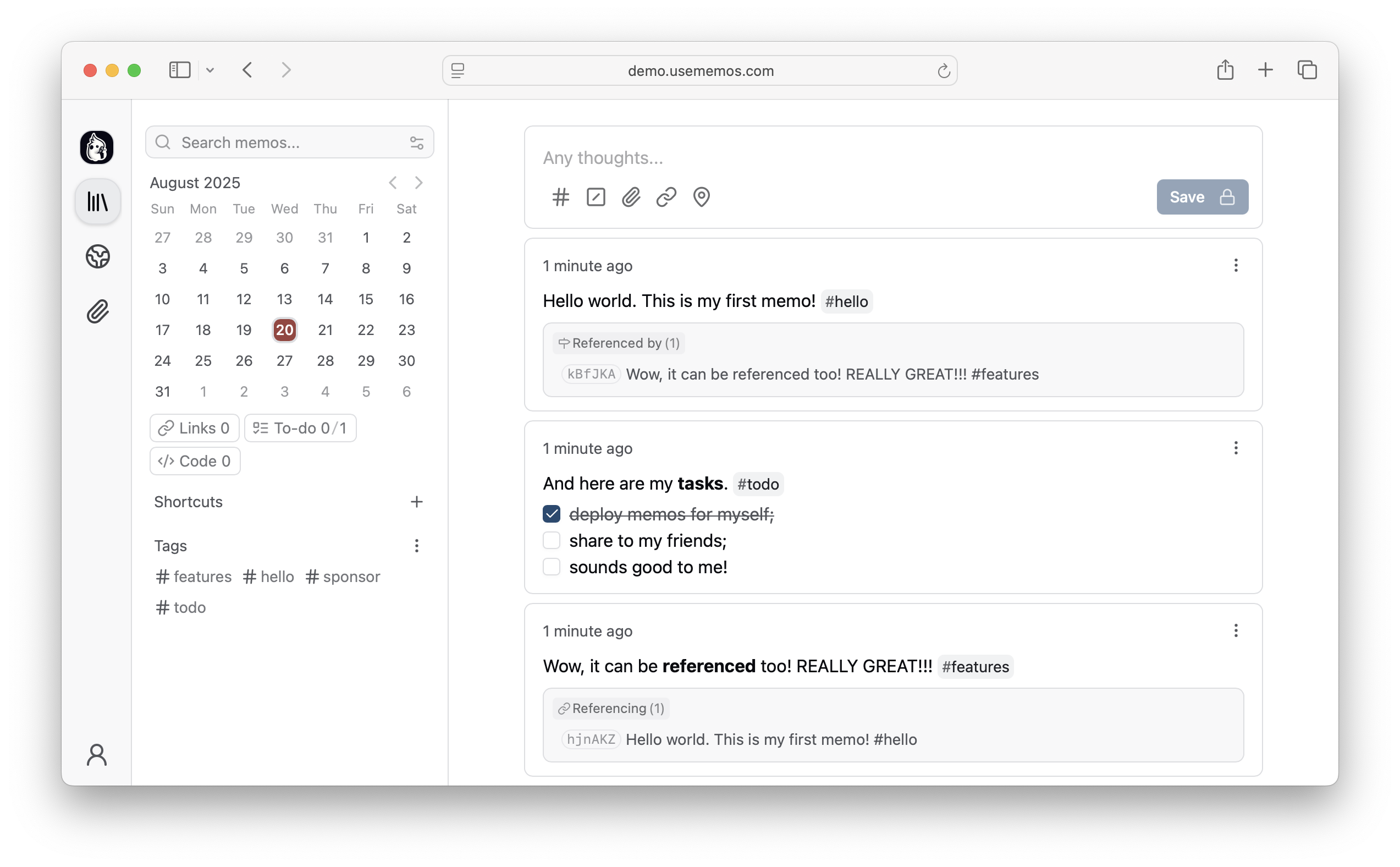
An open-source, self-hosted note-taking application designed for quick capture and Markdown support.
What does memos do?
Memos is a self-hosted note-taking application built around a timeline-first interface to facilitate rapid thought capture. It prioritizes data ownership by allowing users to deploy the application on their own infrastructure, ensuring no telemetry or external data collection occurs. The tool natively supports Markdown for formatting and offers a lightweight footprint, available as a single Go binary or a Docker container. It provides flexibility by supporting multiple database backends, including SQLite, MySQL, and PostgreSQL, and offers REST and gRPC APIs for custom integrations. This creates a secure, highly personal knowledge base alternative to cloud services.
Who is memos for?
Memos is designed for individuals, developers, and privacy advocates who want a fast, self-hosted alternative to cloud-based note-taking apps. Users should be comfortable with basic deployment methods like Docker or running standalone binaries.
How do I get started with memos?
docker run -d --name memos -p 5230:5230 -v ~/.memos:/var/opt/memos neosmemo/memos:stable
How popular is memos on GitHub?
usememos/memos has 63,482 stars and 4,804 forks on GitHub, and gained 171 stars in the last 7 days.
What license does memos use?
usememos/memos is released under the MIT license.
Star history
since May 15, 2022
63.5K stars as of Oct 4, 2026. Before Jul 29, 2026, reconstructed from public GitHub event archives (checked against the repository's real star total); since then measured daily.
Contribution activity
commits per day, last 52 weeks
984 commits in the last yearLessMore
Signals and awards
derived from tracked data
Landmark project
63,482 stars
Very active
984 commits in 52 weeks
Community-driven
~398 contributors
Permissive license
MIT
Continuous integration
Automated checks passing
What memos does
Memos is a self-hosted note-taking application built around a timeline-first interface to facilitate rapid thought capture. It prioritizes data ownership by allowing users to deploy the application on their own infrastructure, ensuring no telemetry or external data collection occurs. The tool natively supports Markdown for formatting and offers a lightweight footprint, available as a single Go binary or a Docker container. It provides flexibility by supporting multiple database backends, including SQLite, MySQL, and PostgreSQL, and offers REST and gRPC APIs for custom integrations. This creates a secure, highly personal knowledge base alternative to cloud services.
Memos is designed for individuals, developers, and privacy advocates who want a fast, self-hosted alternative to cloud-based note-taking apps. Users should be comfortable with basic deployment methods like Docker or running standalone binaries.
Timeline-First Interface: Provide a simple, feed-like view for capturing and reviewing notes quickly without complex categorization overhead.
Data Ownership: Ensure complete privacy by running entirely on self-hosted infrastructure with absolutely no telemetry.
Flexible Deployment: Run as a single Go binary or a Docker container, supporting SQLite, MySQL, or PostgreSQL for data storage.
Markdown Native: Natively support Markdown syntax for formatting notes, ensuring compatibility and ease of use.
API Integrations: Expose both REST and gRPC APIs, allowing developers to build custom tools and integrations on top of the platform.
Lightweight Architecture: Design to consume minimal system resources, making it suitable for low-power personal servers and homelabs.
Where teams use it
Personal Knowledge Management
Individuals use the timeline interface to rapidly capture daily thoughts, links, and ideas without worrying about folder structures.
Private Journaling
Privacy-conscious users host the application locally to maintain a secure, private digital journal that cannot be accessed by third parties.
Custom Tool Integration
Developers utilize the exposed REST APIs to build automated note-taking workflows or custom frontend clients.
Low-Resource Deployment
Homelabbers deploy the lightweight Docker image alongside SQLite on a Raspberry Pi for a highly efficient note-taking solution.
Fast enough for every thought. Private enough for all of them.
Memos is an open-source, self-hosted home for short-form thinking. Daily notes, links, work logs, and snippets flow into a chronological Markdown timeline—on infrastructure you control, without the overhead of an all-in-one workspace.
Releases use YY.MM, with optional point releases such as 26.09.1 and release
candidates such as 26.09-rc.1. Calendar release tags have no v prefix. The Docker stable tag follows stable releases;
canary follows development builds. If upgrading from a release before v0.31.0,
run v0.31.0 successfully.
See the upgrade requirements for earlier versions.
Web Clipper
Save pages, selections, and images from your browser straight into Memos as source-linked Markdown. Get the Memos Web Clipper for Chrome or Firefox.
Memos 0.31 adds Spaces for collaboration, Calendar and Map views for browsing your notes, and tools to move your memos between instances. Writing, search, attachments, and navigation also receive improvements throughout the app.
## Highlights
* **Spaces:** Organize memos in shared Spaces, invite people through their inbox, move memos between Spaces, and choose custom icons or emoji. Space-only visibility limits a memo's audience to active Space members, with the administrator access described below. ([#6228](https://github.com/usememos/memos/pull/6228), [#6266](https://github.com/usememos/memos/pull/6266), [#6285](https://github.com/usememos/memos/pull/6285), [#6287](https://github.com/usememos/memos/pull/6287))
* **Calendar and Map:** Browse memos by month, open a day to read or add notes for that date, and explore memos with location data on a dedicated map. ([#6277](https://github.com/usememos/memos/pull/6277), [#6280](https://github.com/usememos/memos/pull/6280), [map page](https://github.com/usememos/memos/commit/bc89ec00060623cff52eacbc2c3ca82038e5c924))
* **Views and search:** Save reusable filters as Views with custom icons. Filter by Space or location, find memos o
### What's new
* **Calendar:** Browse memos by month, open a day to read its entries, and add a memo for that date. ([#6277](https://github.com/usememos/memos/pull/6277))
* **Map:** Explore memos with location data on a dedicated map page. ([bc89ec0](https://github.com/usememos/memos/commit/bc89ec00060623cff52eacbc2c3ca82038e5c924))
* **Spaces:** Move memos between Spaces, receive invitations in your inbox, and choose custom icons or emoji. Switch Spaces without losing your current page or filters. ([#6285](https://github.com/usememos/memos/pull/6285), [#6266](https://github.com/usememos/memos/pull/6266), [#6287](https://github.com/usememos/memos/pull/6287))
* **Views and search:** Personalize saved Views with icons, find memos by Space, and use expressions in Quick Find for more precise searches. ([#6305](https://github.com/usememos/memos/pull/6305), [#6267](https://github.com/usememos/memos/pull/6267), [#6276](https://github.com/usememos/memos/pull/6276))
* **Writing:** Format Markdown with keyboard shortcuts and start typing right away when Home opens on desktop. ([#6258](https://github.com/usememos/memos/pull/6258))
* **More options:** Check attachment storage usage in account
## Summary
Memos 0.31.0-rc.1 introduces first-class Spaces for collaboration while preserving individual memo ownership. It also brings a unified sidebar and global composer, inline attachment images and optional media metadata, Saved Views, richer link previews, and consistent tag and mention parsing.
This release candidate separates instance access policy from its public URL and strengthens attachment authorization, database upgrades, and live-update performance. Existing memos keep their identity, author, visibility, and relations and start as Unassigned rather than being placed into a generated default Space.
## ⚠ BREAKING CHANGES
* **Saved Views:** Saved Views replace Shortcuts throughout the API, MCP surface, persisted settings, resource names, and web routes. `ShortcutService` and `/api/v1/users/*/shortcuts/*` become `MemoViewService` and `/api/v1/users/*/views/*`, and the web route moves from `/shortcuts` to `/views`. Stored shortcut data is migrated automatically, but API clients, MCP integrations, and saved links must be updated. ([#6167](https://github.com/usememos/memos/issues/6167))
* **Memo ownership:** Instance administrators are no longer implicit memo
Memos 0.30 refreshes how you capture, write, and browse your notes. It introduces the Memos Web Clipper, a rebuilt Markdown editor, richer memo detail views, flexible multi-column feeds, faster rendering, and stronger authentication and sharing boundaries.
## Introducing Memos Web Clipper
Save page details, selected text, and images directly to Memos from Chromium-based browsers and Firefox. The clipper converts links, lists, code, and tables to Markdown, uploads images as attachments, and lets you review and edit every clip before saving.
Choose Private, Protected, or Public visibility, customize the output with local templates, or save selected text and images as private memos from the browser context menu. Connect through usememos.com, or connect directly with your Memos instance URL and a personal access token.
[Install for Chrome](https://chromewebstore.google.com/detail/memos-web-clipper/nebaoebnljalfegiidibihhkebeiklbl) · [Install for Firefox](https://addons.mozilla.org/en-US/firefox/addon/memos-web-clipper/) · [Visit website](https://usememos.com/web-clipper) · [GitHub](https://github.com/usememos/web-clipper)
## Writing and browsing
- **A new Markdown edi
### Introducing Memos Web Clipper
Save pages, selected text, and images as Markdown directly to your Memos instance. Review and edit every clip before saving, choose its visibility, and customize the Markdown format to fit your workflow.
[Install for Chrome](https://chromewebstore.google.com/detail/memos-web-clipper/nebaoebnljalfegiidibihhkebeiklbl) · [Install for Firefox](https://addons.mozilla.org/en-US/firefox/addon/memos-web-clipper/) · [Learn more](https://github.com/usememos/web-clipper)
### Highlights
* **Memo detail and navigation:** Redesigned the memo detail sidebar as a property rail with quick actions, editable visibility, memo metadata, attachments, relations, and a scroll-aware outline. Feed scroll position is now restored when navigating back from another page. ([d4b5a16](https://github.com/usememos/memos/commit/d4b5a1695b9acf4da3ef72f600789a4a0f90e4d5)) ([e497895](https://github.com/usememos/memos/commit/e497895bf3b72cdae92e5bab6cd5b691c8eedc15))
* **Settings and access tokens:** Refreshed settings navigation and expanded the access-token page with practical guidance, a copyable API example, safety notes, and last-used timestamps. The About page and pro
Code frequency
additions and deletions
+461.7K lines added, -303.9K removed over the last year.
Commits per week
last 52 weeks
984 commits in the last 52 weeks.
When work happens
weekday and hour
Commit volume by weekday and hour (UTC). Larger dots mean more commits.