zhouxiaoka/autoclipPublic

AutoClip|一个链接,一键出片。开源 AI 视频剪辑桌面工具,将播客、访谈、课程等长视频自动剪成短视频,生成字幕、封面和发布文案,适配抖音、小红书、TikTok、Reels 与 YouTube Shorts。Open-source AI video clipping & content repurposing.

AI summary: An AI-powered video processing tool that automatically downloads videos and extracts highlights for content creation.

Stars
12.2K
+95 today
Forks
2K
Watchers
49
Open issues
17
Open PRs
26
Contributors
~6
Commits
1.3K
Branches
271
Views (30d)
7

PythonMITCreated Jul 8, 2025Last push todayLatest release v1.5.8+1.8K stars this week+2.6K this month

Quick answers

What is autoclip?
An AI-powered video processing tool that automatically downloads videos and extracts highlights for content creation.
What does autoclip do?
AutoClip is an automated video processing system designed to download videos from platforms like YouTube and Bilibili and intelligently extract highlight clips. It utilizes large language models, specifically Qwen, to analyze the video content and identify the most engaging segments. The system automatically cuts the video into smaller clips and can organize them into curated collections. It features a modern React-based frontend and a robust FastAPI backend supported by a Celery task queue for handling asynchronous processing. This pipeline dramatically reduces the manual effort required for secondary video creation and social media clipping.
Who is autoclip for?
This tool is built for content creators, video editors, and social media managers looking to scale their short-form content production. Users should be familiar with basic Docker or Python setups to deploy the system.
How popular is autoclip on GitHub?
zhouxiaoka/autoclip has 12,241 stars and 2,018 forks on GitHub, and gained 1,845 stars in the last 7 days.
What license does autoclip use?
zhouxiaoka/autoclip is released under the MIT license.

Star history

since Sep 21, 2026
05K10KSep 2026Oct 2026Oct 2026Nov 2026
12.2K stars as of Nov 21, 2026. Measured daily since Sep 21, 2026; GitHub no longer exposes earlier star timestamps.

Update history

4 recorded
  • Nov 6, 2026New release v1.5.8 (previously v1.5.7).
  • Oct 27, 2026New release v1.5.7 (previously v1.5.6).
  • Oct 18, 2026New release v1.5.6 (previously v1.5.5).
  • Oct 10, 2026New release v1.5.5 (previously v1.4.0).

Contribution activity

commits per day, last 52 weeks
NovDecJanFebMarAprMayJunJulAugSepOctNovMonWedFri2025-11-23: 0 commits2025-11-24: 0 commits2025-11-25: 0 commits2025-11-26: 0 commits2025-11-27: 0 commits2025-11-28: 0 commits2025-11-29: 0 commits2025-11-30: 0 commits2025-12-01: 0 commits2025-12-02: 0 commits2025-12-03: 0 commits2025-12-04: 0 commits2025-12-05: 0 commits2025-12-06: 0 commits2025-12-07: 0 commits2025-12-08: 0 commits2025-12-09: 0 commits2025-12-10: 0 commits2025-12-11: 0 commits2025-12-12: 0 commits2025-12-13: 0 commits2025-12-14: 0 commits2025-12-15: 0 commits2025-12-16: 0 commits2025-12-17: 0 commits2025-12-18: 0 commits2025-12-19: 0 commits2025-12-20: 0 commits2025-12-21: 0 commits2025-12-22: 0 commits2025-12-23: 0 commits2025-12-24: 0 commits2025-12-25: 0 commits2025-12-26: 0 commits2025-12-27: 0 commits2025-12-28: 0 commits2025-12-29: 0 commits2025-12-30: 0 commits2025-12-31: 0 commits2026-01-01: 0 commits2026-01-02: 0 commits2026-01-03: 0 commits2026-01-04: 0 commits2026-01-05: 0 commits2026-01-06: 0 commits2026-01-07: 0 commits2026-01-08: 0 commits2026-01-09: 0 commits2026-01-10: 0 commits2026-01-11: 0 commits2026-01-12: 0 commits2026-01-13: 0 commits2026-01-14: 0 commits2026-01-15: 0 commits2026-01-16: 0 commits2026-01-17: 0 commits2026-01-18: 0 commits2026-01-19: 0 commits2026-01-20: 0 commits2026-01-21: 0 commits2026-01-22: 0 commits2026-01-23: 0 commits2026-01-24: 0 commits2026-01-25: 0 commits2026-01-26: 0 commits2026-01-27: 0 commits2026-01-28: 0 commits2026-01-29: 0 commits2026-01-30: 0 commits2026-01-31: 0 commits2026-02-01: 0 commits2026-02-02: 0 commits2026-02-03: 0 commits2026-02-04: 0 commits2026-02-05: 0 commits2026-02-06: 0 commits2026-02-07: 0 commits2026-02-08: 0 commits2026-02-09: 0 commits2026-02-10: 0 commits2026-02-11: 0 commits2026-02-12: 0 commits2026-02-13: 0 commits2026-02-14: 0 commits2026-02-15: 0 commits2026-02-16: 0 commits2026-02-17: 0 commits2026-02-18: 0 commits2026-02-19: 0 commits2026-02-20: 0 commits2026-02-21: 0 commits2026-02-22: 0 commits2026-02-23: 0 commits2026-02-24: 0 commits2026-02-25: 0 commits2026-02-26: 0 commits2026-02-27: 0 commits2026-02-28: 0 commits2026-03-01: 0 commits2026-03-02: 0 commits2026-03-03: 0 commits2026-03-04: 0 commits2026-03-05: 0 commits2026-03-06: 0 commits2026-03-07: 0 commits2026-03-08: 0 commits2026-03-09: 0 commits2026-03-10: 0 commits2026-03-11: 0 commits2026-03-12: 0 commits2026-03-13: 0 commits2026-03-14: 0 commits2026-03-15: 0 commits2026-03-16: 0 commits2026-03-17: 0 commits2026-03-18: 0 commits2026-03-19: 0 commits2026-03-20: 0 commits2026-03-21: 0 commits2026-03-22: 0 commits2026-03-23: 0 commits2026-03-24: 0 commits2026-03-25: 0 commits2026-03-26: 0 commits2026-03-27: 0 commits2026-03-28: 0 commits2026-03-29: 0 commits2026-03-30: 0 commits2026-03-31: 0 commits2026-04-01: 0 commits2026-04-02: 0 commits2026-04-03: 0 commits2026-04-04: 0 commits2026-04-05: 0 commits2026-04-06: 0 commits2026-04-07: 0 commits2026-04-08: 0 commits2026-04-09: 0 commits2026-04-10: 0 commits2026-04-11: 0 commits2026-04-12: 0 commits2026-04-13: 0 commits2026-04-14: 0 commits2026-04-15: 0 commits2026-04-16: 0 commits2026-04-17: 0 commits2026-04-18: 0 commits2026-04-19: 0 commits2026-04-20: 0 commits2026-04-21: 0 commits2026-04-22: 0 commits2026-04-23: 0 commits2026-04-24: 0 commits2026-04-25: 0 commits2026-04-26: 0 commits2026-04-27: 0 commits2026-04-28: 0 commits2026-04-29: 0 commits2026-04-30: 0 commits2026-05-01: 0 commits2026-05-02: 0 commits2026-05-03: 0 commits2026-05-04: 0 commits2026-05-05: 0 commits2026-05-06: 0 commits2026-05-07: 0 commits2026-05-08: 0 commits2026-05-09: 0 commits2026-05-10: 0 commits2026-05-11: 0 commits2026-05-12: 0 commits2026-05-13: 0 commits2026-05-14: 0 commits2026-05-15: 0 commits2026-05-16: 0 commits2026-05-17: 0 commits2026-05-18: 0 commits2026-05-19: 0 commits2026-05-20: 0 commits2026-05-21: 0 commits2026-05-22: 0 commits2026-05-23: 0 commits2026-05-24: 0 commits2026-05-25: 0 commits2026-05-26: 0 commits2026-05-27: 0 commits2026-05-28: 3 commits2026-05-29: 4 commits2026-05-30: 6 commits2026-05-31: 7 commits2026-06-01: 0 commits2026-06-02: 1 commit2026-06-03: 5 commits2026-06-04: 0 commits2026-06-05: 0 commits2026-06-06: 0 commits2026-06-07: 0 commits2026-06-08: 0 commits2026-06-09: 0 commits2026-06-10: 0 commits2026-06-11: 0 commits2026-06-12: 0 commits2026-06-13: 0 commits2026-06-14: 0 commits2026-06-15: 0 commits2026-06-16: 0 commits2026-06-17: 0 commits2026-06-18: 0 commits2026-06-19: 0 commits2026-06-20: 0 commits2026-06-21: 0 commits2026-06-22: 0 commits2026-06-23: 0 commits2026-06-24: 0 commits2026-06-25: 0 commits2026-06-26: 0 commits2026-06-27: 0 commits2026-06-28: 0 commits2026-06-29: 0 commits2026-06-30: 0 commits2026-07-01: 0 commits2026-07-02: 0 commits2026-07-03: 0 commits2026-07-04: 0 commits2026-07-05: 0 commits2026-07-06: 0 commits2026-07-07: 0 commits2026-07-08: 0 commits2026-07-09: 0 commits2026-07-10: 0 commits2026-07-11: 0 commits2026-07-12: 0 commits2026-07-13: 0 commits2026-07-14: 0 commits2026-07-15: 0 commits2026-07-16: 0 commits2026-07-17: 0 commits2026-07-18: 0 commits2026-07-19: 0 commits2026-07-20: 0 commits2026-07-21: 0 commits2026-07-22: 0 commits2026-07-23: 0 commits2026-07-24: 0 commits2026-07-25: 0 commits2026-07-26: 0 commits2026-07-27: 0 commits2026-07-28: 0 commits2026-07-29: 0 commits2026-07-30: 0 commits2026-07-31: 0 commits2026-08-01: 0 commits2026-08-02: 0 commits2026-08-03: 0 commits2026-08-04: 0 commits2026-08-05: 0 commits2026-08-06: 0 commits2026-08-07: 0 commits2026-08-08: 0 commits2026-08-09: 0 commits2026-08-10: 0 commits2026-08-11: 0 commits2026-08-12: 0 commits2026-08-13: 0 commits2026-08-14: 0 commits2026-08-15: 0 commits2026-08-16: 0 commits2026-08-17: 0 commits2026-08-18: 0 commits2026-08-19: 0 commits2026-08-20: 0 commits2026-08-21: 0 commits2026-08-22: 0 commits2026-08-23: 0 commits2026-08-24: 0 commits2026-08-25: 0 commits2026-08-26: 0 commits2026-08-27: 0 commits2026-08-28: 0 commits2026-08-29: 0 commits2026-08-30: 0 commits2026-08-31: 0 commits2026-09-01: 0 commits2026-09-02: 0 commits2026-09-03: 0 commits2026-09-04: 0 commits2026-09-05: 0 commits2026-09-06: 8 commits2026-09-07: 8 commits2026-09-08: 0 commits2026-09-09: 0 commits2026-09-10: 0 commits2026-09-11: 0 commits2026-09-12: 0 commits2026-09-13: 0 commits2026-09-14: 0 commits2026-09-15: 0 commits2026-09-16: 0 commits2026-09-17: 0 commits2026-09-18: 0 commits2026-09-19: 0 commits2026-09-20: 1 commit2026-09-21: 6 commits2026-09-22: 16 commits2026-09-23: 15 commits2026-09-24: 2 commits2026-09-25: 5 commits2026-09-26: 19 commits2026-09-27: 12 commits2026-09-28: 2 commits2026-09-29: 18 commits2026-09-30: 45 commits2026-10-01: 63 commits2026-10-02: 25 commits2026-10-03: 29 commits2026-10-04: 9 commits2026-10-05: 5 commits2026-10-06: 6 commits2026-10-07: 0 commits2026-10-08: 0 commits2026-10-09: 44 commits2026-10-10: 48 commits2026-10-11: 13 commits2026-10-12: 5 commits2026-10-13: 3 commits2026-10-14: 56 commits2026-10-15: 83 commits2026-10-16: 108 commits2026-10-17: 128 commits2026-10-18: 14 commits2026-10-19: 15 commits2026-10-20: 21 commits2026-10-21: 11 commits2026-10-22: 23 commits2026-10-23: 20 commits2026-10-24: 2 commits2026-10-25: 1 commit2026-10-26: 12 commits2026-10-27: 2 commits2026-10-28: 2 commits2026-10-29: 5 commits2026-10-30: 38 commits2026-10-31: 3 commits2026-11-01: 1 commit2026-11-02: 2 commits2026-11-03: 2 commits2026-11-04: 0 commits2026-11-05: 0 commits2026-11-06: 0 commits2026-11-07: 0 commits2026-11-08: 0 commits2026-11-09: 0 commits2026-11-10: 0 commits2026-11-11: 0 commits2026-11-12: 0 commits2026-11-13: 0 commits2026-11-14: 0 commits2026-11-15: 0 commits2026-11-16: 0 commits2026-11-17: 0 commits2026-11-18: 0 commits2026-11-19: 0 commits2026-11-20: 0 commits2026-11-21: 0 commits
982 commits in the last yearLessMore

Signals and awards

derived from tracked data
  • Widely adopted

    12,241 stars

  • Rising fast

    +1,845 stars this week

  • Very active

    982 commits in 52 weeks

  • Well documented

    High community health score

  • Permissive license

    MIT

  • Continuous integration

    Automated checks passing

  • Repeat trending

    5 trending appearances

What autoclip does

AutoClip is an automated video processing system designed to download videos from platforms like YouTube and Bilibili and intelligently extract highlight clips. It utilizes large language models, specifically Qwen, to analyze the video content and identify the most engaging segments. The system automatically cuts the video into smaller clips and can organize them into curated collections. It features a modern React-based frontend and a robust FastAPI backend supported by a Celery task queue for handling asynchronous processing. This pipeline dramatically reduces the manual effort required for secondary video creation and social media clipping.

This tool is built for content creators, video editors, and social media managers looking to scale their short-form content production. Users should be familiar with basic Docker or Python setups to deploy the system.

  • Multi-platform downloads: Easily fetch source videos from platforms like YouTube and Bilibili or upload local files.
  • AI-driven highlights: Uses large language models to analyze content and identify the most compelling moments for clipping.
  • Automated slicing: Intelligently cuts full-length videos into shorter highlight clips without manual intervention.
  • Smart collections: Groups generated clips into curated collections with AI recommendations and drag-and-drop sorting.
  • Asynchronous processing: Relies on a Celery task queue to handle heavy video processing tasks without blocking the UI.

Where teams use it

Social media content creation

Content creators generating short-form clips from long videos for platforms like TikTok or YouTube Shorts.

Stream highlight extraction

Streamers automatically pulling the best moments from hours of live broadcast footage.

Video curation automation

Media managers organizing and categorizing large libraries of video content into digestible highlight reels.

Secondary content production

Video editors accelerating their workflow by letting AI handle the initial rough cut of interesting segments.

README

main branch
AutoClip

AutoClip

一个链接,一键出片

开源,在你的电脑上剪辑与渲染。贴一个链接,选好平台,生成 视频、封面和发布文案,
适配抖音、小红书、TikTok、Reels、YouTube Shorts、B 站与 YouTube。
软件免费,云端模型按量计费;需要调整时可进入编辑器。

GitHub release GitHub stars Downloads License: MIT

AutoClip — GitHub Trending

官网 · 下载桌面版 · 案例库 · 研究 · 快速开始 · 文档 · 问题反馈

简体中文 · English · 日本語 · 한국어 · Español · Português · Русский · Français

最新正式版,桌面、CLI 与 MCP 同步更新。版本以 autoclip --version 和 MCP get_version 为准。一键出片、字幕分页、人物取景与长视频队列修复见 更新日志。旧版用户请升级。

真实成片

点击截图或「播放」直接观看完整成片;下方语言指成片字幕语言。这里精选 6 条,展开可看另外 10 条。

竖版 · 访谈式与满屏播客式

Bill Gates — AI测试时竟会装傻?
Bill Gates
访谈式 · 抖音 · 中文
▶ 播放 1:01 · 原片
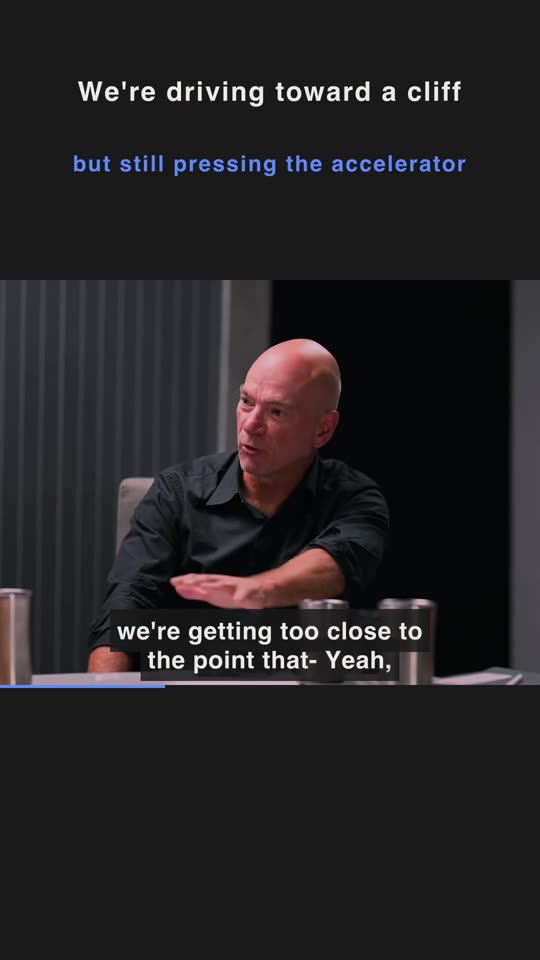
AI Experts Debate — We're Driving Toward a Cliff in the Fog
AI Experts Debate
访谈式 · Shorts · 英文
▶ 播放 1:25 · 原片
Tony Robbins — 风险极小,回报极大?
Tony Robbins
满屏播客 · 抖音 · 中文
▶ 播放 1:45 · 原片
Andrew Garfield × Amy Poehler — I Love Competition—but Hate Fake Casualness
Andrew Garfield × Amy Poehler
满屏播客 · Shorts · 英文
▶ 播放 1:01 · 原片

横版 · 保留原画幅

佟丽娅 × 鲁豫 — 舞蹈是我骨子里的东西
佟丽娅 × 鲁豫
原画幅 · B 站 · 中文
▶ 播放 1:41 · 原片
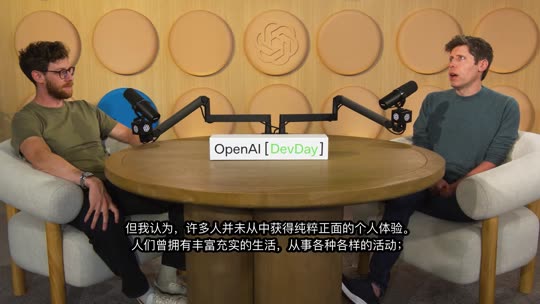
Sam Altman — AI是文艺复兴,还是工业革命?
Sam Altman
原画幅 · B 站 · 中文
▶ 播放 2:02 · 原片
查看更多 10 条真实成片
Adam Neumann — Success is how you feel one minute before death—full of love, no regret
Adam Neumann
满屏播客 · TikTok · 英文
▶ 播放 0:59 · 原片
小奇 × 鲁豫 — 想证明自己,又怕被注视
小奇 × 鲁豫
访谈式 · 抖音 · 中文
▶ 播放 0:50 · 原片
郭柯宇 × 鲁豫 — 演员的快感在创作过程 不在结果
郭柯宇 × 鲁豫
访谈式 · 抖音 · 中文
▶ 播放 1:11 · 原片
Willem Dafoe — Fake teeth made him feel lascivious and instantly became the character
Willem Dafoe
满屏播客 · TikTok · 英文
▶ 播放 1:07 · 原片
TIM × 罗永浩 — 红得快的网红 糊得更快
TIM × 罗永浩
访谈式 · 抖音 · 中文
▶ 播放 1:05 · 原片
Jensen Huang — AI是五层蛋糕 能源才是底层
Jensen Huang
访谈式 · 小红书 · 中文
▶ 播放 1:17 · 原片
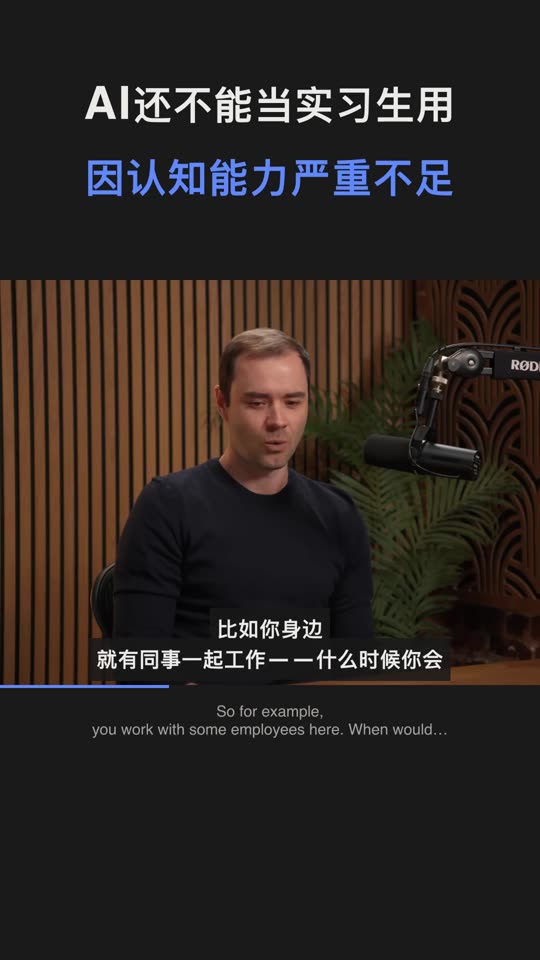
Andrej Karpathy — AI还不能当实习生用 因认知能力严重不足
Andrej Karpathy
访谈式 · 抖音 · 中文
▶ 播放 0:43 · 原片
A20 Pro — 苹果芯片不是拼乐高
A20 Pro
访谈式 · 小红书 · 中文
▶ 播放 2:00 · 原片
Sylvester Stallone — 60岁写《洛奇》 是向衰老宣战
Sylvester Stallone
访谈式 · 抖音 · 中文
▶ 播放 1:39 · 原片
MrBeast — YouTube's first 5 seconds matter more than thumbnails
MrBeast
满屏播客 · TikTok · 英文
▶ 播放 1:42 · 原片

视频、封面与发布文案见 官网案例库 →,欢迎投稿你的成片。原片版权归原作者,仅作效果展示。

能做什么

贴链接就出片

选好平台,按平台的画幅与时长要求自动生成。每个平台按评分自动生成至多 10 条合格片段,其余列为备选,点「生成这条」再制作。每条都带封面、标题、简介、话题和 ZIP 发布包。

成片自己会包装

抖音 / 小红书默认访谈式,TikTok / Reels / Shorts 默认满屏播客式;竖版也可自行选择两种版式。字幕和文案语言仍按平台,B 站 / YouTube 为横版。画面跟随说话人,无人镜头保留完整画面。自动品牌片尾默认开启,可在设置中关闭;复制发布文案不附 AutoClip 署名。

还在你的电脑上

剪辑、取景与渲染在本机完成。分析模型自选,字幕可用作者字幕、本地 Whisper / SenseVoice 或已配置的云端转写。CLI / MCP 与桌面共用同一条一键出片链路。

真实素材的耗时与费用

以下是开发期间三条不同素材的实测,不是同一输入的速度对照。费用按当时 qwen-plus 的文字模型用量估算,不含云端语音识别、AI 生图或投稿服务费用;实际账单以所选服务商为准。

版本 原片 出片 文字模型费用估算(人民币)
新版 · 有字幕 Jensen · 1h43m(英 → 小红书) 7.5 分钟 / 10 条 ¥0.09
新版 · 无字幕 TIM × 罗永浩 · 2h52m(中 → 抖音) 29.5 分钟 / 10 条 ¥0.20
旧版 MrBeast · 2h06m(英 → TikTok) 65 分钟 ¥0.64
测试条件与记录

2026-10-01,同一台 Apple Silicon Mac。前两条为新链路、自动生成 10 条;旧链路生成 33 条,素材与输出数量不同。Jensen 使用作者字幕,TIM 使用本地 Whisper base。

已有作者字幕时跳过转写;没有字幕时可选本地或云端转写。追加平台和制作备选会增加处理时间与用量。完整阶段记录与估算口径见 成本与时间。

模型与数据由你选择

剪辑和渲染在你的电脑上完成。使用云端分析会发送相关字幕与文案;画面理解或参考帧生图会发送所需抽样画面,云端转写会发送音频。使用本地分析与本地转写时不需要对应云端 API。成片只有选择投稿后才上传到已连接的平台;匿名统计与错误报告可在设置中关闭。详见 隐私说明。

快速开始

你的使用场景 建议方式 准备事项
在电脑上出片 桌面版 macOS Apple Silicon 或 Windows x64
自建 Web 服务 / Linux Docker Docker 与 Compose v2
批量处理 / 接入 Agent CLI / MCP Python 3.10+(建议 3.11)与 FFmpeg

桌面版

  1. 下载安装:在 Releases 下载。macOS Apple Silicon 选 .dmg,Windows 10 / 11 x64 选 -setup.exe。安装包自带 Python 和 FFmpeg。macOS 15 及以上首次打开:双击一次,若被拦截则到「系统设置 → 隐私与安全性 → 仍要打开」(Apple 说明)。较旧的 macOS 可右键应用 →「打开」。Windows 若出现 SmartScreen,点「更多信息 → 仍要运行」。
  2. 配置模型:在设置里选择服务商、填写 API Key,选择可用的分析模型,测试连接并保存;本地模型先在 Ollama / LM Studio 启动服务并加载模型。
  3. 先看示例,再贴自己的视频:首页还没有项目时,点「用示例项目看看效果」,不需要 API Key,示例在安装包内。之后用自己的访谈或播客,可选择竖版版式。没有字幕、本地 Whisper 装不上或太慢时,打开「设置 → 默认模型 → 语音转字幕」,改用百炼云端转写(qwen-audio-3.1-asr-flash,大约 0.1 元/小时音频,具体以阿里云账单为准)。音频会上传到云端。导入被拦住时,点「改用云端转写」。若安装本地转写,第一次要下载约 220 MB,国内网络约 15 分钟。
  4. 检查并下载:预览自动成片,检查字幕、取景与内容完整性,再下载发布包或连接账号投稿;需要更多片段时生成备选。

Intel Mac 目前没有桌面安装包,与 Linux 一样使用 Docker 或 CLI。安装要求见 安装指南 与 最新 Release。

完整安装与首次使用指南 · 遇到问题?

Docker / Web 部署

git clone https://github.com/zhouxiaoka/autoclip.git
cd autoclip
cp env.example .env
mkdir -p data logs uploads
docker compose up -d --build

打开 Web 界面;API 文档 在后端启动后可用。部署细节见 Docker 指南。

Linux 上若绑定目录出现权限错误,先修正数据目录的归属再启动:

docker compose run --rm --no-deps --user root --entrypoint sh autoclip -c 'chown -R autoclip:autoclip /app/data /app/logs /app/uploads'
docker compose up -d

从局域网 IP 或自定义域名打开时,在 .env 的 AUTOCLIP_ALLOWED_ORIGINS 填入前端地址(可逗号分隔)。

CLI / MCP

需要 Python 3.10+(建议 3.11),FFmpeg 与 FFprobe 在 PATH 中可用;本地 CLI 不需要 Redis。下载 正式 CLI / MCP ZIP,解压后在该目录执行:

python3 -m venv venv
source venv/bin/activate
python -m pip install -r requirements.txt
python -m pip install --force-reinstall --no-deps autoclip_mcp-*-py3-none-any.whl

不下载 ZIP 时,可以直接一行安装。从源码安装仍可作为备选:

# 一行安装
uvx autoclip-mcp
npx skills add zhouxiaoka/autoclip
# 备选:在已克隆的仓库根目录从源码安装
python3 -m venv .venv
source .venv/bin/activate
python -m pip install -r requirements.txt
python -m pip install --no-deps .
autoclip --version

以上命令用于 macOS / Linux。Windows 用 py -m venv venv 创建环境、.\venv\Scripts\Activate.ps1 激活;随后使用相同的 python -m pip 安装命令。

先保存模型配置:可复用桌面设置;独立使用时按 ZIP 的无密钥示例配置自己的数据目录,详见 CLI / MCP 指南。produce 不使用旧 run --provider 的临时覆盖。已有字幕可用 --srt 跳过转写。

autoclip --version
autoclip produce talk.mp4 --srt talk.srt --platform douyin --portrait-style podcast --json
autoclip outputs PROJECT_ID --export-kits

MCP 服务由客户端启动。需要单独调试时,在另一个终端运行 autoclip mcp;使用 OpenCode 可执行 autoclip mcp install opencode 写入客户端配置。

把 PROJECT_ID 换成制作结果中的项目 ID。MCP 新入口为 start_quick_output / get_quick_output_status;客户端 command 指向虚拟环境中的 autoclip 绝对路径,args 为 ["mcp"]。旧 run / export 和旧切片工具继续兼容。详见 CLI / MCP、OpenCode 接入 与 Agent skill。

Smithery 本地 stdio 用 MCPB:在仓库根目录执行 python scripts/pack_mcpb.py,产物是 dist/autoclip-mcp.mcpb(不提交)。发布命令是 smithery mcp publish ./dist/autoclip-mcp.mcpb -n io.github.zhouxiaoka/autoclip-mcp,需要维护者自己的登录,仓库不保存 API key。步骤见 CLI / MCP。

模型配置

方式 配置
云端 API 在设置中选择服务商,填写自己的 API Key。OpenAI 兼容服务还可配置 Base URL。
Ollama 默认地址 http://localhost:11434/v1;先拉取并启动本地模型,再选择服务实际提供的模型,无需 API Key。
LM Studio 加载模型并启动 Local Server,默认地址 http://localhost:1234/v1。

Docker 访问宿主机模型服务时,localhost 指向容器自身,需要改为容器可访问的宿主机地址。

模型配置指南 · 本地模型与容器配置

特别感谢 ❤️

88API
88API
感谢 88API Token聚合平台 赞助 AutoClip!聚合 GPT、Claude、Gemini、Grok、DeepSeek、Kimi、GLM 等语言与编程模型,适合字幕分析、高光筛选与标题生成。
🎨 多媒体能力:平台提供 GPT-Image、Gemini、Grok 等图片模型,Seedance、Veo、MiniMax Hailuo H3、Kling、Grok 等视频模型,以及 Whisper、TTS 等语音能力;AutoClip 可接入兼容的分析、封面生图与字幕转写接口。
🏷️ 服务与结算:据合作方介绍,由海外企业运营,提供人工客服、正规发票,充值比例 1:1;具体模型、服务与结算条件以平台页面为准。
🎁 新用户福利:通过 专属推广链接注册可获体验额度,用于测试模型能力,领取条件以活动页面为准。 接入说明
Infistar
Infistar.cc
无限星河
感谢 Infistar.cc 无限星河 赞助 AutoClip!提供多模型 API 服务,适合长视频字幕分析、高光筛选与标题生成等工作流。
⚙️ 兼容接入:在 AutoClip 选择 OpenAI 兼容接口,填写 Base URL、API Key 和可用模型,即可配置使用。
🧩 多模型选择:合作方提供 Claude、GPT、Gemini、DeepSeek 等系列模型,可选择支持兼容接口的型号,对比字幕分析与高光筛选效果。
🏷️ 价格与服务:据合作方介绍,部分模型低至官方定价的 0.1 折,支持人民币结算、开票及模型验真;具体型号、价格与服务条件以平台页面为准。
🎁 AutoClip 专属福利:通过 专属推广链接注册可领取 $5 体验额度,领取条件以活动页面为准。 接入说明
APIMart
APIMart
感谢 APIMart 赞助了本项目!APIMart 是专注 AI 图片/视频生成的低价 API 平台,GPT-Image-2 低至 $0.006/张,1 美元可出图 160+ 张。图片、视频一套异步 API 通吃,提交任务拿 ID、回调取结果,跑批万张不超时、换模型不改代码。按量付费、无月费,通过此注册链接注册即可开用。

推荐链接

这是作者推荐链接,不是上面的赞助。

用它注册阿里云或领取优惠,再到百炼控制台创建 API Key,即可在「设置 → 默认模型 → 语音转字幕」使用百炼云端转写。音频会上传到云端。

  1. 作者推荐链接:注册或领优惠。
  2. 百炼控制台:创建 API Key。

常见问题

需要付费或 API Key 吗?

软件免费、MIT 开源。云端分析、转写与 AI 生图按所选服务商计费,需自己的凭据;自动设计封面默认不调用付费生图。Ollama / LM Studio 本地分析不需要云端 Key,但需相应硬件。直接投稿还需自己的 B 站或 Upload-Post 账号。

我的视频会上传吗?

剪辑和渲染在你的电脑上完成。使用云端分析会发送相关字幕与文案;画面理解或参考帧生图会发送所需抽样画面,云端转写会发送音频。使用本地分析与本地转写时不需要对应云端 API。成片只有选择投稿后才上传到已连接的平台;匿名统计与错误报告可在设置中关闭。详见 隐私说明。

什么视频效果最好?

访谈、播客、课程和口播是主要验证场景,有作者字幕时最快。缺字幕可用本地或云端转写;游戏录屏、口播较少的素材可启用画面识别并选择支持图片的模型,仍需检查实际选段。

为什么没有生成片段?

先看具体失败阶段:字幕/转写是否成功、模型连接、FFmpeg 与磁盘是否正常,以及候选是否满足目标平台规则。YouTube 长视频要求完整片段至少 180 秒,短素材可选 Shorts 或 B 站。仍失败请附 autoclip --version 的版本号、系统、素材时长、模型和脱敏日志,见 已知问题。

完整排错指南 · 已知问题

文档

你想了解 文档
安装与首次出片 安装指南
自建服务与自动化 Docker 部署 · CLI / MCP · Agent skill · OpenCode 接入
配置模型与排错 模型配置 · 常见问题
版本、路线图与隐私 更新日志 · 路线图 · 社区看板 · 隐私说明
研究笔记 选对瞬间,而不是堆特效 · English
参与开发与翻译 贡献指南 · 翻译维护

参与贡献

欢迎提交修复、出片样例、使用反馈和翻译改进。如果 AutoClip 帮到了你,欢迎给项目一个 Star。

个人维护,回复时间不固定,不提供即时客服或一对一部署服务。

Star History

感谢 FastAPI、React、Tauri、FFmpeg、yt-dlp、Whisper、FunASR,以及所有贡献者。项目采用 MIT License。

View on GitHub

Recent activity

commits and pull requests

Releases and announcements

19 total
  1. AutoClip Desktop v1.5.8v1.5.8Nov 2, 202611.4K downloads

    ## AutoClip Desktop v1.5.8 ### 下载与安装 / Download and install | 平台 | 文件 | 首次打开 | |---|---|---| | macOS 15 及以上(Apple Silicon)| `AutoClip.Desktop_1.5.8_aarch64.dmg` | 双击一次。若被拦截:系统设置 → 隐私与安全性 → **仍要打开**([Apple](https://developer.apple.com/news/?id=saqachfa)) | | 较旧的 macOS(Apple Silicon)| 同上 | 未公证:右键应用 → **打开** | | Windows 10/11 x64 | `AutoClip.Desktop_1.5.8_x64-setup.exe` | 未签名:SmartScreen → **更多信息 → 仍要运行** | | CLI / MCP(Python 3.11+)| `autoclip-1.5.8-cli-mcp.zip` / `autoclip_mcp-1.5.8-py3-none-any.whl` | ZIP 内含安装与模型配置说明,需 FFmpeg | Intel Mac 目前没有桌面安装包,请用 Docker(`DOCKER.md`)或 CLI。Linux 同样没有桌面安装包,请用 Docker、上面的 `uvx`,或 `pip install -e .` 跑 `autoclip` CLI。 两个桌面包都内置便携 Python 与静态 ffmpeg,不需要预装任何东西;Windows 安装包按用户安装,不需要管理员权限,缺 WebView2 会自动下载。 不下载 ZIP 时:`uvx autoclip-mcp` 安装并启动 MCP,`npx skills add zhouxiaoka/autoclip` 安装 skill。从源码安装仍可用(在仓库根目录 `python -m pip install --no-deps .`)。 安装后若项目列表是空的,点首页「用示例项目看看效果」。示例在安装包内,不需要 API Key。 没有字幕的视频,第一次要下载本地转写组件(约 220 MB,国内网络约 15 分钟)。装不上或太慢时,打开「设置 → 默认模型 → 语音转字幕」,改用百炼云端转写;音频会上传到云端。导入被拦住时,点「改用云端转写」。 A video without subtitles downloads the local transcription component the first time (about 220 MB, about 15 minutes on a slow network). Built-in portable Pyth

  2. AutoClip Desktop v1.5.7v1.5.7Oct 24, 20265.7K downloads

    ## AutoClip Desktop v1.5.7 这一版主要让出片更稳,字幕更好看,第一次上手更顺。 This release makes clip generation more reliable, fixes caption display, and smooths out first-time setup. ### 更新了什么 **字幕与风格更好看** - 长句子不会再被裁掉,会自动分成几屏依次显示;字幕跟着画面一句一句换。 - 制作页可以直接打开或关闭字幕。 - 新增杂志风、街头快剪;成片不再把封面式大标题烧进画面,标题只留在封面图。 - 街头快剪左下人名条会带上公开标题里的嘉宾名(有依据才显示)。 - 杂志风 / 街头快剪的画面叠加更接近选片预览;竖屏取景跟着真正在说话的人。 **第一次用更顺** - 填好 AI 服务以后马上就能生成,不用刷新页面。 - 设置页空搜索时,推荐服务商把 APIMart 排在第一;也可添加任何 OpenAI 兼容服务。 - 需要下载本地转写时,会提前告诉你要下多大、大概多久,也可以改用云端转写。 - 素材不满足平台要求时(比如 YouTube 横屏要 3 分钟以上),生成前就会提醒你。 **出片更稳** - 网络抖动或服务繁忙时会自动重试。 - 出错时会用一句中文说清楚原因和怎么办,不再显示看不懂的英文报错。 - 失败的项目可以一键重试。 - 画面理解或封面校对用的模型如果被服务商下架,会按账号当前列表自动换一个还能用的再试。 - Windows 上安装本地转写更快更稳;开着代理也能正常下载成片。 ### 下载 | 平台 | 文件 | sha256 | |---|---|---| | macOS(Apple 芯片) | `AutoClip.Desktop_1.5.7_aarch64.dmg` | `0c917181b1091271575be918ff39290e415d4bb8b7a752c521ee9681481a41ec` | | Windows 10/11 | `AutoClip.Desktop_1.5.7_x64-setup.exe` | `5fe5f50bc6964cf7f3b847f7372ee0f86e519740bb66439283387a0a64e96f77` | 构建:commit `29583c53`(完整 `29583c5373f2a35f4465105e01e7151e88b9d28f`)。内部 Desktop Build(验收绑定包)`40087677965`;Internal Acceptance 回执 run `40098790801`;Pre-release Desktop Build `https://github.com/zhouxiaoka/autoclip

  3. AutoClip Desktop v1.5.6v1.5.6Oct 9, 20267.1K downloads

    ## AutoClip Desktop v1.5.6 - 默认自动预检失败时改走字幕路线继续出片,不再整单失败;只有明确要求视觉分析时才停住。 - 导入前检查分析模型、转写、视觉和 FFmpeg。缺什么直接给出连接、安装或打开设置的入口;没有字幕且转写未就绪时不能开始。 - 自动出片失败事件补齐失败阶段、HTTP 状态和字幕/视觉路线,不再把所有失败都记成笼统的模型错误。 - 安装冒烟改为走 Studio 一键出片,并用 ffprobe 检查成片。 - 桌面版不再启动 Celery。项目列表以 studio.json 的出片终态为准,避免首页一直停在「制作中」。 - 删除已不再使用的旧导入页和未引用的 Celery 试验文件。 - 失败记录保留模型服务返回的 HTTP 状态;健康检查接口报告实际版本号;视频网站拒绝下载(HTTP 403/412/429)时显示中文原因和换网络或使用浏览器登录信息重试的建议,不再显示下载工具的英文原文。(#297) - 转写模型改为后台下载并显示真实状态,不再提前提示“下载完成”;导入前检查所选模型是否已在本地,缺少时可直接下载。模型下载默认先连官方源,失败后改用镜像。两个成片草稿不再选中同一段内容;成片渲染完成前首页不再显示“已完成”。(#298) - Windows 覆盖安装先确认应用已退出,再结束残留的后台进程,避免留下无法使用的应用;覆盖安装时清除旧版遗留的后端文件,不影响用户数据。(#299) - 视频太短,或没有音轨且不能改用画面分析时,在调用模型前直接给出原因,不再先消耗模型请求再失败;制作中删除项目会停止后台渲染并清理项目文件。(#300) - 制作中应用被关闭或重启后,未完成的项目显示「服务已重启,请重新生成」并提供重新生成入口,不再显示已完成或一直制作中;启动时清理已删除项目遗留的文件夹。本地 Whisper 转写时显示进度百分比;模型服务连接失败、超时或限流时只显示一句简明说明。Windows 卸载默认保留 %APPDATA%\AutoClip,只有勾选删除数据时才一并删除,升级时不删除。(#301) - 使用 Ollama、LM Studio 等本地模型分析长视频时,按更小的片段分批发送字幕,减少上下文不足导致的截断;设置页提示把本地模型的上下文调到 16384 以上。云端模型不受影响。(#302) - 内容切片因模型服务出错而失败时,失败记录同样保留 HTTP 状态;没有声音的视频按画面也找不到可用片段时,直接说明视频没有声音,并建议附上 SRT 字幕后重新导入。(#305) - 使用阿里云百炼的 Qwen3.5–3.8 混合思考模型(如 qwen3.8-flash)时,切片、包装和画面判断请求关闭默认的深度思考,减少等待时间和输出 token 消耗;只支持思考模式的模型和

  4. AutoClip Desktop v1.5.5v1.5.5Oct 6, 20262K downloads

    ## AutoClip Desktop v1.5.5 - 包含未公开发布的 1.5.4 全部修复(1.5.4 标签的发布构建被验收门禁误拦,未生成安装包),并修复发布构建读取验收标签的问题。 - 云端转写失败时保留云端原因和配置提示,不再误报本地 Whisper 未安装;保留原有请求上限。 - 成片保存后继续同步本次封面收尾,修复最后一张卡片封面生成后未自动显示的问题;可选封面失败或服务重启仍保留已生成视频。 - 发布简介中的 CEO、CTO、CFO、COO 或“公司负责人”等任职说法缺少原字幕依据时,保留标题与话题并省略简介,避免补入没有依据的身份或曾任经历;不增加模型请求。 - 静音切点检测兼容 Windows 本地编码和缺失的 FFmpeg 错误输出;可选停顿检测失败时仍可按字幕完成选段。 - 修复制作偏好和调整方案弹窗中下拉菜单被遮挡、无法用鼠标选择的问题。 - 修复隐私设置读取较慢时覆盖刚修改的崩溃报告开关,以及离开设置页后旧请求覆盖新选择的问题。 - 将访谈式成片的重点词标签和人物名牌放到字幕区域下方,避免与生成字幕或原视频字幕重叠。 - 模型目录的本地缓存无法写入时,继续返回已取得的账号模型列表;避免可选缓存故障阻断设置页刷新。 - Windows 安装包补齐微软 C++ 运行库,修复旧系统运行库导致本地 Whisper 转写崩溃;限制转写并行度,并修复已有模型缓存重试仍保留旧错误。 - 修复低帧率素材尾部取帧失败;自动视觉制作遇到读取或模型错误时明确失败并提供重试,不再静默切换成字幕制作。 - 修复在设置中开启崩溃报告后,后台错误丢失运行环境标签的问题,保证验收告警与线上告警能够区分。 - 修正本地视频处理超时的错误分类,避免被统一记录成未知错误;渲染失败保留已有成片并可重新生成。 - 自动视觉成片完成或失败后同步项目列表状态,修复游戏视频已可下载但首页一直显示“制作中”的问题;旧项目按已保存的终态恢复,保留成片与原设置。 - 关闭使用统计后不再初始化统计 SDK 或请求远程配置、功能开关;重新开启后正常恢复统计。 - 修复 Windows 原生便携 Python 路径带扩展前缀时未使用内置 SenseVoice wheel 的问题,保留 macOS 便携运行时识别与安装限制。 - 无口播的视觉高光不再误报字幕不可用;仍保留访谈字幕缺失和已恢复字幕的真实提示。 - Windows 桌面程序包含所需 Visual C++ 运行库;新增实际程序依赖检查,防止开发机预装组件掩盖干净机器无法启动的问题。 - 翻译包装遗漏字幕行时保留可用译文或原文,旧的空字幕草稿重新导出时恢复原字幕;界面根据实际字幕显示双语与降级情况。 - 访谈切点识别字幕中的说话人切换,避免带入下一个问题的开头;忽略上一句只重叠几毫秒的字幕,标题按自然短语

  5. AutoClip Desktop v1.5.3v1.5.3Oct 3, 2026pre-release190 downloads

    ## AutoClip Desktop v1.5.3 > **验收未通过,请暂缓安装此预发布版本。** 项目状态文件持续无法写入时,部分制作任务可能一直显示等待或进行中。对应修复仍在验收,本版安装包未包含。 - 修复访谈式竖屏成片裁掉引用卡、幻灯片两侧文字的问题。 - 百炼视觉模型缺少能力信息时可正确使用画面分析;未知模型能力可在设置中确认。 - 关闭画面识别后,自动封面选帧和硬字幕语言判断不再向视觉服务发送素材画面。 - 视觉高光分析兼容模型直接返回事件列表,保留选段边界和错误格式校验。 ### 下载 / Download | 平台 | 文件 | 首次打开 | |---|---|---| | macOS(Apple Silicon)| `AutoClip.Desktop_1.5.3_aarch64.dmg` | 未公证:右键应用 → **打开** | | Windows 10/11 x64 | `AutoClip.Desktop_1.5.3_x64-setup.exe` | 未签名:SmartScreen → **更多信息 → 仍要运行** | | CLI / MCP(Python 3.11+)| `autoclip-1.5.3-cli-mcp.zip` / `.whl` | ZIP 内含安装与模型配置说明,需 FFmpeg | 两个包都内置便携 Python 与静态 ffmpeg,不需要预装任何东西;Windows 安装包按用户安装,不需要管理员权限,缺 WebView2 会自动下载。 Intel Mac / Linux 暂无安装包,请用 Docker(`DOCKER.md`)或 `pip install -e .` 跑 `autoclip` CLI。 Built-in portable Python + static ffmpeg, nothing to install. macOS build is ad-hoc signed (right-click → Open on first launch); Windows build is unsigned (SmartScreen → More info → Run anyway). If a file is missing, that platform's build failed for this tag — see the Desktop Build workflow run. ### 反馈 / Feedback - 已知问题与当前状态:#96 · 能复现的故障走 [Issue 模板](https://github.com/zhouxiaoka/autoclip/issues/new/choose) · 想法与用法走 [Discussions](https://github.com/

Code frequency

additions and deletions
+82.2K-82.2KWeek of 2025-11-23: +0 linesWeek of 2025-11-23: -0 linesWeek of 2025-11-30: +0 linesWeek of 2025-11-30: -0 linesWeek of 2025-12-07: +0 linesWeek of 2025-12-07: -0 linesWeek of 2025-12-14: +0 linesWeek of 2025-12-14: -0 linesWeek of 2025-12-21: +0 linesWeek of 2025-12-21: -0 linesWeek of 2025-12-28: +0 linesWeek of 2025-12-28: -0 linesWeek of 2026-01-04: +0 linesWeek of 2026-01-04: -0 linesWeek of 2026-01-11: +0 linesWeek of 2026-01-11: -0 linesWeek of 2026-01-18: +0 linesWeek of 2026-01-18: -0 linesWeek of 2026-01-25: +0 linesWeek of 2026-01-25: -0 linesWeek of 2026-02-01: +0 linesWeek of 2026-02-01: -0 linesWeek of 2026-02-08: +0 linesWeek of 2026-02-08: -0 linesWeek of 2026-02-15: +0 linesWeek of 2026-02-15: -0 linesWeek of 2026-02-22: +0 linesWeek of 2026-02-22: -0 linesWeek of 2026-03-01: +0 linesWeek of 2026-03-01: -0 linesWeek of 2026-03-08: +0 linesWeek of 2026-03-08: -0 linesWeek of 2026-03-15: +0 linesWeek of 2026-03-15: -0 linesWeek of 2026-03-22: +0 linesWeek of 2026-03-22: -0 linesWeek of 2026-03-29: +0 linesWeek of 2026-03-29: -0 linesWeek of 2026-04-05: +0 linesWeek of 2026-04-05: -0 linesWeek of 2026-04-12: +0 linesWeek of 2026-04-12: -0 linesWeek of 2026-04-19: +0 linesWeek of 2026-04-19: -0 linesWeek of 2026-04-26: +0 linesWeek of 2026-04-26: -0 linesWeek of 2026-05-03: +0 linesWeek of 2026-05-03: -0 linesWeek of 2026-05-10: +0 linesWeek of 2026-05-10: -0 linesWeek of 2026-05-17: +0 linesWeek of 2026-05-17: -0 linesWeek of 2026-05-24: +36,883 linesWeek of 2026-05-24: -29,961 linesWeek of 2026-05-31: +3,295 linesWeek of 2026-05-31: -9,788 linesWeek of 2026-06-07: +0 linesWeek of 2026-06-07: -0 linesWeek of 2026-06-14: +0 linesWeek of 2026-06-14: -0 linesWeek of 2026-06-21: +0 linesWeek of 2026-06-21: -0 linesWeek of 2026-06-28: +0 linesWeek of 2026-06-28: -0 linesWeek of 2026-07-05: +0 linesWeek of 2026-07-05: -0 linesWeek of 2026-07-12: +0 linesWeek of 2026-07-12: -0 linesWeek of 2026-07-19: +0 linesWeek of 2026-07-19: -0 linesWeek of 2026-07-26: +0 linesWeek of 2026-07-26: -0 linesWeek of 2026-08-02: +0 linesWeek of 2026-08-02: -0 linesWeek of 2026-08-09: +0 linesWeek of 2026-08-09: -0 linesWeek of 2026-08-16: +0 linesWeek of 2026-08-16: -0 linesWeek of 2026-08-23: +0 linesWeek of 2026-08-23: -0 linesWeek of 2026-08-30: +0 linesWeek of 2026-08-30: -0 linesWeek of 2026-09-06: +8,336 linesWeek of 2026-09-06: -3,449 linesWeek of 2026-09-13: +0 linesWeek of 2026-09-13: -0 linesWeek of 2026-09-20: +33,004 linesWeek of 2026-09-20: -9,022 linesWeek of 2026-09-27: +60,005 linesWeek of 2026-09-27: -29,288 linesWeek of 2026-10-04: +36,637 linesWeek of 2026-10-04: -3,754 linesWeek of 2026-10-11: +82,223 linesWeek of 2026-10-11: -18,644 linesWeek of 2026-10-18: +35,965 linesWeek of 2026-10-18: -18,562 linesWeek of 2026-10-25: +25,716 linesWeek of 2026-10-25: -1,939 linesWeek of 2026-11-01: +2,736 linesWeek of 2026-11-01: -115 linesWeek of 2026-11-08: +0 linesWeek of 2026-11-08: -0 linesWeek of 2026-11-15: +0 linesWeek of 2026-11-15: -0 linesNov 23, 2025Nov 15, 2026
+324.8K lines added, -124.5K removed over the last year.

Commits per week

last 52 weeks
3960Week of 2025-11-23: 0 commitsWeek of 2025-11-30: 0 commitsWeek of 2025-12-07: 0 commitsWeek of 2025-12-14: 0 commitsWeek of 2025-12-21: 0 commitsWeek of 2025-12-28: 0 commitsWeek of 2026-01-04: 0 commitsWeek of 2026-01-11: 0 commitsWeek of 2026-01-18: 0 commitsWeek of 2026-01-25: 0 commitsWeek of 2026-02-01: 0 commitsWeek of 2026-02-08: 0 commitsWeek of 2026-02-15: 0 commitsWeek of 2026-02-22: 0 commitsWeek of 2026-03-01: 0 commitsWeek of 2026-03-08: 0 commitsWeek of 2026-03-15: 0 commitsWeek of 2026-03-22: 0 commitsWeek of 2026-03-29: 0 commitsWeek of 2026-04-05: 0 commitsWeek of 2026-04-12: 0 commitsWeek of 2026-04-19: 0 commitsWeek of 2026-04-26: 0 commitsWeek of 2026-05-03: 0 commitsWeek of 2026-05-10: 0 commitsWeek of 2026-05-17: 0 commitsWeek of 2026-05-24: 13 commitsWeek of 2026-05-31: 13 commitsWeek of 2026-06-07: 0 commitsWeek of 2026-06-14: 0 commitsWeek of 2026-06-21: 0 commitsWeek of 2026-06-28: 0 commitsWeek of 2026-07-05: 0 commitsWeek of 2026-07-12: 0 commitsWeek of 2026-07-19: 0 commitsWeek of 2026-07-26: 0 commitsWeek of 2026-08-02: 0 commitsWeek of 2026-08-09: 0 commitsWeek of 2026-08-16: 0 commitsWeek of 2026-08-23: 0 commitsWeek of 2026-08-30: 0 commitsWeek of 2026-09-06: 16 commitsWeek of 2026-09-13: 0 commitsWeek of 2026-09-20: 64 commitsWeek of 2026-09-27: 194 commitsWeek of 2026-10-04: 112 commitsWeek of 2026-10-11: 396 commitsWeek of 2026-10-18: 106 commitsWeek of 2026-10-25: 63 commitsWeek of 2026-11-01: 5 commitsWeek of 2026-11-08: 0 commitsWeek of 2026-11-15: 0 commitsNov 23, 2025Nov 15, 2026
982 commits in the last 52 weeks.

When work happens

weekday and hour
SunMonTueWedThuFriSat036912151821Sun 0:00 — 4 commitsSun 1:00 — 8 commitsSun 2:00 — 4 commitsSun 3:00 — 2 commitsSun 4:00 — 0 commitsSun 5:00 — 0 commitsSun 6:00 — 1 commitsSun 7:00 — 0 commitsSun 8:00 — 0 commitsSun 9:00 — 0 commitsSun 10:00 — 0 commitsSun 11:00 — 2 commitsSun 12:00 — 6 commitsSun 13:00 — 4 commitsSun 14:00 — 5 commitsSun 15:00 — 4 commitsSun 16:00 — 3 commitsSun 17:00 — 2 commitsSun 18:00 — 4 commitsSun 19:00 — 1 commitsSun 20:00 — 3 commitsSun 21:00 — 5 commitsSun 22:00 — 6 commitsSun 23:00 — 3 commitsMon 0:00 — 4 commitsMon 1:00 — 2 commitsMon 2:00 — 7 commitsMon 3:00 — 6 commitsMon 4:00 — 2 commitsMon 5:00 — 2 commitsMon 6:00 — 2 commitsMon 7:00 — 1 commitsMon 8:00 — 5 commitsMon 9:00 — 1 commitsMon 10:00 — 2 commitsMon 11:00 — 2 commitsMon 12:00 — 3 commitsMon 13:00 — 1 commitsMon 14:00 — 3 commitsMon 15:00 — 3 commitsMon 16:00 — 4 commitsMon 17:00 — 3 commitsMon 18:00 — 0 commitsMon 19:00 — 1 commitsMon 20:00 — 5 commitsMon 21:00 — 0 commitsMon 22:00 — 1 commitsMon 23:00 — 6 commitsTue 0:00 — 12 commitsTue 1:00 — 5 commitsTue 2:00 — 19 commitsTue 3:00 — 6 commitsTue 4:00 — 0 commitsTue 5:00 — 0 commitsTue 6:00 — 2 commitsTue 7:00 — 0 commitsTue 8:00 — 0 commitsTue 9:00 — 9 commitsTue 10:00 — 10 commitsTue 11:00 — 1 commitsTue 12:00 — 4 commitsTue 13:00 — 1 commitsTue 14:00 — 3 commitsTue 15:00 — 6 commitsTue 16:00 — 8 commitsTue 17:00 — 4 commitsTue 18:00 — 6 commitsTue 19:00 — 2 commitsTue 20:00 — 0 commitsTue 21:00 — 2 commitsTue 22:00 — 2 commitsTue 23:00 — 4 commitsWed 0:00 — 0 commitsWed 1:00 — 2 commitsWed 2:00 — 4 commitsWed 3:00 — 3 commitsWed 4:00 — 1 commitsWed 5:00 — 0 commitsWed 6:00 — 1 commitsWed 7:00 — 1 commitsWed 8:00 — 0 commitsWed 9:00 — 1 commitsWed 10:00 — 4 commitsWed 11:00 — 7 commitsWed 12:00 — 4 commitsWed 13:00 — 5 commitsWed 14:00 — 4 commitsWed 15:00 — 9 commitsWed 16:00 — 19 commitsWed 17:00 — 29 commitsWed 18:00 — 7 commitsWed 19:00 — 8 commitsWed 20:00 — 11 commitsWed 21:00 — 10 commitsWed 22:00 — 5 commitsWed 23:00 — 6 commitsThu 0:00 — 2 commitsThu 1:00 — 3 commitsThu 2:00 — 1 commitsThu 3:00 — 3 commitsThu 4:00 — 3 commitsThu 5:00 — 0 commitsThu 6:00 — 0 commitsThu 7:00 — 0 commitsThu 8:00 — 10 commitsThu 9:00 — 7 commitsThu 10:00 — 3 commitsThu 11:00 — 11 commitsThu 12:00 — 15 commitsThu 13:00 — 6 commitsThu 14:00 — 22 commitsThu 15:00 — 5 commitsThu 16:00 — 8 commitsThu 17:00 — 3 commitsThu 18:00 — 7 commitsThu 19:00 — 27 commitsThu 20:00 — 5 commitsThu 21:00 — 5 commitsThu 22:00 — 18 commitsThu 23:00 — 20 commitsFri 0:00 — 24 commitsFri 1:00 — 16 commitsFri 2:00 — 11 commitsFri 3:00 — 9 commitsFri 4:00 — 6 commitsFri 5:00 — 1 commitsFri 6:00 — 1 commitsFri 7:00 — 0 commitsFri 8:00 — 5 commitsFri 9:00 — 9 commitsFri 10:00 — 5 commitsFri 11:00 — 17 commitsFri 12:00 — 16 commitsFri 13:00 — 19 commitsFri 14:00 — 12 commitsFri 15:00 — 18 commitsFri 16:00 — 7 commitsFri 17:00 — 13 commitsFri 18:00 — 16 commitsFri 19:00 — 9 commitsFri 20:00 — 9 commitsFri 21:00 — 5 commitsFri 22:00 — 10 commitsFri 23:00 — 7 commitsSat 0:00 — 3 commitsSat 1:00 — 15 commitsSat 2:00 — 30 commitsSat 3:00 — 6 commitsSat 4:00 — 12 commitsSat 5:00 — 19 commitsSat 6:00 — 10 commitsSat 7:00 — 17 commitsSat 8:00 — 14 commitsSat 9:00 — 8 commitsSat 10:00 — 17 commitsSat 11:00 — 20 commitsSat 12:00 — 14 commitsSat 13:00 — 4 commitsSat 14:00 — 6 commitsSat 15:00 — 3 commitsSat 16:00 — 2 commitsSat 17:00 — 6 commitsSat 18:00 — 6 commitsSat 19:00 — 0 commitsSat 20:00 — 8 commitsSat 21:00 — 4 commitsSat 22:00 — 4 commitsSat 23:00 — 8 commits
Commit volume by weekday and hour (UTC). Larger dots mean more commits.

Who is committing

last 52 weeks
Maintainer commits973 (79%)
Community commits263 (21%)

1,236 commits in total over the last year.

DateListRankStars gained
Nov 21, 2026daily#11+983
Nov 20, 2026daily#11+983
Nov 19, 2026daily#11+110
Sep 22, 2026daily#8+395
Sep 21, 2026daily#8+395
  • public-apis/public-apis

    A collective list of free APIs

    500.5K stars · Python

  • morluto/rea

    Reverse engineer anything with agents, from app behavior down to native binaries.

    471.6K stars · TypeScript

  • donnemartin/system-design-primer

    Learn how to design large-scale systems. Prep for the system design interview. Includes Anki flashcards.

    378.7K stars · Python

  • affaan-m/ECC

    The agent harness performance optimization system. Skills, instincts, memory, security, and research-first development for Claude Code, Codex, Opencode, Cursor and beyond.

    307.9K stars · JavaScript

  • practical-tutorials/project-based-learning

    Curated list of project-based tutorials

    290.1K stars · Python

  • NousResearch/hermes-agent

    The agent that grows with you

    265K stars · Python