RustApache-2.0Created Jul 14, 2026Last push 5d ago+130 stars this week+795 this month
Quick answers
What is grok-build?
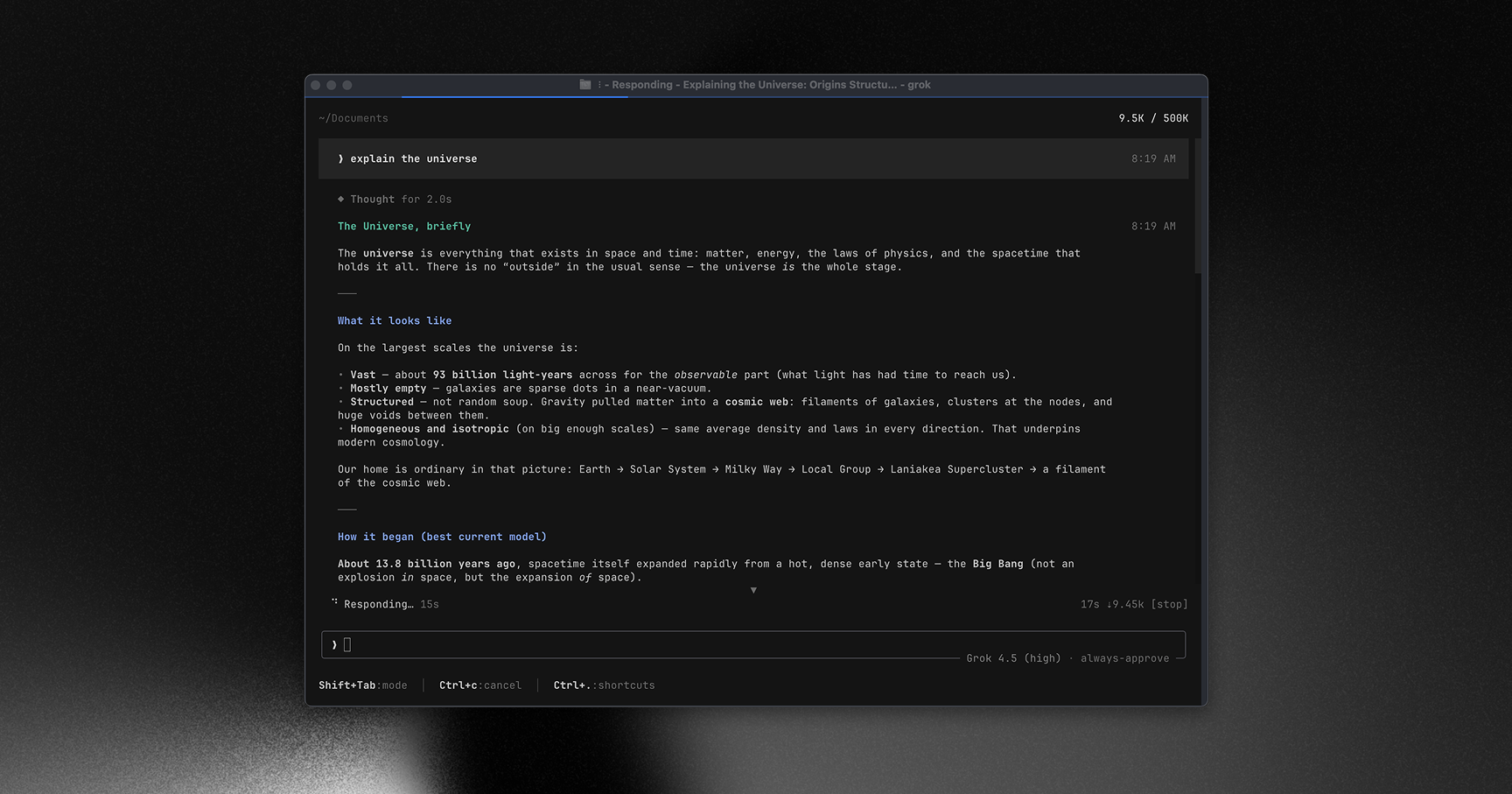
A fullscreen, mouse-interactive terminal UI and harness for SpaceXAI's coding agents.
What does grok-build do?
Grok Build is a sophisticated terminal-based user interface and execution harness designed specifically for interacting with advanced coding agents. Written in Rust for maximum performance, it provides a highly responsive, fullscreen experience that surprisingly includes full mouse interactivity within the terminal environment. The tool acts as a bridge between the developer and the AI, managing the agent's context window and execution environment. It is architected to be highly extensible, allowing developers to plug in custom tools and workflows directly into the agent's harness. This provides a robust, developer-centric alternative to standard web-based chat interfaces for complex software engineering tasks.
Who is grok-build for?
Systems programmers, AI engineers, and terminal power users who require a robust, low-latency interface for interacting with autonomous coding agents. Requires comfort with advanced CLI environments.
How do I get started with grok-build?
cargo install --path .
How popular is grok-build on GitHub?
xai-org/grok-build has 27,210 stars and 5,124 forks on GitHub, and gained 130 stars in the last 7 days.
What license does grok-build use?
xai-org/grok-build is released under the Apache-2.0 license.
Star history
since Jul 29, 2026
27.2K stars as of Oct 3, 2026. Measured daily since Jul 29, 2026; GitHub no longer exposes earlier star timestamps.
Contribution activity
commits per day, last 52 weeks
51 commits in the last yearLessMore
Signals and awards
derived from tracked data
Widely adopted
27,210 stars
Breakout launch
27,210 stars in 82 days
Permissive license
Apache-2.0
Repeat trending
8 trending appearances
What grok-build does
Grok Build is a sophisticated terminal-based user interface and execution harness designed specifically for interacting with advanced coding agents. Written in Rust for maximum performance, it provides a highly responsive, fullscreen experience that surprisingly includes full mouse interactivity within the terminal environment. The tool acts as a bridge between the developer and the AI, managing the agent's context window and execution environment. It is architected to be highly extensible, allowing developers to plug in custom tools and workflows directly into the agent's harness. This provides a robust, developer-centric alternative to standard web-based chat interfaces for complex software engineering tasks.
Systems programmers, AI engineers, and terminal power users who require a robust, low-latency interface for interacting with autonomous coding agents. Requires comfort with advanced CLI environments.
Fullscreen Terminal UI: Provides an immersive, distraction-free environment for reviewing agent-generated code and plans.
Mouse Interactivity: Supports complex interactions like scrolling, clicking, and selecting text directly within standard terminal emulators.
High-Performance Rust Core: Ensures minimal latency and efficient resource usage even when managing massive context windows.
Extensible Plugin System: Allows developers to integrate custom static analysis or deployment tools directly into the harness.
Advanced Context Management: Orchestrates exactly what files and execution results are fed back into the agent's reasoning loop.
Where teams use it
Complex Code Generation
Software engineers use the harness to direct agents in writing and refactoring large modules without leaving their terminal environment.
Agent Execution Monitoring
Developers utilize the interactive UI to step through an agent's planned actions and intervene when logic errors occur.
Custom Toolchain Integration
Teams extend the harness to allow the AI agent direct access to internal proprietary testing frameworks.
Rapid Prototyping
Hackers rapidly iterate on project structures by communicating with the agent through a high-bandwidth, keyboard-driven interface.
Getting started: cargo install --path .
README
main branch
Grok Build (grok)
Grok Build is SpaceXAI's terminal-based AI coding agent. It runs as a
full-screen TUI that understands your codebase, edits files, executes shell
commands, searches the web, and manages long-running tasks — interactively,
headlessly for scripting/CI, or embedded in editors via the Agent Client
Protocol (ACP).
See the changelog for the latest fixes,
features, and improvements in each release.
Building from source
Requirements:
Rust — the toolchain is pinned by rust-toolchain.toml;
rustup installs it automatically on first build.
DotSlash — required so hermetic tools under
bin/ (notably bin/protoc) can download and run.
Install it and ensure dotslash is on your PATHbefore building:
protoc — proto codegen resolves bin/protoc via DotSlash,
or falls back to a protoc on PATH / $PROTOC.
macOS and Linux are supported build hosts; Windows builds are best-effort
and not currently tested from this tree.
cargo run -p xai-grok-pager-bin              # build + launch the TUI
cargo build -p xai-grok-pager-bin --release  # release binary: target/release/xai-grok-pager
cargo check -p xai-grok-pager-bin            # fast validation
The binary artifact is named xai-grok-pager; official installs ship it as
grok. On first launch it opens your browser to authenticate — see the
authentication guide.
The user guide ships with the pager crate:
crates/codegen/xai-grok-pager/docs/user-guide/
— getting started, keyboard shortcuts, slash commands, configuration, theming,
MCP servers, skills, plugins, hooks, headless mode, sandboxing, and more.
Repository layout
Path
Contents
crates/codegen/xai-grok-pager-bin
Composition-root package; builds the xai-grok-pager binary
A cross-platform desktop All-in-One assistant for Claude Code, Codex, OpenCode, OpenClaw, Grok Build & Hermes Agent. Only official website: ccswitch.io
π RuView turns commodity WiFi signals into real-time spatial intelligence, vital sign monitoring, and presence detection — all without a single pixel of video.