yynxxxxx/Codex-XPublic

OpenAI Codex 桌面端/CLI 的可视化管理工具,具有Provider/API 切换、会话同步、提示词注入、Skills/MCP 管理、TOML 配置可视化的跨平台工具。

AI summary: A cross-platform desktop management tool for OpenAI Codex prompt injections, sessions, and MCP skills.

Stars
4.6K
+32 today
Forks
599
Watchers
16
Open issues
13
Open PRs
0
Contributors
~3
Commits
253
Branches
6

RustMITCreated Jul 4, 2026Last push todayLatest release v0.3.35+134 stars this week+296 this month

Quick answers

What is Codex-X?
A cross-platform desktop management tool for OpenAI Codex prompt injections, sessions, and MCP skills.
What does Codex-X do?
Codex-X provides a graphical user interface for managing interactions with OpenAI Codex via desktop or CLI environments. It centralizes the configuration of prompt templates, API provider settings, and Model Context Protocol skills into a single application. The tool synchronizes sessions and allows users to define custom prompt injections without manually editing TOML configuration files. By offering a visual interface, it streamlines the orchestration of complex AI coding workflows and third-party API integrations.
Who is Codex-X for?
AI engineers, prompt engineers, and developers who heavily utilize OpenAI Codex or similar coding agents. Users should have a foundational understanding of LLM interactions and API configurations.
How popular is Codex-X on GitHub?
yynxxxxx/Codex-X has 4,573 stars and 599 forks on GitHub, and gained 134 stars in the last 7 days.
What license does Codex-X use?
yynxxxxx/Codex-X is released under the MIT license.

Star history

since Sep 19, 2026
02K4KSep 2026Oct 2026Oct 2026Nov 2026
4.6K stars as of Nov 20, 2026. Measured daily since Sep 19, 2026; GitHub no longer exposes earlier star timestamps.

Update history

4 recorded
  • Nov 20, 2026New release v0.3.35 (previously v0.3.30).
  • Nov 6, 2026New release v0.3.30 (previously v0.3.28).
  • Oct 24, 2026New release v0.3.28 (previously v0.3.26).
  • Oct 13, 2026New release v0.3.26 (previously v0.3.22).

Contribution activity

commits per day, last 52 weeks
NovDecJanFebMarAprMayJunJulAugSepOctNovMonWedFri2025-11-23: 0 commits2025-11-24: 0 commits2025-11-25: 0 commits2025-11-26: 0 commits2025-11-27: 0 commits2025-11-28: 0 commits2025-11-29: 0 commits2025-11-30: 0 commits2025-12-01: 0 commits2025-12-02: 0 commits2025-12-03: 0 commits2025-12-04: 0 commits2025-12-05: 0 commits2025-12-06: 0 commits2025-12-07: 0 commits2025-12-08: 0 commits2025-12-09: 0 commits2025-12-10: 0 commits2025-12-11: 0 commits2025-12-12: 0 commits2025-12-13: 0 commits2025-12-14: 0 commits2025-12-15: 0 commits2025-12-16: 0 commits2025-12-17: 0 commits2025-12-18: 0 commits2025-12-19: 0 commits2025-12-20: 0 commits2025-12-21: 0 commits2025-12-22: 0 commits2025-12-23: 0 commits2025-12-24: 0 commits2025-12-25: 0 commits2025-12-26: 0 commits2025-12-27: 0 commits2025-12-28: 0 commits2025-12-29: 0 commits2025-12-30: 0 commits2025-12-31: 0 commits2026-01-01: 0 commits2026-01-02: 0 commits2026-01-03: 0 commits2026-01-04: 0 commits2026-01-05: 0 commits2026-01-06: 0 commits2026-01-07: 0 commits2026-01-08: 0 commits2026-01-09: 0 commits2026-01-10: 0 commits2026-01-11: 0 commits2026-01-12: 0 commits2026-01-13: 0 commits2026-01-14: 0 commits2026-01-15: 0 commits2026-01-16: 0 commits2026-01-17: 0 commits2026-01-18: 0 commits2026-01-19: 0 commits2026-01-20: 0 commits2026-01-21: 0 commits2026-01-22: 0 commits2026-01-23: 0 commits2026-01-24: 0 commits2026-01-25: 0 commits2026-01-26: 0 commits2026-01-27: 0 commits2026-01-28: 0 commits2026-01-29: 0 commits2026-01-30: 0 commits2026-01-31: 0 commits2026-02-01: 0 commits2026-02-02: 0 commits2026-02-03: 0 commits2026-02-04: 0 commits2026-02-05: 0 commits2026-02-06: 0 commits2026-02-07: 0 commits2026-02-08: 0 commits2026-02-09: 0 commits2026-02-10: 0 commits2026-02-11: 0 commits2026-02-12: 0 commits2026-02-13: 0 commits2026-02-14: 0 commits2026-02-15: 0 commits2026-02-16: 0 commits2026-02-17: 0 commits2026-02-18: 0 commits2026-02-19: 0 commits2026-02-20: 0 commits2026-02-21: 0 commits2026-02-22: 0 commits2026-02-23: 0 commits2026-02-24: 0 commits2026-02-25: 0 commits2026-02-26: 0 commits2026-02-27: 0 commits2026-02-28: 0 commits2026-03-01: 0 commits2026-03-02: 0 commits2026-03-03: 0 commits2026-03-04: 0 commits2026-03-05: 0 commits2026-03-06: 0 commits2026-03-07: 0 commits2026-03-08: 0 commits2026-03-09: 0 commits2026-03-10: 0 commits2026-03-11: 0 commits2026-03-12: 0 commits2026-03-13: 0 commits2026-03-14: 0 commits2026-03-15: 0 commits2026-03-16: 0 commits2026-03-17: 0 commits2026-03-18: 0 commits2026-03-19: 0 commits2026-03-20: 0 commits2026-03-21: 0 commits2026-03-22: 0 commits2026-03-23: 0 commits2026-03-24: 0 commits2026-03-25: 0 commits2026-03-26: 0 commits2026-03-27: 0 commits2026-03-28: 0 commits2026-03-29: 0 commits2026-03-30: 0 commits2026-03-31: 0 commits2026-04-01: 0 commits2026-04-02: 0 commits2026-04-03: 0 commits2026-04-04: 0 commits2026-04-05: 0 commits2026-04-06: 0 commits2026-04-07: 0 commits2026-04-08: 0 commits2026-04-09: 0 commits2026-04-10: 0 commits2026-04-11: 0 commits2026-04-12: 0 commits2026-04-13: 0 commits2026-04-14: 0 commits2026-04-15: 0 commits2026-04-16: 0 commits2026-04-17: 0 commits2026-04-18: 0 commits2026-04-19: 0 commits2026-04-20: 0 commits2026-04-21: 0 commits2026-04-22: 0 commits2026-04-23: 0 commits2026-04-24: 0 commits2026-04-25: 0 commits2026-04-26: 0 commits2026-04-27: 0 commits2026-04-28: 0 commits2026-04-29: 0 commits2026-04-30: 0 commits2026-05-01: 0 commits2026-05-02: 0 commits2026-05-03: 0 commits2026-05-04: 0 commits2026-05-05: 0 commits2026-05-06: 0 commits2026-05-07: 0 commits2026-05-08: 0 commits2026-05-09: 0 commits2026-05-10: 0 commits2026-05-11: 0 commits2026-05-12: 0 commits2026-05-13: 0 commits2026-05-14: 0 commits2026-05-15: 0 commits2026-05-16: 0 commits2026-05-17: 0 commits2026-05-18: 0 commits2026-05-19: 0 commits2026-05-20: 0 commits2026-05-21: 0 commits2026-05-22: 0 commits2026-05-23: 0 commits2026-05-24: 0 commits2026-05-25: 0 commits2026-05-26: 0 commits2026-05-27: 0 commits2026-05-28: 0 commits2026-05-29: 0 commits2026-05-30: 0 commits2026-05-31: 0 commits2026-06-01: 0 commits2026-06-02: 0 commits2026-06-03: 0 commits2026-06-04: 0 commits2026-06-05: 0 commits2026-06-06: 0 commits2026-06-07: 0 commits2026-06-08: 0 commits2026-06-09: 0 commits2026-06-10: 0 commits2026-06-11: 0 commits2026-06-12: 0 commits2026-06-13: 0 commits2026-06-14: 0 commits2026-06-15: 0 commits2026-06-16: 0 commits2026-06-17: 0 commits2026-06-18: 0 commits2026-06-19: 0 commits2026-06-20: 0 commits2026-06-21: 0 commits2026-06-22: 0 commits2026-06-23: 0 commits2026-06-24: 0 commits2026-06-25: 0 commits2026-06-26: 0 commits2026-06-27: 0 commits2026-06-28: 1 commit2026-06-29: 0 commits2026-06-30: 0 commits2026-07-01: 4 commits2026-07-02: 2 commits2026-07-03: 2 commits2026-07-04: 31 commits2026-07-05: 8 commits2026-07-06: 12 commits2026-07-07: 7 commits2026-07-08: 3 commits2026-07-09: 2 commits2026-07-10: 0 commits2026-07-11: 5 commits2026-07-12: 0 commits2026-07-13: 5 commits2026-07-14: 35 commits2026-07-15: 0 commits2026-07-16: 10 commits2026-07-17: 0 commits2026-07-18: 0 commits2026-07-19: 0 commits2026-07-20: 0 commits2026-07-21: 0 commits2026-07-22: 0 commits2026-07-23: 0 commits2026-07-24: 3 commits2026-07-25: 0 commits2026-07-26: 2 commits2026-07-27: 0 commits2026-07-28: 2 commits2026-07-29: 0 commits2026-07-30: 0 commits2026-07-31: 1 commit2026-08-01: 0 commits2026-08-02: 1 commit2026-08-03: 2 commits2026-08-04: 0 commits2026-08-05: 0 commits2026-08-06: 0 commits2026-08-07: 0 commits2026-08-08: 0 commits2026-08-09: 0 commits2026-08-10: 0 commits2026-08-11: 4 commits2026-08-12: 0 commits2026-08-13: 0 commits2026-08-14: 0 commits2026-08-15: 0 commits2026-08-16: 0 commits2026-08-17: 0 commits2026-08-18: 1 commit2026-08-19: 0 commits2026-08-20: 4 commits2026-08-21: 0 commits2026-08-22: 0 commits2026-08-23: 0 commits2026-08-24: 0 commits2026-08-25: 0 commits2026-08-26: 0 commits2026-08-27: 0 commits2026-08-28: 0 commits2026-08-29: 0 commits2026-08-30: 0 commits2026-08-31: 0 commits2026-09-01: 0 commits2026-09-02: 0 commits2026-09-03: 0 commits2026-09-04: 0 commits2026-09-05: 0 commits2026-09-06: 0 commits2026-09-07: 0 commits2026-09-08: 0 commits2026-09-09: 2 commits2026-09-10: 0 commits2026-09-11: 0 commits2026-09-12: 0 commits2026-09-13: 0 commits2026-09-14: 0 commits2026-09-15: 0 commits2026-09-16: 0 commits2026-09-17: 1 commit2026-09-18: 3 commits2026-09-19: 0 commits2026-09-20: 0 commits2026-09-21: 0 commits2026-09-22: 11 commits2026-09-23: 1 commit2026-09-24: 0 commits2026-09-25: 0 commits2026-09-26: 0 commits2026-09-27: 0 commits2026-09-28: 0 commits2026-09-29: 0 commits2026-09-30: 3 commits2026-10-01: 5 commits2026-10-02: 0 commits2026-10-03: 0 commits2026-10-04: 0 commits2026-10-05: 0 commits2026-10-06: 0 commits2026-10-07: 0 commits2026-10-08: 4 commits2026-10-09: 9 commits2026-10-10: 0 commits2026-10-11: 0 commits2026-10-12: 0 commits2026-10-13: 0 commits2026-10-14: 0 commits2026-10-15: 0 commits2026-10-16: 4 commits2026-10-17: 2 commits2026-10-18: 0 commits2026-10-19: 0 commits2026-10-20: 3 commits2026-10-21: 0 commits2026-10-22: 0 commits2026-10-23: 0 commits2026-10-24: 22 commits2026-10-25: 0 commits2026-10-26: 0 commits2026-10-27: 0 commits2026-10-28: 0 commits2026-10-29: 0 commits2026-10-30: 0 commits2026-10-31: 0 commits2026-11-01: 0 commits2026-11-02: 0 commits2026-11-03: 0 commits2026-11-04: 0 commits2026-11-05: 0 commits2026-11-06: 0 commits2026-11-07: 0 commits2026-11-08: 0 commits2026-11-09: 22 commits2026-11-10: 0 commits2026-11-11: 0 commits2026-11-12: 0 commits2026-11-13: 0 commits2026-11-14: 4 commits2026-11-15: 0 commits2026-11-16: 0 commits2026-11-17: 0 commits2026-11-18: 0 commits2026-11-19: 3 commits2026-11-20: 3 commits2026-11-21: 0 commits
249 commits in the last yearLessMore

Signals and awards

derived from tracked data
  • Actively maintained

    Pushed within 48 hours

  • Permissive license

    MIT

  • Continuous integration

    Automated checks passing

  • Repeat trending

    4 trending appearances

What Codex-X does

Codex-X provides a graphical user interface for managing interactions with OpenAI Codex via desktop or CLI environments. It centralizes the configuration of prompt templates, API provider settings, and Model Context Protocol skills into a single application. The tool synchronizes sessions and allows users to define custom prompt injections without manually editing TOML configuration files. By offering a visual interface, it streamlines the orchestration of complex AI coding workflows and third-party API integrations.

AI engineers, prompt engineers, and developers who heavily utilize OpenAI Codex or similar coding agents. Users should have a foundational understanding of LLM interactions and API configurations.

  • Visual Configuration: Replaces manual TOML file editing with a graphical interface for managing settings.
  • Prompt Management: Allows users to save, organize, and inject custom prompt templates into Codex sessions.
  • MCP Integration: Manages Model Context Protocol skills to extend the capabilities of the AI agent.
  • Cross-Platform: Built with Rust and Tauri to run efficiently across different desktop operating systems.
  • Provider Switching: Facilitates seamless switching between different third-party API providers.

Where teams use it

Prompt Engineering

Design, refine, and store complex prompt templates for repetitive coding tasks.

Environment Synchronization

Sync Codex sessions and configurations across multiple development machines.

API Orchestration

Manage multiple LLM providers and route requests based on specific task requirements.

Skill Development

Configure and test custom Model Context Protocol plugins before deploying them to production agents.

README

main branch

中文 English

Codex-X Logo

Codex-X

Codex 可视化提示词注入 · Provider · 会话 · Skills / MCP 管理工具

一款面向 OpenAI Codex 桌面端 / Codex CLI 的跨平台桌面工具。把提示词模板、自定义 Prompt、第三方 API 供应商、会话同步、Skills / MCP 和 TOML 配置都放进可视化界面里,不用反复手改文件。

GitHub Trending 全球日榜第 12 名(2026-09-22)   GitHub Trending Rust 日榜第 2 名
Rust 日榜第 2 · 2026-09-20 · Rust 周榜第 2 · 2026-09-27

version platform tauri license


Codex-X 是什么?

当你同时使用 Codex 桌面端、CLI、第三方 API、Skills / MCP 和多套提示词时,配置很容易散落在不同文件里。Codex-X 把这些高频操作集中到一个桌面界面中,让当前状态看得见、常用操作点一下就能完成。

你可以用它:

  • 像管理插件一样管理提示词:分类、导入 Markdown、自定义编辑、一键启用 / 禁用
  • 内置 5 套提示词模板,同时支持用户把自己的提示词变成可视化模板库
  • 管理多个可命名的官方 Codex 登录与第三方 API,一键复制、切换,并从 cc-switch 导入现有供应商
  • 同步、检查、搜索和删除本地会话,按项目路径整理 Codex 历史记录
  • 集中管理 Skills 与 MCP,查看当前 config.toml、auth.json 和操作备份
  • 在设置中按日期、模型查看 Token 用量趋势,子代理用量归入所属主会话

软件预览

以下截图来自 Codex-X v0.3.35,使用 Atlas Studio 演示工作区。点击图片可查看原图。

会话管理 · 按项目文件夹浏览历史会话
会话管理 · 按项目文件夹浏览历史会话

概览 · 查看当前模型、供应商和配置目录
概览
查看当前模型、供应商和配置目录
供应商 · 管理官方账号和第三方 API
供应商
管理官方账号和第三方 API
指令提示词 · 按分类选择和启用提示词
指令提示词
按分类选择和启用提示词
用量统计 · 查看近七天的 Token 用量和模型分布
用量统计
查看近七天的 Token 用量和模型分布
展开查看 Skills、MCP、TOML、路由、设置和关于
Skills · 查看和启用工作区技能
Skills
查看和启用工作区技能
MCP · 管理本地与远程 MCP 服务
MCP
管理本地与远程 MCP 服务
TOML · 查看当前生效的配置
TOML
查看当前生效的配置
路由与故障转移 · 查看主备供应商的优先级和状态
路由与故障转移
查看主备供应商的优先级和状态
通用设置 · 切换语言并查看环境检查结果
通用设置
切换语言并查看环境检查结果
关于 · 查看版本和更新状态
关于
查看版本和更新状态

功能特性

你想做的事 Codex-X 能帮你
提示词注入管理 内置 5 套提示词模板,支持分类、GitHub 同步、本地缓存、导入 .md、添加自定义提示词、编辑说明、一键启用 / 禁用。
启用方式切换 可选择“保留原提示词”追加写入,也可选择“替换原提示词”完整切换;适合在不同模型、不同任务、不同 Prompt 之间快速切换。
Provider / API 保存多个可命名的官方 Codex 登录配置,与第三方供应商统一管理、一键复制和切换;第三方供应商支持连接检测、模型获取 / 测试及从 cc-switch 导入。
会话管理 搜索本地会话、按项目路径分组、同步当前供应商、检查会话状态,并支持单选 / 多选 / 项目级永久删除。
Skills / MCP 可视化查看 Skills 与 MCP,导入已有配置,从 ZIP 安装 Skill,逐项启用 / 禁用,并检查更新状态。
配置与登录 集中查看 config.toml 与 auth.json;官方登录和第三方供应商编辑页均可在 config.toml 旁勾选“开启 1M 上下文窗口”,保存后生效,需模型支持;重要写入前自动备份。
用量统计 设置页提供“通用设置 / 用量统计”标签,按日期与模型筛选本地 Token 用量,查看每日趋势、缓存命中率、模型分布及最近 10 个主会话;子代理用量归入所属主会话,不单独计为会话。
跨平台使用 提供 macOS Apple Silicon / Intel、Windows MSI / 便携版和 Linux 安装包;MSI 安装版可在应用内直接下载、校验并安装更新,便携版继续使用手动下载。

交流

用 QQ 扫描任一二维码,加入 AI 技术交流群。

QQ AI 技术交流群 1
QQ AI 技术交流群 1 二维码
QQ AI 技术交流群 2
QQ AI 技术交流群 2 二维码

核心亮点

1. 可视化提示词注入中心

当前模板库 11 套 离线内置 5 套 GitHub 自动同步 支持自定义提示词

Tip

安装后就能用,联网后自动补齐,也能维护自己的提示词库。

安装包离线自带 5 套模板;软件启动后会从 GitHub examples/ 同步另外 6 套软件开发与写作辅助模板,以及后续更新。同步成功的在线版本会缓存到本地,临时离线仍可继续使用。你也可以导入自己的 .md、新增分类、编辑说明,并像切换插件一样启用或禁用任意提示词。

Codex-X 现在不只是“几套内置 Prompt”的启动器,而是一个可视化提示词注入与管理工具:

  • 按分类管理提示词,例如软件开发、写作辅助,也可以新增自己的分类
  • 支持同步 GitHub 模板、导入 Markdown、手动添加提示词、编辑标题 / 文件名 / 内容
  • 每个提示词都有独立开关,打开时自动按当前启用方式写入 Codex 指令文件
  • 支持“保留原提示词”和“替换原提示词”两种模式,适合日常叠加或完整切换
  • 本地缓存可离线使用,后续模板更新不会影响你自己维护的自定义提示词
模板 适合场景 获取方式
software-development-maintainer.md 长期维护正式项目,强调复用、最小改动、安全、测试与可维护性 GitHub 在线同步
software-development-debugging.md 从稳定复现和证据采集推进到根因修复与回归验证 GitHub 在线同步
software-development-code-review.md 按严重级别审查缺陷、回归、安全风险和测试缺口 GitHub 在线同步
writing-clarity-editor.md 在保留原意和事实的前提下润色中英文表达 GitHub 在线同步
writing-technical-docs.md 基于代码与事实编写 README、指南、API 和发布文档 GitHub 在线同步
writing-structured-draft.md 将零散材料组织成报告、方案、复盘或文章初稿 GitHub 在线同步
保留原提示词
适合已经有个人规则的用户。Codex-X 只追加自己管理的内容,禁用时也只移除这一部分,不动原有提示词。
替换原提示词
将所选模板设为当前主要指令入口,适合希望完整切换到某套模板的用户。

每次启用或禁用前都会自动创建备份。除了模板库,你也可以导入、编辑、删除自己的 .md 提示词,并通过分类管理把常用提示词整理成自己的工作流。

Note

如果你有好用的提示词模板,欢迎在 Issues 提交:请附上模板名称、适用场景、Markdown 内容、推荐启用方式和必要说明。合适的模板会考虑收录到 examples/,让更多用户可以一键同步使用。

2. Provider / API:添加、检测、获取模型、随时切换

Note

启用新的第三方供应商后,新建或重新打开 Codex 会话即可使用新的中转,不需要重启整个 Codex 客户端。

  • 保存多个可命名的官方 Codex 登录配置与第三方供应商,随时查看当前正在使用哪一个
  • 点击“复制”直接新增独立副本,无需确认或进入编辑页;名称可稍后修改
  • 切换前可检测连接,并可获取模型进行测试
  • 在同一页面编辑 Base URL、API Key、Model、上游接口协议、Headers 和完整 TOML
  • 本地路由支持 Responses、Chat Completions、Claude Messages、Gemini 原生接口,使用方式与边界见供应商协议说明
  • 从 cc-switch 导入时自动区分新增、更新、合并与跳过;相同 URL + Key 不再重复显示
  • 切回 OpenAI Official 时保留当前官方登录态,第三方配置也不会凭空消失

3. 会话管理:同步、检查与永久删除

会话列表优先显示会话名称,鼠标悬停在会话行上可预览首次提示词。在 Windows 中选择 WSL 的 .codex 目录,点击「检查会话」即可查看或导出已有会话。WSL 会话使用说明

同步和检查
检查本地会话是否和当前 Provider / 模型一致,需要时一键同步到当前供应商配置,不修改聊天内容。
查找和整理
按标题、项目路径、供应商或 ID 搜索会话,也可以按项目路径分组查看,适合清理长期使用后积累的会话列表。
精确删除
支持单选、多选,也可以勾选一个或多个项目,一次选中项目下的全部会话;确认后会从 Codex 自身存储中删除对应会话及其派生子会话。

Caution

永久删除不可恢复。 删除前请先关闭仍在使用这些会话的 Codex 窗口或 CLI,并在确认窗口中再次核对待删除列表。

4. Skills / MCP 管理

在【技能和 MCP】页面集中管理 Codex 的能力扩展,不必再到多个目录和配置文件中逐项查找。

Skills
查看当前 Skill,导入已有内容或从 ZIP 安装;可以逐项启用 / 禁用,并检查已安装 Skill 是否有更新。
MCP
导入前先预览现有 MCP Server,再决定哪些需要纳管;启用或禁用后由 Codex-X 自动维护 Codex 配置。

5. TOML 与官方 Auth 管理

  • 自动读取 Codex 官方 auth.json
  • 支持查看 / 编辑 ChatGPT 登录态 Auth
  • 区分官方 Auth 与第三方 API Key
  • 官方配置可和第三方 Provider 在 UI 中统一管理
  • 查看当前 Codex 正在使用的 live config.toml
  • 深色代码预览与语法高亮
  • Provider 编辑页可直接编辑完整 TOML
  • 保存后同步到 Codex 配置目录

6. 跨平台桌面软件

  • macOS Apple Silicon .dmg
  • macOS Intel .dmg
  • Windows .msi(推荐安装包,支持应用内在线更新)
  • Windows Portable .zip
  • Linux .deb / .rpm / .AppImage
  • GitHub Releases 自动构建发布
  • 安装版支持应用内自动更新,Windows 便携版保留手动更新

Windows 安装包统一为 MSI。已安装 EXE 的用户需手动换装一次:先退出 Codex-X,在 Windows 设置中卸载 EXE 版,并保留应用数据(不要勾选删除数据),再安装 MSI。换装后继续使用软件内在线更新。

技术栈

类型 技术
桌面框架 Tauri 2
前端 React 18 / TypeScript / Vite
后端 Rust
本地数据 SQLite / rusqlite
配置编辑 TOML / JSON
发布 GitHub Actions / GitHub Releases

配置路径

Codex-X 默认读取 Codex 配置目录:

~/.codex/config.toml
~/.codex/auth.json

也支持环境变量:

CODEX_HOME=/path/to/.codex
CODEXX_HOME=/path/to/codex-x-data
CC_SWITCH_HOME=/path/to/.cc-switch

Codex-X 自身数据库默认位于:

~/.codexx/codexx.db

下载

请前往 Releases 页面下载:

https://github.com/yynxxxxx/Codex-X/releases

开发运行

pnpm install
pnpm dev

构建桌面端:

pnpm --dir apps/desktop tauri build

桌面端安装说明

macOS 正式版 DMG 已通过 Apple 签名和公证。请按芯片架构选择 Apple Silicon 或 Intel 版本。

许可证

本项目基于 MIT License 开源。

致谢 / Thanks

感谢 LINUX DO 论坛 社区的关注、反馈与支持。

Star History
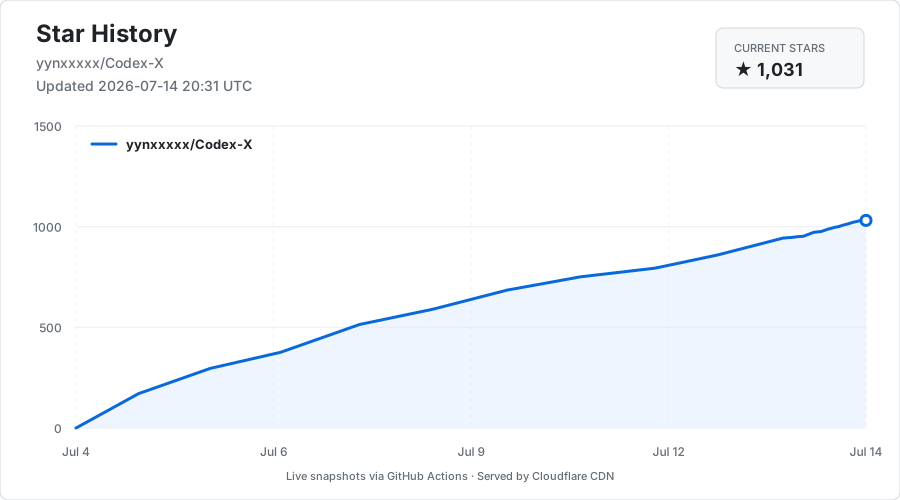
Codex-X Star History


Important

使用声明

本项目仅用于大模型与智能体相关技术的学习、研究与交流,软件本身不包含主动破坏性功能。请在合法、合规并获得授权的范围内使用,禁止将其用于攻击、侵害他人权益或其他违法用途。使用者应自行判断使用边界,并对相关行为与后果承担责任。

View on GitHub

Recent activity

commits and pull requests

Recent open issues

view all

Releases and announcements

65 total
  1. Codex-X v0.3.35v0.3.35Nov 19, 20261.3K downloads

    - 修复已同步会话被标为「待同步」的问题,尤其是在同一台电脑上用过正式版和开发版 Codex 时。检查或同步期间,页面显示当前进度。 - 会话列表优先显示会话名称,悬停在整行即可预览首次提示词。部分旧会话也能从聊天记录中找回首次提示词。 - 改善 Windows 加载 WSL 会话的体验。旧数据库或名称索引损坏时,仍可查看和导出当前会话。当前数据库读取失败时,页面会显示具体原因。 **Windows 安装说明** - MSI 用户可直接在软件内检查更新。旧 EXE 用户请先卸载 EXE 版,保留应用数据,再安装 MSI,之后继续在线更新。 - 如果提示“智能应用控制已阻止此应用”,确认安装包来自本仓库后,打开 **Windows 安全中心 → 应用和浏览器控制 → 智能应用控制设置 → 关闭**,再重新安装或启动。此操作会关闭该项系统防护。[微软设置说明](https://support.microsoft.com/zh-cn/windows/security/windows-security/app-browser-control-in-the-windows-security-app)

  2. Codex-X v0.3.34v0.3.34Nov 14, 20264.6K downloads

    - 修复 Windows 重启 Microsoft Store 版 Codex/ChatGPT 时,将启动器或安装路径别名误认成其他程序而中断的问题;客户端尚未出现时继续等待,并正确处理未运行状态。 **Windows 安装说明** - MSI 用户可直接在软件内检查更新。旧 EXE 用户请先卸载 EXE 版,保留应用数据,再安装 MSI,之后继续在线更新。 - 如果提示“智能应用控制已阻止此应用”,确认安装包来自本仓库后,打开 **Windows 安全中心 → 应用和浏览器控制 → 智能应用控制设置 → 关闭**,再重新安装或启动。此操作会关闭该项系统防护。[微软设置说明](https://support.microsoft.com/zh-cn/windows/security/windows-security/app-browser-control-in-the-windows-security-app)

  3. Codex-X v0.3.33v0.3.33Nov 9, 20264.5K downloads

    - 修复 Windows 重启 Codex/ChatGPT 时误报进程路径或权限错误,导致客户端关闭后没有重新打开的问题;操作失败时显示更清楚的原因。 - 改善 macOS 重启时的状态确认和启动恢复,减少短暂延迟导致的失败,并避免重复打开客户端。 **Windows 安装说明** - MSI 用户可直接在软件内检查更新。旧 EXE 用户请先卸载 EXE 版,保留应用数据,再安装 MSI,之后继续在线更新。 - 如果提示“智能应用控制已阻止此应用”,确认安装包来自本仓库后,打开 **Windows 安全中心 → 应用和浏览器控制 → 智能应用控制设置 → 关闭**,再重新安装或启动。此操作会关闭该项系统防护。[微软设置说明](https://support.microsoft.com/zh-cn/windows/security/windows-security/app-browser-control-in-the-windows-security-app)

  4. Codex-X v0.3.32v0.3.32Nov 9, 2026114 downloads

    - Windows 安装包统一为 MSI,支持软件内在线更新。 - 修复供应商环境变量密钥在保存、切换后丢失的问题,模型列表和连接检测也支持读取该密钥。 - 会话列表优先显示会话名称,鼠标悬停可查看首次消息,也能按首次消息搜索。 - 新增 Windows 下 WSL 会话的查看和导出功能;发行版需安装 Python 3,目前仅支持只读操作。 - 改善 Windows 管理员模式下重启 Microsoft Store 版 Codex 的体验。 **Windows 安装说明** - MSI 用户可直接在软件内检查更新。旧 EXE 用户请先卸载 EXE 版,保留应用数据,再安装 MSI,之后继续在线更新。 - 如果提示“智能应用控制已阻止此应用”,确认安装包来自本仓库后,打开 **Windows 安全中心 → 应用和浏览器控制 → 智能应用控制设置 → 关闭**,再重新安装或启动。此操作会关闭该项系统防护。[微软设置说明](https://support.microsoft.com/zh-cn/windows/security/windows-security/app-browser-control-in-the-windows-security-app)

  5. Codex-X v0.3.30v0.3.30Oct 24, 202613.3K downloads

    - 修复部分历史用量漏计,以及继续或分叉会话后误报记录不完整的问题,统计现在包含压缩和已归档会话。 - 修复部分第三方供应商无法发送请求、故障后未切换或界面未更新的问题。使用默认模型时,备用供应商可使用各自的默认模型继续处理。 - 统一输入框和下拉菜单的外观与对齐,模型支持搜索选择;供应商较多时,卡片保持完整,列表可以独立滚动。 - 未登录也能查看官方模型列表,新建配置默认采用推荐模型,并正确保存模型选择。 - 有多个官方账号时,可以删除原来的默认账号;只剩一个时保留删除保护。 - 开启 Codex 简体中文后,普通重启不再重复应用语言设置,语言处理异常会单独提示。 - 支持 Sub2API 站点显示钱包余额,每 5 分钟自动更新,也可手动刷新;无法查询时隐藏余额区域。 - Windows 因管理员权限无法重启客户端时,会显示具体原因和处理方法。

Code frequency

additions and deletions
+41.9K-41.9KWeek of 2026-06-28: +13,494 linesWeek of 2026-06-28: -497 linesWeek of 2026-07-05: +12,835 linesWeek of 2026-07-05: -2,744 linesWeek of 2026-07-12: +41,890 linesWeek of 2026-07-12: -21,980 linesWeek of 2026-07-19: +11,523 linesWeek of 2026-07-19: -573 linesWeek of 2026-07-26: +8,363 linesWeek of 2026-07-26: -1,631 linesWeek of 2026-08-02: +1,888 linesWeek of 2026-08-02: -12,257 linesWeek of 2026-08-09: +6,201 linesWeek of 2026-08-09: -1,335 linesWeek of 2026-08-16: +3,659 linesWeek of 2026-08-16: -736 linesWeek of 2026-08-23: +0 linesWeek of 2026-08-23: -0 linesWeek of 2026-08-30: +0 linesWeek of 2026-08-30: -0 linesWeek of 2026-09-06: +14,715 linesWeek of 2026-09-06: -957 linesWeek of 2026-09-13: +18,064 linesWeek of 2026-09-13: -713 linesWeek of 2026-09-20: +3,296 linesWeek of 2026-09-20: -430 linesWeek of 2026-09-27: +5,909 linesWeek of 2026-09-27: -493 linesWeek of 2026-10-04: +10,855 linesWeek of 2026-10-04: -397 linesWeek of 2026-10-11: +7,271 linesWeek of 2026-10-11: -634 linesWeek of 2026-10-18: +4,167 linesWeek of 2026-10-18: -655 linesWeek of 2026-10-25: +0 linesWeek of 2026-10-25: -0 linesWeek of 2026-11-01: +0 linesWeek of 2026-11-01: -0 linesWeek of 2026-11-08: +4,788 linesWeek of 2026-11-08: -823 linesWeek of 2026-11-15: +1,188 linesWeek of 2026-11-15: -287 linesJun 28, 2026Nov 15, 2026
+170.1K lines added, -47.1K removed over the last year.

Commits per week

last 52 weeks
500Week of 2025-11-23: 0 commitsWeek of 2025-11-30: 0 commitsWeek of 2025-12-07: 0 commitsWeek of 2025-12-14: 0 commitsWeek of 2025-12-21: 0 commitsWeek of 2025-12-28: 0 commitsWeek of 2026-01-04: 0 commitsWeek of 2026-01-11: 0 commitsWeek of 2026-01-18: 0 commitsWeek of 2026-01-25: 0 commitsWeek of 2026-02-01: 0 commitsWeek of 2026-02-08: 0 commitsWeek of 2026-02-15: 0 commitsWeek of 2026-02-22: 0 commitsWeek of 2026-03-01: 0 commitsWeek of 2026-03-08: 0 commitsWeek of 2026-03-15: 0 commitsWeek of 2026-03-22: 0 commitsWeek of 2026-03-29: 0 commitsWeek of 2026-04-05: 0 commitsWeek of 2026-04-12: 0 commitsWeek of 2026-04-19: 0 commitsWeek of 2026-04-26: 0 commitsWeek of 2026-05-03: 0 commitsWeek of 2026-05-10: 0 commitsWeek of 2026-05-17: 0 commitsWeek of 2026-05-24: 0 commitsWeek of 2026-05-31: 0 commitsWeek of 2026-06-07: 0 commitsWeek of 2026-06-14: 0 commitsWeek of 2026-06-21: 0 commitsWeek of 2026-06-28: 40 commitsWeek of 2026-07-05: 37 commitsWeek of 2026-07-12: 50 commitsWeek of 2026-07-19: 3 commitsWeek of 2026-07-26: 5 commitsWeek of 2026-08-02: 3 commitsWeek of 2026-08-09: 4 commitsWeek of 2026-08-16: 5 commitsWeek of 2026-08-23: 0 commitsWeek of 2026-08-30: 0 commitsWeek of 2026-09-06: 2 commitsWeek of 2026-09-13: 4 commitsWeek of 2026-09-20: 12 commitsWeek of 2026-09-27: 8 commitsWeek of 2026-10-04: 13 commitsWeek of 2026-10-11: 6 commitsWeek of 2026-10-18: 25 commitsWeek of 2026-10-25: 0 commitsWeek of 2026-11-01: 0 commitsWeek of 2026-11-08: 26 commitsWeek of 2026-11-15: 6 commitsNov 23, 2025Nov 15, 2026
249 commits in the last 52 weeks.

When work happens

weekday and hour
SunMonTueWedThuFriSat036912151821Sun 0:00 — 1 commitsSun 1:00 — 0 commitsSun 2:00 — 0 commitsSun 3:00 — 0 commitsSun 4:00 — 0 commitsSun 5:00 — 0 commitsSun 6:00 — 0 commitsSun 7:00 — 0 commitsSun 8:00 — 0 commitsSun 9:00 — 0 commitsSun 10:00 — 0 commitsSun 11:00 — 4 commitsSun 12:00 — 0 commitsSun 13:00 — 0 commitsSun 14:00 — 0 commitsSun 15:00 — 0 commitsSun 16:00 — 0 commitsSun 17:00 — 1 commitsSun 18:00 — 1 commitsSun 19:00 — 0 commitsSun 20:00 — 0 commitsSun 21:00 — 0 commitsSun 22:00 — 0 commitsSun 23:00 — 5 commitsMon 0:00 — 1 commitsMon 1:00 — 4 commitsMon 2:00 — 1 commitsMon 3:00 — 0 commitsMon 4:00 — 0 commitsMon 5:00 — 0 commitsMon 6:00 — 0 commitsMon 7:00 — 0 commitsMon 8:00 — 0 commitsMon 9:00 — 0 commitsMon 10:00 — 7 commitsMon 11:00 — 0 commitsMon 12:00 — 0 commitsMon 13:00 — 5 commitsMon 14:00 — 3 commitsMon 15:00 — 1 commitsMon 16:00 — 3 commitsMon 17:00 — 5 commitsMon 18:00 — 6 commitsMon 19:00 — 0 commitsMon 20:00 — 0 commitsMon 21:00 — 2 commitsMon 22:00 — 0 commitsMon 23:00 — 3 commitsTue 0:00 — 2 commitsTue 1:00 — 5 commitsTue 2:00 — 0 commitsTue 3:00 — 0 commitsTue 4:00 — 0 commitsTue 5:00 — 0 commitsTue 6:00 — 0 commitsTue 7:00 — 0 commitsTue 8:00 — 0 commitsTue 9:00 — 0 commitsTue 10:00 — 0 commitsTue 11:00 — 0 commitsTue 12:00 — 0 commitsTue 13:00 — 3 commitsTue 14:00 — 1 commitsTue 15:00 — 1 commitsTue 16:00 — 0 commitsTue 17:00 — 9 commitsTue 18:00 — 11 commitsTue 19:00 — 5 commitsTue 20:00 — 9 commitsTue 21:00 — 3 commitsTue 22:00 — 6 commitsTue 23:00 — 8 commitsWed 0:00 — 2 commitsWed 1:00 — 0 commitsWed 2:00 — 0 commitsWed 3:00 — 0 commitsWed 4:00 — 0 commitsWed 5:00 — 0 commitsWed 6:00 — 0 commitsWed 7:00 — 0 commitsWed 8:00 — 0 commitsWed 9:00 — 0 commitsWed 10:00 — 0 commitsWed 11:00 — 0 commitsWed 12:00 — 0 commitsWed 13:00 — 0 commitsWed 14:00 — 0 commitsWed 15:00 — 0 commitsWed 16:00 — 0 commitsWed 17:00 — 0 commitsWed 18:00 — 3 commitsWed 19:00 — 5 commitsWed 20:00 — 0 commitsWed 21:00 — 3 commitsWed 22:00 — 0 commitsWed 23:00 — 0 commitsThu 0:00 — 0 commitsThu 1:00 — 1 commitsThu 2:00 — 0 commitsThu 3:00 — 0 commitsThu 4:00 — 0 commitsThu 5:00 — 0 commitsThu 6:00 — 0 commitsThu 7:00 — 0 commitsThu 8:00 — 0 commitsThu 9:00 — 0 commitsThu 10:00 — 0 commitsThu 11:00 — 0 commitsThu 12:00 — 0 commitsThu 13:00 — 8 commitsThu 14:00 — 9 commitsThu 15:00 — 0 commitsThu 16:00 — 1 commitsThu 17:00 — 2 commitsThu 18:00 — 3 commitsThu 19:00 — 0 commitsThu 20:00 — 3 commitsThu 21:00 — 3 commitsThu 22:00 — 1 commitsThu 23:00 — 0 commitsFri 0:00 — 0 commitsFri 1:00 — 1 commitsFri 2:00 — 0 commitsFri 3:00 — 0 commitsFri 4:00 — 0 commitsFri 5:00 — 0 commitsFri 6:00 — 0 commitsFri 7:00 — 0 commitsFri 8:00 — 0 commitsFri 9:00 — 0 commitsFri 10:00 — 0 commitsFri 11:00 — 2 commitsFri 12:00 — 4 commitsFri 13:00 — 0 commitsFri 14:00 — 0 commitsFri 15:00 — 3 commitsFri 16:00 — 2 commitsFri 17:00 — 0 commitsFri 18:00 — 2 commitsFri 19:00 — 6 commitsFri 20:00 — 3 commitsFri 21:00 — 2 commitsFri 22:00 — 0 commitsFri 23:00 — 0 commitsSat 0:00 — 2 commitsSat 1:00 — 0 commitsSat 2:00 — 0 commitsSat 3:00 — 0 commitsSat 4:00 — 0 commitsSat 5:00 — 0 commitsSat 6:00 — 0 commitsSat 7:00 — 0 commitsSat 8:00 — 0 commitsSat 9:00 — 0 commitsSat 10:00 — 4 commitsSat 11:00 — 5 commitsSat 12:00 — 7 commitsSat 13:00 — 5 commitsSat 14:00 — 5 commitsSat 15:00 — 5 commitsSat 16:00 — 2 commitsSat 17:00 — 0 commitsSat 18:00 — 4 commitsSat 19:00 — 11 commitsSat 20:00 — 11 commitsSat 21:00 — 3 commitsSat 22:00 — 0 commitsSat 23:00 — 0 commits
Commit volume by weekday and hour (UTC). Larger dots mean more commits.

Who is committing

last 52 weeks
Maintainer commits247 (99%)
Community commits3 (1%)

250 commits in total over the last year.

DateListRankStars gained
Sep 22, 2026daily#11+210
Sep 21, 2026daily#11+210
Sep 20, 2026daily#13+64
Sep 19, 2026daily#13+64
  • ultraworkers/claw-code

    An agent-managed museum exhibit, built in Rust with Gajae-Code / LazyCodex — developed and maintained with no human intervention.

    194.8K stars · Rust

  • farion1231/cc-switch

    A cross-platform desktop All-in-One assistant for Claude Code, Codex, OpenCode,DeepSeek Harness and more. Only official website: ccswitch.io

    156K stars · Rust

  • openai/codex

    Lightweight coding agent that runs in your terminal

    136K stars · Rust

  • rust-lang/rust

    Empowering everyone to build reliable and efficient software.

    122.3K stars · Rust

  • pbakaus/impeccable

    The design vocabulary for your coding agent. Steer with polish and bolder, review with critique and audit, catch AI slop before it ships.

    114.1K stars · Rust

  • denoland/deno

    A modern runtime for JavaScript and TypeScript.

    109.1K stars · Rust




