lightpanda-io/browserPublic

Lightpanda: the headless browser designed for AI and automation

AI summary: A headless browser built in Zig specifically designed for AI agents and web scraping.

Stars
33.6K
+59 today
Forks
1.5K
Watchers
85
Open issues
71
Open PRs
13
Contributors
~58
Commits
8.6K
Branches
38

ZigAGPL-3.0Created Feb 7, 2023Last push todayLatest release nightly+513 stars this week+638 this month

Star history

since May 19, 2024
010K20K30KMay 2024Feb 2025Nov 2025Aug 2026
33.6K stars as of Aug 7, 2026, tracked back to May 19, 2024. Historical curve reconstructed from public GitHub event archives, calibrated to the current total.

Contribution activity

commits per day, last 52 weeks
AugSepOctNovDecJanFebMarAprMayJunJulAugMonWedFri2025-08-10: 0 commits2025-08-11: 2 commits2025-08-12: 7 commits2025-08-13: 10 commits2025-08-14: 9 commits2025-08-15: 1 commit2025-08-16: 0 commits2025-08-17: 0 commits2025-08-18: 5 commits2025-08-19: 6 commits2025-08-20: 10 commits2025-08-21: 10 commits2025-08-22: 10 commits2025-08-23: 0 commits2025-08-24: 0 commits2025-08-25: 8 commits2025-08-26: 13 commits2025-08-27: 8 commits2025-08-28: 6 commits2025-08-29: 5 commits2025-08-30: 1 commit2025-08-31: 3 commits2025-09-01: 8 commits2025-09-02: 19 commits2025-09-03: 6 commits2025-09-04: 9 commits2025-09-05: 11 commits2025-09-06: 7 commits2025-09-07: 2 commits2025-09-08: 10 commits2025-09-09: 17 commits2025-09-10: 9 commits2025-09-11: 10 commits2025-09-12: 7 commits2025-09-13: 0 commits2025-09-14: 0 commits2025-09-15: 8 commits2025-09-16: 15 commits2025-09-17: 3 commits2025-09-18: 12 commits2025-09-19: 10 commits2025-09-20: 0 commits2025-09-21: 0 commits2025-09-22: 6 commits2025-09-23: 6 commits2025-09-24: 9 commits2025-09-25: 10 commits2025-09-26: 6 commits2025-09-27: 0 commits2025-09-28: 0 commits2025-09-29: 7 commits2025-09-30: 8 commits2025-10-01: 7 commits2025-10-02: 1 commit2025-10-03: 4 commits2025-10-04: 0 commits2025-10-05: 0 commits2025-10-06: 5 commits2025-10-07: 1 commit2025-10-08: 1 commit2025-10-09: 9 commits2025-10-10: 8 commits2025-10-11: 0 commits2025-10-12: 0 commits2025-10-13: 1 commit2025-10-14: 4 commits2025-10-15: 4 commits2025-10-16: 4 commits2025-10-17: 0 commits2025-10-18: 1 commit2025-10-19: 0 commits2025-10-20: 0 commits2025-10-21: 0 commits2025-10-22: 0 commits2025-10-23: 0 commits2025-10-24: 0 commits2025-10-25: 0 commits2025-10-26: 0 commits2025-10-27: 0 commits2025-10-28: 5 commits2025-10-29: 2 commits2025-10-30: 1 commit2025-10-31: 1 commit2025-11-01: 4 commits2025-11-02: 2 commits2025-11-03: 1 commit2025-11-04: 0 commits2025-11-05: 0 commits2025-11-06: 0 commits2025-11-07: 0 commits2025-11-08: 0 commits2025-11-09: 0 commits2025-11-10: 0 commits2025-11-11: 0 commits2025-11-12: 0 commits2025-11-13: 6 commits2025-11-14: 5 commits2025-11-15: 1 commit2025-11-16: 2 commits2025-11-17: 5 commits2025-11-18: 2 commits2025-11-19: 3 commits2025-11-20: 8 commits2025-11-21: 17 commits2025-11-22: 4 commits2025-11-23: 0 commits2025-11-24: 4 commits2025-11-25: 15 commits2025-11-26: 12 commits2025-11-27: 7 commits2025-11-28: 3 commits2025-11-29: 2 commits2025-11-30: 1 commit2025-12-01: 10 commits2025-12-02: 10 commits2025-12-03: 8 commits2025-12-04: 3 commits2025-12-05: 8 commits2025-12-06: 4 commits2025-12-07: 1 commit2025-12-08: 26 commits2025-12-09: 19 commits2025-12-10: 5 commits2025-12-11: 14 commits2025-12-12: 5 commits2025-12-13: 4 commits2025-12-14: 2 commits2025-12-15: 4 commits2025-12-16: 6 commits2025-12-17: 3 commits2025-12-18: 6 commits2025-12-19: 10 commits2025-12-20: 0 commits2025-12-21: 5 commits2025-12-22: 18 commits2025-12-23: 8 commits2025-12-24: 19 commits2025-12-25: 11 commits2025-12-26: 4 commits2025-12-27: 0 commits2025-12-28: 0 commits2025-12-29: 14 commits2025-12-30: 8 commits2025-12-31: 8 commits2026-01-01: 2 commits2026-01-02: 6 commits2026-01-03: 0 commits2026-01-04: 4 commits2026-01-05: 12 commits2026-01-06: 13 commits2026-01-07: 21 commits2026-01-08: 7 commits2026-01-09: 19 commits2026-01-10: 8 commits2026-01-11: 2 commits2026-01-12: 12 commits2026-01-13: 8 commits2026-01-14: 19 commits2026-01-15: 22 commits2026-01-16: 15 commits2026-01-17: 3 commits2026-01-18: 2 commits2026-01-19: 13 commits2026-01-20: 11 commits2026-01-21: 7 commits2026-01-22: 4 commits2026-01-23: 10 commits2026-01-24: 6 commits2026-01-25: 0 commits2026-01-26: 4 commits2026-01-27: 11 commits2026-01-28: 16 commits2026-01-29: 10 commits2026-01-30: 8 commits2026-01-31: 4 commits2026-02-01: 0 commits2026-02-02: 5 commits2026-02-03: 11 commits2026-02-04: 27 commits2026-02-05: 11 commits2026-02-06: 7 commits2026-02-07: 9 commits2026-02-08: 2 commits2026-02-09: 26 commits2026-02-10: 17 commits2026-02-11: 8 commits2026-02-12: 17 commits2026-02-13: 7 commits2026-02-14: 8 commits2026-02-15: 9 commits2026-02-16: 17 commits2026-02-17: 47 commits2026-02-18: 37 commits2026-02-19: 32 commits2026-02-20: 13 commits2026-02-21: 5 commits2026-02-22: 5 commits2026-02-23: 8 commits2026-02-24: 19 commits2026-02-25: 31 commits2026-02-26: 14 commits2026-02-27: 14 commits2026-02-28: 17 commits2026-03-01: 13 commits2026-03-02: 39 commits2026-03-03: 28 commits2026-03-04: 13 commits2026-03-05: 14 commits2026-03-06: 14 commits2026-03-07: 3 commits2026-03-08: 5 commits2026-03-09: 34 commits2026-03-10: 30 commits2026-03-11: 28 commits2026-03-12: 25 commits2026-03-13: 11 commits2026-03-14: 22 commits2026-03-15: 14 commits2026-03-16: 27 commits2026-03-17: 23 commits2026-03-18: 25 commits2026-03-19: 36 commits2026-03-20: 15 commits2026-03-21: 17 commits2026-03-22: 6 commits2026-03-23: 26 commits2026-03-24: 17 commits2026-03-25: 16 commits2026-03-26: 30 commits2026-03-27: 13 commits2026-03-28: 2 commits2026-03-29: 6 commits2026-03-30: 25 commits2026-03-31: 17 commits2026-04-01: 18 commits2026-04-02: 19 commits2026-04-03: 19 commits2026-04-04: 4 commits2026-04-05: 2 commits2026-04-06: 7 commits2026-04-07: 21 commits2026-04-08: 35 commits2026-04-09: 27 commits2026-04-10: 36 commits2026-04-11: 17 commits2026-04-12: 9 commits2026-04-13: 28 commits2026-04-14: 12 commits2026-04-15: 14 commits2026-04-16: 7 commits2026-04-17: 20 commits2026-04-18: 4 commits2026-04-19: 0 commits2026-04-20: 27 commits2026-04-21: 11 commits2026-04-22: 12 commits2026-04-23: 12 commits2026-04-24: 24 commits2026-04-25: 7 commits2026-04-26: 26 commits2026-04-27: 38 commits2026-04-28: 31 commits2026-04-29: 33 commits2026-04-30: 23 commits2026-05-01: 5 commits2026-05-02: 5 commits2026-05-03: 0 commits2026-05-04: 28 commits2026-05-05: 21 commits2026-05-06: 23 commits2026-05-07: 36 commits2026-05-08: 11 commits2026-05-09: 13 commits2026-05-10: 4 commits2026-05-11: 49 commits2026-05-12: 36 commits2026-05-13: 60 commits2026-05-14: 27 commits2026-05-15: 24 commits2026-05-16: 8 commits2026-05-17: 5 commits2026-05-18: 8 commits2026-05-19: 27 commits2026-05-20: 15 commits2026-05-21: 37 commits2026-05-22: 38 commits2026-05-23: 6 commits2026-05-24: 12 commits2026-05-25: 27 commits2026-05-26: 13 commits2026-05-27: 11 commits2026-05-28: 23 commits2026-05-29: 14 commits2026-05-30: 26 commits2026-05-31: 12 commits2026-06-01: 29 commits2026-06-02: 20 commits2026-06-03: 33 commits2026-06-04: 34 commits2026-06-05: 40 commits2026-06-06: 10 commits2026-06-07: 3 commits2026-06-08: 32 commits2026-06-09: 31 commits2026-06-10: 8 commits2026-06-11: 30 commits2026-06-12: 21 commits2026-06-13: 3 commits2026-06-14: 2 commits2026-06-15: 16 commits2026-06-16: 16 commits2026-06-17: 28 commits2026-06-18: 23 commits2026-06-19: 8 commits2026-06-20: 1 commit2026-06-21: 0 commits2026-06-22: 13 commits2026-06-23: 12 commits2026-06-24: 4 commits2026-06-25: 16 commits2026-06-26: 17 commits2026-06-27: 6 commits2026-06-28: 5 commits2026-06-29: 11 commits2026-06-30: 19 commits2026-07-01: 21 commits2026-07-02: 21 commits2026-07-03: 25 commits2026-07-04: 13 commits2026-07-05: 5 commits2026-07-06: 9 commits2026-07-07: 7 commits2026-07-08: 13 commits2026-07-09: 9 commits2026-07-10: 38 commits2026-07-11: 35 commits2026-07-12: 18 commits2026-07-13: 22 commits2026-07-14: 37 commits2026-07-15: 48 commits2026-07-16: 17 commits2026-07-17: 22 commits2026-07-18: 4 commits2026-07-19: 0 commits2026-07-20: 15 commits2026-07-21: 27 commits2026-07-22: 20 commits2026-07-23: 21 commits2026-07-24: 11 commits2026-07-25: 9 commits2026-07-26: 5 commits2026-07-27: 13 commits2026-07-28: 20 commits2026-07-29: 28 commits2026-07-30: 7 commits2026-07-31: 6 commits2026-08-01: 2 commits2026-08-02: 2 commits2026-08-03: 8 commits2026-08-04: 17 commits2026-08-05: 10 commits2026-08-06: 11 commits2026-08-07: 0 commits2026-08-08: 0 commits
4,285 commits in the last yearLessMore

Signals and awards

derived from tracked data
  • Widely adopted

    33,558 stars

  • Very active

    4,285 commits in 52 weeks

  • Continuous integration

    Automated checks passing

  • Repeat trending

    6 trending appearances

What browser does

Lightpanda is a modern, ultra-fast headless browser engineered from the ground up in the Zig programming language, tailored specifically for AI agents, automation, and web scraping. Unlike traditional headless browsers (like Puppeteer or Playwright wrapping Chromium) which carry significant overhead, Lightpanda is designed to be extremely lightweight and fast by shedding unnecessary features like a graphical rendering pipeline. It focuses on rapid DOM parsing, JavaScript execution, and network interception, making it ideal for tasks where raw speed and low resource consumption are critical. It provides an API optimized for programmatic interaction rather than human viewing.

Lightpanda is for developers building web-scraping infrastructure, AI agents that need internet access, and automated testing tools. It appeals to those looking for a high-performance alternative to traditional headless browsers.

  • Zig implementation: Written in Zig for high performance, memory safety, and minimal resource footprint.
  • Purpose-built for headless: Strips out graphical rendering engines and UI components to maximize speed and efficiency.
  • AI agent optimized: Provides APIs and data structures specifically designed to feed web content to large language models.
  • Fast DOM manipulation: Implements a highly optimized Document Object Model parser for rapid content extraction.
  • Low latency execution: Reduces the overhead of starting and running browser instances compared to traditional Chromium-based tools.
  • Native language bindings: Offers easy integration with languages commonly used for AI and scraping, such as Python and JavaScript.

Where teams use it

AI web browsing agents

Developers integrate it into AI agents to allow them to quickly navigate the web, read pages, and interact with sites.

High-scale web scraping

Data engineers use it to build highly concurrent scraping pipelines that consume significantly less memory than Chromium.

Automated testing

QA teams leverage its speed to run massive suites of end-to-end web tests in a fraction of the time.

Serverless automation

Platform engineers deploy it in serverless environments where startup time and memory constraints are critical factors.

Getting started: zig build

README

main branch

Logo

Lightpanda Browser

The headless browser built from scratch for AI agents and automation.
Not a Chromium fork. Not a WebKit patch. A new browser, written in Zig.

License Twitter Follow GitHub stars Discord

Benchmarks

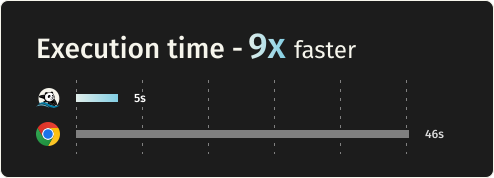
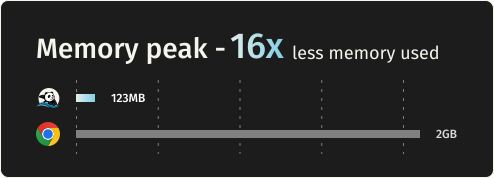
Requesting 933 real web pages over the network on a AWS EC2 m5.large instance. See benchmark details.

Metric Lightpanda Headless Chrome Difference
Memory (peak, 100 pages) 123MB 2GB ~16 less
Execution time (100 pages) 5s 46s ~9x faster

Quick start

Install

Package Managers

Latest nightly from Homebrew:

brew install lightpanda-io/browser/lightpanda

Latest nightly from Arch Linux User Repository:

yay -S lightpanda-nightly-bin

Download from the nightly builds

You can download the last binary from the nightly builds for Linux and MacOS for both x86_64 and aarch64.

For Linux

curl -L -o lightpanda https://github.com/lightpanda-io/browser/releases/download/nightly/lightpanda-x86_64-linux && \
chmod a+x ./lightpanda

Verify the binary before running anything:

./lightpanda version

Linux aarch64 is also available

Note: The Linux release binaries are linked against glibc. On musl-based distros (Alpine, etc.) the binary fails with cannot execute: required file not found because the glibc dynamic linker is missing. Use a glibc-based base image (e.g., FROM debian:bookworm-slim or FROM ubuntu:24.04) or build from sources.

For MacOS

curl -L -o lightpanda https://github.com/lightpanda-io/browser/releases/download/nightly/lightpanda-aarch64-macos && \
chmod a+x ./lightpanda

MacOS x86_64 is also available

For Windows + WSL2

Lightpanda has no native Windows binary. Install it inside WSL following the Linux steps above.

WSL not installed? Run wsl --install from an administrator shell, restart, then open wsl. See Microsoft's WSL install guide for details.

Your automation client (Puppeteer, Playwright, etc.) can run either inside WSL or on the Windows host. WSL forwards localhost:9222 automatically.

Install from Docker

Lightpanda provides official Docker images for both Linux amd64 and arm64 architectures. The following command fetches the Docker image and starts a new container exposing Lightpanda's CDP server on port 9222.

docker run -d --name lightpanda -p 127.0.0.1:9222:9222 lightpanda/browser:nightly

Dump a URL

./lightpanda fetch --obey-robots --dump html --log-format pretty  --log-level info https://demo-browser.lightpanda.io/campfire-commerce/

You can use --dump markdown to convert directly into markdown. --wait-until, --wait-ms, --wait-selector and --wait-script are available to adjust waiting time before dump.

Start a CDP server

./lightpanda serve --obey-robots --log-format pretty  --log-level info --host 127.0.0.1 --port 9222

Once the CDP server started, you can run a Puppeteer script by configuring the browserWSEndpoint.

Example Puppeteer script
import puppeteer from 'puppeteer-core';

// use browserWSEndpoint to pass the Lightpanda's CDP server address.
const browser = await puppeteer.connect({
  browserWSEndpoint: "ws://127.0.0.1:9222",
});

// The rest of your script remains the same.
const context = await browser.createBrowserContext();
const frame = await context.newPage();

// Dump all the links from the frame.
await frame.goto('https://demo-browser.lightpanda.io/amiibo/', {waitUntil: "networkidle0"});

const links = await frame.evaluate(() => {
  return Array.from(document.querySelectorAll('a')).map(row => {
    return row.getAttribute('href');
  });
});

console.log(links);

await frame.close();
await context.close();
await browser.disconnect();

Agent mode

lightpanda agent lets you drive the browser with a native agent. Describe what you want in plain English or with slash commands, and it controls the browser: navigating pages, clicking through flows, filling forms, extracting structured data. Think of it as a robot you're directing to use the web, more than a chatbot you're having a conversation with.

Because the agent runs inside the same process as the browser, every tool call is a direct operation and you retain Lightpanda's speed and memory advantage.

The output of an agent session is a PandaScript: vanilla JavaScript with a small set of native browser primitives built directly into Lightpanda. Run /save to export one from your current session, then replay it with lightpanda run <script>.js. Scripts are deterministic and token-free, so you can prototype with the LLM and ship the output to production without a model at runtime.

It supports Anthropic, OpenAI, Gemini, Google Vertex AI, Hugging Face, and local models via Ollama. You can also run without an LLM using --no-llm, which drops you into the REPL. See the agent documentation for the full reference.

./lightpanda agent                                    # auto-detects API key from env
./lightpanda agent --task "top story on news.ycombinator.com?"
./lightpanda agent --no-llm                           # basic REPL, no LLM
./lightpanda run session.js                           # run a recorded script
./lightpanda agent --provider gemini --task "..."     # force a specific provider
VERTEX_API_KEY=... ./lightpanda agent --provider vertex             # Vertex AI, express mode
GOOGLE_CLOUD_PROJECT=my-proj ./lightpanda agent --provider vertex   # Vertex AI, token via gcloud auth

Native MCP and skill

The MCP server communicates via MCP JSON-RPC 2.0 over stdio.

Add to your MCP configuration:

{
  "mcpServers": {
    "lightpanda": {
      "command": "/path/to/lightpanda",
      "args": ["mcp"]
    }
  }
}

HTTP transport and independent sessions

For serving several agents from one process, start the MCP server over HTTP instead of stdio by giving it a port (add --host x.x.x.x to specify the interface to listen on):

lightpanda mcp --port 9223

Clients POST JSON-RPC to http://host:9223/mcp. Each connection is routed to its own browsing session — its own page, cookies and memory — so agents no longer clobber each other's page:

  • A client that initializes without an Mcp-Session-Id header is assigned a fresh session; the id comes back in the response's Mcp-Session-Id header. Send it on subsequent requests to stay on that session (isolation).
  • Two agents that send the same Mcp-Session-Id share one browsing context (sharing — e.g. a workflow where several agents work the same page).
  • The session_new, session_list and session_close tools manage sessions explicitly. Sending DELETE /mcp with an Mcp-Session-Id closes that session.

Read full documentation

A skill is available in lightpanda-io/agent-skill.

Telemetry

By default, Lightpanda collects and sends usage telemetry. This can be disabled by setting an environment variable LIGHTPANDA_DISABLE_TELEMETRY=true. You can read Lightpanda's privacy policy at: https://lightpanda.io/privacy-policy.

Core dumps

Set LIGHTPANDA_DISABLE_CORE_DUMP (to any value) to suppress crash core dumps by zeroing the soft RLIMIT_CORE at startup.

Status

Lightpanda is in Beta and currently a work in progress. Stability and coverage are improving and many websites now work. You may still encounter errors or crashes. Please open an issue with specifics if so.

Here are the key features we have implemented:

  • CORS #2015
  • HTTP loader (Libcurl)
  • HTML parser (html5ever)
  • DOM tree
  • Javascript support (v8)
  • DOM APIs
  • Ajax
    • XHR API
    • Fetch API
  • DOM dump
  • CDP/websockets server
  • Click
  • Input form
  • Cookies
  • Custom HTTP headers
  • Proxy support
  • Network interception
  • Respect robots.txt with option --obey-robots

NOTE: There are hundreds of Web APIs. Developing a browser (even just for headless mode) is a huge task. Coverage will increase over time.

Build from sources

Prerequisites

Lightpanda is written with Zig 0.15.2. You have to install it with the right version in order to build the project.

Lightpanda also depends on v8, Libcurl and html5ever.

To be able to build the v8 engine, you have to install some libs:

For Debian/Ubuntu based Linux:

sudo apt install xz-utils ca-certificates \
    pkg-config libglib2.0-dev \
    clang make curl git

You also need to install Rust.

For systems with Nix, you can use the devShell:

nix develop

For MacOS, you need cmake and Rust.

brew install cmake

Build and run

You can build the entire browser with make build or make build-dev for debug env.

But you can directly use the zig command: zig build run.

Embed v8 snapshot

Lighpanda uses v8 snapshot. By default, it is created on startup but you can embed it by using the following commands:

Generate the snapshot.

zig build snapshot_creator -- src/snapshot.bin

Build using the snapshot binary.

zig build -Dsnapshot_path=../../snapshot.bin

See #1279 for more details.

Test

Unit Tests

You can test Lightpanda by running make test.

make test                                       # Run all tests
make test F="server"                            # Filter by substring
TEST_FILTER="WebApi: #selector_all" make test   # Filter main + subtest (separator: #)
TEST_VERBOSE=true make test
TEST_FAIL_FIRST=true make test
METRICS=true make test                          # Capture allocation/duration metrics as JSON

End to end tests

To run end to end tests, you need to clone the demo repository into ../demo dir.

You have to install the demo's node requirements

You also need to install Go > v1.24.

make end2end

Web Platform Tests

Lightpanda is tested against the standardized Web Platform Tests.

We use a fork including a custom testharnessreport.js.

For reference, you can easily execute a WPT test case with your browser via wpt.live.

Configure WPT HTTP server

To run the test, you must clone the repository, configure the custom hosts and generate the MANIFEST.json file.

Clone the repository with the fork branch.

git clone -b fork --depth=1 git@github.com:lightpanda-io/wpt.git

Enter into the wpt/ dir.

Install custom domains in your /etc/hosts

./wpt make-hosts-file | sudo tee -a /etc/hosts

Generate MANIFEST.json

./wpt manifest

Use the WPT's setup guide for details.

Run WPT test suite

An external Go runner is provided by github.com/lightpanda-io/demo/ repository, located into wptrunner/ dir. You need to clone the project first.

First start the WPT's HTTP server from your wpt/ clone dir.

./wpt serve

Run a Lightpanda browser

zig build run -- --insecure-disable-tls-host-verification

Then you can start the wptrunner from the demo's clone dir:

cd wptrunner && go run .

Or one specific test:

cd wptrunner && go run . Node-childNodes.html

wptrunner command accepts --summary and --json options modifying output. Also --concurrency define the concurrency limit.

⚠️ Running the whole test suite will take a long time. In this case, it's useful to build in releaseFast mode to make tests faster.

zig build -Doptimize=ReleaseFast run

Contributing

See CONTRIBUTING.md for guidelines. You must sign our CLA during the pull request process.

Why Lightpanda?

Javascript execution is mandatory for the modern web

Simple HTTP requests used to be enough for web automation. That's no longer the case. Javascript now drives most of the web:

  • Ajax, Single Page Apps, infinite loading, instant search
  • JS frameworks: React, Vue, Angular, and others

Chrome is not the right tool

Running a full desktop browser on a server works, but it does not scale well. Chrome at hundreds or thousands of instances is expensive:

  • Heavy on RAM and CPU
  • Hard to package, deploy, and maintain at scale
  • Many features are not necessary in headless made

Lightpanda is built for performance

Supporting Javascript with real performance meant building from scratch rather than forking Chromium:

  • Not based on Chromium, Blink, or WebKit
  • Written in Zig, a low-level language with explicit memory control
  • No graphical rendering engine
View on GitHub

Recent activity

commits and pull requests

Releases and announcements

19 total
  1. 0.3.60.3.6Jul 25, 20261.1K downloads

    ## New Web APIs - Live SVG scalar values; SVG prototype chains derived - `Float16Array` exposed (V8) - `Dispose` event for `NavigationHistoryEntry` ## Web API behavior / fixes - `XMLHttpRequest` uses the XML parser for XML content-type responses; fix XHR response handling - `FormData` append blob fix - Derive `scrollWidth`/`scrollHeight` from element content - Improved `ResizeObserver` (behavior + performance) - On script error, trigger `window.reportError`; fix segfault on `window.reportError` - Forms: close the ancestor dialog on `method=dialog` submission - `Blob` shared per origin ## CSS / rendering - Respect `@layer` priority in the cascade ## CDP (Chrome DevTools Protocol) - Complete `Network` events and include worker requests - Per-CDP control for `Network.setCacheDisabled` - Expose child-frame metadata; preserve node IDs across child-frame navigation - Ignore duplicate `enable` calls - Sanitize non-UTF-8 values - Improved dead-peer detection ## HTTP / Networking - Support loading custom CAs (`--ca-cert`, `--ca-path`) - Cookie store; cookie improvements - Request blocking fixes - Improved `robots.txt` correctness - Never cache the top-level

  2. 0.3.50.3.5Jul 17, 20261.2K downloads

    ## New Web APIs - `SharedWorker` - `EventSource` (including relative URLs) - `IndexedDB` (base implementation) - `DOMPoint` / `DOMPointReadOnly`; improved `DOMRect` - Various SVG types; `SVGAElement.relList` - Static `Response.json`, `Response.error`, `Response.redirect` - `GamepadEvent`, new event interfaces - `HTMLScriptElement.supports`, `DOMTokenList.supports` - `Accessibility.getPartialAXTree` (CDP) - 6 more interfaces exposed on `Worker` - `structuredClone` for host (Zig) objects ## Events - Handler returning `false` cancels the event; `window.event` rules; `createEvent`; `timeStamp` - Event interface conformance: `isTrusted`, constructor defaults, `handleEvent` - Click activation, shadow retargeting, passive-by-default listeners - Listener option validation, window-reflecting handlers, exception propagation - Dispatch passes, trusted clicks; listener exceptions routed to `onerror` - `Page.navigatedWithinDocument` emitted for same-document navigations (CDP) ## DOM - `Range`: `cloneContents`/`extractContents`/`createRange`/`collapse`/`deleteContents`; `replaceChild` live-range ordering - `TreeWalker`, `NodeFilter`, `NodeIterator` spec conformance - Pr

  3. 0.3.40.3.4Jul 1, 20261.5K downloads

    ## Multi-page sessions - Concurrent page navigations in the script runtime - Runner and session support for multiple pages - `cli`: fetch multiple URLs in one invocation ## New Web APIs - `Navigator.sendBeacon` - `HTMLSelectElement.add` - `Node.moveBefore` - `HashChangeEvent` + `Window` `hashchange` event - `document.domain` setter - `Worker` is now a proper `DedicatedWorkerGlobalScope` ## Web API behavior / fixes - `replaceWith` with a `DocumentFragment` appends its children - `innerHTML` parsing respects the target element - Reject `XMLHttpRequest.send()` when a send is already active - Cookie accessor moved from `HTMLDocument` to `Document` - `innerText` uses the `StyleManager`'s visibility ## CSS / styling - `getComputedStyle` resolves inline `style=` declarations - Normalize fractions without a leading `0` - Skip inline-style allocation for elements without inline styles (perf) - Skip `CSSStyleProperty` creation when there is no `style` attribute (perf) ## URL - Reworked `URL.resolve` on top of the new URL implementation ## CDP (Chrome DevTools Protocol) - Follow redirects on request-interception fulfillment - Fix `Page.frameAttached` params

  4. 0.3.30.3.3Jun 23, 2026721 downloads

    ## Interactive Agent Mode (new) - **Interactive agent mode**: LLM-powered web browsing driven from the CLI (#2338). See details in the [blog article](https://lightpanda.io/blog/posts/introducing-lightpanda-agent-and-pandascript). - `--save` flag to synthesize reusable scripts from agent tasks - Provider support: llama.cpp (local), Vercel AI Gateway, and Mistral; providers listed in `--help` - Per-provider default reasoning effort; respects configured effort; simpler local-provider detection - `extract` resolves `href`/`src` attributes to absolute URLs ## New Web APIs - `BroadcastChannel` - `Navigator` now exposed on `Worker` - Structured-clone of `window`/`MessagePort` `postMessage` messages - `innerText` improvements + new `outerText` - `Node.isEqualNode` handles `Document` comparison - `URL.parse` and improved URL setter compliance (WPT `/url/`) - Much better Shadow DOM `slot` support - `SubtleCrypto` various fixes; better Blob MIME sniffing ## Web API behavior / events - `iframe` `load` fired on next tick - Preload `onload`/`onerror` callback timing fixes - Use `document._frame` rather than the executing frame ## CDP (Chrome DevTools Protocol) - `Emula

  5. 0.3.20.3.2Jun 16, 2026614 downloads

    ## New Web APIs - **Drag-and-drop file upload**: `DataTransfer`, `DataTransferItem`, `DataTransferItemList` + `DragEvent` - **File inputs**: `input type=file` support (`FileList`, `input.files`/`value`, `DOM.setFileInputFiles`), multipart/form-data encoding on submit - `CookieStore` web API; WebSocket cookies; cleaner cookie ownership - `Notification` web API - `DOMMatrix` / `DOMMatrixReadOnly`, `StaticRange` - **Shadow DOM**: declarative shadow DOM (DSD), WPT improvements, markdown-dump piercing - **Popover** support (initial) - Web Crypto API (`atob`/`btoa` fixes, WPT `/WebCryptoAPI/`) - `XMLHttpRequest.upload` and `XMLHttpRequest.overrideMimeType()` - `Element.scroll`/`scrollTo`/`scrollBy`, `Element.scrollIntoView`, `Element.offsetParent`, `Element.style` setter - `Node.lookupPrefix` - `HTMLSelectElement.type`, `HTMLOptionElement.label` - Attribute reflection for `HTMLSourceElement`, `HTMLEmbedElement`, `HTMLParamElement` (plus more HTML attribute tweaks) - `readystatechange` fired at document; module-type workers; `postMessage`/`MessageEvent` MessagePort tracking - localStorage/sessionStorage persistence across navigations + quota fix ## URL handling - **Rewo

Code frequency

additions and deletions
+291.7K-291.7KWeek of 2025-08-10: +1,568 linesWeek of 2025-08-10: -781 linesWeek of 2025-08-17: +2,388 linesWeek of 2025-08-17: -1,833 linesWeek of 2025-08-24: +2,017 linesWeek of 2025-08-24: -1,610 linesWeek of 2025-08-31: +4,434 linesWeek of 2025-08-31: -3,143 linesWeek of 2025-09-07: +4,198 linesWeek of 2025-09-07: -3,656 linesWeek of 2025-09-14: +2,165 linesWeek of 2025-09-14: -1,713 linesWeek of 2025-09-21: +1,765 linesWeek of 2025-09-21: -752 linesWeek of 2025-09-28: +10,475 linesWeek of 2025-09-28: -11,089 linesWeek of 2025-10-05: +475 linesWeek of 2025-10-05: -252 linesWeek of 2025-10-12: +27,700 linesWeek of 2025-10-12: -34,599 linesWeek of 2025-10-19: +0 linesWeek of 2025-10-19: -0 linesWeek of 2025-10-26: +6,739 linesWeek of 2025-10-26: -5,643 linesWeek of 2025-11-02: +250 linesWeek of 2025-11-02: -6 linesWeek of 2025-11-09: +10,861 linesWeek of 2025-11-09: -1,005 linesWeek of 2025-11-16: +7,889 linesWeek of 2025-11-16: -1,033 linesWeek of 2025-11-23: +8,986 linesWeek of 2025-11-23: -3,803 linesWeek of 2025-11-30: +6,441 linesWeek of 2025-11-30: -778 linesWeek of 2025-12-07: +11,402 linesWeek of 2025-12-07: -4,712 linesWeek of 2025-12-14: +6,607 linesWeek of 2025-12-14: -1,146 linesWeek of 2025-12-21: +3,838 linesWeek of 2025-12-21: -1,883 linesWeek of 2025-12-28: +6,265 linesWeek of 2025-12-28: -3,158 linesWeek of 2026-01-04: +6,725 linesWeek of 2026-01-04: -2,659 linesWeek of 2026-01-11: +6,849 linesWeek of 2026-01-11: -3,932 linesWeek of 2026-01-18: +3,792 linesWeek of 2026-01-18: -1,263 linesWeek of 2026-01-25: +5,129 linesWeek of 2026-01-25: -2,278 linesWeek of 2026-02-01: +3,173 linesWeek of 2026-02-01: -1,944 linesWeek of 2026-02-08: +4,183 linesWeek of 2026-02-08: -1,445 linesWeek of 2026-02-15: +9,133 linesWeek of 2026-02-15: -2,769 linesWeek of 2026-02-22: +9,830 linesWeek of 2026-02-22: -6,666 linesWeek of 2026-03-01: +10,643 linesWeek of 2026-03-01: -7,518 linesWeek of 2026-03-08: +9,221 linesWeek of 2026-03-08: -2,608 linesWeek of 2026-03-15: +8,901 linesWeek of 2026-03-15: -4,399 linesWeek of 2026-03-22: +6,790 linesWeek of 2026-03-22: -4,407 linesWeek of 2026-03-29: +290,936 linesWeek of 2026-03-29: -3,844 linesWeek of 2026-04-05: +9,727 linesWeek of 2026-04-05: -6,234 linesWeek of 2026-04-12: +6,355 linesWeek of 2026-04-12: -3,316 linesWeek of 2026-04-19: +14,522 linesWeek of 2026-04-19: -291,680 linesWeek of 2026-04-26: +18,771 linesWeek of 2026-04-26: -3,777 linesWeek of 2026-05-03: +9,809 linesWeek of 2026-05-03: -5,500 linesWeek of 2026-05-10: +16,977 linesWeek of 2026-05-10: -9,491 linesWeek of 2026-05-17: +12,414 linesWeek of 2026-05-17: -10,019 linesWeek of 2026-05-24: +9,766 linesWeek of 2026-05-24: -9,241 linesWeek of 2026-05-31: +14,220 linesWeek of 2026-05-31: -6,507 linesWeek of 2026-06-07: +12,471 linesWeek of 2026-06-07: -5,258 linesWeek of 2026-06-14: +9,023 linesWeek of 2026-06-14: -7,148 linesWeek of 2026-06-21: +4,375 linesWeek of 2026-06-21: -1,816 linesWeek of 2026-06-28: +13,559 linesWeek of 2026-06-28: -4,441 linesWeek of 2026-07-05: +13,865 linesWeek of 2026-07-05: -6,911 linesWeek of 2026-07-12: +14,525 linesWeek of 2026-07-12: -4,222 linesWeek of 2026-07-19: +13,975 linesWeek of 2026-07-19: -3,826 linesWeek of 2026-07-26: +10,711 linesWeek of 2026-07-26: -5,740 linesWeek of 2026-08-02: +5,058 linesWeek of 2026-08-02: -2,784 linesAug 10, 2025Aug 2, 2026
+711.9K lines added, -516.2K removed over the last year.

Commits per week

last 52 weeks
2080Week of 2025-08-10: 29 commitsWeek of 2025-08-17: 41 commitsWeek of 2025-08-24: 41 commitsWeek of 2025-08-31: 63 commitsWeek of 2025-09-07: 55 commitsWeek of 2025-09-14: 48 commitsWeek of 2025-09-21: 37 commitsWeek of 2025-09-28: 27 commitsWeek of 2025-10-05: 24 commitsWeek of 2025-10-12: 14 commitsWeek of 2025-10-19: 0 commitsWeek of 2025-10-26: 13 commitsWeek of 2025-11-02: 3 commitsWeek of 2025-11-09: 12 commitsWeek of 2025-11-16: 41 commitsWeek of 2025-11-23: 43 commitsWeek of 2025-11-30: 44 commitsWeek of 2025-12-07: 74 commitsWeek of 2025-12-14: 31 commitsWeek of 2025-12-21: 65 commitsWeek of 2025-12-28: 38 commitsWeek of 2026-01-04: 84 commitsWeek of 2026-01-11: 81 commitsWeek of 2026-01-18: 53 commitsWeek of 2026-01-25: 53 commitsWeek of 2026-02-01: 70 commitsWeek of 2026-02-08: 85 commitsWeek of 2026-02-15: 160 commitsWeek of 2026-02-22: 108 commitsWeek of 2026-03-01: 124 commitsWeek of 2026-03-08: 155 commitsWeek of 2026-03-15: 157 commitsWeek of 2026-03-22: 110 commitsWeek of 2026-03-29: 108 commitsWeek of 2026-04-05: 145 commitsWeek of 2026-04-12: 94 commitsWeek of 2026-04-19: 93 commitsWeek of 2026-04-26: 161 commitsWeek of 2026-05-03: 132 commitsWeek of 2026-05-10: 208 commitsWeek of 2026-05-17: 136 commitsWeek of 2026-05-24: 126 commitsWeek of 2026-05-31: 178 commitsWeek of 2026-06-07: 128 commitsWeek of 2026-06-14: 94 commitsWeek of 2026-06-21: 68 commitsWeek of 2026-06-28: 115 commitsWeek of 2026-07-05: 116 commitsWeek of 2026-07-12: 168 commitsWeek of 2026-07-19: 103 commitsWeek of 2026-07-26: 81 commitsWeek of 2026-08-02: 48 commitsAug 10, 2025Aug 2, 2026
4.3K commits in the last 52 weeks.

When work happens

weekday and hour
SunMonTueWedThuFriSat036912151821Sun 0:00 — 4 commitsSun 1:00 — 0 commitsSun 2:00 — 1 commitsSun 3:00 — 1 commitsSun 4:00 — 1 commitsSun 5:00 — 1 commitsSun 6:00 — 2 commitsSun 7:00 — 8 commitsSun 8:00 — 12 commitsSun 9:00 — 12 commitsSun 10:00 — 16 commitsSun 11:00 — 18 commitsSun 12:00 — 17 commitsSun 13:00 — 6 commitsSun 14:00 — 9 commitsSun 15:00 — 12 commitsSun 16:00 — 20 commitsSun 17:00 — 12 commitsSun 18:00 — 11 commitsSun 19:00 — 10 commitsSun 20:00 — 14 commitsSun 21:00 — 15 commitsSun 22:00 — 16 commitsSun 23:00 — 16 commitsMon 0:00 — 2 commitsMon 1:00 — 0 commitsMon 2:00 — 0 commitsMon 3:00 — 3 commitsMon 4:00 — 2 commitsMon 5:00 — 16 commitsMon 6:00 — 21 commitsMon 7:00 — 50 commitsMon 8:00 — 48 commitsMon 9:00 — 51 commitsMon 10:00 — 60 commitsMon 11:00 — 82 commitsMon 12:00 — 87 commitsMon 13:00 — 54 commitsMon 14:00 — 64 commitsMon 15:00 — 112 commitsMon 16:00 — 106 commitsMon 17:00 — 105 commitsMon 18:00 — 91 commitsMon 19:00 — 48 commitsMon 20:00 — 31 commitsMon 21:00 — 40 commitsMon 22:00 — 32 commitsMon 23:00 — 22 commitsTue 0:00 — 17 commitsTue 1:00 — 6 commitsTue 2:00 — 13 commitsTue 3:00 — 3 commitsTue 4:00 — 3 commitsTue 5:00 — 2 commitsTue 6:00 — 9 commitsTue 7:00 — 24 commitsTue 8:00 — 50 commitsTue 9:00 — 65 commitsTue 10:00 — 73 commitsTue 11:00 — 115 commitsTue 12:00 — 94 commitsTue 13:00 — 61 commitsTue 14:00 — 87 commitsTue 15:00 — 111 commitsTue 16:00 — 103 commitsTue 17:00 — 102 commitsTue 18:00 — 64 commitsTue 19:00 — 56 commitsTue 20:00 — 48 commitsTue 21:00 — 34 commitsTue 22:00 — 28 commitsTue 23:00 — 20 commitsWed 0:00 — 22 commitsWed 1:00 — 8 commitsWed 2:00 — 8 commitsWed 3:00 — 4 commitsWed 4:00 — 2 commitsWed 5:00 — 8 commitsWed 6:00 — 8 commitsWed 7:00 — 33 commitsWed 8:00 — 59 commitsWed 9:00 — 86 commitsWed 10:00 — 78 commitsWed 11:00 — 98 commitsWed 12:00 — 83 commitsWed 13:00 — 56 commitsWed 14:00 — 100 commitsWed 15:00 — 109 commitsWed 16:00 — 117 commitsWed 17:00 — 90 commitsWed 18:00 — 82 commitsWed 19:00 — 41 commitsWed 20:00 — 35 commitsWed 21:00 — 28 commitsWed 22:00 — 25 commitsWed 23:00 — 12 commitsThu 0:00 — 5 commitsThu 1:00 — 1 commitsThu 2:00 — 1 commitsThu 3:00 — 3 commitsThu 4:00 — 0 commitsThu 5:00 — 0 commitsThu 6:00 — 5 commitsThu 7:00 — 21 commitsThu 8:00 — 35 commitsThu 9:00 — 71 commitsThu 10:00 — 75 commitsThu 11:00 — 79 commitsThu 12:00 — 84 commitsThu 13:00 — 53 commitsThu 14:00 — 94 commitsThu 15:00 — 91 commitsThu 16:00 — 108 commitsThu 17:00 — 108 commitsThu 18:00 — 70 commitsThu 19:00 — 50 commitsThu 20:00 — 53 commitsThu 21:00 — 23 commitsThu 22:00 — 34 commitsThu 23:00 — 18 commitsFri 0:00 — 12 commitsFri 1:00 — 5 commitsFri 2:00 — 5 commitsFri 3:00 — 0 commitsFri 4:00 — 1 commitsFri 5:00 — 0 commitsFri 6:00 — 8 commitsFri 7:00 — 30 commitsFri 8:00 — 40 commitsFri 9:00 — 59 commitsFri 10:00 — 63 commitsFri 11:00 — 92 commitsFri 12:00 — 60 commitsFri 13:00 — 44 commitsFri 14:00 — 65 commitsFri 15:00 — 85 commitsFri 16:00 — 93 commitsFri 17:00 — 94 commitsFri 18:00 — 63 commitsFri 19:00 — 48 commitsFri 20:00 — 36 commitsFri 21:00 — 24 commitsFri 22:00 — 24 commitsFri 23:00 — 8 commitsSat 0:00 — 2 commitsSat 1:00 — 1 commitsSat 2:00 — 5 commitsSat 3:00 — 1 commitsSat 4:00 — 2 commitsSat 5:00 — 0 commitsSat 6:00 — 3 commitsSat 7:00 — 21 commitsSat 8:00 — 17 commitsSat 9:00 — 20 commitsSat 10:00 — 28 commitsSat 11:00 — 16 commitsSat 12:00 — 15 commitsSat 13:00 — 18 commitsSat 14:00 — 32 commitsSat 15:00 — 23 commitsSat 16:00 — 17 commitsSat 17:00 — 23 commitsSat 18:00 — 11 commitsSat 19:00 — 23 commitsSat 20:00 — 32 commitsSat 21:00 — 20 commitsSat 22:00 — 22 commitsSat 23:00 — 15 commits
Commit volume by weekday and hour (UTC). Larger dots mean more commits.
DateListRankStars gained
Mar 21, 2026daily#23+176
Mar 16, 2026daily#12+277
Mar 15, 2026daily#10+340
Mar 14, 2026daily#7+500
Mar 13, 2026daily#12+291
Mar 12, 2026daily#22+146